Easy Tech Tuts
Wix vs Squarespace, Best Squarespace Alternative from Godaddy, Shopify, Wordpress, Square, Hostinger
By Impran M NLast checked against official docs
Choosing a website builder means weighing features, pricing, and ease of use across a crowded field, and the honest answer changes depending on what you're building. This comparison looks at what it's like to work inside Wix's editor and pricing page, then walks through where WordPress and Shopify pull ahead for their own use cases: a blog-and-content site versus a serious online store. This guide grounds each platform in its real interface and pricing instead of repeating marketing claims, so you can judge them the way you would after signing up.
01See what building in Wix looks like
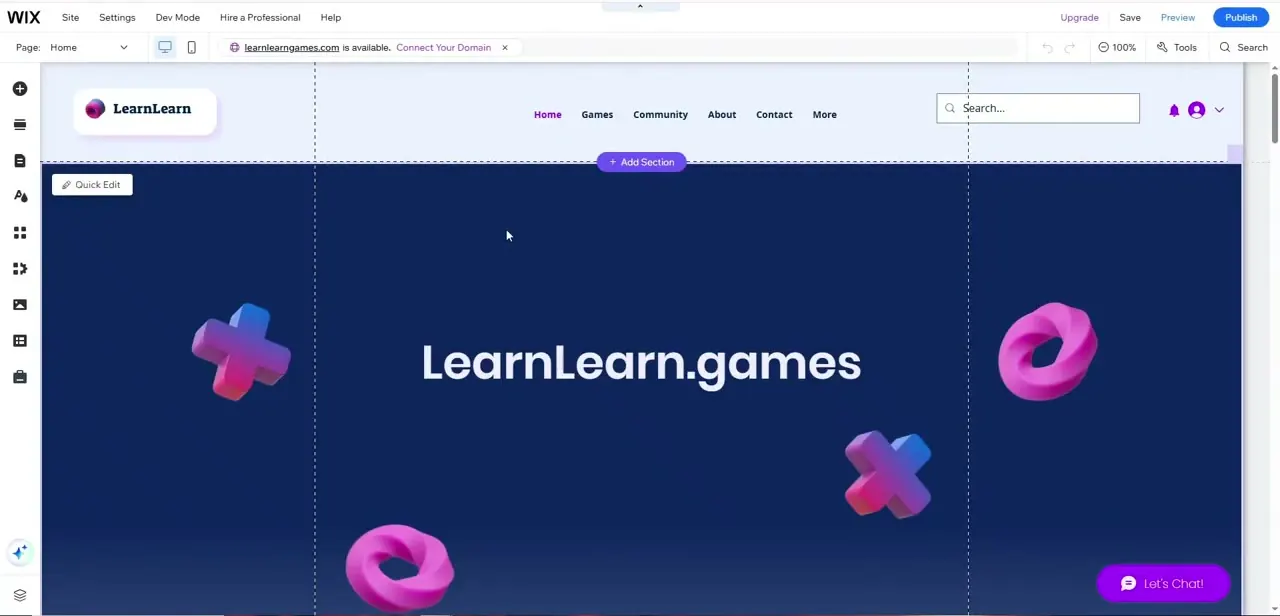
Wix's editor opens with Site, Settings, Dev Mode, Hire a Professional, and Help across the top, and a left rail of block-adding tools running from a big plus icon down to layers, pages, text, and design panels. A live example site called "LearnLearn.games" shows the layout in progress: a top nav with Home, Games, Community, About, and Contact, a large "+ Add Section" button for building the page section by section, and a Quick Edit shortcut hovering over the active block. Wix also flags an available domain ("learnlearngames.com is available") right in the toolbar and offers to connect it immediately, a small touch that keeps domain setup from becoming a separate task you forget about.
02Check what each Wix tier includes
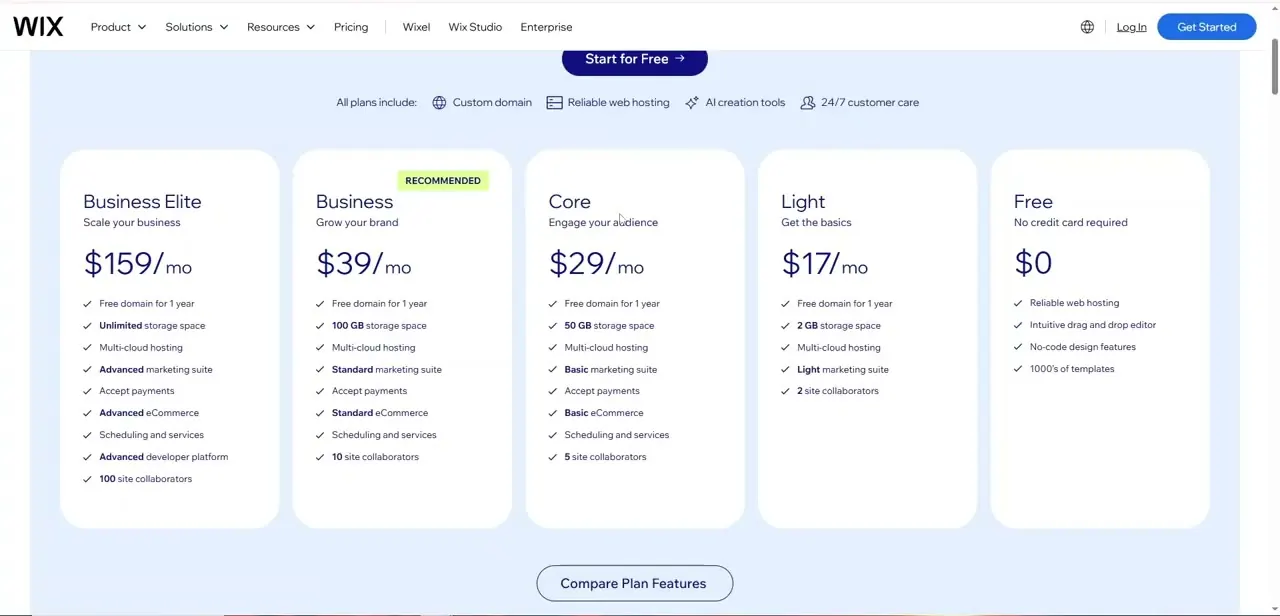
Wix's pricing page lines up five plans: Free at $0 with no credit card required, Light at around $17/mo for "the basics," Core at around $29/mo aimed at audience engagement, Business at around $39/mo (marked Recommended) adding a fuller online store, and Business Elite at around $159/mo for large operations with unlimited storage and 100 site collaborators. One correction worth flagging: Wix's own pricing page lists payment acceptance starting on the Light plan, not gated behind Business as older comparisons (including an earlier version of this one) sometimes claim.
What does scale up through the tiers is store depth, from basic selling tools on the lower plans to a full multi-channel store and scheduling suite on Business and above. If you only need to take payments at all, Light already covers it; if you need a proper storefront with inventory and scheduling, plan on Core or higher.
03Where Squarespace still wins
Squarespace's pitch has stayed consistent: fewer, more polished templates instead of Wix's fully open canvas. You trade some layout freedom for a design that's harder to make look amateurish by accident.
That's the real trade-off to understand before comparing prices line by line. Wix optimizes for control; Squarespace optimizes for a curated result.
Neither is objectively better, only better suited to a specific kind of user. Someone comfortable fiddling with sections and spacing will likely prefer Wix's editor, shown above. Someone who wants strong defaults and fewer decisions to make usually prefers Squarespace's more guided setup.
04Consider WordPress if content is the priority
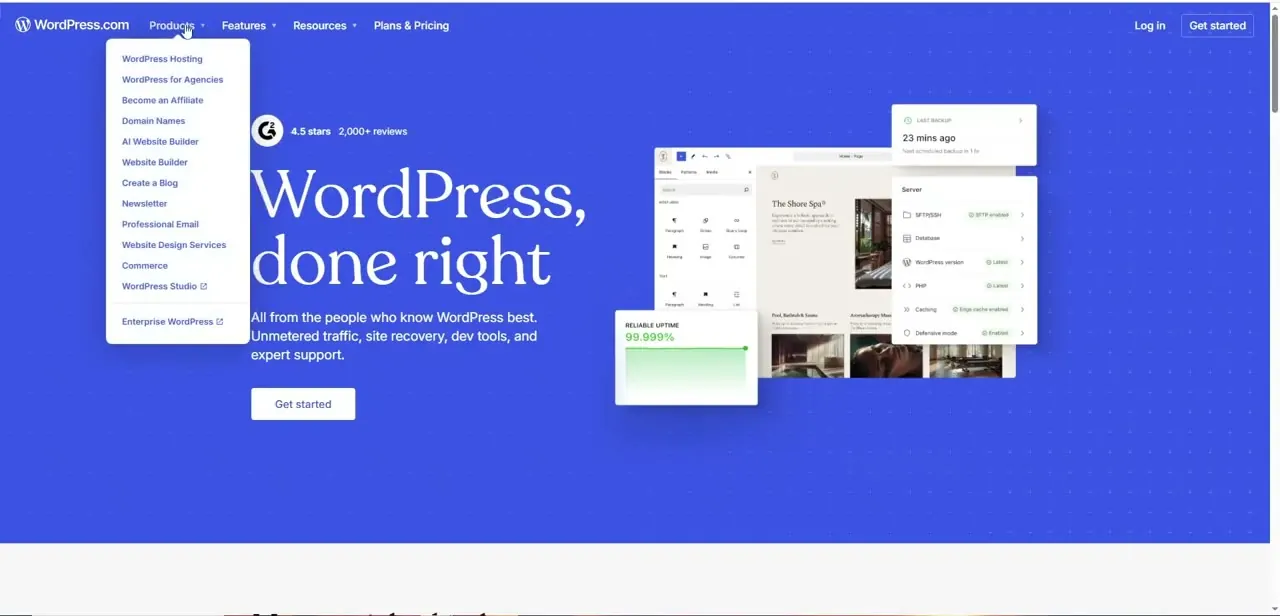
WordPress.com's homepage makes its positioning clear the moment you open the Products menu. WordPress Hosting, WordPress for Agencies, an AI Website Builder, Website Builder, Create a Blog, Newsletter, Professional Email, Website Design Services, Commerce, and WordPress Studio are all listed as distinct products, not tiers of one plan.
The headline promises "Unmetered traffic, site recovery, dev tools, and expert support," backed by a 4.5-star rating across 2,000+ reviews and a dashboard preview showing uptime (99.999%), backup status, and server details like PHP version and caching. That's a fundamentally different pitch from Wix or Squarespace. WordPress leans into content publishing, developer control, and hosting infrastructure, which is why it remains a default choice for blogs and content-heavy sites even as page builders get more visual.
05Consider Shopify if selling is the priority
Shopify's marketing page makes its commerce-first identity clear with three side-by-side pitches: "Sell on every channel" (with logos for eBay, Pinterest, TikTok, Instagram, Amazon, Google, and YouTube), "Sell face to face" through Shopify POS to keep online and in-store sales in sync, and "Sell to 250M+ shoppers with Shop" via the Shop app's pre-verified shopper base. A checkout preview alongside displays a stored Visa card and an order summary total.
Payment handling sits inside the core product here, not added on afterward. If your site's main job is selling physical or digital products across multiple channels, Shopify's multichannel integration is purpose-built for that in a way Wix and Squarespace's more general commerce tools aren't.

06Where GoDaddy, Square, and Hostinger fit
GoDaddy, Square, and Hostinger round out this comparison as lower-friction options. GoDaddy leans on its domain-registrar roots to bundle a website with hosting you might already be paying for.
Square's website builder ties in tightly with its point-of-sale hardware for businesses already running Square in person. Hostinger competes mainly on price for basic hosting and site-building needs.
None of these three try to out-feature Wix, Squarespace, WordPress, or Shopify. They win on convenience or cost for a narrower use case, so they're worth a look mainly if you're already inside one of their ecosystems for another reason.
07Match the platform to the job
If you want full visual control over layout and don't mind spending time in an editor, Wix's canvas is built for that. If you want strong design defaults with less fiddling, Squarespace stays the safer pick.
If content and publishing come first, WordPress's dedicated hosting and blogging tools are hard to beat. And if selling products across channels is the whole point of the site, Shopify's checkout and multichannel tools justify its more commerce-focused pricing. Pick based on the job the site needs to do, not which platform has the flashiest demo.
| Plan | Approx. monthly (annual billing) | Accepts payments |
|---|---|---|
| Free | $0 | No |
| Light | $17 | Yes |
| Core | $29 | Yes, with a fuller store |
| Business | $39 | Yes, full online store |
| Business Elite | $159 | Yes, unlimited storage and collaborators |
Checked against wix.com's own pricing page in September 2026. Figures are rounded and reflect annual billing; monthly billing runs higher.
Frequently asked questions
Is Wix or Squarespace better for beginners?
Wix's open canvas, shown above with its "+ Add Section" workflow, gives more layout freedom but more decisions to make. Squarespace's more curated templates typically get a beginner to a polished result faster with less tinkering.
What are the best Squarespace alternatives?
Wix, WordPress, Shopify, GoDaddy, Square, and Hostinger each cover a different priority: Wix for design control, WordPress for content and blogging, Shopify for commerce, and GoDaddy, Square, or Hostinger for convenience or cost.
Which Wix plan do I need to accept payments?
Light, Wix's cheapest paid tier at around $17/mo, already includes payment acceptance according to Wix's own pricing page. What Business and above add is a deeper online store and scheduling suite, not payments themselves.
Which platform is best for an online store?
Shopify is purpose-built for selling. Its homepage highlights multichannel integration (eBay, Amazon, TikTok, and more), in-person sales via Shopify POS, and built-in checkout, which goes further than the general commerce tools in Wix or Squarespace.
Why would someone choose WordPress over a drag-and-drop builder?
WordPress.com separates its offerings into distinct products (Hosting, an AI Website Builder, Newsletter, Commerce) and backs them with infrastructure details like uptime and backup status, which appeals to sites where content publishing and developer control matter more than visual drag-and-drop editing.
Sources and last check
The Wix editor screens and the WordPress.com and Shopify homepage screens come from a walkthrough recorded on each platform's live site. Wix's pricing and feature gating were re-checked directly against wix.com/plans in September 2026, which corrected this guide's earlier claim that payment acceptance is limited to the Business plan and above; it's available starting on Light. Squarespace, GoDaddy, Square, and Hostinger claims here describe positioning, not pricing specifics, and weren't re-verified against a pricing page in this pass.
About the author

Impran M N
I've been hooked on technology for as long as I can remember — especially the new tools and AI apps that seem to land every other week. Easy Tech Tuts is where I write up whatever I've just worked out: I do the task in the real product, record the screen, and turn it into the guide I wish I'd found first.