Easy Tech Tuts
How to Get TradingView Premium for Free Easily 2026
By Impran M NLast checked against official docs
TradingView Premium unlocks extra charts per tab, more indicators, deeper historical data, and a much bigger allowance of price and technical alerts, but there's no permanent free way to keep it. What does exist is an official trial you can run without a separate purchase, a referral program worth real money, and a plan lineup worth comparing before you pick one. This guide walks through the real pricing and sign-up screens, how long the trial runs on each tier, what TradingView's referral program pays out, and why the third-party "free premium unlock" tools floating around are worth ignoring entirely.
01Know there's no permanent free Premium tier
TradingView's free plan is genuinely usable, but Premium-level features sit behind a paid subscription. There's no setting or workaround that unlocks it permanently at no cost.
Every legitimate route to trying Premium without paying is time-limited: an official trial, a seasonal discount, or a referral credit. Anything claiming to hand you a permanent free unlock outside those channels isn't a real option; it's a scam wearing a tutorial's clothing.
02Compare the plan tiers side by side
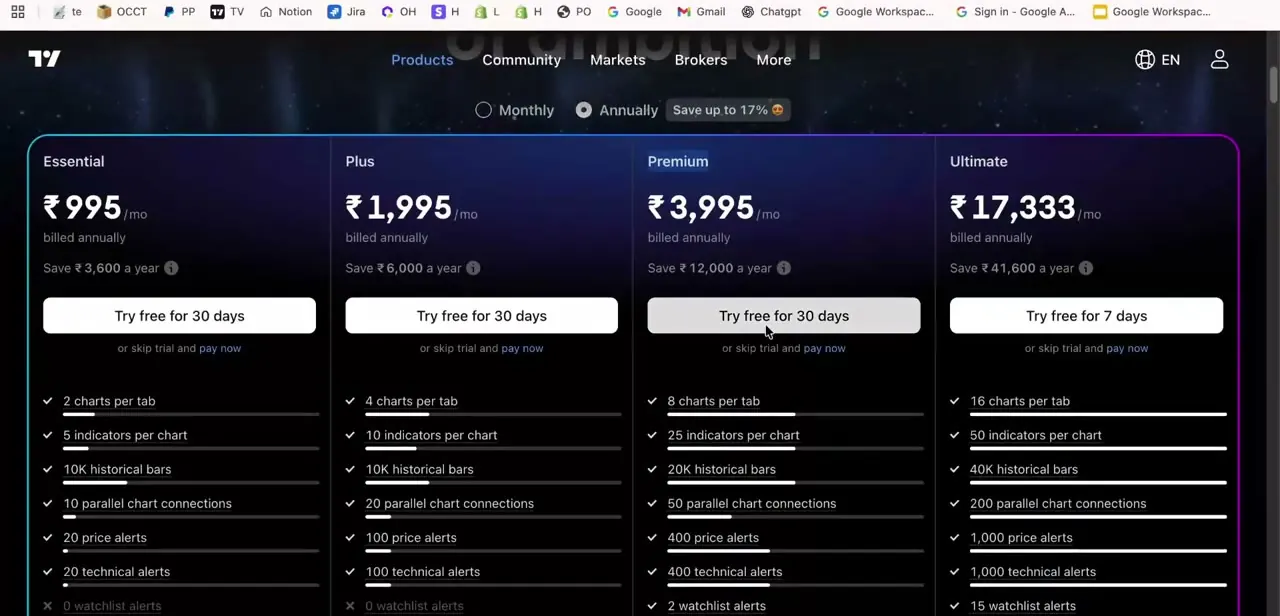
TradingView's pricing page lists four paid tiers: Essential, Plus, Premium, and Ultimate, each priced per month when billed annually, with the annual option costing noticeably less than paying monthly. Premium sits as the third tier, and its card is highlighted with a distinct border on the pricing page, marking it as the plan most people land on. Every tier also carries a "Try free" button under the price, which is the legitimate starting point instead of anything you'd find through a browser extension or a third-party generator.
03Check what each tier unlocks, and how long its trial runs
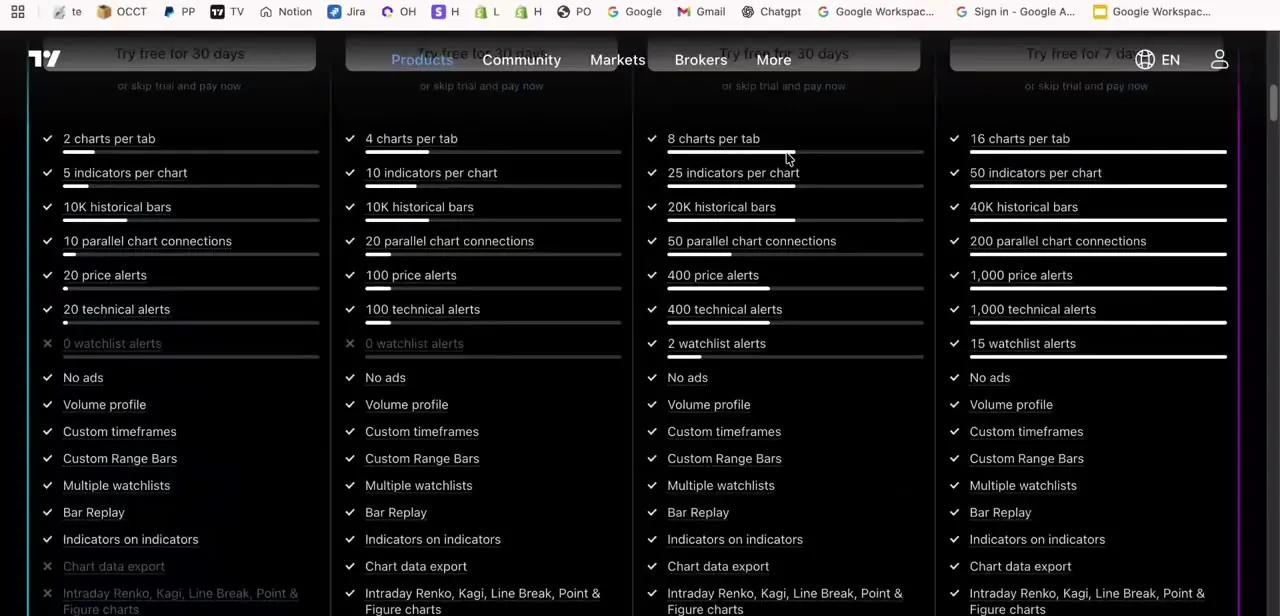
Scrolling the feature list under each plan shows what you're paying for as you move up: chart count per tab doubles at each step, indicators per chart go from 5 on the entry tier into the dozens, and historical bar depth, parallel chart connections, price alerts, and technical alerts all scale up together. Watchlist alerts don't exist at all on Essential or Plus and only appear once you cross into Premium, worth checking against your own workflow before assuming you need the top plan.
The trial length isn't the same across tiers either. Essential, Plus, and Premium each give 30 days; Ultimate gives 14. You can switch a running trial between tiers (Essential up to Plus or Premium, for example) without restarting the clock, but moving up to an Ultimate trial resets the remaining time to 14 days, and TradingView doesn't allow switching back down from an Ultimate trial once you're on it.
04Create your account, and know what happens when the trial ends
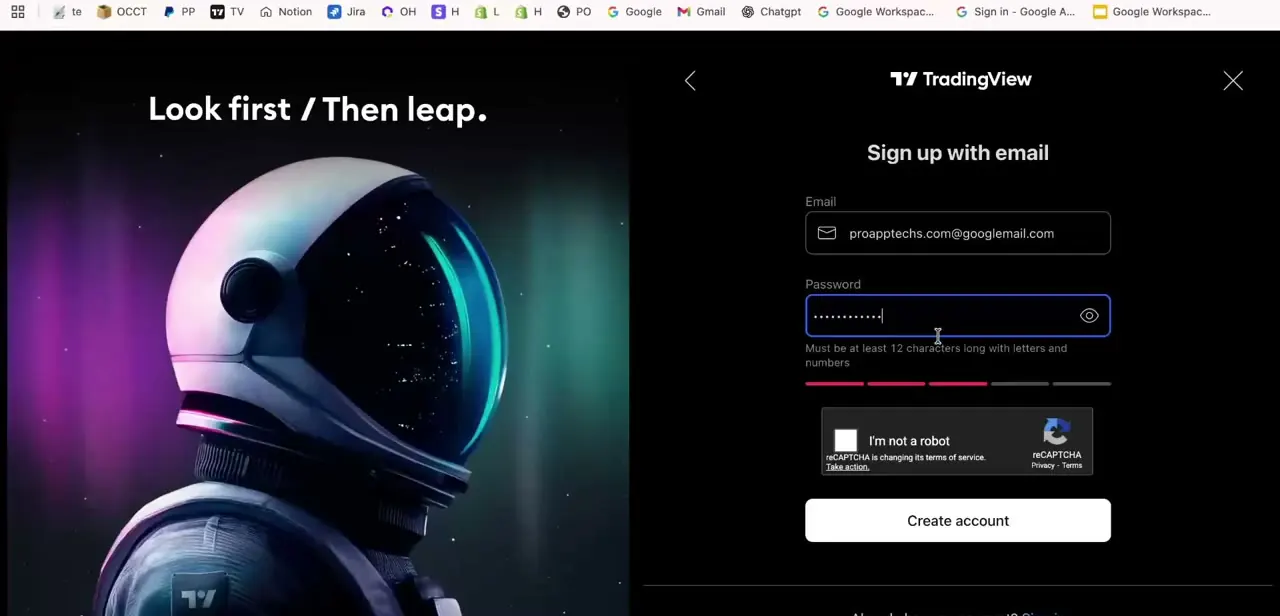
Starting the trial routes you through TradingView's own sign-up form: an email address and a password of at least 12 characters with letters and numbers, plus a standard bot check before the account is created. This happens entirely on TradingView's own site, which is the detail that separates a legitimate trial from fake "free premium" tools that ask you to install something or hand over your existing login instead of creating a fresh account through the official form.
TradingView allows only one trial per account, so there's no repeating this later on the same login if you let it lapse or cancel it. The trial typically asks for a payment method up front and converts automatically into a paid subscription once the window closes, so mark the end date somewhere you'll see it. Cancel from your account settings before that date if Premium isn't worth it for your trading style; once the charge goes through, reversing it is a separate hassle from simply not starting it in the first place.
05Use the referral program and seasonal discounts instead of chasing free unlocks
TradingView's official referral program pays out in both directions: once someone you refer signs up as a genuinely new user and becomes a paying subscriber within 3 months of joining, you get a $15 credit toward Essential, Plus, or Premium, and your friend gets a $15 discount coupon of their own. Your personal referral link lives in the Refer a friend section of the account menu, or at tradingview.com/share-your-love/.
Outside referrals, TradingView also runs seasonal promotions directly through its site and app. Both reduce what you pay instead of promising to eliminate it, and both show up as banners or account credits inside TradingView itself, not as a link from a random video description or a Discord server offering to "activate" your account for a fee.
06Avoid fake premium unlock tools
Any tool, extension, or generator claiming to unlock Premium for free without going through TradingView's own trial or payment flow is not legitimate, and using one risks your account credentials or payment details being harvested instead of saved. If an offer asks you to log in somewhere other than tradingview.com, download a modified app, or enter card details on a page that isn't clearly TradingView's own checkout, stop and back out. The real trial never requires any of that.
| Plan | Free trial | Charts per tab | Indicators per chart | Price + technical alerts | Watchlist alerts |
|---|---|---|---|---|---|
| Essential | 30 days | 2 | 5 | 20 + 20 | 0 |
| Plus | 30 days | 4 | 10 | 100 + 100 | 0 |
| Premium | 30 days | 8 | 25 | 400 + 400 | 2 |
| Ultimate | 14 days | 16 | 50 | 1,000 + 1,000 | 15 |
From TradingView's pricing page, checked September 2026. Monthly price isn't listed here since TradingView displays it in the visitor's local currency instead of one global figure; the live pricing page shows the exact number for yours.
Frequently asked questions
Does TradingView offer a permanent free Premium tier?
No. Premium is a paid tier, and any free access comes through the official time-limited trial or promotions instead of a permanent free option.
How long is the free trial?
30 days on Essential, Plus, and Premium. Ultimate's trial runs 14 days. Switching a running trial up to Ultimate resets the remaining time to 14 days, and you can't switch back down once you're on an Ultimate trial.
What do I get from the referral program?
TradingView gives you a $15 credit toward Essential, Plus, or Premium once someone you refer becomes a paying subscriber within 3 months of signing up as a genuinely new user. Your friend separately gets a $15 discount coupon.
How can I tell if a 'free premium' offer is a scam?
Be suspicious of any offer outside TradingView's own website or app, especially ones asking you to log in elsewhere, install a modified app, or hand over account credentials or payment details.
What happens if I don't cancel before the trial ends?
You'll likely be charged automatically for the plan you trialed once the period ends, since most trials require a payment method up front. Cancel beforehand if you don't want to continue, and remember you only get one trial per account.
Which plan should I trial if I'm not sure I need Premium?
Compare the feature list against your actual workflow first. Watchlist alerts, for example, only appear at Premium and above, so check whether you'd use a feature before trialing the plan that includes it.
Sources and last check
Click path and screens come from a recorded walkthrough. Plan names, feature counts, trial lengths, the one-trial-per-account limit, the trial-switching rules, and the referral program's $15/$15 payout and 3-month window were checked against TradingView's official pricing page and Help Center in September 2026. The trial-length differences by tier, the one-trial-per-account rule, and the exact referral payout were not in the previous version of this guide.
About the author

Impran M N
I've been hooked on technology for as long as I can remember — especially the new tools and AI apps that seem to land every other week. Easy Tech Tuts is where I write up whatever I've just worked out: I do the task in the real product, record the screen, and turn it into the guide I wish I'd found first.