Easy Tech Tuts
How to Get Live Futures Data on Tradingview for Free 2026 Easily
By Impran M NLast checked against official docs
Official CME, ICE and other exchange futures data on TradingView usually sits behind a paid subscription, and the free version of that same data is delayed, not live. This guide covers finding tradeable futures contracts through Symbol Search, telling a live chart from a delayed one at a glance, and two free options, CFDs and crypto futures pairs, that carry real-time pricing where the official contract doesn't. It's grounded in TradingView's own documentation, not a workaround that breaks the platform's terms.
01Open a chart and launch Symbol Search
TradingView doesn't require an account to browse charts, and the free Basic plan already covers the full charting toolset and symbol library that the rest of this guide runs on. Open any chart, then click the symbol name in the top-left corner, or press Ctrl+K on Windows and Cmd+K on Mac, to bring up Symbol Search.

02Filter Symbol Search to Futures
Symbol Search opens with tabs for each asset type: stocks, futures, forex, crypto, bonds, economic data and options. Click the Futures tab, then type a keyword, a commodity name, an index, or a ticker root.
Results show the ticker, a short description and the exchange each contract trades on (NYMEX, COMEX, CBOT and others), which matters because data delay is set per exchange, not per instrument. If a contract you know exists doesn't appear, check that an exchange or symbol-type filter isn't still active from an earlier search; TradingView's own troubleshooting page names that as the most common reason a valid symbol seems to be missing.
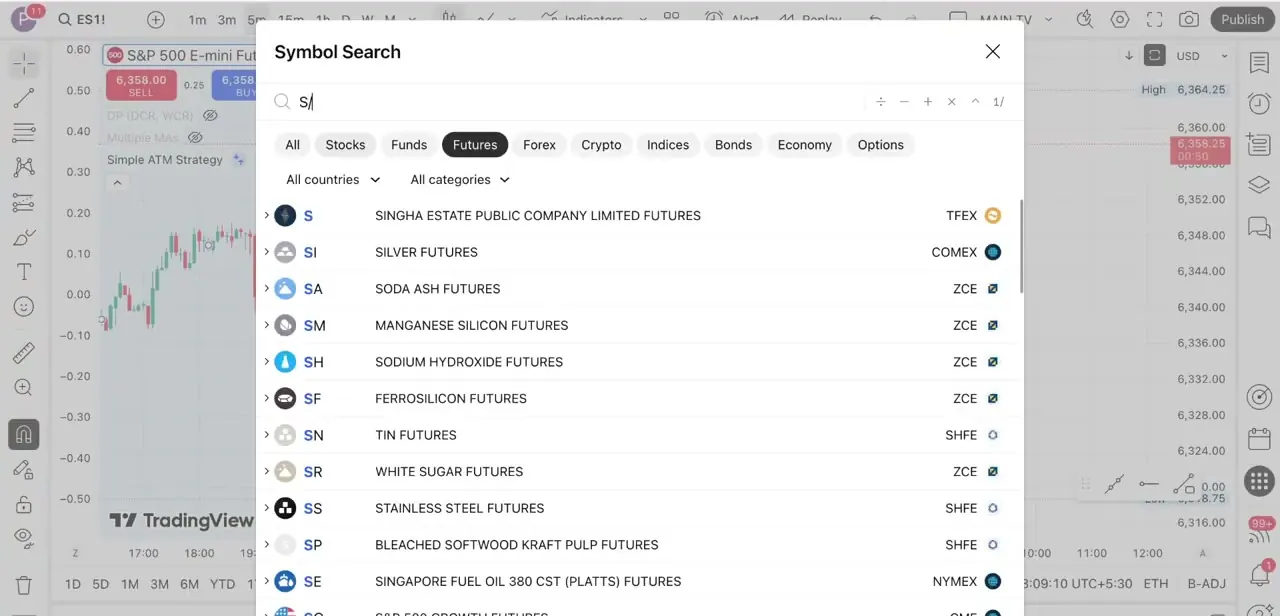
03Open a contract and check whether the feed is live or delayed
Open a contract such as Light Crude Oil Futures (NYMEX:CL1!). CME Group data, which covers CBOT, COMEX and NYMEX, is free on TradingView, but it's delayed by 10 minutes by default.
It is not live unless you add a paid real-time subscription for that exchange. TradingView marks a delayed symbol with a small D next to the price; a symbol with no marker is running live. Switch between the 5m, 15m, 1h and daily buttons above the chart to match your timeframe, and treat anything on a D-marked chart as roughly 10 minutes behind the actual market, not current.
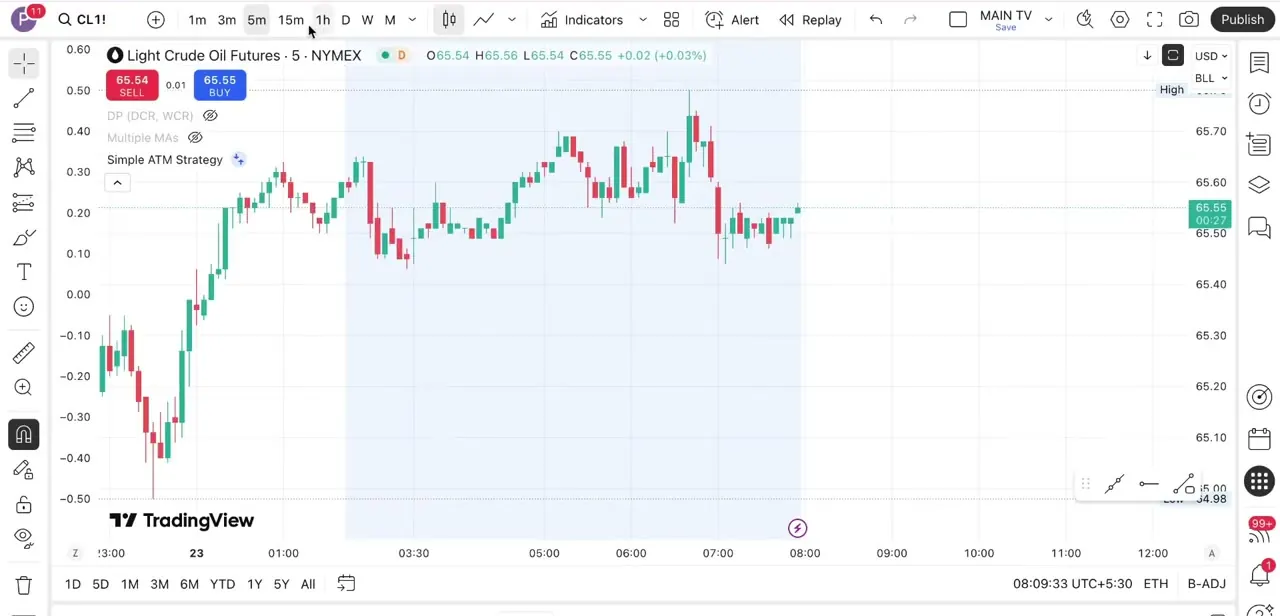
04Use CFD alternatives where the official contract is delayed
If a futures contract you want carries the delay marker and paying for that exchange's data isn't worth it, search the same market as a CFD instead. CFDs track a close approximation of the official futures price, and some carry real-time data for free where the official contract or index doesn't.
INDEX:DXY, for instance, only updates once a day on TradingView; the CFD version, TVC:DXY, is free and real-time. Volume and open-interest figures on a CFD won't match the exchange's own contract exactly, but for charting and strategy testing it's a reasonable stand-in.
05Use crypto futures pairs for around-the-clock coverage
Symbols like BTCUSDT.P and ETHUSDT.P track perpetual futures on connected crypto exchanges and update continuously, since crypto data is real-time for every TradingView user and the underlying markets never close. They're useful for practicing a live futures-style order book outside regular trading hours, when most traditional futures data on the platform is delayed or stale anyway.
| Data type | Status on the free Basic plan |
|---|---|
| CME/CBOT/COMEX/NYMEX futures | Delayed 10 minutes |
| Crypto (spot and perpetual futures) | Real-time |
| CFDs, e.g. TVC:DXY | Real-time for many symbols |
| US stocks via the Cboe feed | Real-time by default; primary NYSE/Nasdaq feeds are a separate paid add-on |
Based on TradingView's official market-data and data-coverage pages, checked September 2026. Individual exchange terms can change without notice.
When it doesn't work
A CME, NYMEX or COMEX futures contract looks delayed even though it's supposed to be free
Why: CME Group data (CBOT, COMEX, NYMEX) is delayed 10 minutes on TradingView's free plan by default. The small D beside the price marks this.
Fix: Either work with the 10-minute lag for charting and strategy testing, or add that exchange's real-time data subscription from Symbol Search.
The US Dollar Index only updates once a day
Why: INDEX:DXY is an end-of-day-only symbol on TradingView.
Fix: Search for TVC:DXY instead. It's a free CFD version of the same index with real-time data.
A futures contract I know exists doesn't show up in Symbol Search
Why: An exchange or symbol-type filter left active from an earlier search is hiding it, which TradingView's own help article names as the most common cause.
Fix: Clear the filters at the top of the Symbol Search window and search again.
Frequently asked questions
Can I get real-time CME futures data on TradingView for free?
Not by default. The free plan includes CME Group data (CBOT, COMEX, NYMEX) but delays it by 10 minutes; real-time access for those exchanges is a separate paid subscription. Crypto futures pairs and some CFDs, such as TVC:DXY, are exceptions and stay free and live.
How do I tell whether a chart is live or delayed?
TradingView marks a delayed symbol with a small D next to the price. No marker means the feed is live. Treat anything with the D marker as roughly 10 minutes behind the market.
Why does the US Dollar Index only update once a day?
INDEX:DXY is an end-of-day-only symbol on TradingView. Search for TVC:DXY instead, a free CFD version of the same index that carries real-time data.
Are crypto futures pairs like BTCUSDT.P available around the clock?
Yes. Crypto data on TradingView is real-time for every user and trades 24/7, which makes pairs like BTCUSDT.P and ETHUSDT.P useful for live charting when traditional futures markets are delayed or closed.
How much does real-time futures data cost if I want it?
TradingView sells it per exchange, not as one flat add-on bundled into a charting plan tier. CME Group real-time access is a separate subscription you add from Symbol Search or your account's data settings, priced by exchange.
Sources and last check
Click paths, the CFD and crypto-pair workarounds, and the screenshots come from a walkthrough recorded in July 2025. The claim that NYMEX/CME contracts run real-time on the free plan was checked against TradingView's official data-coverage and market-data-purchase pages in September 2026, which show CME Group data as free but delayed 10 minutes, not live, and that overstatement in the earlier draft has been corrected. The DXY end-of-day/CFD distinction, the delayed-data D marker, and the Symbol Search filter fix were confirmed against TradingView's own support articles at the same time.
- TradingView: How to purchase additional market data (official)
- TradingView: Market Data — Global Coverage (official)
- TradingView: Symbol Search tips for finding assets (official)
- TradingView: I see only EOD data for DXY symbol and no real-time (official)
- TradingView: I can't find a symbol in the symbol search box (official)
- TradingView: Alerts based on real-time and non-real-time symbols (official)
About the author

Impran M N
I've been hooked on technology for as long as I can remember — especially the new tools and AI apps that seem to land every other week. Easy Tech Tuts is where I write up whatever I've just worked out: I do the task in the real product, record the screen, and turn it into the guide I wish I'd found first.