Easy Tech Tuts
How to Get 30 Days Free Trial in Tradingview Easily 2026
By Impran M NLast checked against official docs
TradingView's free plan is usable, but the extra indicators, faster data, and advanced chart layouts sit behind Essential, Plus, Premium, and Ultimate, and the fastest way to test whether they're worth paying for is the trial offered right on the pricing page. This guide covers where the trial starts, what happens once billing kicks in, and the account step you have to clear before TradingView lets you in. It also covers a detail the "30 days" framing usually skips: one of the four tiers only trials for 14.
01Start from TradingView's pricing page and pick a tier
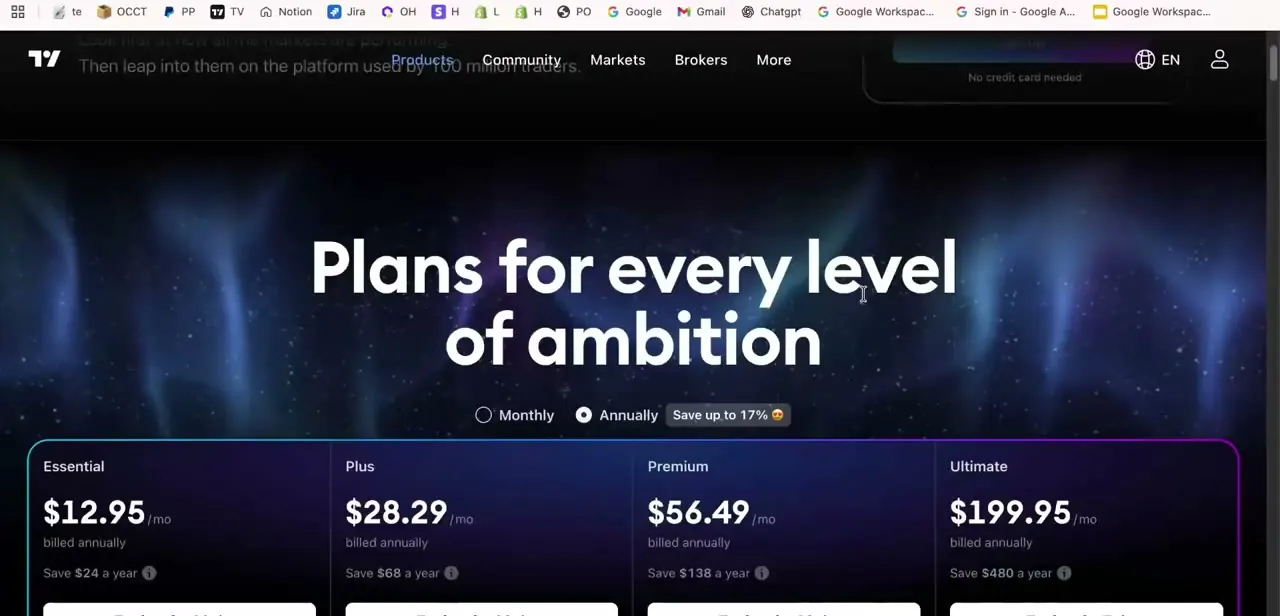
The trial isn't hidden in a settings menu; it begins at tradingview.com/pricing, the same page anyone lands on to compare paid tiers. TradingView lists four levels there: Essential, Plus, Premium, and Ultimate, each shown as a monthly rate billed annually, with the annual toggle saving up to 17% over paying month to month.
Essential and Plus suit casual chart-watchers; Premium and Ultimate unlock the deeper toolset, more indicators per chart, extra alerts, and priority data, that active or day traders tend to use. Pick based on the features you want to test: Essential, Plus, and Premium all trial for 30 days, but Ultimate's trial runs 14 days only, a difference the pricing page doesn't make obvious until you're already on the checkout screen.
02Finish creating or signing into your TradingView account
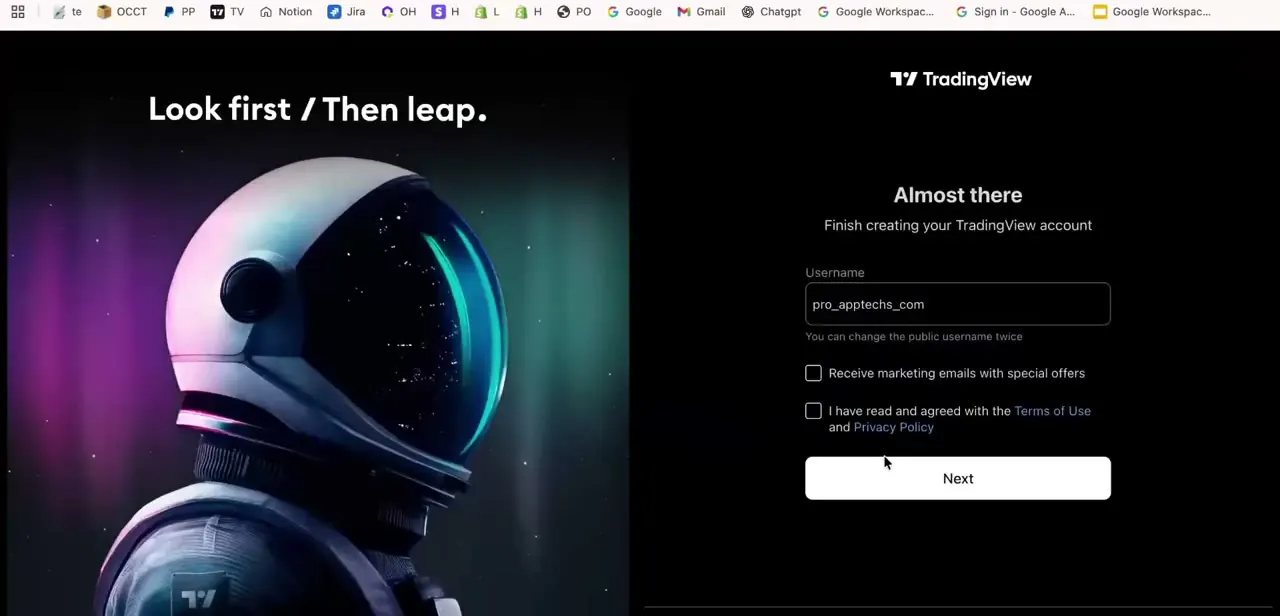
Selecting a plan routes you into account setup if you're not already signed in. TradingView asks for a username, with an option to opt into marketing emails and a required checkbox agreeing to the Terms of Use and Privacy Policy before the Next button becomes active. If you already have a free TradingView account, sign into that one instead of creating a second, so the trial and any existing chart layouts or watchlists stay attached to a single profile.
03Add a payment method to activate the trial
TradingView requires a card or PayPal on file before the trial starts, even though nothing is charged immediately. The "No credit card needed" line you may have seen elsewhere on the pricing page applies to signing up for the free Basic plan, not to activating a paid-tier trial. Entering payment details is the actual trigger that starts the countdown, whether that's 30 days or 14.
04Know the eligibility and tier-switching rules
Trials are limited to accounts that haven't already used one on that tier, so a second attempt on the same account often won't qualify no matter how long ago the first trial ran; TradingView enforces this per account, not per browser or device. If you realize partway through that you picked the wrong tier, you don't have to start over: Trial upgrade and Trial downgrade links at the bottom of each plan on the pricing page let you switch. One restriction to know before upgrading: moving up to Ultimate caps you at 14 days remaining if you had 14 or more left on the lower tier, and downgrading away from an Ultimate trial isn't possible at all.
05Use the trial to actually test premium features
Once active, spend the days deliberately: add the extra indicators to a real chart you use, set up the alerts you'd rely on day to day, and check whether the faster data feed changes anything for your trading style. Treating the trial as a real workflow test, not just clicking through settings, is what tells you whether the paid tier earns its monthly cost.
06Cancel before billing starts if you don't want to continue
The trial converts automatically into a paid subscription at the end of its term unless you cancel first, so mark the actual end date (day 30, or day 14 on Ultimate) instead of relying on a reminder email. Cancel from Settings and billing > Subscriptions > Cancel trial. Doing it a day or two early is safer than waiting until the last hour, in case of a processing delay on TradingView's end.
When it doesn't work
The trial ends after 14 days instead of the 30 you expected.
Why: Only Essential, Plus, and Premium trials run 30 days. TradingView's Ultimate tier is a 14-day trial.
Fix: If the full 30 days matters more than Ultimate's feature set, trial Essential, Plus, or Premium instead. You can still use the upgrade link on the pricing page later, keeping in mind that moving up to Ultimate resets your remaining days to 14 if you had that many or more left.
You started a trial on the wrong tier.
Why: Nothing is broken; this is a normal case TradingView supports.
Fix: Use the Trial upgrade or Trial downgrade links at the bottom of each plan on the pricing page to switch. The one exception is Ultimate: once you're trialing it, you can't downgrade to a lower tier's trial; you'd need to cancel and start a new one.
You skipped adding a payment method because a page said no card was needed, and now can't start the trial.
Why: The "No credit card needed" note applies to the free Basic plan signup, not to the Essential, Plus, Premium, or Ultimate trials, which all require a card or PayPal on file.
Fix: Add a payment method during account setup. It isn't charged until the trial ends, and only then if you haven't canceled.
Frequently asked questions
Does TradingView offer a 30-day free trial?
For Essential, Plus, and Premium, yes. Ultimate's trial runs 14 days instead of 30.
Do I need a credit card to start the trial?
Yes, for any paid tier. The "no credit card needed" messaging you may see on the pricing page refers to signing up for the free Basic plan, not the trial.
Will I be charged automatically after the trial ends?
Yes, unless you cancel first from Settings and billing > Subscriptions > Cancel trial. Billing starts automatically on the payment method added to activate the trial.
Can I switch tiers in the middle of a trial?
Yes, using the Trial upgrade or Trial downgrade links on the pricing page. Upgrading to Ultimate caps your remaining trial at 14 days, and you can't downgrade away from an Ultimate trial once it's started.
What might block me from getting a free trial?
Having already used a trial on that account is the most common blocker. TradingView limits trials per account, not per device or browser.
What features are unlocked during the trial?
Whichever paid tier you selected on the pricing page determines what you get, from extra indicators to faster data and more alerts.
Sources and last check
Click path and screens come from a recorded pricing-page and signup walkthrough. Re-checked against TradingView's official pricing page and Help Center in September 2026, which corrected a real gap in the original draft: the trial is not uniformly 30 days across all four tiers, Ultimate's is 14. The mid-trial tier-switching mechanism (Trial upgrade/downgrade links, the 14-day cap on upgrading to Ultimate, and the ban on downgrading away from an Ultimate trial) came from TradingView's own support article and wasn't in the original draft at all. The payment-method requirement for paid-tier trials was double-checked against the pricing page's "No credit card needed" text, which turned out to apply only to the free Basic plan, not the trials, so that part of the original draft was left as written.
About the author

Impran M N
I've been hooked on technology for as long as I can remember — especially the new tools and AI apps that seem to land every other week. Easy Tech Tuts is where I write up whatever I've just worked out: I do the task in the real product, record the screen, and turn it into the guide I wish I'd found first.