Easy Tech Tuts
How to Combine Two Indicators in Tradingview Pine Script with Chatgpt 2026 Easily
By Impran M NLast checked against official docs
Running RSI and MACD as two separate indicators means two panels competing for chart space and no easy way to combine their signals. Merging them into one Pine Script fixes both problems, but writing that merge by hand means dealing with duplicate input names, mismatched version headers, and plot conflicts.
This guide walks through using ChatGPT to generate each indicator individually, verify it works alone, then merge both into a single combined script, following the actual code and chart output from a real RSI-and-MACD merge on a live BTCUSD chart. It also flags a real gap in ChatGPT's default output: it writes Pine Script v5, and TradingView's current language version is v6.
01Generate each indicator separately first
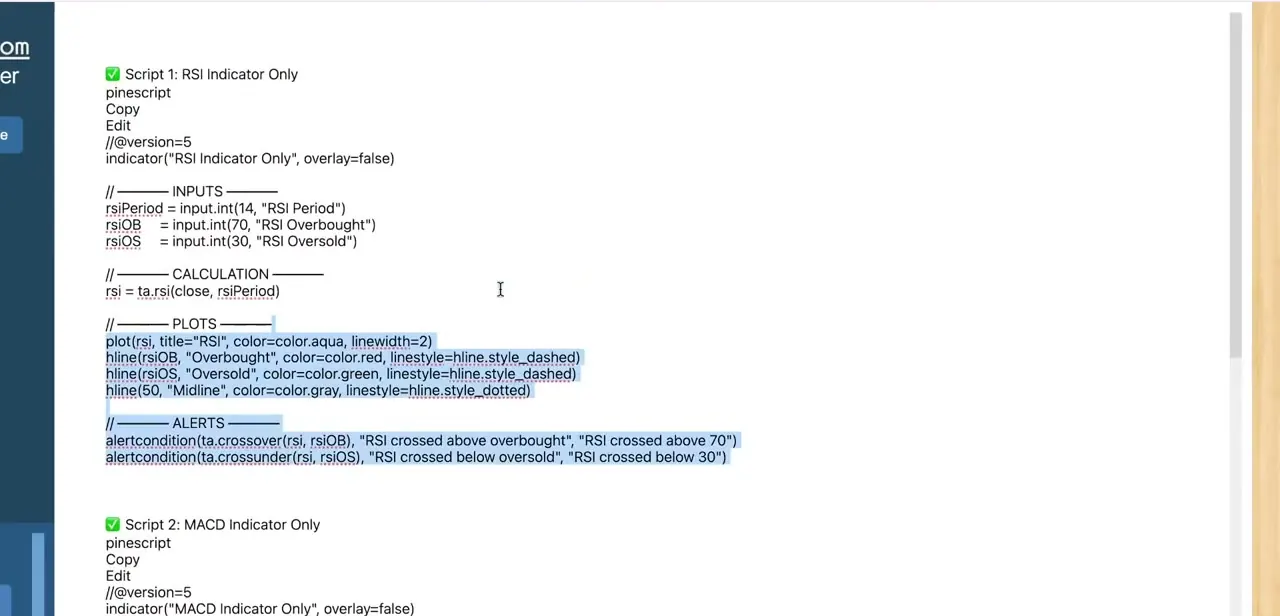
Before asking for a merge, get ChatGPT to write out each indicator as its own clean, working script: one labeled "RSI Indicator Only," the other "MACD Indicator Only." Each one starts with a version header and an indicator() declaration, followed by clearly separated Inputs, Calculation, Plots, and Alerts sections. Keeping them separate at this stage matters because it's easier to spot a mistake in a 20-line single-indicator script than in a 60-line combined one, and the same input names get reused when asking for the merge in the next step.
02Tell ChatGPT which Pine Script version to target
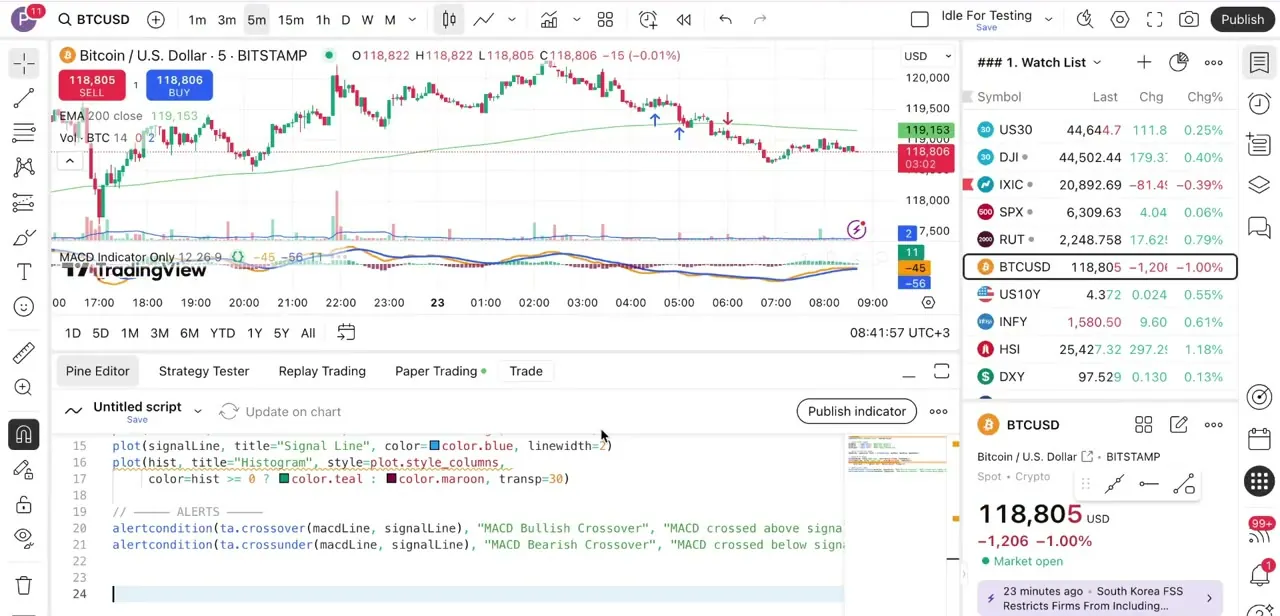
Left to its own defaults, ChatGPT tends to write //@version=5 at the top of the script, which is what it produced for both the RSI and MACD examples here. That still compiles and runs on TradingView; the version pragma pins the script to that language's rules.
But TradingView's current language version is Pine Script v6, and a v5 habit carried into hand edits later can cause confusion, most visibly through the transp= parameter inside plot() calls (used in the MACD example below), which v6 removed in favor of color.new(color, transparency). Asking ChatGPT directly, "write this in Pine Script v6," avoids the mismatch from the start. If existing v5 scripts are being kept, that's fine too, just don't mix a v5 script's transp= styling into a v6 merge without converting it first.
03Test each script alone on your chart
Paste the first script into TradingView's Pine Editor and click Add to chart (or Update on chart, if a version of it is already on the chart) to confirm it compiles and plots correctly before adding any complexity. In the example run, the MACD-only script adds its line, signal line, and histogram in a separate panel below a live BTCUSD five-minute chart, with the indicator name and settings shown in the panel header. If a single indicator throws an error at this stage, fix it here; debugging one script is simpler than debugging two that have already been merged.
04Ask ChatGPT to merge the two into one script
With both scripts verified individually, paste them into the same ChatGPT conversation and ask it to combine them into a single indicator, keeping their "Script 1" / "Script 2" labels intact so it can tell which inputs belong to which indicator. Tell it explicitly to rename any clashing variables (both scripts likely used similar names for length or smoothing inputs) and to keep the indicator title descriptive, something like "RSI & MACD Combo." A good merge keeps the same Inputs / Calculation / Plots / Alerts structure as the originals, with both indicators' logic under one indicator() declaration instead of two.
05Decide overlay or separate panel before you paste
RSI and MACD are both oscillators that don't belong on the price chart itself, so tell ChatGPT to set overlay=false and keep the combined output in its own panel below price; that's the correct default for this pairing. Combining something like a moving average with price action instead would call for overlay=true, so it draws directly on the candles. Specifying this up front avoids a second round-trip to fix the display after the code is already pasted and tested.
06Paste the merged script and add it to the chart
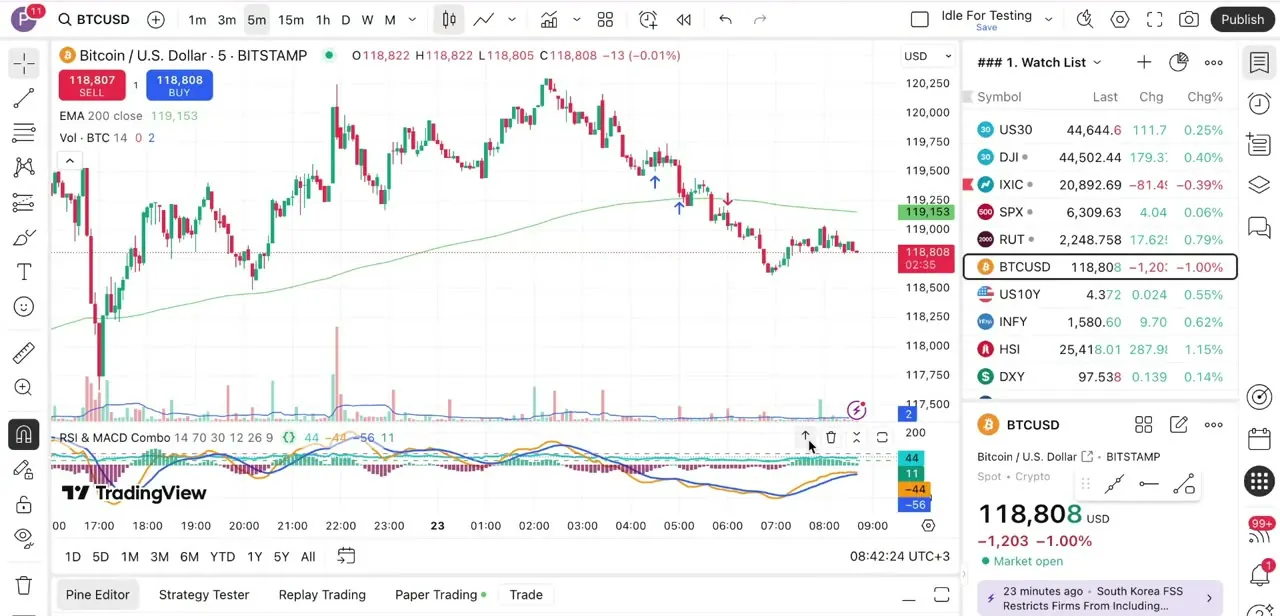
Copy the final combined code from ChatGPT, paste it into a fresh Pine Editor tab, and click Add to chart. In the finished example, the combined "RSI & MACD Combo" indicator renders the RSI line and the MACD line, signal, and histogram together in a single lower panel under the same BTCUSD chart: one script, one panel, both signals visible instead of stacked across two separate indicators.
07Fix compile errors by pasting them back into ChatGPT
If the merged script throws an error on paste, copy the exact error message TradingView shows and paste it back into the ChatGPT conversation with the script, rather than hand-debugging unfamiliar Pine Script syntax. Most merge errors come from duplicate variable names ChatGPT missed, a version mismatch between the two original scripts, or a leftover transp= argument from a v5 script that a v6 merge won't accept. Naming the specific error gets a working fix faster than describing the symptom.
08Add combined alert conditions
Both original scripts already had their own alertcondition() calls: RSI crossing overbought or oversold, MACD crossing its signal line. Once merged, ask ChatGPT to add a new alertcondition that fires only when both are true at once, using an if-then check like a MACD bullish crossover happening while RSI is below its oversold line.
That combined condition is usually the whole reason to merge two indicators in the first place. After adding it, click Update on chart before opening Create Alert; the alert dialog reads conditions from whatever version of the script is currently on the chart, not from the editor tab.
| v5 | v6 |
|---|---|
| plot(x, color=c, transp=30) | plot(x, color=color.new(c, 30)) |
| Numeric value used directly as a condition | Must be explicitly cast, e.g. bool(x) |
| Integer division truncates (5/2 = 2) | Integer division returns a float (5/2 = 2.5) unless wrapped in int() |
From TradingView's official Pine Script v6 migration guide. Only the changes relevant to a basic RSI/MACD-style script are listed; the full guide covers more.
When it doesn't work
Compile error mentions the transp parameter
Why: One of the original scripts (typically ChatGPT's default v5 output) styled a plot with transp=, which Pine Script v6 removed.
Fix: Replace transp=N inside the plot with a transparent color, for example color.new(color.maroon, 30), or keep the whole merged script on //@version=5 if that's acceptable.
The new combined alert doesn't appear in Create Alert
Why: Editing alertcondition() in the Pine Editor doesn't change the script instance already sitting on the chart until it's refreshed.
Fix: Click Update on chart after any change to an alertcondition() call, then reopen Create Alert.
ChatGPT renames the wrong variables or merges inputs incorrectly
Why: Pasting both scripts without their section labels makes it harder for ChatGPT to tell which input or calculation belongs to which original indicator.
Fix: Keep the "Script 1: X Indicator Only" / "Script 2: Y Indicator Only" headings from the generation step when pasting them in for the merge request.
Frequently asked questions
Do I need coding experience to combine indicators using ChatGPT?
Not necessarily. ChatGPT can generate and merge the Pine Script code, though testing each indicator alone first, as covered above, helps catch problems before they get buried in a combined script.
Can ChatGPT make mistakes when merging Pine Script code?
Yes. Duplicate variable names and version mismatches are the most common issues. Paste the exact TradingView error message back into ChatGPT rather than describing it, and it can usually fix it in one pass.
Should I use Pine Script v5 or v6?
V6 is TradingView's current version. ChatGPT often defaults to v5 unless told otherwise, which still runs fine on its own, but mixing v5 syntax like transp= into a v6 merge causes a compile error. Ask for v6 explicitly to avoid the mismatch.
Should combined oscillators like RSI and MACD use overlay=true or false?
False. Both are oscillators that plot in their own panel below the price chart, not on top of the candles, so overlay=false is correct for this kind of pairing.
Can I combine more than two indicators into one script?
Yes, the same generate-test-merge approach extends to three or more, though testing each one alone first matters even more as the combined script grows.
Will combining indicators automatically create a combined alert?
No. Each original script keeps its own separate alertcondition() calls after merging. A new alert that checks both indicators' conditions together has to be requested explicitly, and the script has to be updated on the chart before that new alert shows up in Create Alert.
Sources and last check
The generated scripts, the Pine Editor layout, and the MACD/combined-indicator panels were checked directly against this guide's own screenshots. That check found the RSI and MACD scripts both used //@version=5 and, in the MACD histogram, a transp=30 argument. Checked against TradingView's official Pine Script v6 migration guide in September 2026, that parameter is removed in the current language version, which the previous draft of this guide didn't mention. The version-targeting step, the transp/color.new table, and the alert-refresh troubleshooting entry were added from that same documentation.
About the author

Impran M N
I've been hooked on technology for as long as I can remember — especially the new tools and AI apps that seem to land every other week. Easy Tech Tuts is where I write up whatever I've just worked out: I do the task in the real product, record the screen, and turn it into the guide I wish I'd found first.