Easy Tech Tuts
How to Withdraw Money From Stripe Easily 2026
By Impran M NLast checked against official docs
Collecting payments through Stripe is only half the job. At some point that balance needs to land in your bank account, and Stripe doesn't push money out the moment it's charged.
It holds funds in your balance until a payout is triggered, either on a schedule you set or by hand. This guide covers the Balances page where that money lives, how to attach a bank account, and the real difference in cost and speed between a standard payout and an Instant Payout.
Before you start
- A Stripe account that has processed at least one successful live payment — Stripe holds the very first payout for 7-14 days as a new-account check, regardless of your schedule
- Admin or Owner permissions on the account. Stripe restricts adding or editing bank account details to those two roles
01Check your available balance
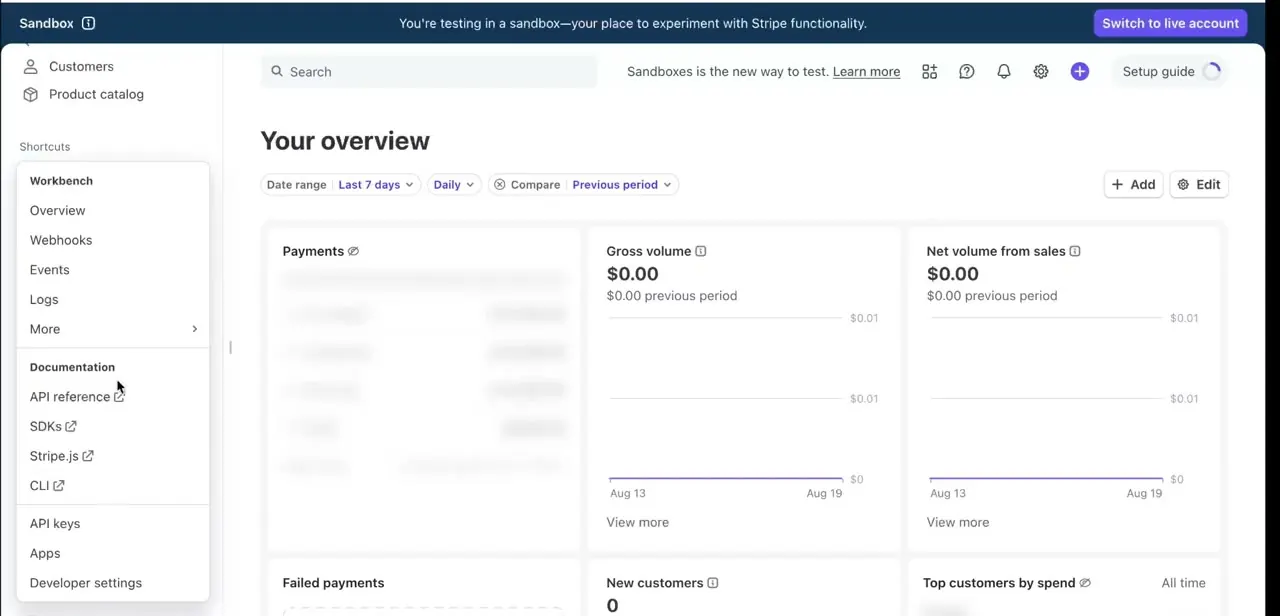
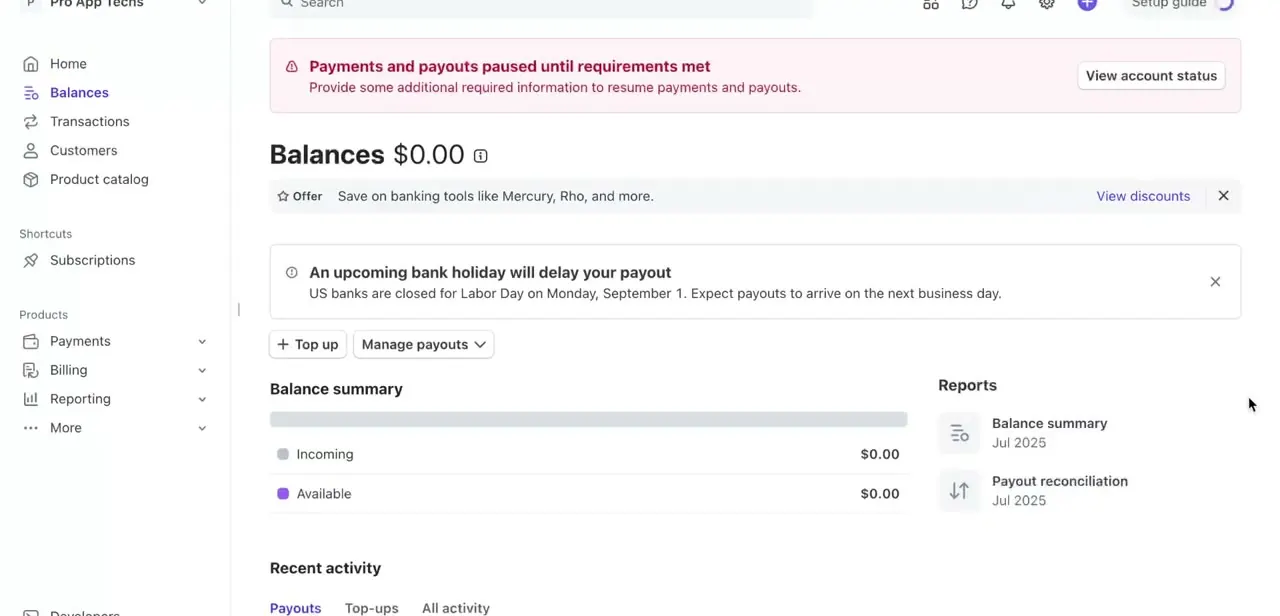
Every Stripe account has a Balances page reachable from the left-hand menu, and it's the control center for anything payout-related. It splits your money into Incoming (payments still clearing) and Available (funds Stripe will let you move out), both shown as running totals.
Before trying to withdraw anything, check Available: if it reads $0.00, there is nothing to pay out yet, no matter how the schedule is configured. Stripe also surfaces account-level notices here, such as a request for more verification information or a bank holiday that will push a payout back a day. Both are worth reading before assuming something is broken.
02Add and confirm your bank account
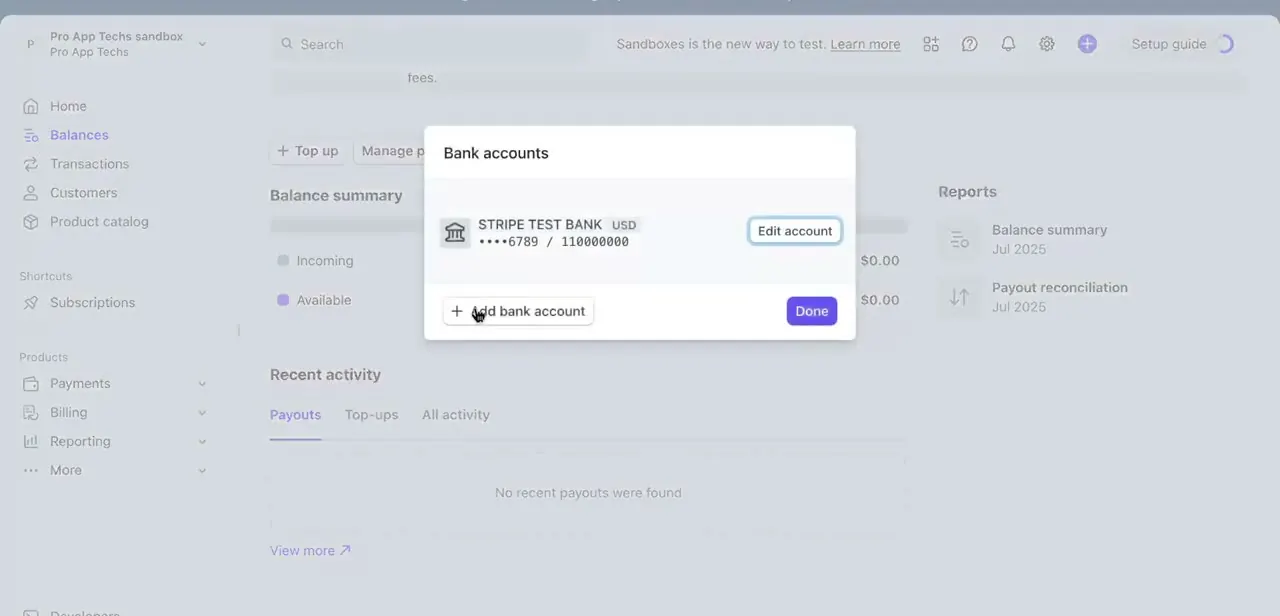
Stripe can't send money anywhere until it knows where to send it, and this setting does not live under a dedicated payouts menu the way older recordings show it. Click the gear icon for Settings, then Business settings, then Bank accounts and scheduling.
Any account already on file is listed with its bank name, currency, and the last few digits of the account number. Use Add bank account to connect a new one, or Edit to update details.
Depending on your country, Stripe may run a verification step, such as confirming a small deposit, before the account is trusted to receive payouts. Don't expect a brand-new account to be payout-ready within seconds of adding it, and remember only Admin or Owner users can make this change.
03Set your payout schedule
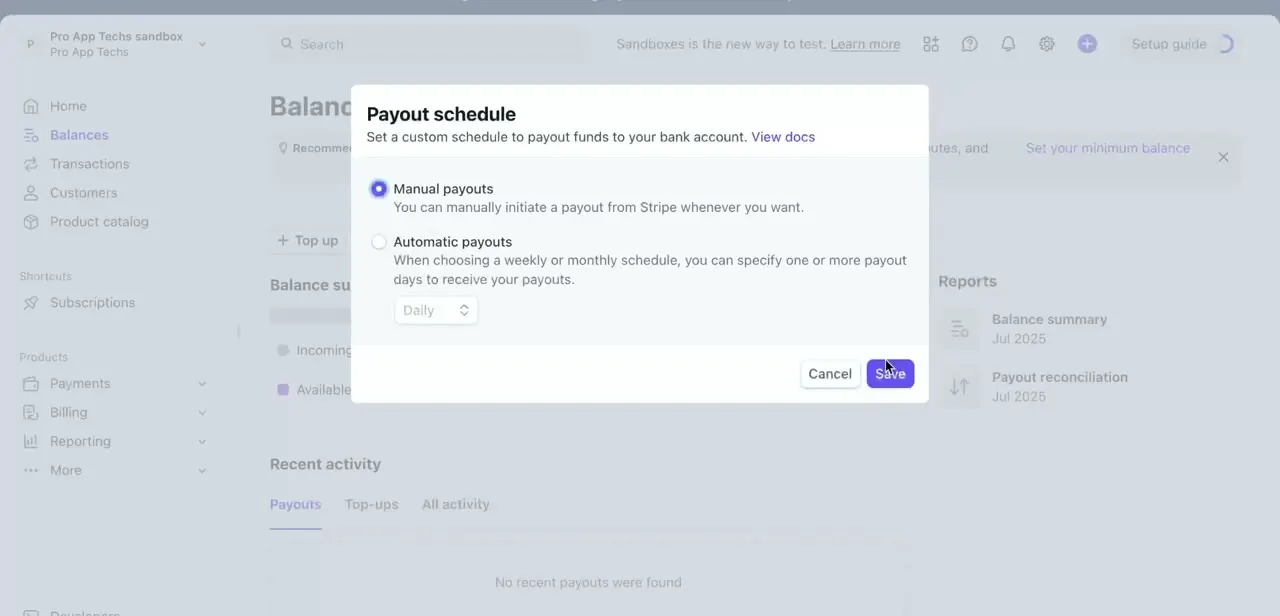
This is where automatic and manual payouts get decided, on the same Bank accounts and scheduling screen from the step above. There are two options: Manual, where nothing leaves your balance until you initiate it, and Automatic, where you pick daily, weekly, or monthly, with specific days for the latter two.
Automatic suits most ongoing businesses since it keeps cash moving without a login required. Manual gives more control over exactly when transfers happen, useful for matching them to your own accounting periods. Some countries override this choice entirely: Brazil and India run automatic daily payouts only, and Japan does not offer a daily option at all.
04Trigger a payout and know what affects its timing
To pay out sooner than the next scheduled date, go back to the Balances page and click Pay out (shown as Manage payouts in some older dashboards; Stripe has since renamed it). If your account qualifies for Instant Payouts and has an eligible card or bank account attached, you'll be offered a choice between a free standard payout and a fee-based instant one that typically lands within 30 minutes.
Timing has two separate stages. First, funds sit in Incoming for a holding period before becoming Available: commonly a couple of business days in the US, longer elsewhere, and 7-14 days for a brand-new account's very first payout.
Second, once a payout is sent it still travels through the banking network, which is where weekends and bank holidays add a day. If a payout looks delayed, check those two things before assuming there's an account problem: was the money Available yet, and did a holiday push the transfer back.
| Region | Fee |
|---|---|
| Canada, EU, UK, Singapore, Norway, Hong Kong, Malaysia | 1% |
| US, Australia, New Zealand, UAE | 1.5% |
Standard payouts carry no fee in any region. Instant Payouts are also capped per transaction, for example $9,999 USD in the US.
When it doesn't work
"Pay out" is greyed out even though there have been recent sales
Why: Recent charges are still sitting in Incoming, not Available. Funds only become payout-eligible after Stripe's holding period for your country, and a brand-new account's first payout is held for 7-14 days regardless of schedule.
Fix: Check the Available figure on the Balances page rather than the total. Nothing can be paid out until it moves from Incoming into Available.
Can't find the old "Payout schedule" menu item
Why: Stripe now combines bank accounts and payout scheduling on one screen instead of two separate menu entries, so older step-by-step guides point at a layout that no longer exists.
Fix: Go to Settings (gear icon), then Business settings, then Bank accounts and scheduling. Both the bank account list and the schedule options are on that one page.
No Instant Payout option appears at all
Why: Instant Payouts require an eligible debit card or supported bank account and are only offered in a specific set of countries; new accounts also aren't automatically eligible.
Fix: Add an eligible instant payout method under Bank accounts and scheduling, and check the Balances page for an instant-eligible amount before assuming the feature is broken.
A teammate can't add or change the bank account
Why: Stripe restricts editing bank account details to users with Admin or Owner permissions on the account.
Fix: Have an Owner or Admin make the change, or grant the teammate that role first.
Frequently asked questions
How long does a Stripe payout take to arrive?
A brand-new account's first payout takes 7-14 days as a risk check. After that, standard payouts follow your country's settlement timing, commonly a couple of business days in the US and a little longer elsewhere, plus any weekend or holiday delay. Instant Payouts, where available, land in about 30 minutes for a fee.
Is there a fee for withdrawing from Stripe?
Standard payouts to a bank account are free. Instant Payouts cost 1% in Canada, the EU, UK, Singapore, Norway, Hong Kong and Malaysia, or 1.5% in the US, Australia, New Zealand and the UAE, deducted before the funds arrive.
Can I withdraw money before verifying my bank account?
No. Stripe requires a verified bank account on file before it will send any payout.
Where did the separate "Payout schedule" setting go?
It's no longer its own menu item. Both the bank account list and the schedule now live together under Settings > Business settings > Bank accounts and scheduling.
Who is allowed to change the bank account on a Stripe account?
Only users with Admin or Owner permissions. Other team roles can view payout information but can't add or edit bank account details.
Is there a minimum amount Stripe will pay out?
Yes, generally one base unit of the account's currency, for example $0.01 in the US or £1 in the UK. Balances below that stay in the account until more payments arrive.
Sources and last check
Click path and screens come from a walkthrough recorded in 2025. Re-checked against Stripe's official documentation in September 2026, which corrected two things this guide previously carried: the bank account and payout schedule settings are no longer reached via a separate payouts menu (they now sit together under Settings > Business settings > Bank accounts and scheduling), and the Balances page button is currently labelled Pay out rather than Manage payouts. Instant Payout fee percentages, country restrictions, and the 7-14 day first-payout hold were added from the same documentation.
About the author

Impran M N
I've been hooked on technology for as long as I can remember — especially the new tools and AI apps that seem to land every other week. Easy Tech Tuts is where I write up whatever I've just worked out: I do the task in the real product, record the screen, and turn it into the guide I wish I'd found first.