Easy Tech Tuts
How to Manually Charge a Customer in Stripe with Credit Cards 2026 Easily
By Impran M NLast checked against official docs
Not every payment needs a checkout page built into a website. If you're a freelancer or small business billing someone for one-off work, Stripe's Dashboard lets you create and send a payable invoice directly, with the customer entering their own card details on a secure Stripe-hosted page.
This guide walks through that flow, starting from the Dashboard home, into the Invoices section, and through building an invoice with line items, currency, and tax settings, so you can bill a customer today without writing a line of checkout code. It also covers what this route costs, and how that compares to typing a customer's card number into Stripe yourself.
Before you start
- A Stripe account with Invoicing available (part of Stripe Billing)
- The customer's email address, to send the invoice to
01Start from the Stripe Dashboard home
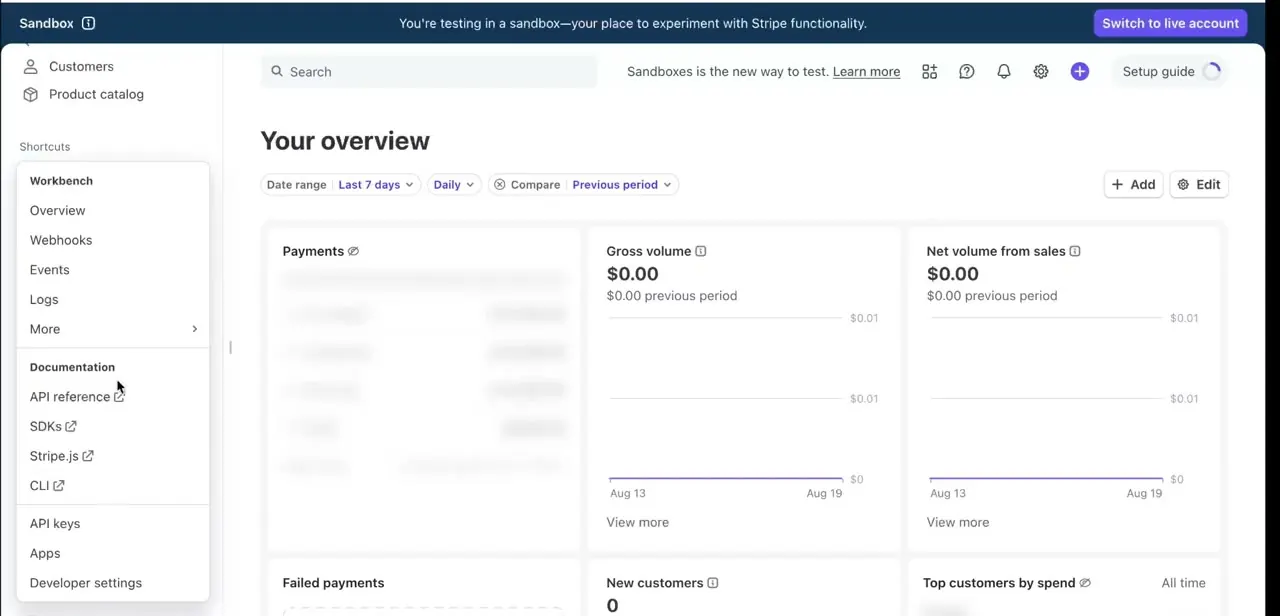
After logging in, you land on the Home view, which shows a Today summary with gross volume, USD balance, and payouts, plus a Setup guide panel on the right walking new accounts through choosing how to accept payments and verifying your business. The left sidebar is where every billing tool lives: Home, Balances, Transactions, Customers, and Product catalog at the top, followed by a Shortcuts section with Invoices, Payment Links, Radar, Billing overview, and Subscriptions. For a manual one-off charge, Invoices is the shortcut you want.
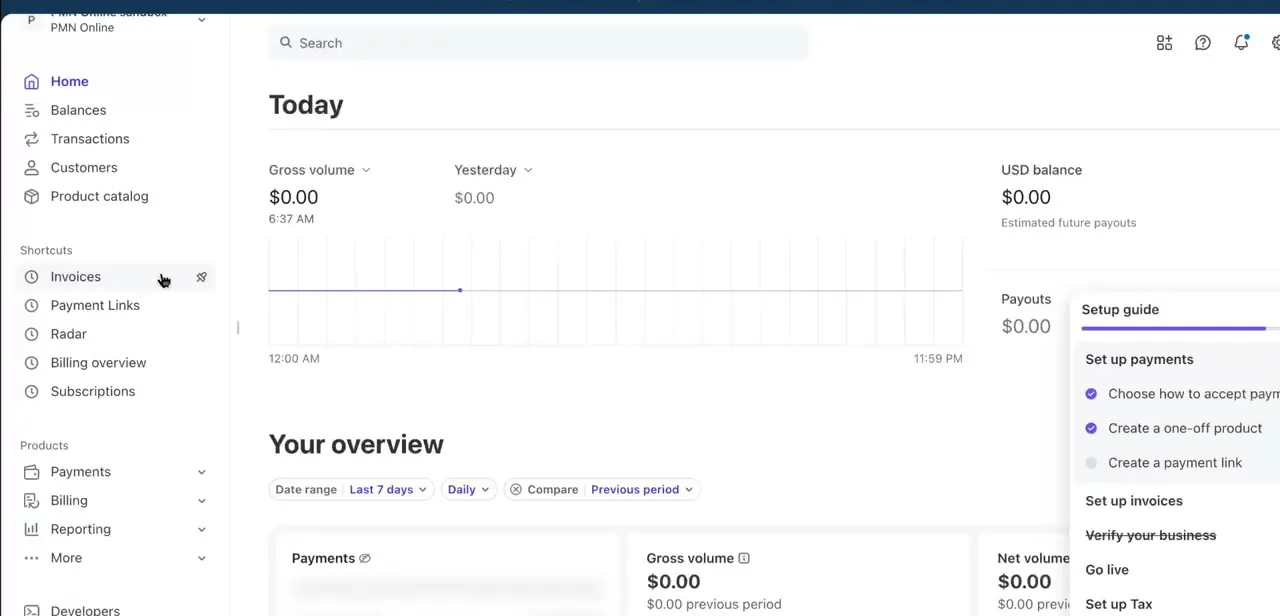
02Open Invoices and start a new one
Click Invoices in the sidebar to reach the Invoices list, organized into tabs for All invoices, Draft, Open, Past due, and Paid. Any invoice you've created shows up here with its total, frequency, invoice number, customer name and email, due date, and creation date, genuinely useful once you're billing more than one or two people and need to see who's paid. Click Create test invoice in test mode (or Create invoice on a live account) in the top-right corner to start a new one.
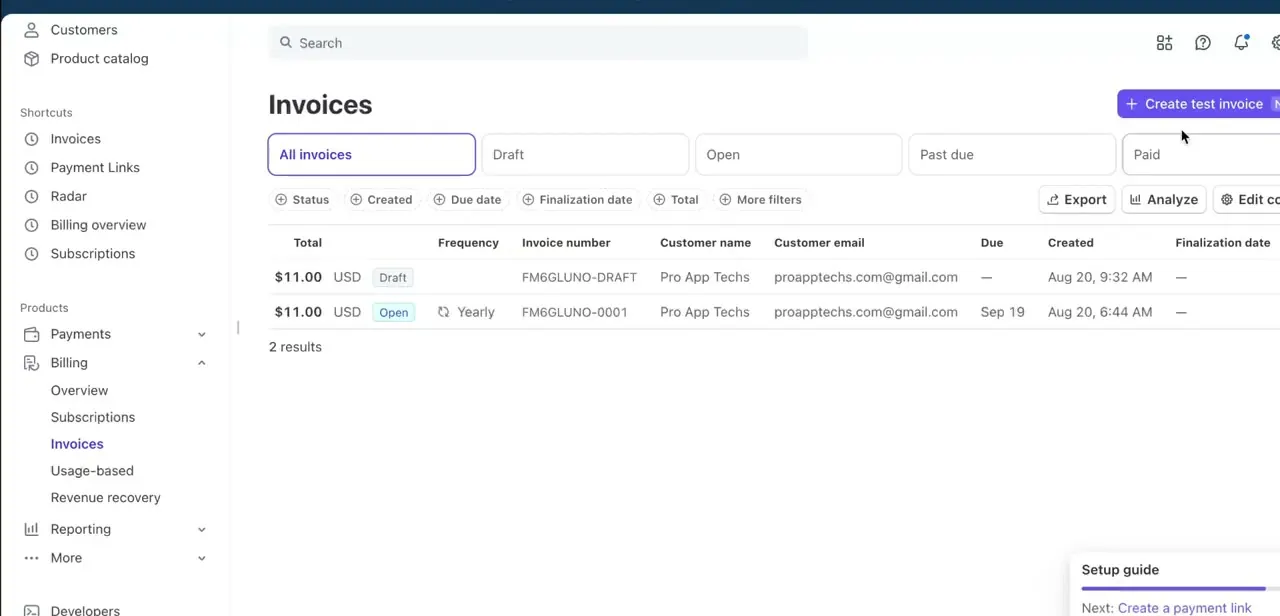
03Add the customer and line items
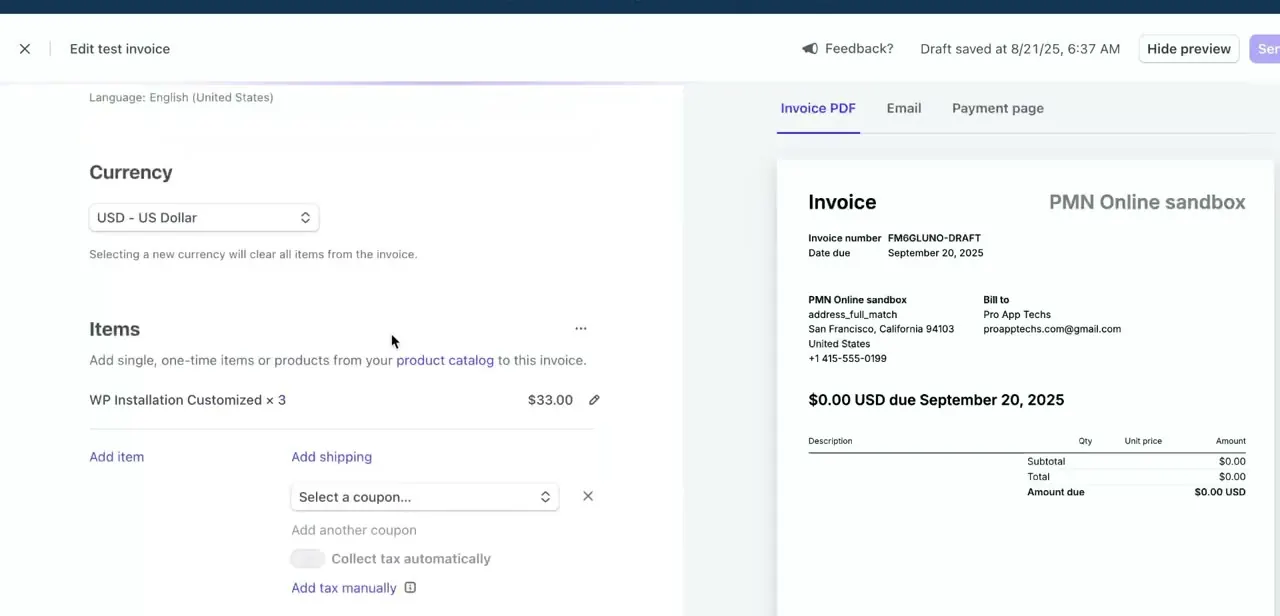
The invoice editor opens with the customer's billing details on one side (name, email, and address, which populate the "Bill to" section of the invoice preview) and the invoice's actual content on the other. Set your Currency first, since switching it later clears any items you've already added.
Under Items, add a single, one-time charge (Stripe's current Dashboard labels this option "Add one-time item"; older screens, including the one below, show it simply as "Add item"), or pull from your product catalog if you've already set up recurring products. In the frame captured here, a single line item, "WP Installation Customized x3", totals $33.00, exactly the kind of one-off service charge this flow is built for.
04Apply shipping, coupons, or tax if the charge needs them
Below the item list, Add shipping lets you add a delivery charge as its own line, a coupon selector lets you apply a discount code you've already created in Stripe, and a Collect tax automatically toggle hands tax calculation to Stripe instead of you working it out by hand. None of these are required for a simple service charge, but they matter the moment you're billing for anything with a shipped component or a location-based tax obligation.
05Review the invoice preview before sending
The right-hand panel mirrors exactly what the customer will see, with tabs for Invoice PDF, Email, and Payment page. The PDF view shows the invoice number, due date, your business address, the customer's billing address, and the itemized total; check this over carefully, since it represents your business to the client.
The Payment page tab is the one that matters for collecting money. It's the hosted Stripe page where the customer enters their own card number, expiry, and CVC to pay, which is what makes this a manual charge without you ever touching their raw card details.
06Choose how the invoice gets paid, then send it
Once the items, currency, and any tax or coupon settings look right, pick a delivery option: Email invoice with link sends the customer a PDF plus a link to the Payment page, which is the standard choice; Automatically charge a payment method on file skips the customer's step entirely, but only works if they already have a saved card on file with your Stripe account from an earlier transaction; Send invoice or payment page link manually hands you the link to share yourself, by text or any channel you like, instead of Stripe emailing it. Finalize the invoice to lock its contents and move it out of Draft, then send it. The invoice automatically flips to Paid in your Invoices list once the customer pays, which is also where you'd check anything still sitting in Open or Past due.
07Confirm payment and keep the receipt trail
After payment, Stripe automatically emails the customer a receipt and updates the invoice status in your dashboard, so no separate confirmation step is needed. If you ever need to issue a refund, open the paid invoice or its underlying payment in Transactions and refund it from there; partial and full refunds are both supported. This flow, an invoice created and sent from the Dashboard instead of a page you built yourself, is Stripe's standard way to bill a customer manually for one-time work.
| Method | Who enters the card | What it costs (US, cards) |
|---|---|---|
| Invoice with a link (this guide) | The customer, on Stripe's hosted Payment page | 2.9% + $0.30 processing, plus a 0.4-0.5% invoicing fee per paid invoice |
| Automatically charge a payment method on file | Nobody; it reuses a card the customer saved earlier | Same as above, since it's still an invoice |
| Typed directly into the Dashboard (manual entry) | You, on the customer's behalf | 3.4% + $0.30 processing, no invoicing fee |
Figures per Stripe's own pricing and manually-entered-card-payments support pages, current as of September 2026. Rates vary outside the US.
When it doesn't work
The line items disappeared after I changed the invoice currency
Why: Changing the currency on an invoice clears any items already added, since prices and products are tied to a specific currency.
Fix: Set the currency first, before adding items, and treat a currency change on an existing draft as a reason to re-add the line items.
"Automatically charge a payment method on file" is greyed out or doesn't collect payment
Why: That option only works if the customer already has a saved card on file with your Stripe account from a previous purchase.
Fix: Use Email invoice with link instead, so a first-time customer can enter their card on the hosted Payment page.
The invoice fee looks higher than the card processing rate you expected
Why: Stripe charges a separate Invoicing fee (0.4% or 0.5% per paid invoice, depending on your plan) on top of standard card processing, and it only shows up once the invoice is paid.
Fix: Check your account's Invoicing plan under billing settings, and factor the invoicing fee into what you charge if margins are tight.
Frequently asked questions
Is it safe to bill a customer this way?
Yes. The customer enters their own card details on Stripe's hosted Payment page, so you never handle or store their raw card number yourself.
Does sending an invoice cost more than a regular card payment?
Slightly. On top of Stripe's standard processing rate, there's a separate invoicing fee of 0.4% (Starter) or 0.5% (Plus) per paid invoice. It's still cheaper than typing the customer's card number in yourself, which Stripe charges at a higher rate.
What if I want to type the customer's card number in myself instead of sending an invoice?
Stripe supports that as a manually entered card payment, but it costs more (3.4% + $0.30 in the US versus 2.9% + $0.30) because Stripe can't verify the card details were collected securely, and it carries more fraud risk.
Can I issue a refund on an invoice charged this way?
Yes. Once an invoice is paid, you can refund it in full or in part from the underlying payment in Transactions, the same as any other Stripe charge.
Is this method good for recurring billing?
One-off invoices work best for single charges. For anything recurring, use Stripe's Subscriptions or Billing tools, both reachable from the same sidebar shortcuts.
What's the difference between a Draft and an Open invoice?
A Draft invoice is still editable and hasn't been sent. Finalizing it moves it to Open, which locks the contents and makes it payable by the customer.
Sources and last check
Dashboard screens and the invoice example come from a recorded walkthrough. The invoicing fee (0.4-0.5% per paid invoice on top of standard processing), the higher rate for manually entered card payments (3.4% + $0.30 in the US), and the delivery-option list on the send step were added after checking Stripe's own Dashboard, pricing, and manual-card-payment documentation in September 2026; none of this appeared in the guide before. The current Dashboard also labels the one-time line item button "Add one-time item", where the recording shows "Add item"; both are noted since the underlying feature is the same.
About the author

Impran M N
I've been hooked on technology for as long as I can remember — especially the new tools and AI apps that seem to land every other week. Easy Tech Tuts is where I write up whatever I've just worked out: I do the task in the real product, record the screen, and turn it into the guide I wish I'd found first.