Easy Tech Tuts
How to Accept ACH Payments With Stripe, Does Stripe Accept it, Know Easily 2026
By Impran M NLast checked against official docs
Stripe does support ACH payments, but the option isn't switched on by default the way card payments are. You have to enable ACH Direct Debit specifically in your payment methods settings and connect it to a way of verifying customer bank accounts.
For US businesses handling larger invoices or subscriptions, ACH is worth the extra setup step: bank-to-bank transfers carry lower processing costs than cards, at the price of confirmation that takes days instead of seconds. This guide covers where the toggle lives in the Stripe Dashboard, what account-connection options you'll be asked to choose, and how to confirm it's working before relying on it for real customer payments.
Before you start
- A Stripe account, since ACH Direct Debit is limited to customers with a US bank account and presented in USD
- A webhook endpoint, or a concrete plan to build one — ACH is a delayed-notification method, so your integration finds out about success or failure later, not in the same request
01Open Settings in your Stripe Dashboard
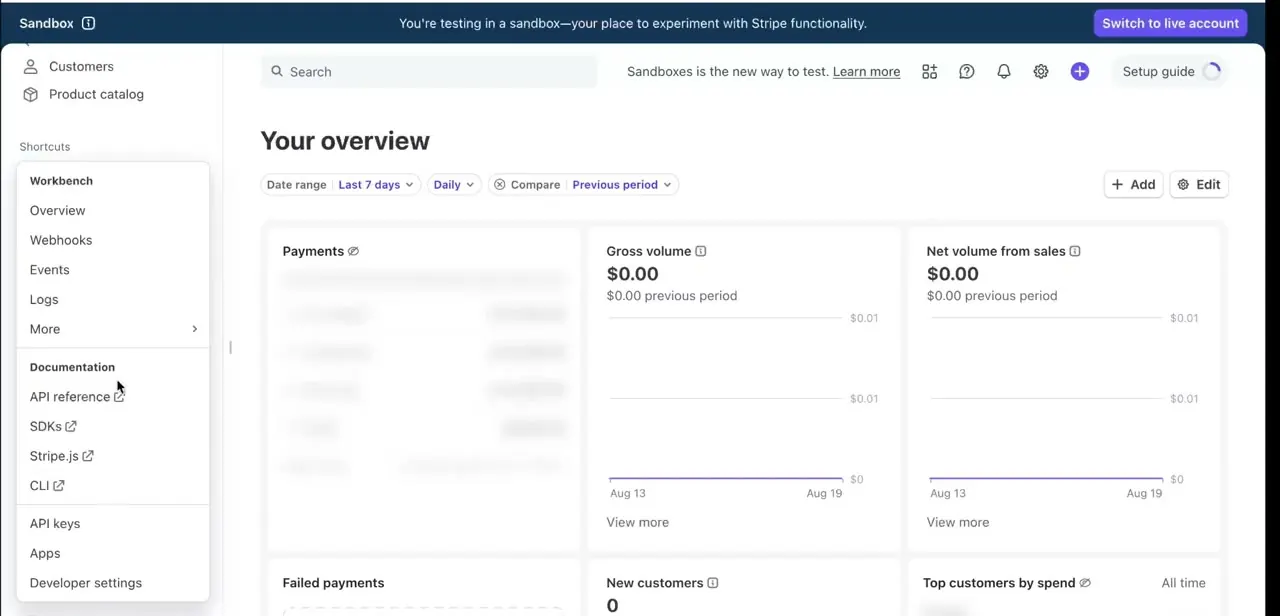
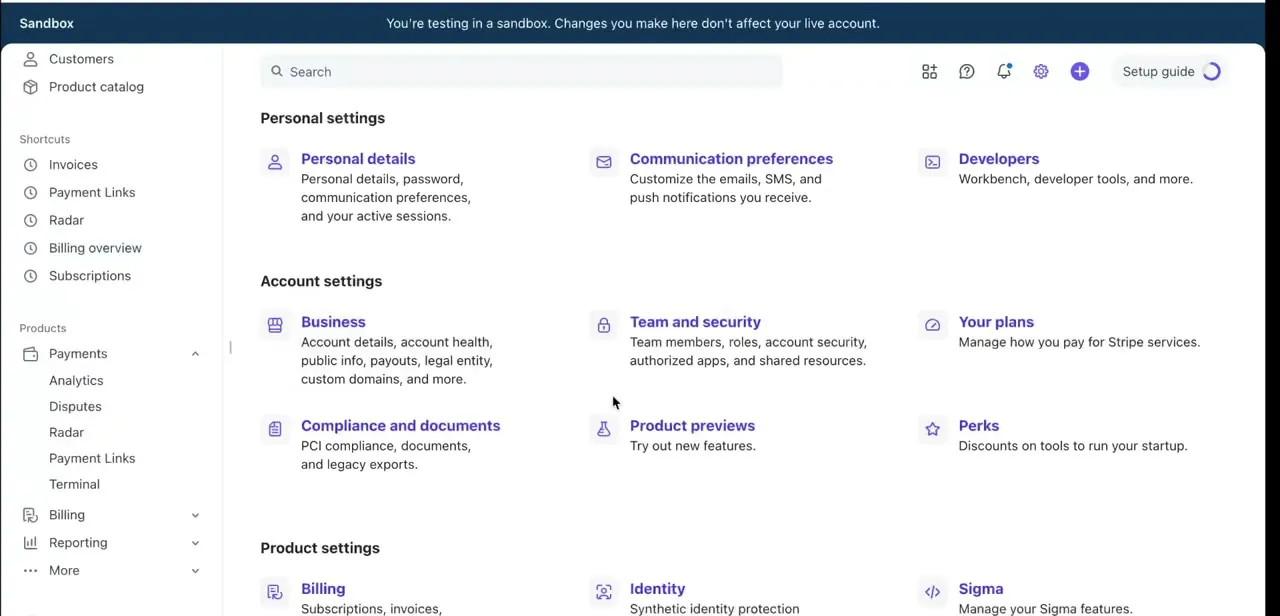
From the Stripe Dashboard, click the gear icon to reach Settings, organized into Personal settings and Account settings sections: Personal details, Communication preferences, and Developers on one row, then Business, Team and security, and Your plans below that. ACH itself isn't configured from this general settings page, but it's the route to Payments, where the payment methods list lives. If you're working in a sandbox, a blue banner across the top confirms you're testing and that changes here won't touch your live account.
02Understand what "ACH Direct Debit" actually covers
What this guide sets up is ACH Direct Debit: you pull funds from a customer's bank account once they've authorized it, the standard fit for checkout, invoices, and subscriptions. The reverse direction, a customer pushing funds to you directly, is a separate Stripe product.
Stripe's older "ACH Credit Transfers" (built on its Sources API) is deprecated; the current equivalent is US Bank Transfers, aimed at large one-off B2B payments rather than typical storefront checkout. Under Payment methods, the option you're looking for is ACH Direct Debit specifically, not something labeled "ACH credit."
03Enable ACH Direct Debit under Payment methods
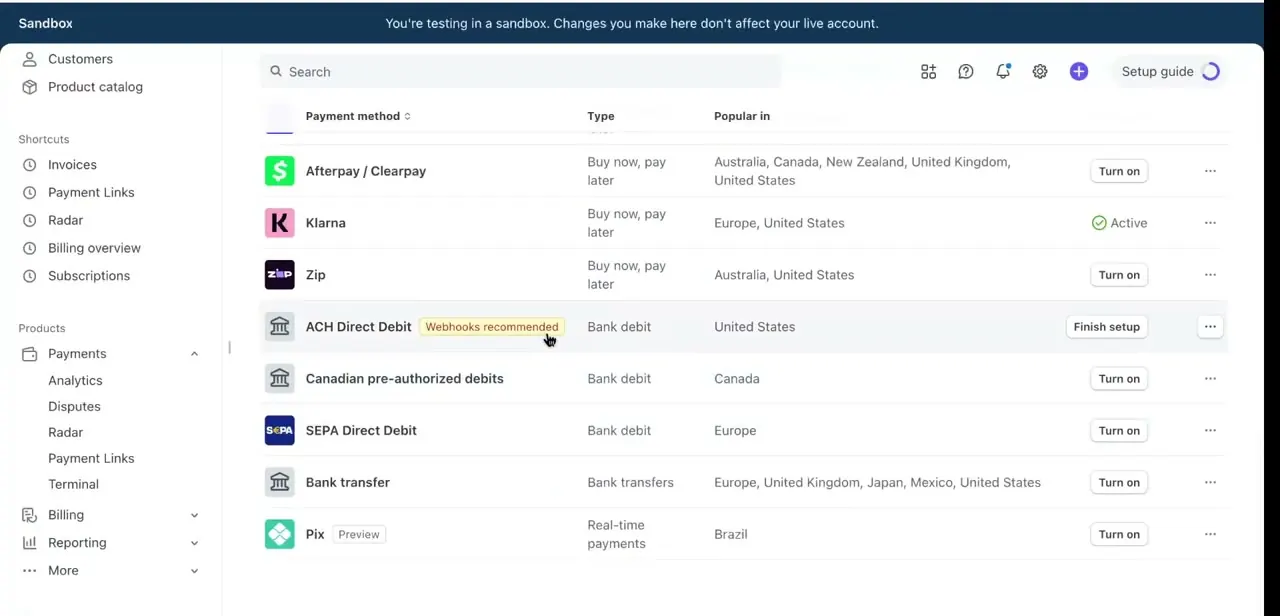
Go to Payments in the left sidebar, then Payment methods, where Stripe lists every option available for your account alongside its type and popularity: Afterpay/Clearpay and Klarna under buy-now-pay-later, SEPA Direct Debit for Europe, Pix for Brazil, and ACH Direct Debit tagged Bank debit, popular in the United States. Click Finish setup next to ACH Direct Debit.
Stripe flags it as Webhooks recommended, since ACH payments confirm asynchronously rather than instantly, and takes up to 4 business days to report success or failure. One compliance detail the setup screen doesn't spell out: Stripe requires you to present a mandate, the customer's authorization to debit their account, before you can charge them.
If you build checkout with Stripe Checkout or the Payment Element, Stripe displays and records this automatically. A custom payment form has to show the mandate language itself before confirming payment.
04Connect bank accounts through Stripe Financial Connections
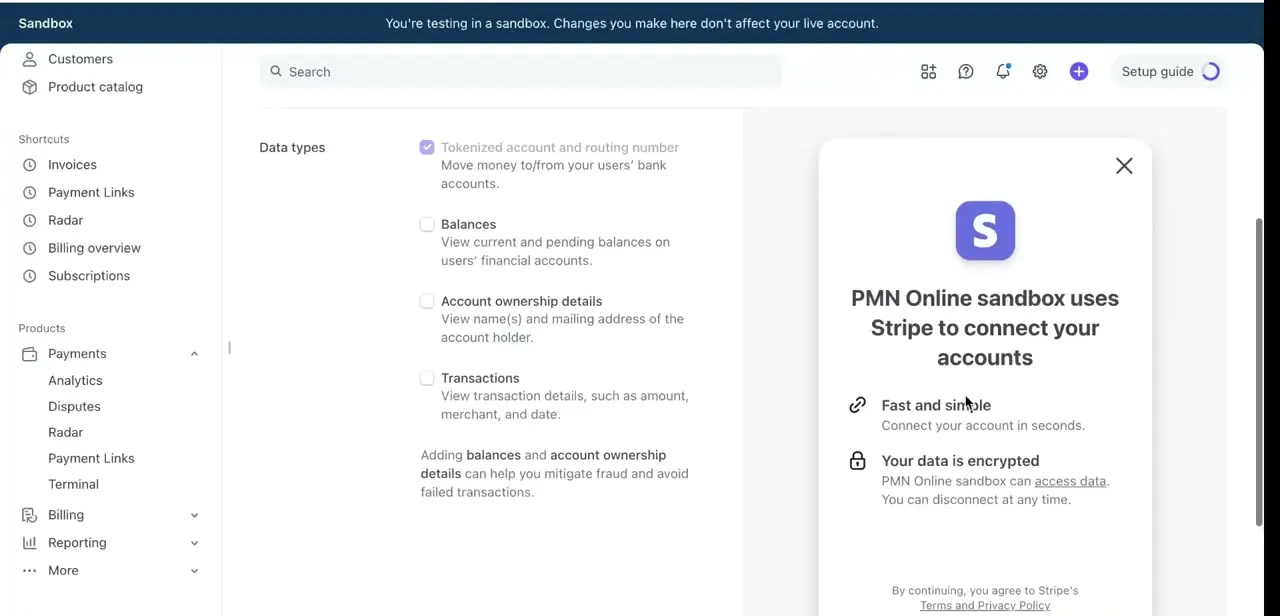
Finishing ACH setup routes you through Stripe Financial Connections, which verifies that a customer's bank account is real and able to receive a debit. You'll choose which data types to request: tokenized account and routing number is required to move money at all, while balances, account ownership details, and transactions are optional add-ons Stripe recommends adding to cut down on failed payments, by confirming the account holder's name matches and funds are actually available.
05Know the settlement timing, refund, and dispute windows
Standard ACH settlement moves funds into your Stripe balance on a T+4 schedule, 4 business days after the payment is created. Eligible US accounts can turn on Faster settlement (T+2) from the same Payment methods settings page, cutting that to 2 business days.
Stripe's public pricing pages don't list a flat ACH percentage the way they do for cards; check the rate shown on your own account's Pricing page, since Stripe caps ACH costs below card rates but doesn't publish one number for every account. Refunds are asynchronous too, taking up to 3 business days once issued, and can be requested up to 180 days after the original payment. Customers can dispute an ACH payment for up to 60 calendar days, and unlike card disputes, Stripe gives you only one round of evidence with no appeal once a bank rules on it.
06Test ACH payments before going live
Stay in the sandbox and run a test transaction using Stripe's published test bank details: routing number 110000000 with account number 000123456789 simulates a successful debit. Stripe also documents specific failure cases with the same routing number, such as 000111111116 for no account found, 000222222227 for insufficient funds, and 000333333335 for debits not authorized.
Confirm your webhook correctly receives the payment_intent status changes for both a success and at least one failure case, since ACH transactions move through pending, processing, and succeeded or failed states over time rather than resolving in a single response. Only switch to live mode once you've watched a full test payment move through each state correctly.
| Scenario | Routing number | Account number |
|---|---|---|
| Successful payment | 110000000 | 000123456789 |
| No account found | 110000000 | 000111111116 |
| Account closed | 110000000 | 000111111113 |
| Insufficient funds | 110000000 | 000222222227 |
| Debits not authorized | 110000000 | 000333333335 |
From Stripe's own testing documentation. Use these only in sandbox/test mode.
When it doesn't work
A customer disputes a payment, claiming they never authorized it
Why: The required mandate (the customer's authorization to debit their account) wasn't properly presented or recorded before the charge.
Fix: Use Stripe Checkout or the Payment Element, which display and store the mandate automatically. A custom payment form must show the mandate text itself before confirming payment.
The payment status doesn't update right after a customer pays
Why: ACH Direct Debit is a delayed-notification method: Stripe can take up to 4 business days to confirm success or failure.
Fix: Rely on webhook events such as payment_intent.processing and payment_intent.succeeded instead of expecting an instant response like a card charge gives.
A payment shows succeeded, then fails days later
Why: In rare cases a bank reports an ACH failure after Stripe has already marked the PaymentIntent succeeded, for reasons like insufficient funds or an incorrect account.
Fix: Treat 'succeeded' as provisional for large orders, and monitor for charge.dispute.created events so a late failure doesn't slip past unnoticed.
Frequently asked questions
Does Stripe accept ACH payments?
Yes. Stripe supports ACH Direct Debit for pulling payments from US bank accounts. It has to be enabled specifically under Payment methods in the Stripe Dashboard, and customers must authorize it through a mandate before you can charge them.
What's the difference between ACH debit and ACH credit?
ACH Direct Debit pulls funds from a customer's bank account with their authorization, the standard setup for checkout and subscriptions. The push direction, a customer sending funds to you directly, is a separate Stripe product called US Bank Transfers, meant for large one-off B2B payments rather than typical storefronts.
Why does Stripe recommend webhooks for ACH payments?
ACH payments don't confirm instantly like card charges. They move through pending, processing, and succeeded or failed states over up to 4 business days, and webhooks are how your system learns about that status change.
How long does an ACH payment take to settle on Stripe?
Standard settlement is 4 business days (T+4). Eligible US accounts can enable Faster settlement (T+2) from the Payment methods settings page to cut that to 2 business days.
Do I need Stripe Financial Connections to accept ACH payments?
It's how Stripe verifies a customer's bank account before a debit can be attempted, and it's part of the standard ACH Direct Debit setup flow. Customers can also enter account details manually and verify with microdeposits instead.
Can a customer dispute an ACH payment the way they would a card charge?
Yes, for up to 60 calendar days, but the process is stricter: Stripe allows only one round of evidence and there's no appeal once a bank decides the dispute.
What does an ACH payment cost on Stripe?
Stripe caps ACH Direct Debit fees below its card rates but doesn't list one flat percentage on its general pricing pages. Check the exact rate on your own account's Pricing page in the Dashboard.
Sources and last check
Click path and screens come from a recorded walkthrough. Re-checked against Stripe's official documentation in September 2026: the vague 'several business days' settlement claim was replaced with Stripe's actual T+4 standard and T+2 faster-settlement figures, the mandate requirement (missing from the original guide entirely) was added, the 'ACH credit' framing was corrected to name Stripe's actual current product (US Bank Transfers, successor to the deprecated ACH Credit Transfers), and the test step now uses Stripe's real published test routing and account numbers instead of a vague reference to 'documented' ones. A specific ACH percentage fee could not be confirmed from Stripe's public pricing pages, so this guide says so rather than inventing one.
About the author

Impran M N
I've been hooked on technology for as long as I can remember — especially the new tools and AI apps that seem to land every other week. Easy Tech Tuts is where I write up whatever I've just worked out: I do the task in the real product, record the screen, and turn it into the guide I wish I'd found first.