Easy Tech Tuts
How To Transfer Squarespace Domain To Hostinger 2026 Easy Guide
By Impran M NLast checked against official docs
If you bought your domain through Squarespace but want to host your site elsewhere, moving it to Hostinger gives you more control over DNS and often a lower renewal cost. The transfer happens in two places: unlocking and starting the move from Squarespace's Domains panel, then choosing how Hostinger should handle your name servers on the receiving end. This guide covers both sides, the eligibility windows that quietly block a transfer, and one thing people assume incorrectly: moving the domain does not move your Squarespace website.
Before you start
- At least 60 days since the domain was registered or last transferred, and at least 45 days since its last renewal
- The domain unlocked in Squarespace, with no suspension or redemption status on it
01Check your domain is genuinely eligible to transfer
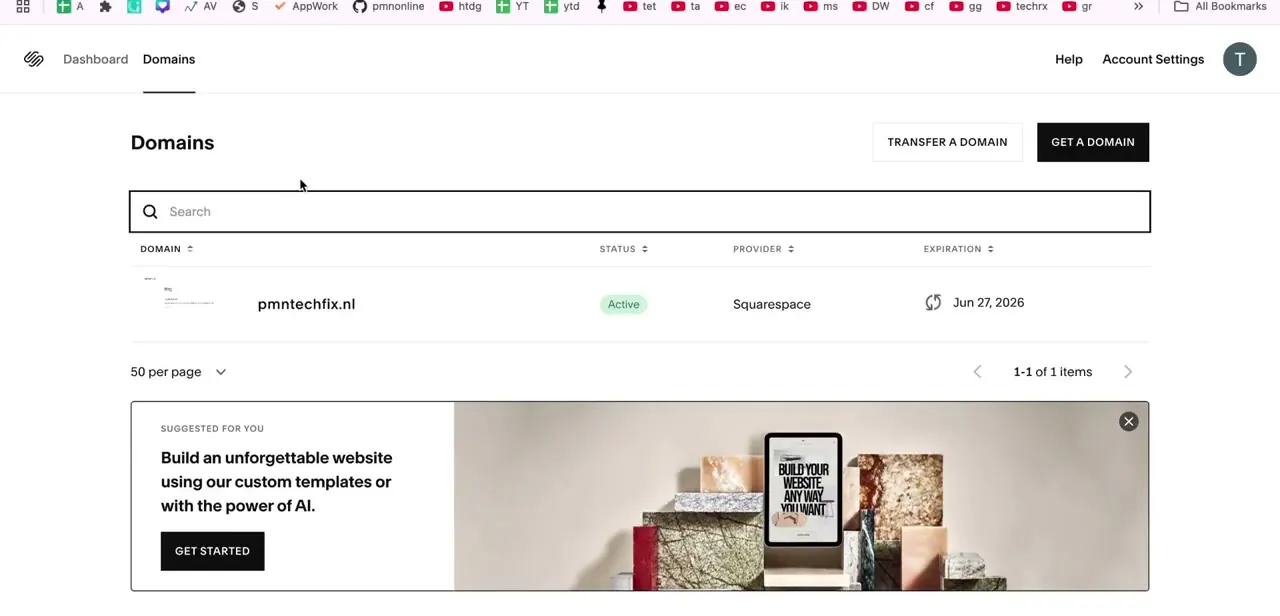
Log in to Squarespace and open Domains from the top navigation. Every domain on the account is listed with its status, current provider, and expiration date.
Confirm the one you're moving shows Active, then check two windows Squarespace enforces before it will let a transfer proceed: 60 days since the domain was registered or last transferred to Squarespace, and 45 days since its last renewal. If either window hasn't closed yet, the transfer option won't work no matter what you do on Hostinger's side.
02Unlock the domain and request the authorization code
Open the domain's settings in Squarespace and toggle Domain Lock off. Click Request transfer code, confirm with your password or two-factor authentication, and Squarespace sends an email titled "Auth code for [yourdomain.com]" from no-reply@squarespace.com, usually within 24 hours. Hostinger will ask for this exact code to verify you're authorized to move the domain, so keep the email until you've entered it.
03Start the transfer at Hostinger and pay before entering the code
In Hostinger, go to Domains, then Transfers, and choose Transfer to Hostinger. Enter the domain name, and you'll be asked to pay for the transfer before the EPP code field appears.
That order is easy to miss if you expect the code first. Once payment is through, enter the authorization code from Squarespace. Hostinger checks the domain is unlocked and eligible and marks it Ready to transfer; if it isn't, the error points back to whichever Squarespace-side condition still needs fixing, usually the lock status or the 60/45-day windows.
04Choose how Hostinger should handle your name servers
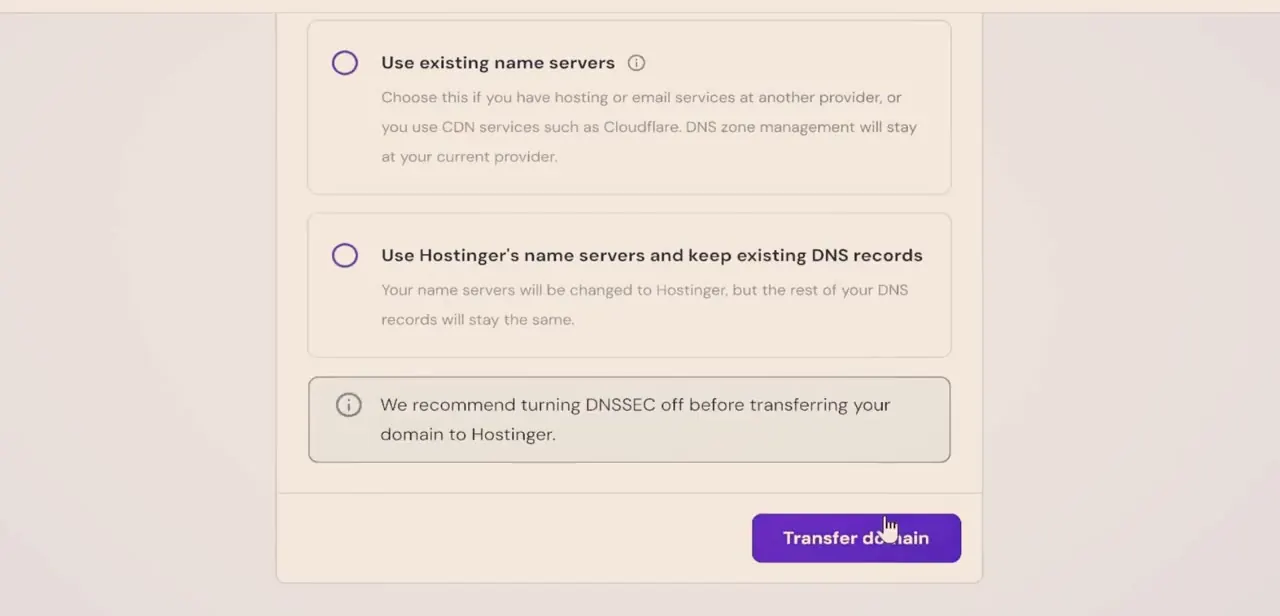
Hostinger presents two options: "Use existing name servers," which leaves DNS zone management wherever it currently lives, the choice if you have hosting or email at another provider or you use a CDN like Cloudflare, or "Use Hostinger's name servers and keep existing DNS records," which switches your name servers to Hostinger while copying your current DNS records over. Hostinger also recommends turning DNSSEC off before transferring, since an active DNSSEC configuration can cause the transfer to fail or your domain to briefly stop resolving.
If your site and email are staying exactly where they are and you're only moving domain registration, pick existing name servers since nothing about your live DNS changes. If you're consolidating everything at Hostinger, switch to its name servers and check the copied records look right afterward. A missed record here is the most common cause of email or site downtime after a transfer.
05Confirm the transfer, and remember it doesn't move your website
Click Transfer domain to submit. Squarespace's own documentation puts the whole process at up to 15 days: transfers through a Tucows-registered domain can be confirmed by email link to speed things along, or the transfer starts automatically after 5 business days if nobody responds.
Add extra time for DNS propagation if you switched name servers. The detail that catches people out: transferring the domain registration does not touch your Squarespace website or its hosting. If you're leaving Squarespace hosting too, you need to separately cancel or downgrade that site subscription, or you'll keep paying for it after the domain has already moved.
When it doesn't work
The transfer option is missing or grayed out in Squarespace
Why: The domain is inside the 60-day window since registration or its last transfer, or the 45-day window since its last renewal.
Fix: Check the exact registration, transfer, and renewal dates on the Domains panel and wait until both windows have closed.
The authorization code email never arrives
Why: It can take up to 24 hours, and it's easy to miss since it comes from no-reply@squarespace.com instead of a person.
Fix: Check spam, wait the full 24 hours, and request the code again from the domain's settings if it still hasn't shown up.
Site or email stopped working after switching name servers
Why: A DNS record didn't copy over correctly during the switch, or DNSSEC was still enabled at the time of transfer.
Fix: Compare the DNS records now showing at Hostinger against what you had before, and confirm DNSSEC was turned off prior to transferring.
Still being billed by Squarespace after the domain moved
Why: Moving the domain doesn't cancel or move the Squarespace website subscription. The two are billed separately.
Fix: Cancel or downgrade the Squarespace site plan directly if you're not keeping the site hosted there.
Frequently asked questions
Why transfer a domain from Squarespace to Hostinger?
Common reasons are lower renewal costs, hosting performance, and more direct control over DNS than Squarespace offers by default.
What is an EPP code and why do I need it?
It's an authorization code that proves you own the domain and lets the new registrar accept the transfer. Squarespace emails it once you request it from the domain's settings, usually within 24 hours.
Do I have to pay to transfer a domain to Hostinger?
Yes. Hostinger's transfer flow has you pay before it asks for the EPP code, and the payment typically extends the domain's registration by a year, the standard practice across registrars.
Why won't Squarespace let me transfer my domain yet?
Squarespace blocks transfers within 60 days of registration or a previous transfer, and within 45 days of the domain's last renewal. Check those dates on the Domains panel before troubleshooting anything else.
Will my website go down during the transfer?
Not if you choose "Use existing name servers" during the Hostinger transfer, which leaves your current DNS setup untouched. Separately, the domain transfer never moves your Squarespace website itself; that stays on its own subscription.
How long does a domain transfer usually take?
Up to 15 days by Squarespace's own estimate. Confirming by the email link speeds it up; without a response, the transfer starts automatically after 5 business days. Add time for DNS propagation if you switched name servers.
Sources and last check
Click path and screens come from a recorded walkthrough; the name-server choice screen matched Hostinger's current wording exactly on inspection. Re-checked against Squarespace's and Hostinger's official documentation in September 2026, which added specifics the earlier version lacked: the 60-day and 45-day eligibility windows, the 24-hour auth-code email timing, the payment step before EPP-code entry, the 15-day/5-business-day transfer timeline, and the fact that a domain transfer never moves the Squarespace website itself.
About the author

Impran M N
I've been hooked on technology for as long as I can remember — especially the new tools and AI apps that seem to land every other week. Easy Tech Tuts is where I write up whatever I've just worked out: I do the task in the real product, record the screen, and turn it into the guide I wish I'd found first.