Easy Tech Tuts
How to Set Up Subscriptions on Squarespace 2026
By Impran M NLast checked against official docs
Recurring revenue changes the math on a small store. Instead of chasing one-off sales, you get predictable income from customers who have already committed.
Squarespace builds subscriptions into its commerce tools, so a membership box or a subscribe-and-save version of a physical product doesn't need a third-party app. The setup lives inside the product editor, filed under Payment Options, not in a separate menu you'd find by browsing the site sidebar.
It also only works on certain product types and certain plans, both of which are easy to miss until checkout fails. This guide covers where the setting is, what it needs to work, and the one product type it flatly won't sell as a subscription.
Before you start
- A Squarespace plan that supports subscriptions: Basic, Core, Plus, Advanced or Commerce Advanced for physical and service products; those plans plus Business and Commerce Basic for the separate digital-product subscription feature
- Squarespace Payments or Stripe connected as the site's payment processor
- Customer accounts enabled on the site
01Open the product you want to sell as a subscription
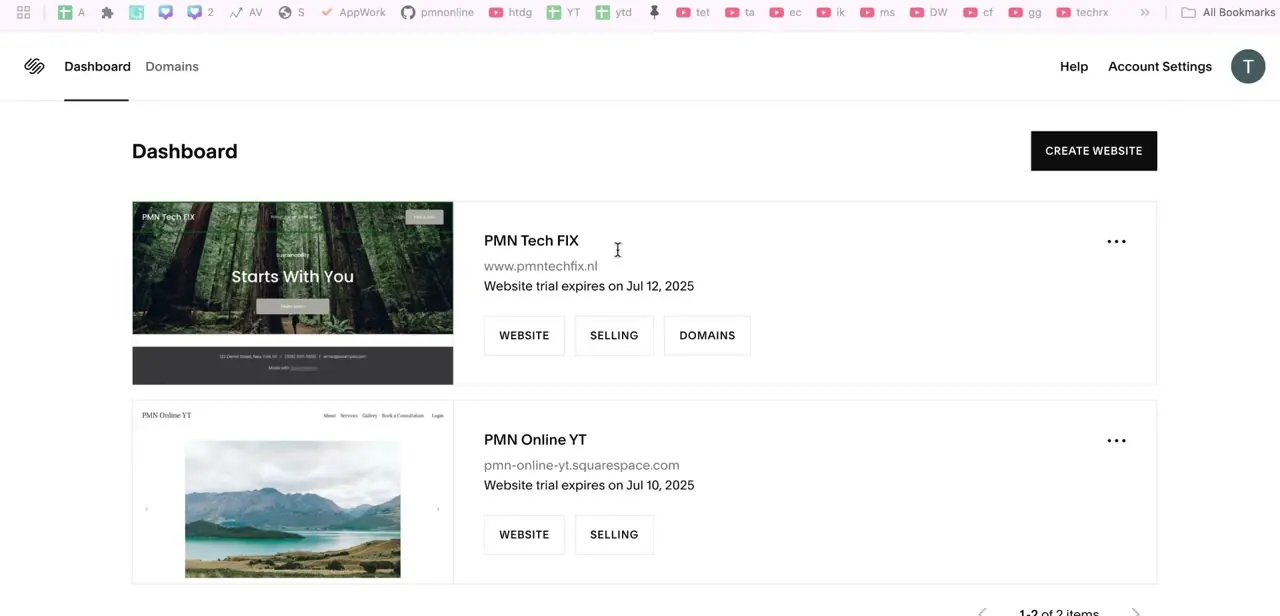
Log in and pick the site from the Dashboard tab, which lists every site tied to your account with its domain and plan status. Subscriptions are configured per site and per product, so double-check you've opened the right project if you manage more than one.
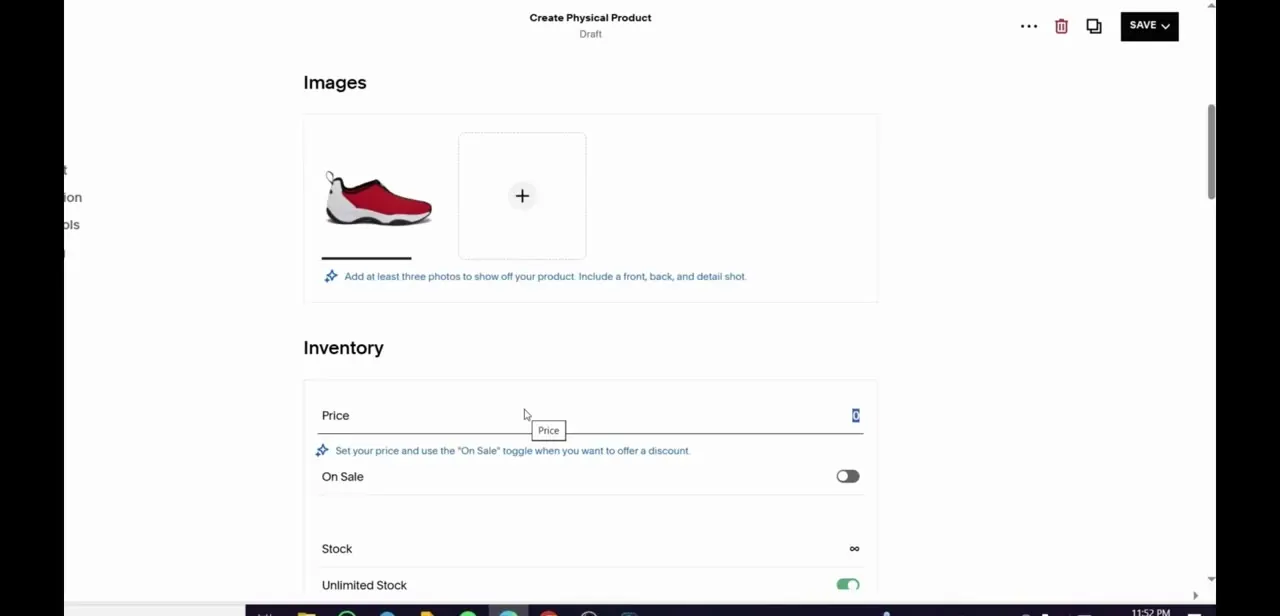
From the Pages panel, open the store page and create or edit the product. You'll land on the standard product editor: an Images panel, and an Inventory section with price and stock. Fill these in the same way you would for a one-time item.
02Turn on Subscription Options
In the product editor, open Payment Options and click Subscription Options. This is where Squarespace draws a hard line: subscriptions work for physical and service products, not for standard downloadable digital products.
If the product you opened is a Digital Download, this section won't turn it into a subscription; digital subscriptions run through a separate feature available only on Basic Commerce, Commerce Advanced, Business or Commerce Basic plans. Once enabled, choose the purchase type: "One-time purchase and subscription" lets a customer pick either at checkout, while "Subscription only" removes the one-time option entirely. Pick subscription-only for something that only exists as a recurring offer, like a membership; pick the combined option for a physical product some customers will want just once.
03Set the frequency and billing cycle
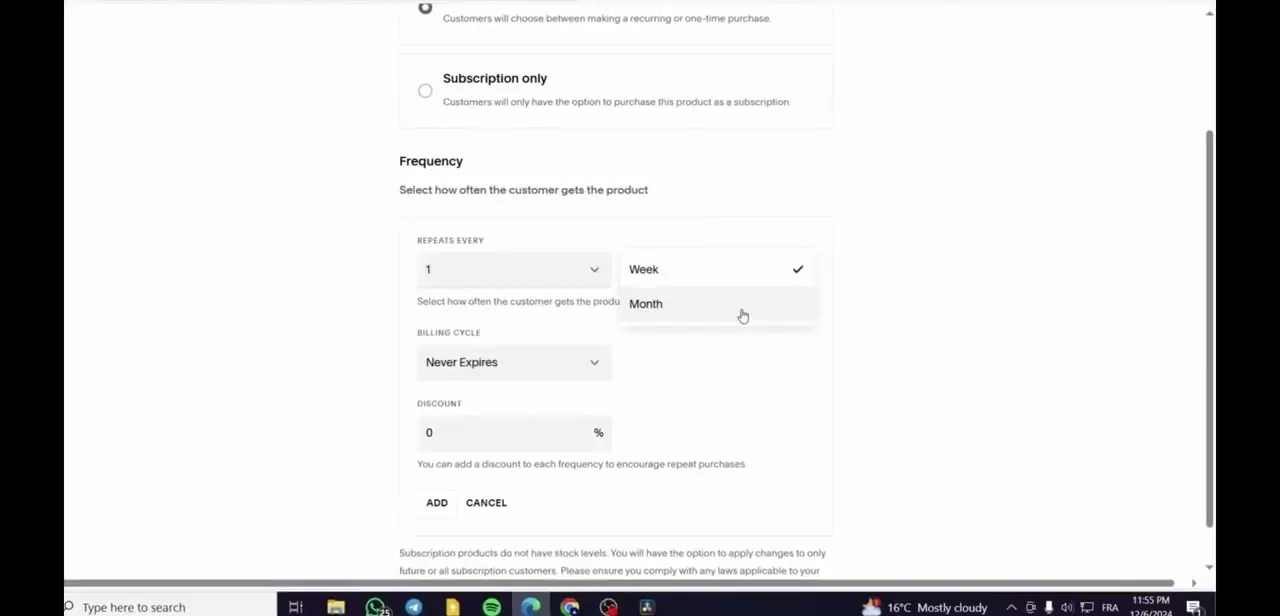
With subscriptions enabled, a Frequency section lets you set how often the order repeats, from weekly up to a 12-month interval. Billing Cycle then controls how long it runs: choose Never Expires for an ongoing plan, or Expires After to cap it at a set number of payments, counting the initial purchase as the first one.
A monthly subscription set to expire after three payments bills the customer three times total, then stops automatically. Match the interval to how the product gets used: weekly for something consumable, monthly for a membership. Click Add once the frequency and cycle are set.
04Add a subscription discount
For a product offering both purchase types, the same screen lets you apply a discount to the subscription option, either to the first payment only or to every renewal. A 100% discount on the first payment only is how Squarespace supports a free-trial-style offer, since the customer still enters payment details but isn't charged until the second cycle.
A modest ongoing discount, five or ten percent, is usually enough to make committing worthwhile without eating into margin on every unit. Click Apply, then Save, to lock in the settings.
05Confirm your payment setup, then test
Recurring orders only work if the store can charge a saved payment method automatically. Squarespace requires Squarespace Payments or Stripe for this, and customer accounts need to be turned on so returning subscribers have somewhere to manage their plan.
Check both at the account level before launch, not just on the individual product. Squarespace won't let a site place a genuine subscription test order until it's on a paid plan, so on a trial site you can review the checkout screen but not complete a real cycle. Note that gift cards can't be redeemed against a subscription order, so don't promise that option to customers.
06Manage subscribers and renewals going forward
Once real subscribers sign up, the orders and customers tools show who's active, when the next renewal is due, and any failed payments. A customer can only hold one subscription product at a time, so repeat sign-ups to the same product replace rather than stack.
Check renewals regularly in the first few weeks after launch. A declined card is far easier to catch and fix early than a lapsed subscriber is to win back later.
When it doesn't work
Subscription Options doesn't appear on a product
Why: The product is a standard Digital Download. Squarespace's subscription feature works on physical and service products; downloadable digital products are excluded from it.
Fix: Sell the item as a physical or service product if it can be shipped or delivered as a service, or check whether the account qualifies for Squarespace's separate digital-product subscription feature.
Can't place a full test order to see the subscription checkout
Why: Squarespace blocks complete subscription test orders on trial sites.
Fix: Upgrade to a paid plan before launch, or review the checkout screens without completing the order.
A customer wants to use a gift card on a subscription order
Why: Gift cards aren't accepted as payment for subscription products.
Fix: Offer the subscriber discount or a one-time promo code instead.
Frequently asked questions
Where do I turn on subscriptions in Squarespace, is there a dedicated menu?
No separate subscriptions menu exists. Open the product editor for a specific product, go to Payment Options, and click Subscription Options.
Can I sell a digital download as a subscription?
Not through this feature. Squarespace's subscription options apply to physical and service products. Standard downloadable digital products aren't eligible; a separate digital-product subscription feature exists on qualifying plans.
Which Squarespace plan do I need?
Basic, Core, Plus, Advanced or Commerce Advanced for physical and service subscriptions. Digital-product subscriptions are also available on Business and Commerce Basic.
Can I offer both one-time and subscription purchases for the same product?
Yes. Choose "One-time purchase and subscription" instead of "Subscription only," and the customer picks at checkout.
Can a customer pay for a subscription with a gift card?
No. Gift cards can't be applied to subscription orders.
Why can't I complete a test subscription order?
Squarespace only allows full subscription checkouts once the site is on a paid plan. On a trial, you can view the checkout flow but not finish an order.
Sources and last check
Click path and screens come from a recorded walkthrough. Plan requirements, the digital-download exclusion, payment processor requirement, billing cycle options and the gift card restriction were checked against Squarespace's official help article in September 2026, which corrected this guide's earlier suggestion that a subscription could work for a recurring digital drop.
About the author

Impran M N
I've been hooked on technology for as long as I can remember — especially the new tools and AI apps that seem to land every other week. Easy Tech Tuts is where I write up whatever I've just worked out: I do the task in the real product, record the screen, and turn it into the guide I wish I'd found first.