Easy Tech Tuts
How to Transfer Domain From Squarespace to Cloudflare Easily 2026
By Impran M NLast checked against official docs
Transferring a domain from Squarespace to Cloudflare can lower your registration cost and simplify management if you already use Cloudflare for DNS or CDN, since registration and DNS end up in the same dashboard. The move isn't instant, and it isn't just a matter of pasting a code into Cloudflare.
Squarespace won't issue that code until you unlock the domain, Cloudflare won't start the transfer until your DNS is active there, and your domain has to clear a few eligibility rules first. This guide walks through all of that in order, from the domain's current state in Squarespace to where the registration transfer starts on the Cloudflare side.
Before you start
- DNSSEC turned off at Squarespace at least 24 hours before you start — Cloudflare's own transfer guide requires it disabled first
- A Cloudflare account with a verified email and a valid payment method on file
- The domain registered at least 60 days ago, with no transfer or registrant-detail change (name, organization, or email) in the last 60 days
01Check your domain's status in Squarespace first
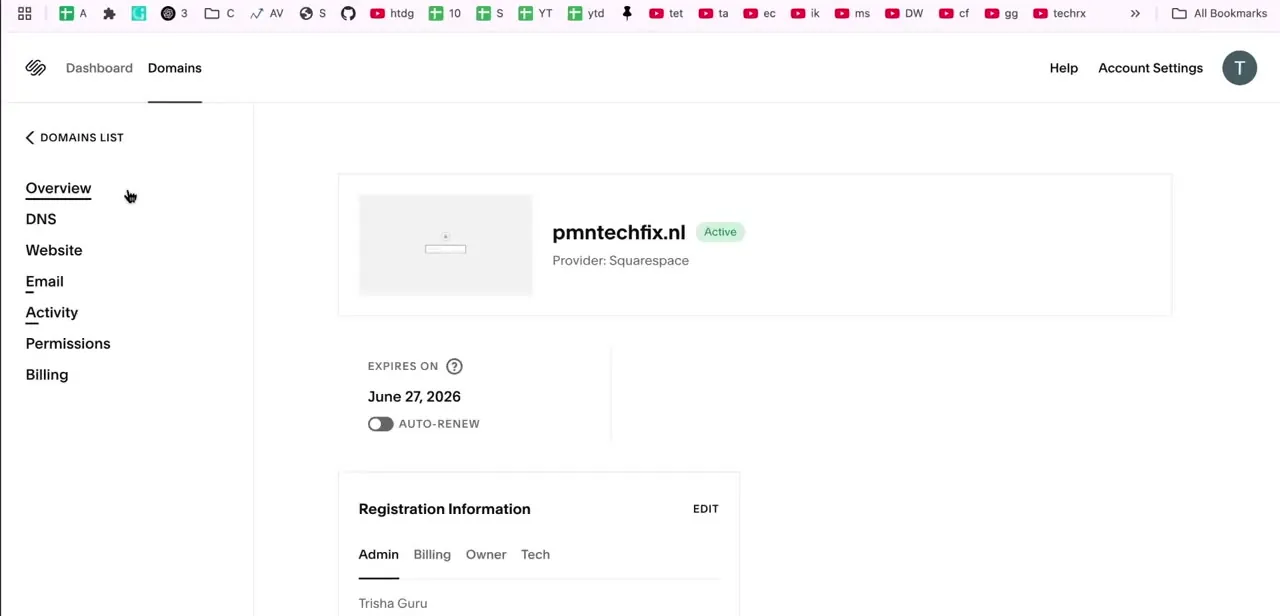
Before starting anything in Cloudflare, go to Squarespace's Domains section and open the domain's Overview. This shows the domain's current status as Active, its provider (Squarespace), and its expiration date; note the date, since a domain very close to expiring can complicate a transfer. The Registration Information panel here also lists the Admin, Billing, Owner, and Tech contacts, worth reviewing since transfer emails go to whichever contact is on file.
02Unlock the domain before requesting a code
Squarespace locks every domain by default to stop unauthorized transfers, and it won't issue an authorization code while that lock is on. In the domain's settings, find the Domain Lock control and toggle it off. This is a separate action from requesting the code itself, and skipping it is the most common reason the next step fails.
03Get your domain authorization code from Squarespace
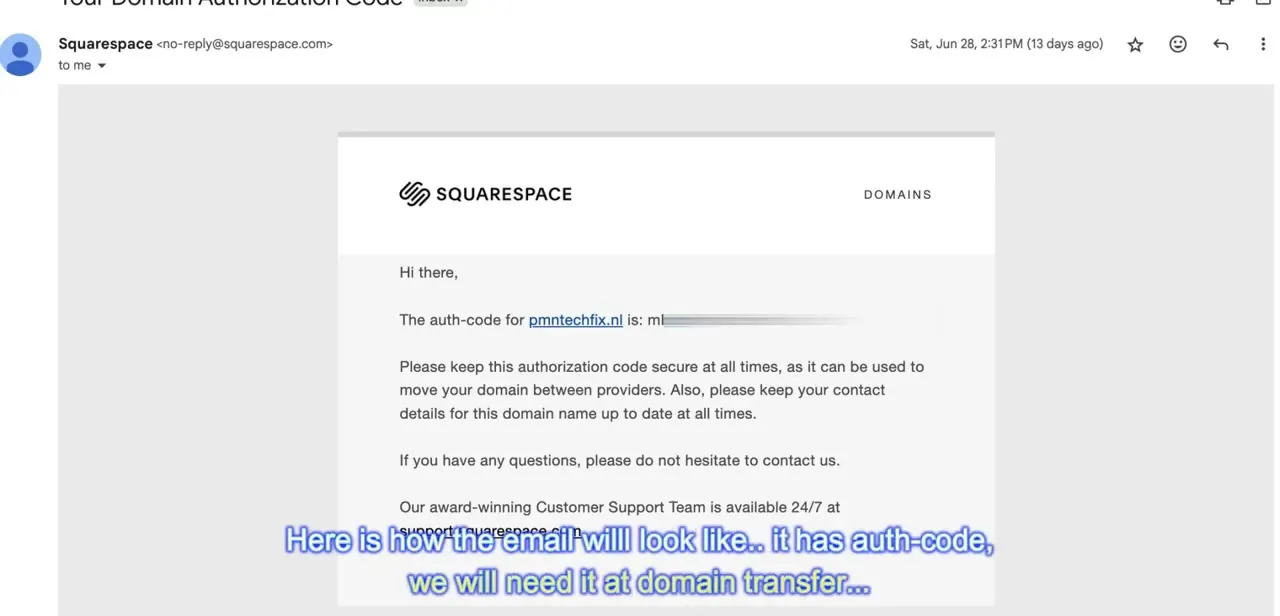
With the domain unlocked, click Request transfer code. You may need to confirm your password or complete two-factor authentication.
Squarespace's own documentation says the code should arrive by email within 24 hours, in a message titled something like "Auth code for yourdomain.com," sent to whichever contact is registered as the domain's owner. Copy the code exactly; you'll paste it into Cloudflare later, so keep the email accessible instead of requesting a fresh code each time.
04Confirm your domain meets transfer eligibility
Cloudflare's transfer requirements match the general ICANN rule: the domain needs to be registered at least 60 days ago, not transferred in the last 60 days, and not have a changed registrant name, organization, or email in that same window. There's no way around any of this if your domain is too new or was recently updated. Domain privacy protection does not need to be disabled for a Squarespace-to-Cloudflare transfer, though Squarespace notes that some older registrar systems on the receiving end may still ask for it.
05Turn off DNSSEC, then set up Cloudflare DNS for the domain
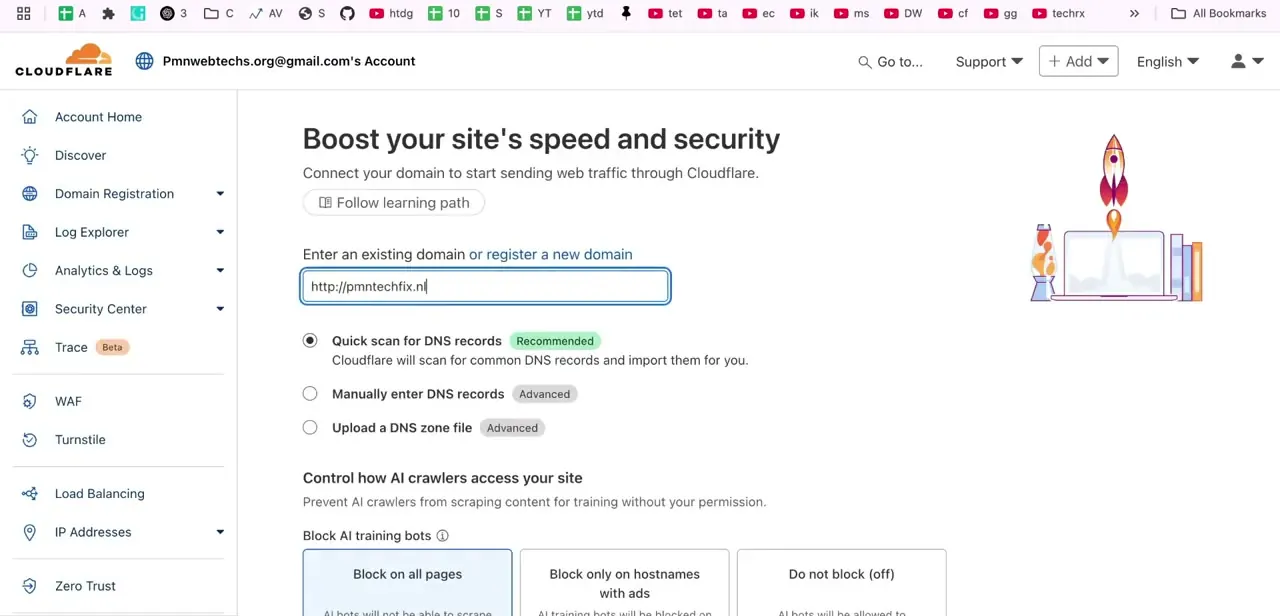
Cloudflare's own transfer guide asks you to disable DNSSEC at your current registrar first and wait 24 hours before adding the domain. After that wait, add the domain in Cloudflare and let the Quick scan option detect and import your existing DNS records, so nothing breaks once the domain points at Cloudflare's nameservers.
Cloudflare then assigns you a pair of nameservers; update those at Squarespace, and wait for the domain's status in the Cloudflare dashboard to change from Pending to Active, which usually takes minutes but can run up to 24 hours. You can't start the registration transfer until it shows Active.
06Start the registration transfer in Cloudflare
Once the domain shows Active, go to the Transfer domains page in the Cloudflare dashboard, select the domain, and enter the authorization code from the Squarespace email. Confirm your payment method, enter the contact information for the new registration, and select Confirm transfer. If the domain doesn't appear as an option here, it usually means its DNS status hasn't reached Active yet, not that anything is wrong with the code.
07Approve the transfer and wait it out
Squarespace typically sends a confirmation email asking you to approve or decline the outgoing transfer; approving it, or simply not declining within the response window, lets the transfer proceed. Cloudflare's own timeline puts the active work at about 30 minutes but the total process at up to 10 days depending on your previous registrar, while Squarespace's page allows for the full handoff to run up to 15 days in some cases. Check back rather than repeating the request.
When it doesn't work
Squarespace won't issue an authorization code
Why: The domain is still locked. Squarespace requires Domain Lock switched off before Request transfer code produces a usable code.
Fix: Open the domain's settings in Squarespace, toggle Domain Lock off, then request the code again.
Cloudflare's Transfer domains page won't accept the domain
Why: The domain's DNS in Cloudflare is still Pending, not Active, which happens until the nameservers are updated at Squarespace and finish propagating.
Fix: Check the domain's status on the Cloudflare dashboard overview and wait for it to read Active before starting the registration transfer.
The transfer stalls or gets rejected without a clear reason
Why: DNSSEC was still enabled at Squarespace when the transfer was requested. Cloudflare's own guide says to disable it and wait 24 hours first.
Fix: Turn off DNSSEC at Squarespace, wait a full day, then re-initiate the transfer.
Frequently asked questions
Why transfer a domain from Squarespace to Cloudflare?
Cloudflare registers and renews domains at cost, and consolidating registration with DNS and CDN management in one dashboard simplifies day-to-day changes.
Do I need to unlock the domain before I can transfer it?
Yes. Squarespace locks domains by default, and Request transfer code won't produce a usable code until you switch Domain Lock off in the domain's settings.
Are there requirements before I can transfer my domain?
The domain needs to be at least 60 days old, not transferred in the last 60 days, and not have a changed registrant name, organization, or email in that window. Privacy protection doesn't need to be off, though some older systems on the receiving end may still ask for it.
Where do I get the authorization code Cloudflare asks for?
Squarespace emails it once you unlock the domain and click Request transfer code, usually within 24 hours, in a message addressed to the domain's owner contact.
Do I need to touch DNSSEC?
Yes, if it's enabled. Cloudflare's transfer guide has you disable DNSSEC at Squarespace and wait 24 hours before adding the domain, or the transfer can stall.
How long does the transfer take?
Cloudflare puts the hands-on work at about 30 minutes but the full process at up to 10 days depending on your previous registrar. Squarespace's own page allows for the complete handoff to take up to 15 days in some cases, so don't expect the domain to move instantly.
Sources and last check
Screens and the on-screen flow come from a walkthrough recorded in 2026. The Domain Lock requirement, the DNSSEC prerequisite, the eligibility rules, the correct Cloudflare menu name (Transfer domains), and the timing ranges were re-checked in September 2026 against Squarespace's own domain-transfer help page and Cloudflare's own Registrar documentation. The unlock and DNSSEC steps weren't in the previous version of this guide, and the privacy-protection claim was softened to match what Squarespace's page actually says.
About the author

Impran M N
I've been hooked on technology for as long as I can remember — especially the new tools and AI apps that seem to land every other week. Easy Tech Tuts is where I write up whatever I've just worked out: I do the task in the real product, record the screen, and turn it into the guide I wish I'd found first.