Easy Tech Tuts
How to Fix Squarespace Domain Forwarding Not Working 2026 Easily
By Impran M NLast checked against official docs
Domain forwarding in Squarespace isn't instant. It can take anywhere from a few minutes to 48 hours to fully propagate, especially with SSL enabled, and in the meantime your domain can throw a browser error that looks more alarming than it is. If your redirect still isn't working after a while, this guide walks through what a correctly configured forwarding rule looks like, what the failure looks like in the browser, and the DNS records and destination restrictions worth checking before you assume something is wrong.
Before you start
- A domain that's registered through Squarespace or connected using nameserver connect — third-party domains using DNS Connect follow that provider's own instructions instead
- A destination that isn't Big Cartel, SiteGround, SmugMug, Systeme.io, or Zoho, since Squarespace forwarding doesn't support pointing at those hosts
01Confirm the forwarding rule itself is set up correctly
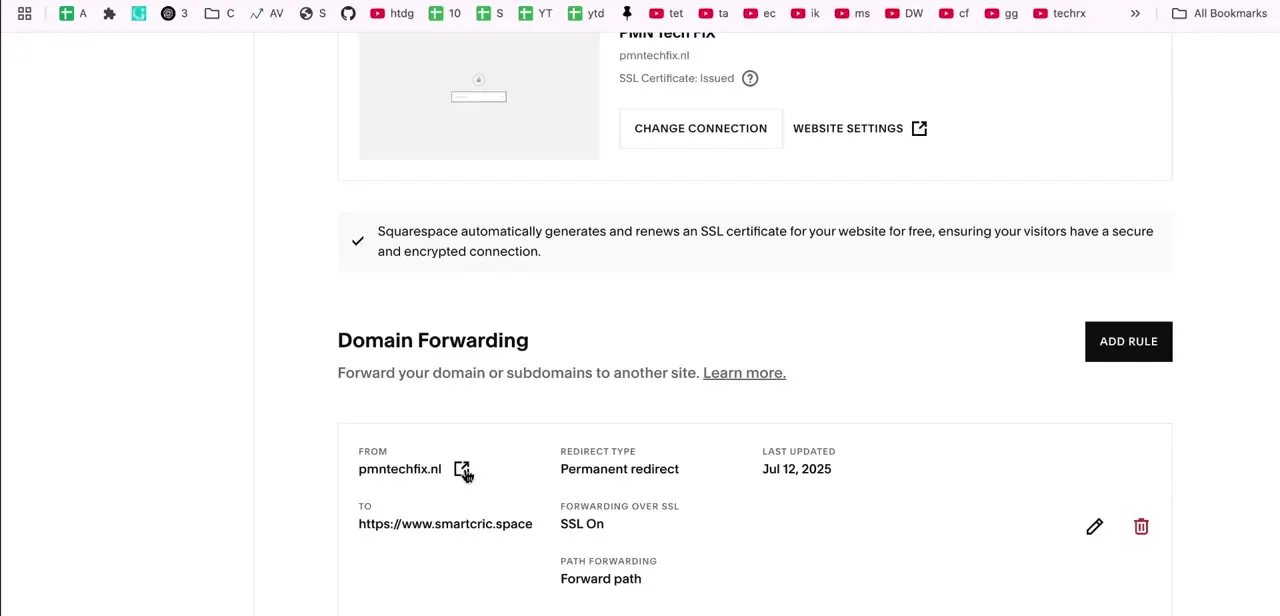
In your domain's forwarding settings (the Domains panel at account.squarespace.com/domains, then Website, then Domain Forwarding Rules), check the existing rule against what you intended: the From field is your domain, the To field is the exact destination URL, Redirect Type shows Permanent Redirect (301) as the standard choice, and the SSL toggle under Advanced options is on. A Last Updated timestamp shows when the rule was last saved; if it's older than you expect, your most recent edit may not have gone through.
02Recognize what a still-propagating redirect looks like
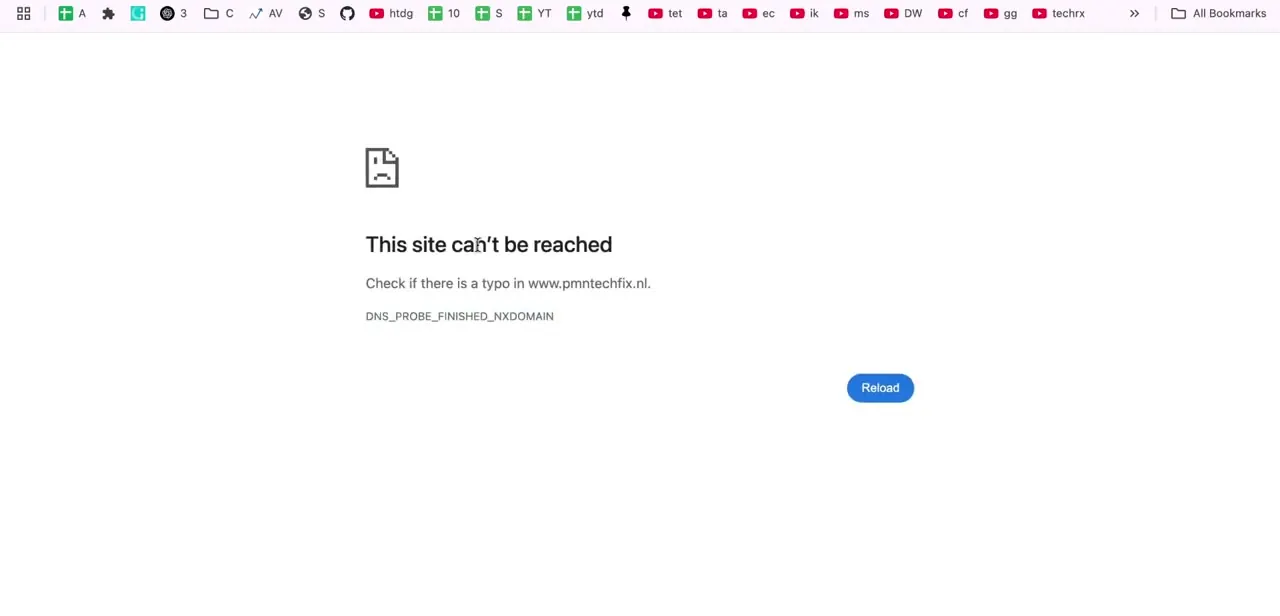
Visiting the domain before forwarding has finished propagating typically shows a browser error like "This site can't be reached" with a DNS_PROBE_FINISHED_NXDOMAIN message, not a broken-looking Squarespace page. That specific error means the browser couldn't resolve the domain to any address yet.
It's a DNS propagation symptom, not evidence the forwarding rule is misconfigured. Seeing this right after saving a new rule is expected, not alarming.
03Give it time before troubleshooting further
Squarespace states that domain forwarding can take up to 48 hours to fully propagate, and that domain updates in general can run to 72 hours in rare cases. Most forwarding rules resolve within one to two hours in practice.
If it's only been thirty minutes since you saved the rule, the NXDOMAIN error from the previous step is most likely DNS still catching up. Wait before assuming something needs fixing.
04Clear your browser cache or test elsewhere
If it's been over an hour and the redirect still isn't working, your browser may be holding onto old DNS or page data. Open the domain in an incognito or private window, or clear your browser's cache and reload.
If it still fails, try the domain on a different network; your phone on cellular data works well for this. If it works there but not on your usual connection, the issue is local DNS caching on your network, not your Squarespace setup.
05Check DNS Settings for leftover records
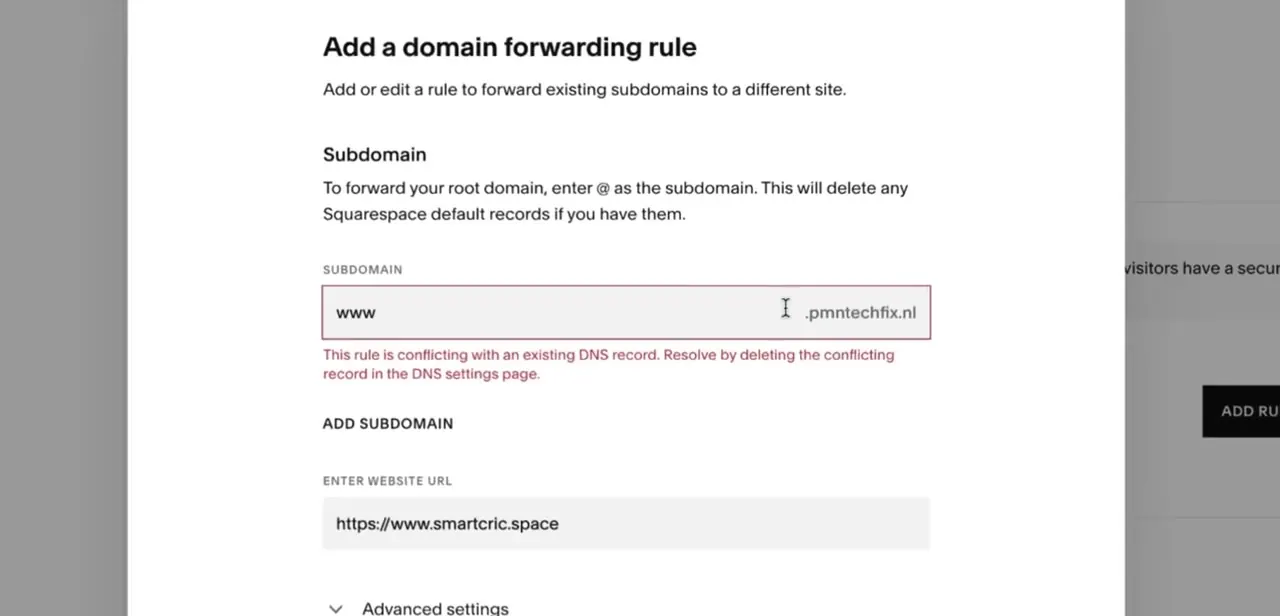
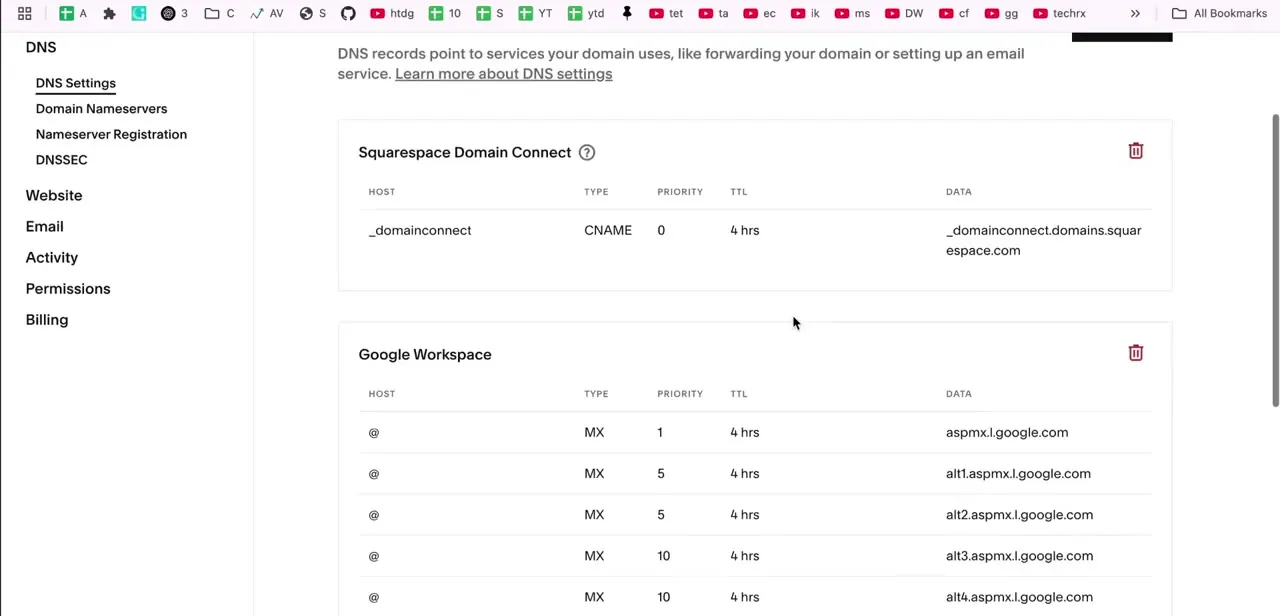
Open the domain in the Domains panel and click DNS, then DNS Settings, to see every record grouped by the service that created it: a Squarespace Domain Connect CNAME record, MX records for an email provider like Google Workspace, and so on. Squarespace's own troubleshooting docs confirm that a conflicting third-party A, AAAA, ALIAS, or CNAME record on the same subdomain you're forwarding, like www, blocks the forwarding rule from working. Delete only the conflicting record and leave unrelated records, like MX entries, alone.
06Remove and re-add the rule as a last resort
If you've waited a reasonable amount of time, cleared your cache, and confirmed there's no conflicting DNS record, delete the forwarding rule, save, wait a minute, and re-add it from scratch with the same From, To, and SSL settings. This resets the underlying configuration and resolves the rare cases where a rule looks correctly saved in the interface but isn't being applied.
When it doesn't work
The forwarding rule won't save, or an error blocks it
Why: Squarespace detected a conflicting third-party A, AAAA, ALIAS, or CNAME record using the same subdomain or root domain as the rule you're trying to create.
Fix: Open DNS Settings, find the record using that subdomain, delete it, and save the forwarding rule again.
The SSL toggle looks off after you reopen a saved rule
Why: Squarespace's own help documentation confirms the SSL toggle hides from view once a rule is saved, even though it stays switched on behind the scenes.
Fix: Don't assume it needs re-enabling. Check the live redirect over https:// first, and only toggle SSL back on if that genuinely fails.
The rule saves but never redirects to the destination
Why: Squarespace blocks forwarding rules that point at a small set of third-party hosts, including Big Cartel, SiteGround, SmugMug, Systeme.io, and Zoho.
Fix: Use that provider's own domain-connection method, such as their nameservers or DNS records, instead of Squarespace's forwarding feature.
Frequently asked questions
How long should I wait before troubleshooting forwarding?
At least an hour or two. Squarespace says forwarding can take up to 48 hours to propagate, and domain updates generally can run to 72 hours in rare cases, though most rules resolve within one to two hours.
Why does clearing my cache help?
Your browser may still be showing a cached DNS lookup or an old version of the page. An incognito window or a cache clear forces it to look the address up again.
What does the DNS_PROBE_FINISHED_NXDOMAIN error mean?
It means the browser couldn't resolve your domain to any address at that moment. That's usually a sign DNS for the new forwarding rule hasn't finished propagating, not that the rule itself is broken.
What if a leftover DNS record is causing the issue?
Squarespace's own troubleshooting docs confirm a conflicting A, AAAA, ALIAS, or CNAME record on the forwarded subdomain blocks the redirect. Remove it in DNS Settings, being careful not to touch records for unrelated services like email.
Can I forward my domain to any website?
Almost any URL, but not every host. Squarespace's forwarding doesn't work when the destination is Big Cartel, SiteGround, SmugMug, Systeme.io, or Zoho; use that provider's own domain-pointing method for those.
Does removing and re-adding the rule help?
It can. It resets the underlying configuration and resolves the rare cases where a rule looks correctly saved but isn't being applied.
Sources and last check
Click path, screens, and the NXDOMAIN error come from a walkthrough recorded in 2026. Propagation timing, the SSL toggle's saved-but-hidden behaviour, the exact conflicting-record types (A, AAAA, ALIAS, CNAME), and the list of hosts forwarding can't point to were re-checked against Squarespace's own Help Center articles on domain forwarding and domain propagation in September 2026. The destination-host restriction and the full conflicting-record list weren't in the previous version of this guide.
About the author

Impran M N
I've been hooked on technology for as long as I can remember — especially the new tools and AI apps that seem to land every other week. Easy Tech Tuts is where I write up whatever I've just worked out: I do the task in the real product, record the screen, and turn it into the guide I wish I'd found first.