 Easy Tech Tuts
Vitals Shopify App Tutorial For Beginners, Vitals App Shopify Full Demo Guide, Pricing, Reviews 2026
By Impran M NLast checked against official docs
The Vitals app bundles dozens of conversion and marketing tools into a single Shopify app, which can save you from installing and paying for separate plugins one by one. Instead of managing ten different apps for reviews, bundles, and upsells, everything lives inside one dashboard reachable straight from your Shopify admin. This guide walks a beginner through what that dashboard actually looks like, how to turn on individual tools like Product Reviews, and what the app actually costs once the trial ends.
01Find Vitals in your Shopify admin
Once installed, Vitals appears as its own entry under Apps in the left-hand Shopify admin menu, alongside your usual Home, Orders, Products, and Marketing links. Opening it drops you into the "More tools for your store" section, organized into labeled groups (Trust, Upsells, UX, Conversion, and more), each showing three featured tools with a "View more" link to see the rest of that category.
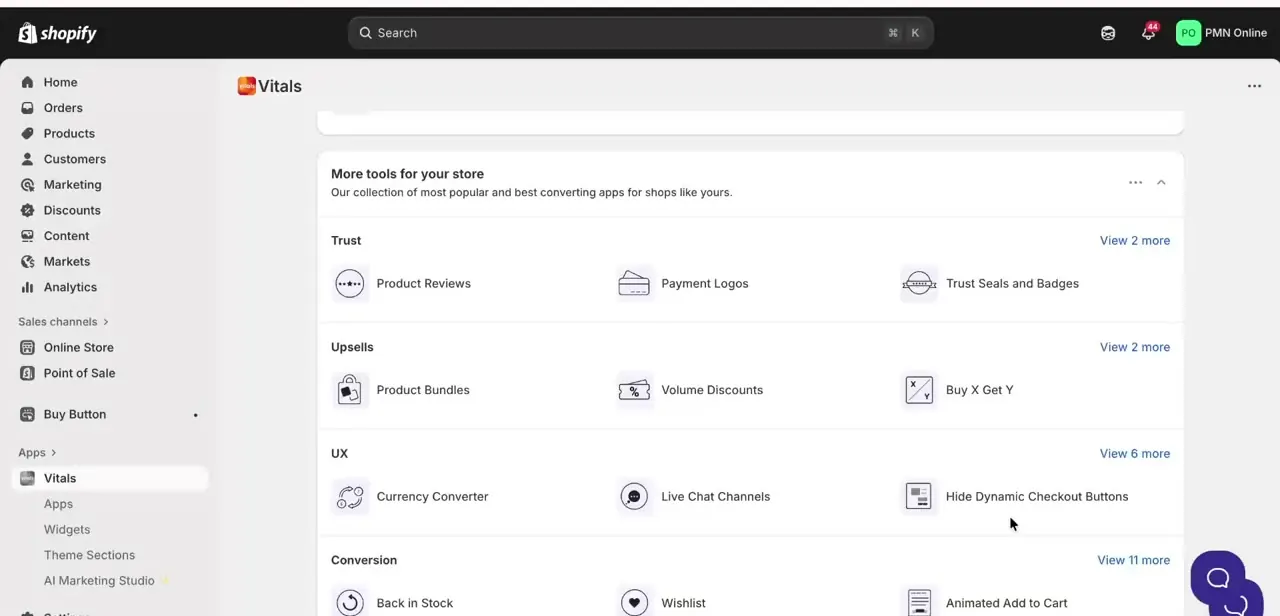
02Scroll through the full tool catalog
Scrolling down reveals more categories, including Conversion tools like Back in Stock, Wishlist, and Animated Add to Cart, plus a Frequently Bought Together module that's already generating a sample bundle recommendation from your store's own products. This is what makes Vitals useful for a beginner: instead of researching and installing a separate app for each of these features, you scan one organized list and switch on only what your store actually needs.
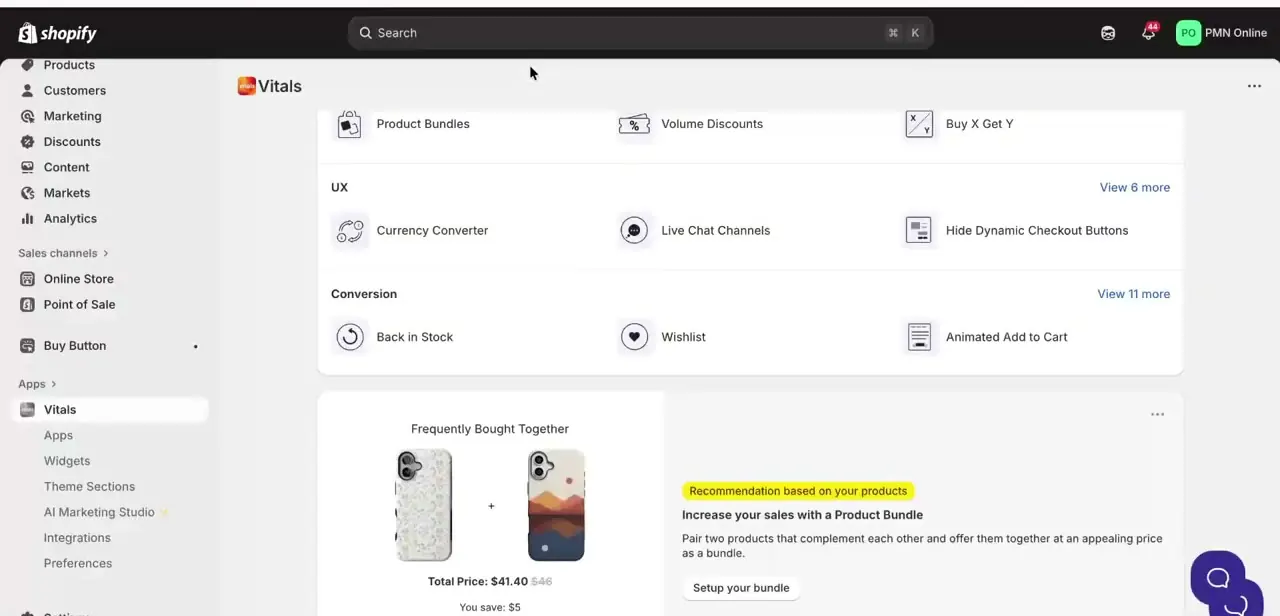
03Open a tool and activate it
Clicking into a specific tool, like Product Reviews, brings up a dedicated screen describing what it does: collecting, importing, and displaying reviews with photos to build trust and conversions. Underneath the description sits a checklist of what's included, covering reviews shown in a grid or list on product pages, automated review-request emails, importing reviews from other apps or CSV files, and featuring select reviews on your homepage. Nothing is live at this point; you still need to press Activate App to turn it on for your store.
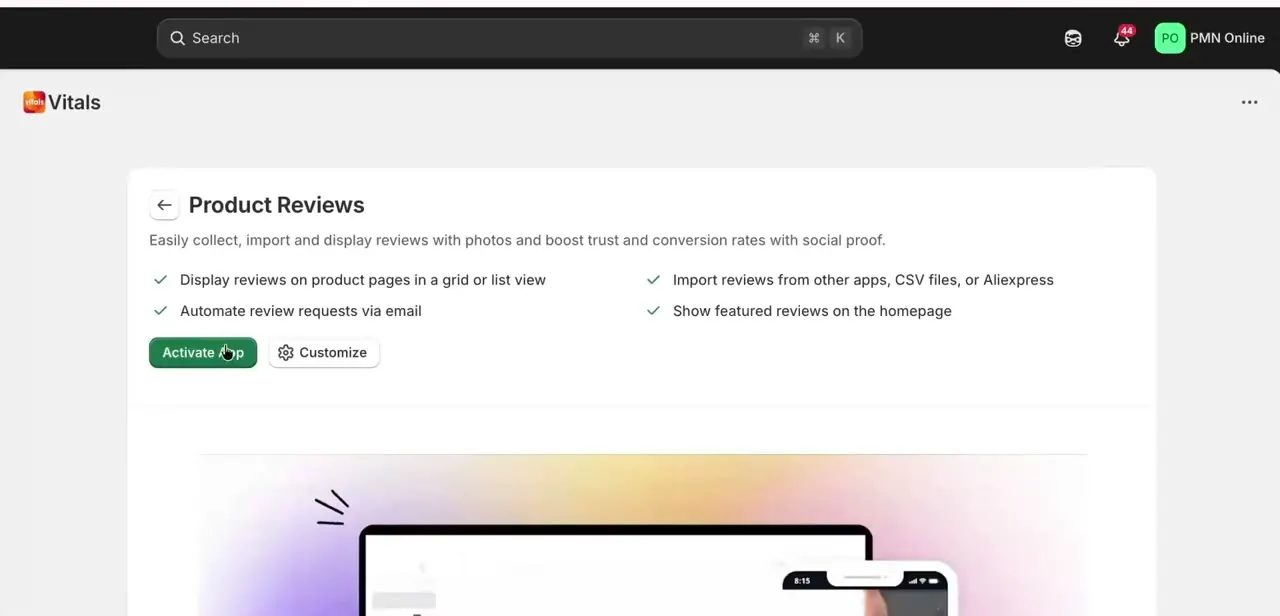
04Configure the tool's settings
Once a tool is active, it gets its own set of tabs (Dashboard, Reviews, Moderation, Featured, Import, Request Reviews, Groups, Settings, and Analytics, for Product Reviews specifically). Inside Settings, a left-hand list breaks widgets down further, like Reviews Widget, Star Ratings, Reviews Carousel, and Happy Customers Page, each with its own configuration panel. For Star Ratings, you can toggle whether stars display under the product name, set the star size in pixels, choose left, center, or right alignment separately for desktop and mobile, and edit the exact display format using variables like {{ stars }} and {{ averageRating }}.
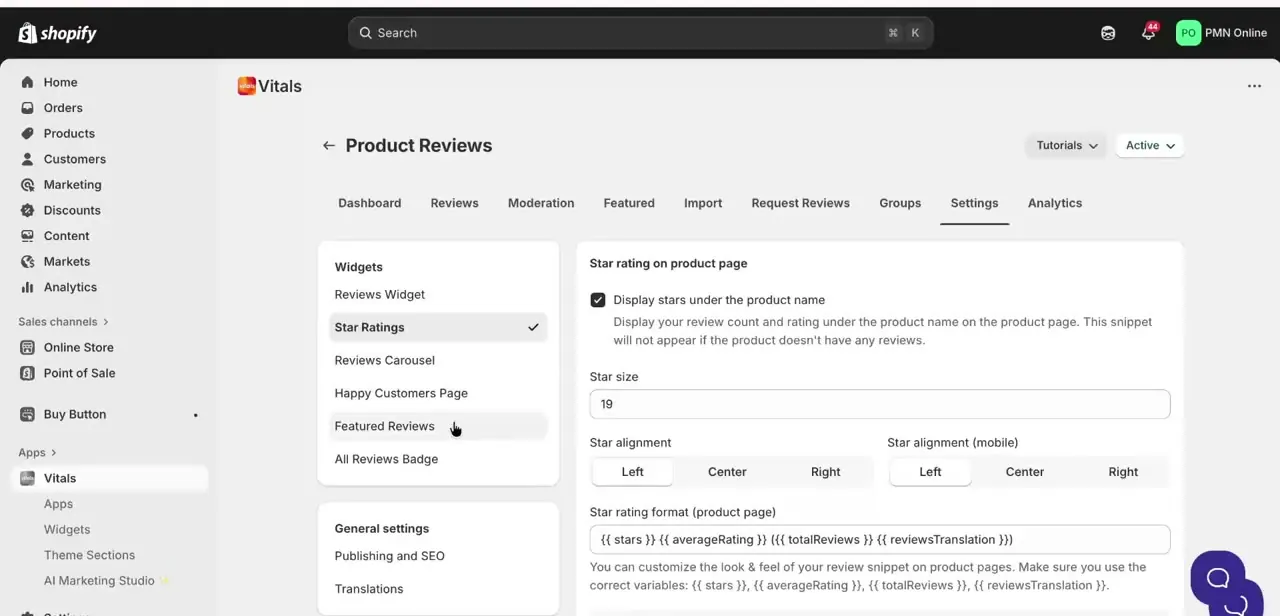
05Turn on only what your store needs
With 40-plus tools available, the temptation is to activate everything at once, but that defeats the purpose of an all-in-one app. Start with two or three tools that map directly to a problem you already have: reviews if you lack social proof, Back in Stock if you're losing sales on out-of-stock items, or a bundle tool if your average order value is lower than you'd like. Each active tool adds page weight, so switching everything on indiscriminately can still slow your storefront down, even coming from one app instead of many.
06Understand what the trial actually costs afterward
Vitals runs a single plan rather than a tier ladder: everything is $29.99 a month, listed on Shopify's official app page alongside a 7-day free trial. The base price includes access to all 40+ tools plus set volumes of the metered features (email contacts, review-request emails, visitor recording page views, and so on).
If your store's usage on any one of those metrics goes past its included volume, Vitals charges for the overage on that metric specifically, not across the whole plan. There's no long-term contract, and Vitals states it won't charge anything after the trial without notifying you first.
| Feature | Included before extra charges |
|---|---|
| Access to tools | All 40+ Vitals tools |
| Email marketing | 500 contacts |
| Request Reviews emails | 5,000 emails |
| Visitor recordings | 1,000 page views |
| Push marketing | 5,000 impressions |
| Product catalog size | Up to 20,000 products |
Development and trial stores get a free plan. Figures are per Vitals' own pricing page as of September 2026 and are the kind of number that changes; check vitals.app/pricing before committing a store to it.
Frequently asked questions
Is Vitals free to try on Shopify?
Yes. Shopify's official listing shows a 7-day free trial, long enough to activate a handful of tools like Product Reviews or Back in Stock and see whether they move your actual sales numbers.
Does Vitals replace multiple separate Shopify apps?
Yes, that's its main selling point: bundling tools like reviews, bundles, upsells, and pop-ups into one dashboard instead of installing dozens of separate apps.
Is Vitals good for beginners?
Yes. Each tool inside Vitals has its own description, a checklist of features, and a simple Activate App button, so you can turn features on one at a time without prior setup experience.
Does Vitals have multiple pricing tiers?
No. Vitals runs one plan at $29.99/month rather than a set of tiers to choose between. Costs beyond that come from usage-based overages on specific metered features, not from upgrading to a higher tier.
What happens if I go over the included email contacts or page views?
Vitals meters several features separately, including email contacts stored, visitor recording page views, and captured leads. Going over the included volume on one of them adds a charge for that metric only; the rest of the plan is unaffected.
Will activating a lot of Vitals tools slow down my store?
It can. Each active tool adds some page weight, so it's worth activating only the tools that solve a real problem for your store instead of switching everything on at once.
Sources and last check
Click paths and screens come from a recorded walkthrough of the Vitals dashboard. Pricing, trial length, and included volumes were checked against Shopify's official Vitals app listing and vitals.app/pricing in September 2026. Correction: the article previously implied a choice of Vitals plan tiers with an unspecified trial length; Vitals runs a single $29.99/month plan with a 7-day trial and usage-based overages on specific metered features, not multiple plan tiers.
About the author

Impran M N
I've been hooked on technology for as long as I can remember — especially the new tools and AI apps that seem to land every other week. Easy Tech Tuts is where I write up whatever I've just worked out: I do the task in the real product, record the screen, and turn it into the guide I wish I'd found first.



