Easy Tech Tuts
The Product Has Inventory but Shows as Sold Out on Shopify Fix It Easily in 2026 & 2026
By Impran M NLast checked against official docs
The admin says 12 in stock. The storefront says Sold Out.
Nothing about that is a display bug, and nothing about it is random. Shopify only ever sells from one of its five inventory quantities, and only from locations you have told it may fulfil online orders.
Stock can be physically present, counted correctly, and still be invisible to a shopper because it is committed to an unfulfilled order, held back by an app, parked at a location that is switched off for online fulfilment, or attached to a variant that is not published to the channel the customer is browsing. Each of those has a different fix, and guessing between them wastes an afternoon. This guide walks the admin screens in the order that eliminates causes fastest, starting with the numbers and ending with the theme.
01Confirm the product's real stock in the Products list
Start in Products. The list view puts Status, Inventory, Category, Channels, and Catalogs side by side, which is enough to separate two very different problems at a glance.
A product marked Active reading "2 in stock" or "35 in stock for 24 variants" has inventory on paper. If the storefront still calls it sold out, the fault is in how that stock is classified or published, not in whether it exists.
Note the Channels and Catalogs counts while you are here. A product showing 0 channels will never appear anywhere, and that shortcut saves you the next four steps.

02Read the Inventory panel: only Available can be sold
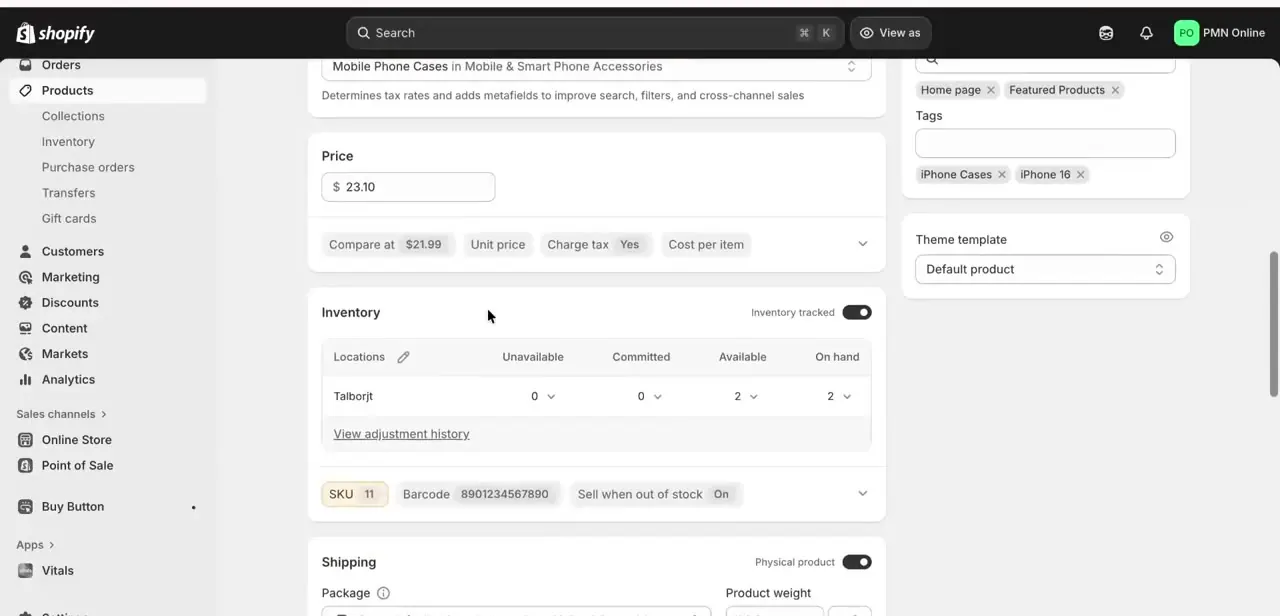
Open the product and scroll to Inventory. Stock is broken out per location across four columns: Unavailable, Committed, Available, and On hand.
Those columns are not four views of the same number. Shopify defines On hand as the sum of Committed, Unavailable, and Available, and the storefront sells from Available alone.
So a location reading 12 On hand with 12 Committed and 0 Available is behaving exactly as designed: every one of those units is already spoken for by an unfulfilled order, a draft order, or a transfer marked ready to ship. Unavailable works the same way for stock an app or a staff member has set aside as damaged, in quality control, or as safety stock.
Incoming is a fifth quantity for units still on their way from a transfer or purchase order, and it never counts toward what a shopper can buy. Below the location table sit the SKU, Barcode, and a toggle Shopify labels "Continue selling when out of stock" (some older guides call this "sell when out of stock").
It only appears once Inventory tracked is on. If Available has genuinely reached zero and that toggle is off, sold out is the correct outcome and no amount of editing the product will change it.
03Check that the location is allowed to fulfil online orders
This is the cause people miss, because every number on the product page looks correct while it is happening. Go to Settings > Locations, open the location holding the stock, and find the Fulfillment section.
The toggle reads "Use inventory at this location to fulfil online orders". It is on by default for new locations, but stores that added a warehouse, a POS-only shop, or a supplier location often switch it off deliberately and forget.
With it off, Shopify strips that location's inventory out of the online quantity entirely. The stock stays usable for in-person POS sales, draft orders, and some other channels, so it keeps showing in the admin while the Online Store treats the product as having nothing to sell.
If the stock is at a location that should not serve online orders, move it to one that does instead of flipping the toggle. Turning it on changes shipping and order routing for every product at that location, not just this one.
04Fix quantities across variants and locations
Multi-variant products are the most frequent source of a half-broken product page. The parent can read "35 in stock for 24 variants" while the three sizes anyone wants sit at zero, and a shopper who picks one of those three gets the sold-out state.
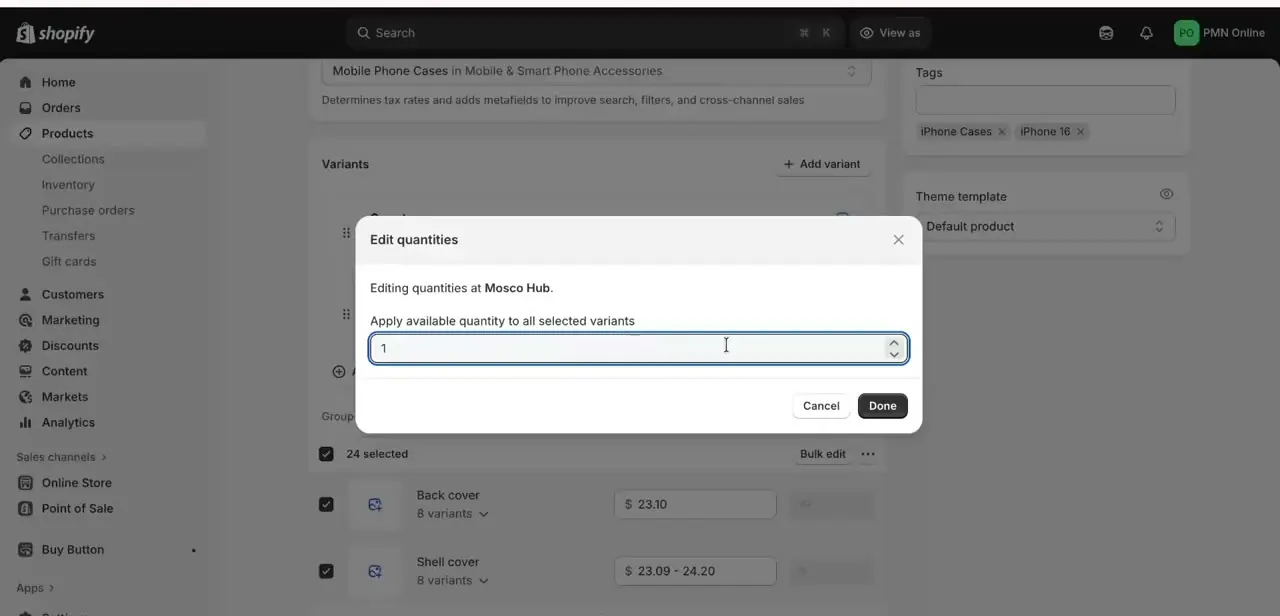
From the variants list, tick the affected variants and use Edit quantities. The dialog names the location and applies one corrected Available quantity across everything you selected, which beats opening 24 variants in turn. Set the number against the location that fulfils online orders, not whichever one happens to be listed first.
05Check publishing at product, variant, and catalog level
Correct stock at a valid location still shows nothing if the product is not published where the customer is looking. There are three separate switches, and they fail independently.
The Publishing section on the product page lists your sales channels and markets; everything is selected by default, so an absence here is something someone turned off. Individual variants have their own publishing state, reached through Manage publishing in the Variants section.
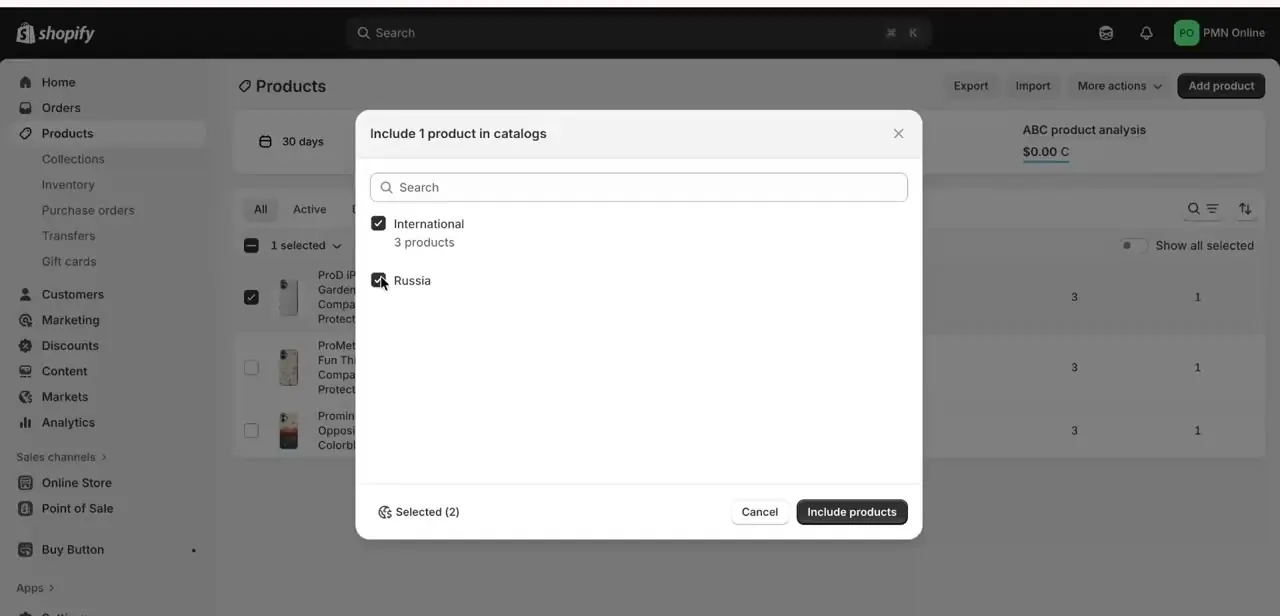
Shopify flags this on the product page with the line "Excludes some variants", and if every variant is unpublished from a channel the whole product vanishes from it. Third, the "Include product in catalogs" dialog controls which market catalogs carry the product, listing them by name (an International catalog alongside country-specific ones, for instance).
Shopify's own requirement for a product to appear in a channel market is both conditions together: published to the sales channel, and included in the catalogs assigned to that market. That is why the problem so often looks regional. The product is fine for you and missing for a shopper in another country.
06Rule out the theme and app layers, then verify as a customer
If the numbers, the location, and the publishing settings all check out, the cause sits above Shopify's inventory data. Themes apply their own out-of-stock logic to what the API hands them, and a badly configured or heavily customised theme can render a sold-out label over stock that exists.
Dropshipping apps such as DSers, Zendrop, or AliExpress connectors sync counts from the supplier on a schedule, and a failed sync can zero out Available without any warning in the admin. Apps can also park stock in the Unavailable column, which is worth re-reading step 2 for.
Re-running the app's sync, or previewing the product under a default Shopify theme, isolates which layer is responsible in a couple of minutes. When you are done, open the live product URL in a private window.
Do not take the admin's word for it. Storefront pages are cached, so a fix can be correct and invisible for a few minutes.
| Quantity | What it holds | Can the online store sell it? |
|---|---|---|
| Available | Units not committed and not set aside | Yes, this is the only one |
| Committed | Units in an unfulfilled order, a draft order, or a transfer marked ready to ship | No |
| Unavailable | Units held by an app or flagged as damaged, in quality control, or safety stock | No |
| On hand | The total at the location: Committed + Unavailable + Available | Not directly, it is a sum |
| Incoming | Units en route from a transfer, purchase order, or app | No, not yet received |
Definitions follow Shopify's inventory states documentation. A location reading high On hand and zero Available is working correctly, not glitching.
When it doesn't work
On hand shows stock but Available is zero
Why: On hand is the sum of Committed, Unavailable, and Available. The units are tied up in unfulfilled or draft orders, or an app has moved them into Unavailable.
Fix: Clear or fulfil the orders holding the Committed units. For Unavailable stock, find the app that set it aside and release it there, since editing the product page will not move it.
Every number looks right and the storefront still says sold out
Why: The location holding the stock has "Use inventory at this location to fulfil online orders" switched off, so Shopify excludes it from the online quantity.
Fix: Settings > Locations > the location > Fulfillment. Either enable it, accepting that this changes order routing for everything stored there, or transfer the stock to a location that already fulfils online orders.
The product page loads but one size or colour cannot be selected
Why: That variant is either at zero at the fulfilling location, or unpublished from the channel. The product page shows "Excludes some variants" when publishing is the reason.
Fix: Use Edit quantities on the affected variants for the first case, and Manage publishing in the Variants section for the second.
Stock keeps returning to zero on its own
Why: A dropshipping or inventory app is syncing the supplier's count over yours on a schedule.
Fix: Check the app's sync log and its overwrite settings. Manual edits to a synced product get reverted at the next sync, so the change has to be made on the app's side.
Frequently asked questions
Why does my Shopify product show sold out when the admin says I have stock?
Because the storefront sells from the Available quantity only. Stock counted under Committed, Unavailable, or Incoming is real but not sellable, and stock at a location that is switched off for online fulfilment is excluded from the online quantity altogether.
What is the difference between On hand and Available?
On hand is the total at a location, and Shopify defines it as Committed plus Unavailable plus Available. Available is the subset a customer can buy. The gap between the two numbers is stock that is already promised or deliberately held back.
Is the toggle called "Sell when out of stock"?
Shopify labels it "Continue selling when out of stock", in the Inventory section of a product or variant, and it only appears once Inventory tracked is on. With it off, a product correctly goes sold out at zero Available.
Can a dropshipping app cause the sold-out display?
Yes. Apps like DSers, Zendrop, and AliExpress connectors pull supplier counts on a schedule, and a failed or stale sync can drop Available to zero. Apps can also place stock into the Unavailable state, which looks like stock in the admin but cannot be sold.
Why does the product show as unavailable only for customers in another country?
Product availability there runs through Markets. Shopify requires a product to be both published to the sales channel and included in the catalogs assigned to that channel market. Miss the catalog and the product is fine domestically and missing abroad.
Does my theme affect whether sold out shows correctly?
It can. The theme decides how to render the inventory data it receives, and customised or third-party themes sometimes carry their own out-of-stock logic. Previewing the product under a stock Shopify theme tells you quickly whether the theme is the layer at fault.
Sources and last check
The admin screens and click path come from a walkthrough recorded in 2025. In September 2026 the inventory-state definitions, the location fulfilment setting, and the variant publishing behaviour were re-checked against Shopify's Help Center. Two things changed as a result: the toggle is named "Continue selling when out of stock", not "Sell when out of stock", and a step was added for the location-level "Use inventory at this location to fulfil online orders" setting, which Shopify documents as removing that location's stock from the online quantity and which the earlier version of this guide did not cover.
About the author

Impran M N
I've been hooked on technology for as long as I can remember — especially the new tools and AI apps that seem to land every other week. Easy Tech Tuts is where I write up whatever I've just worked out: I do the task in the real product, record the screen, and turn it into the guide I wish I'd found first.