Easy Tech Tuts
How to Delete Shopify Store Permanently, Remove One of the Connected Stores Easily 2026
By Impran M NLast checked against official docs
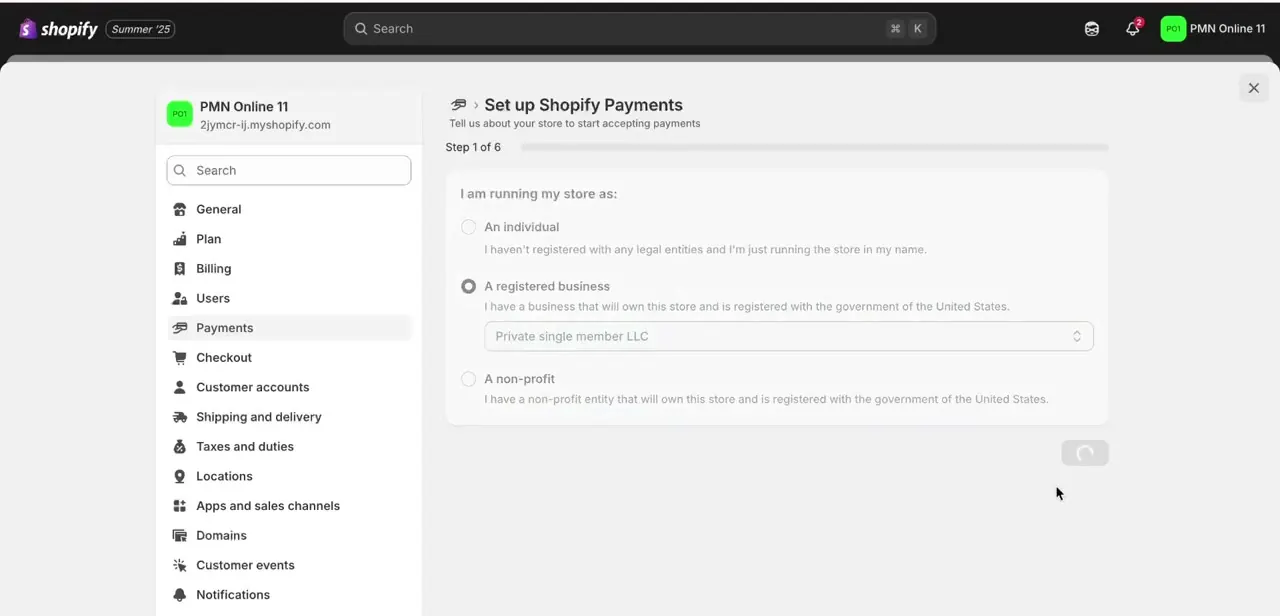
There is no delete button on a Shopify store. The closest thing is Settings > Plan, where the button reads Cancel trial or Cancel plan depending on where the store sits, and what it does is deactivate the store.
That distinction matters more than it sounds. Shopify keeps a deactivated store's information for two years so you can re-open it, which is helpful if you change your mind and unhelpful if you thought "cancel" meant the data was gone.
Deleting it for real is a separate request, made somewhere else entirely, and it cannot be done until every store on the account is already deactivated. This guide covers the cancellation flow, the three things that carry on billing after it, and the extra step that turns deactivation into deletion. It works the same whether you are closing your only store or one of several under the same login.
Before you start
- Store owner access. Shopify only allows the store owner to deactivate a store, so staff accounts cannot complete this even with full permissions.
- Your account password, which the final confirmation screen asks for.
- Shopify Plus stores are the exception: Plus merchants have to go through Plus Support instead of the in-admin flow.
01Pick the right store from your account
A login with more than one store attached lands on a store switcher after sign-in: a "Welcome back" screen listing each store by name and myshopify.com address, with a Create store button off to the side. Check both the name and the domain before continuing.
Store names get reused across a portfolio and myshopify addresses do not, so the address is the reliable identifier. Closing one store has no effect on the others on the account.

02Export your data before you touch anything
Do this first. Products, customers, and orders all export as CSV files from their own admin pages, and the cancellation flow itself links out to a page walking through it.
You technically have two years to change your mind and re-open, but the export takes ten minutes now and becomes a support conversation later. Grab your order history in particular, since it is the piece people come back for at tax time.
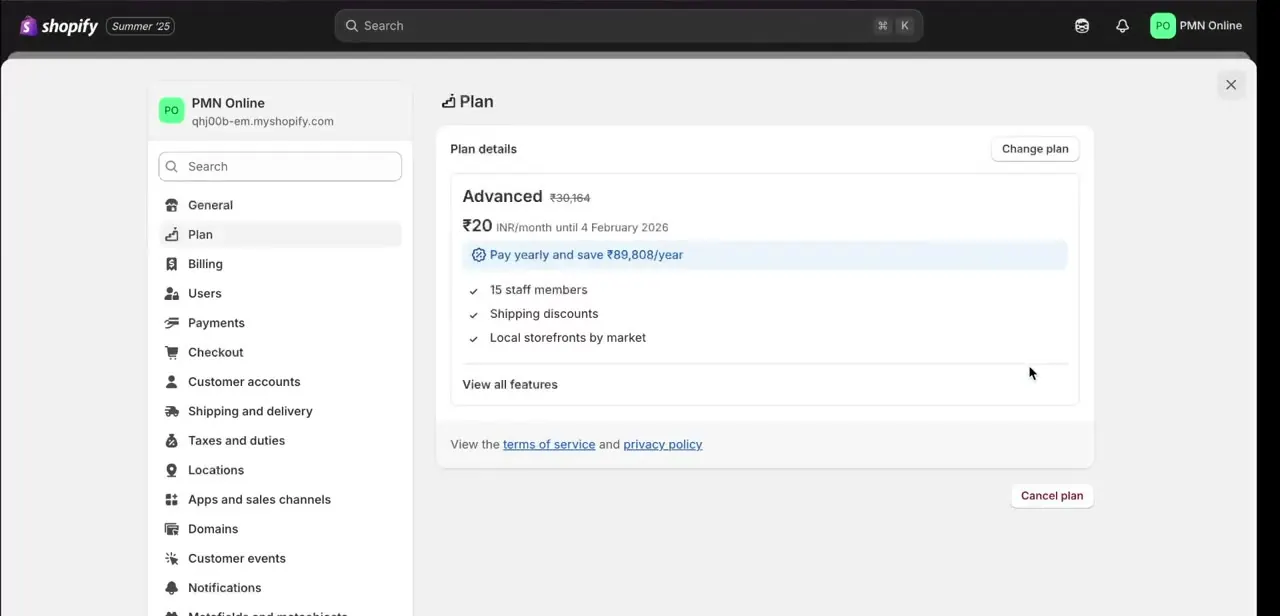
03Open Settings > Plan and start the cancellation
Plan sits in the left-hand settings list, below General and above Billing. There is no closure option in any general store-management menu, which is why people hunt for one and give up.
The page shows the current plan's name, price, renewal date, and included features, with the cancel action at the bottom right. On a store still inside its free trial the button reads Cancel trial.
On a store that has started billing it reads Cancel plan. Both open the same closure flow.
Cancel plan is also the door to pausing instead of closing. If the store is on a paid plan, past its trial, and not on Plus, the flow offers Pause and build, which keeps the storefront browsable and the admin editable while switching checkout off across every sales channel. Worth knowing about before you close something seasonal.
04Work through the pre-cancellation checklist
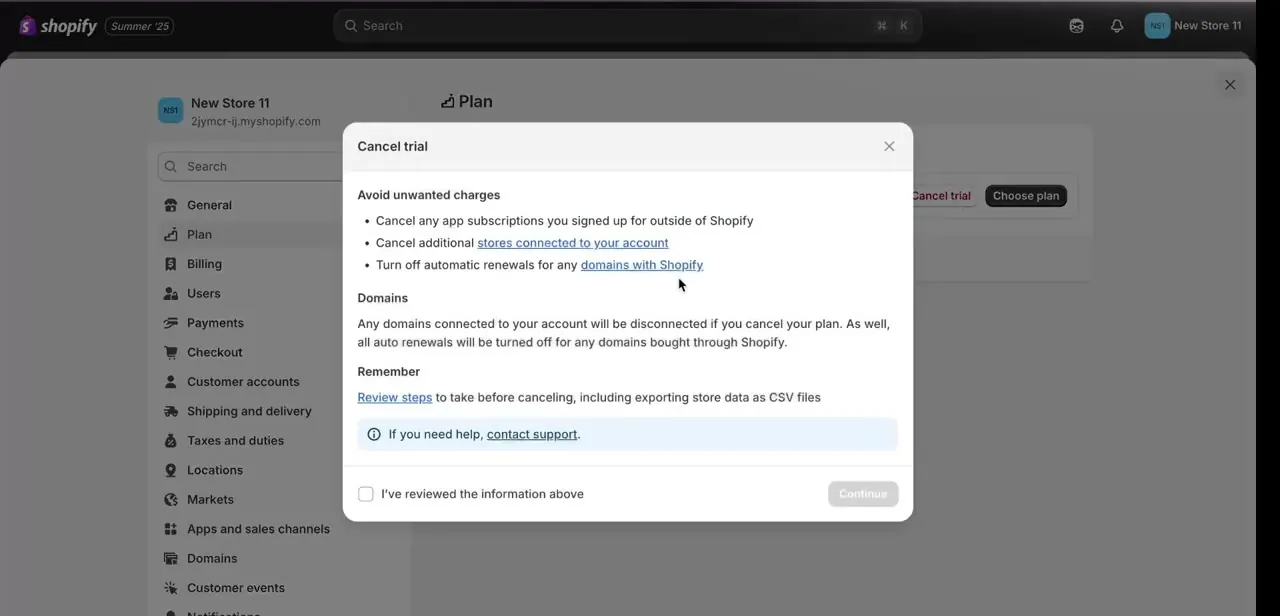
Shopify puts a checklist in front of you before it will continue, and each item is there because it is a real way to keep paying for a store you thought was closed. App subscriptions bought outside Shopify bill through the vendor, so closing the store does not stop them.
Apps installed through Shopify are handled differently: they are uninstalled automatically at cancellation, and any usage charges still outstanding are billed then and there. Additional stores on the account each need cancelling on their own.
Domains bought through Shopify get disconnected from the store but keep their renewal schedule, so auto-renew has to be switched off separately. The checklist also flags data export, which you have already done.
05Confirm the uninstall, give a reason, enter your password
The final stretch has three gates. First, a confirmation that you have reviewed the warnings above, phrased in the admin as a checkbox.
Then Shopify asks you to select the option that cancels the plan and uninstalls all apps, and to pick a reason for leaving from a dropdown. Last, it asks for your account password.
The password prompt is the reason store owner access is non-negotiable here. Once you confirm, billing on that store's plan stops, the apps come off, and any custom domain disconnects from the storefront.
06Deactivated is not deleted: the step almost nobody takes
After confirmation the store is deactivated, and Shopify keeps its information for two years. Sign back in and it is still listed, offered as "Re-open [your-store].myshopify.com".
Choose a plan, add payment details, and it comes back. The myshopify.com address stays reserved to that store and cannot be claimed by a new one, which is why an address you abandoned in 2023 is still refused today.
If you want the data gone for good, that is a separate request through Shopify's privacy controls at privacy.shopify.com, using the "Erase my data" option. Shopify requires every store and every account tied to your email address to be deactivated before it will accept the request, and processing takes up to 30 days.
After erasure nothing is recoverable and the store cannot be re-opened, which is the point but leaves no way back. One loose end worth checking a week later: if the store used a custom domain with HSTS, browsers hold that policy for 90 days after deactivation, so the domain can keep forcing HTTPS to a store that no longer exists.
| Option | Where it lives | What happens | Can you come back? |
|---|---|---|---|
| Pause and build | Settings > Plan > Cancel plan, then choose it | Storefront stays viewable, checkout switches off across all channels, admin stays editable | Yes, resume any time |
| Deactivate | Settings > Plan > Cancel plan or Cancel trial | Apps uninstalled, domains disconnected, billing stops, store data retained | Yes, for two years, via Re-open |
| Erase data | privacy.shopify.com > Erase my data | Personal data removed across all stores and the account, up to 30 days to process | No, and every store must be deactivated first |
Pause and build requires store owner access, a paid plan past the free trial, and a store that is not on Shopify Plus.
When it doesn't work
There is no Cancel plan button on the Plan page
Why: You are signed in as staff, not the store owner. Shopify restricts deactivation to the owner account regardless of the permissions granted.
Fix: Sign in as the store owner, or have ownership transferred first. Shopify Plus stores never see it in-admin and have to raise the request with Plus Support.
A charge arrived after the store was closed
Why: Most likely an app subscription billed by the vendor outside Shopify, an app usage charge settled at cancellation, or a domain renewal. None of the three stop because the plan did.
Fix: Cancel external app subscriptions with the vendor directly, and turn off auto-renew on any Shopify-bought domain. Expect no refund on the plan itself, since Shopify documents a no-refund policy.
Shopify will not let you reuse the myshopify.com address on a new store
Why: A deactivated store keeps its myshopify.com URL. The address is not released back into the pool.
Fix: Pick a different address, or re-open the original store instead of building a replacement.
The custom domain still redirects to the closed storefront
Why: HSTS. Browsers cache the strict-transport policy for 90 days after deactivation, so they keep forcing HTTPS to the old host.
Fix: Repoint the domain's DNS at its new destination and wait the policy out. Testing in a browser profile that has never visited the domain shows whether the new destination is correct.
Frequently asked questions
Does cancelling my plan delete the Shopify store?
No. It deactivates the store. Shopify keeps the store's information for two years and offers a Re-open option when you sign back in. Deleting the data is a separate request through privacy.shopify.com.
Is closing a Shopify store reversible?
For two years, yes. Sign in, select Re-open on the store, choose a plan and add payment details. Past two years, or after a data erasure request, the store cannot be restored. Custom domains have to be reconnected after re-opening.
Will cancelling stop every charge?
It stops the plan fee. It does not stop app subscriptions billed outside Shopify, and it does not stop domain renewals. Outstanding app usage charges are billed automatically at cancellation.
Can I close one store without touching the others on my account?
Yes. Each store is cancelled independently through its own Settings > Plan. Use the store switcher after sign-in to make sure you are inside the right one, checking the myshopify.com address and not just the name.
Do I get a refund for the rest of the month?
No. Shopify's terms set out a no-refund policy on subscription fees, so cancelling mid-cycle does not return the unused portion.
Can a staff member close the store?
No. Only the store owner can deactivate a store, and the final confirmation asks for the owner's account password. Shopify Plus stores go through Plus Support instead.
What happens to my apps?
Apps installed through Shopify are uninstalled automatically as part of the cancellation, and the flow asks you to confirm that. Subscriptions you signed up for on a vendor's own site are outside Shopify's reach and have to be cancelled there.
Sources and last check
The admin screens and click path come from a walkthrough recorded in 2025. The cancellation behaviour was re-checked against Shopify's Help Center in September 2026, and that check corrected the central claim this guide previously made. Cancelling a plan deactivates a store, it does not delete it: Shopify retains the store's information for two years and offers a Re-open option, and permanent erasure is a separate request through privacy.shopify.com that requires every store on the account to be deactivated first. The owner-only restriction, the automatic uninstall of Shopify-installed apps, the no-refund policy, and the Pause and build alternative were added from the same documentation.
About the author

Impran M N
I've been hooked on technology for as long as I can remember — especially the new tools and AI apps that seem to land every other week. Easy Tech Tuts is where I write up whatever I've just worked out: I do the task in the real product, record the screen, and turn it into the guide I wish I'd found first.