 Easy Tech Tuts
How to Integrate Gokwik with Shopify Easily 2026
By Impran M NLast checked against official docs
Cash-on-delivery drives a large share of orders for Indian D2C brands, and with it comes return-to-origin: customers who order COD and then refuse the parcel. GoKwik built its Kwik COD & Checkout product to cut that loss with smart COD verification and a faster checkout layered on top of Shopify.
The part that's changed since this walkthrough was recorded is how you get started. Kwik COD & Checkout is no longer listed as an installable app on the Shopify App Store, so this guide covers both what the original setup looked like and how to reach the same feature set through GoKwik's current onboarding path.
Before you start
- Real cash-on-delivery order volume. GoKwik pitches this product at merchants already losing money to RTO, not stores where COD is a minor payment option.
- A GoKwik merchant account, created through Book a Demo on gokwik.co or by signing in at dashboard.gokwik.co, since this product is no longer a one-click Shopify App Store install.
01Check the fit, using what the product actually promises
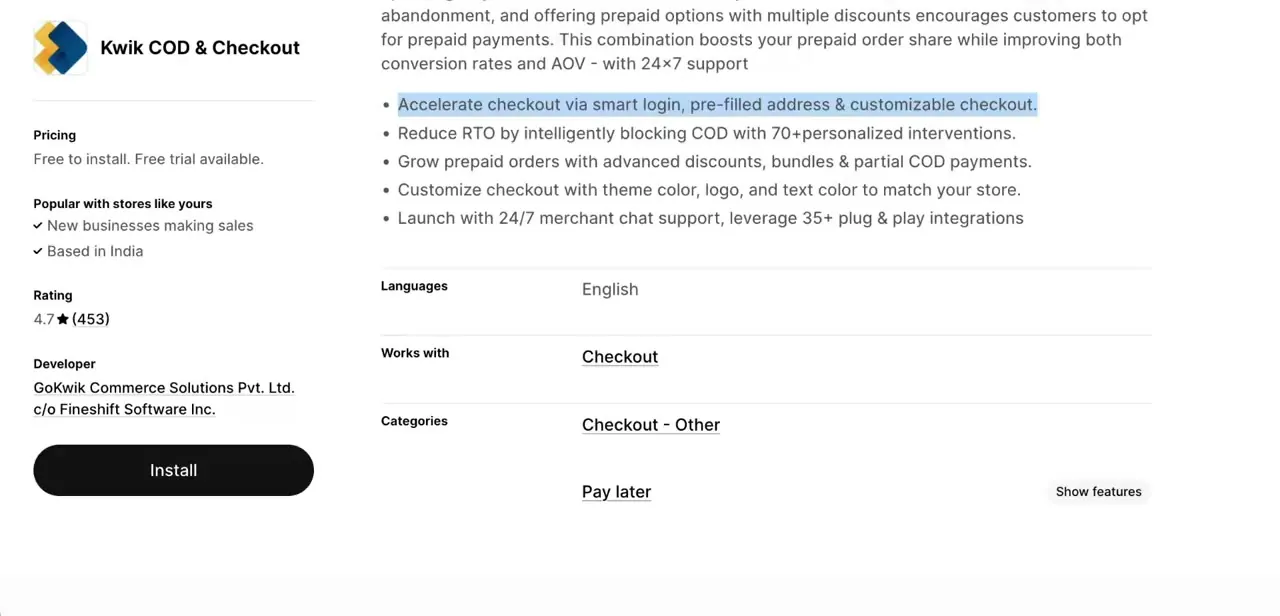
GoKwik's own product page pitches Kwik Checkout as built for high-RTO Indian D2C brands, claiming up to a 40% cut in RTO alongside faster checkout. If your store barely uses COD, that pitch doesn't apply to you; confirm RTO is a real, measured problem before going further. The feature set GoKwik advertises: address prefill for around 90% of returning shoppers, one-tap login drawing on GoKwik's own shopper network, discount templates to nudge buyers toward prepaid, and COD risk-scoring meant to block or flag orders likely to bounce.
02Understand the mechanism before you commit
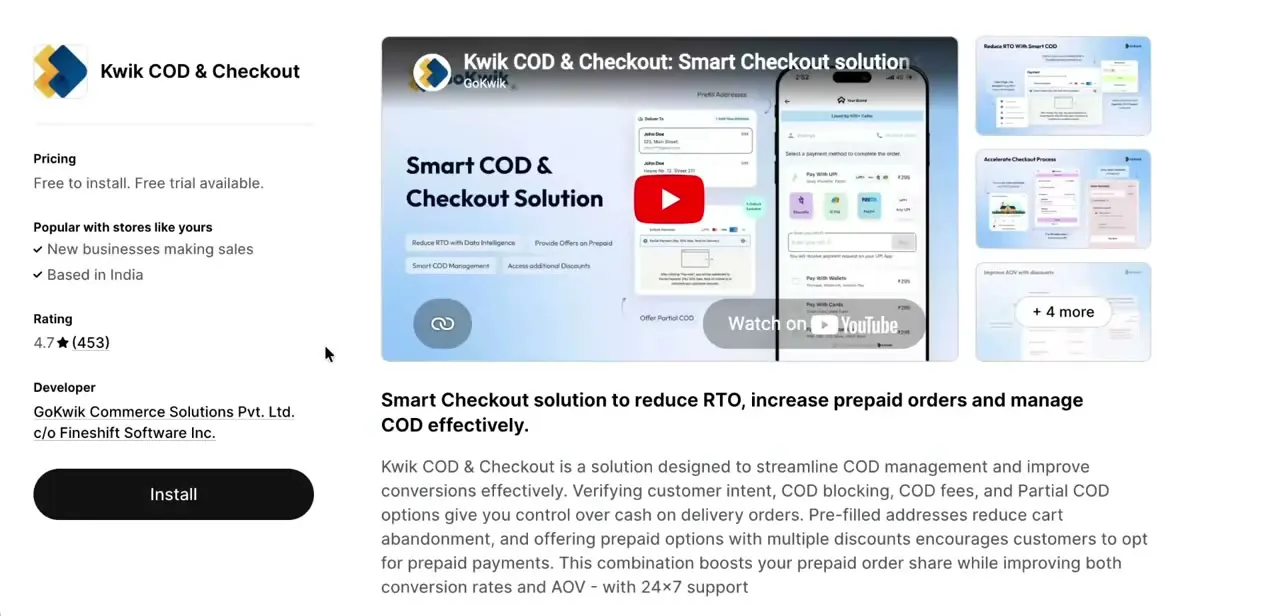
Regardless of which door you come in through, the underlying flow is the same: COD blocking and partial-COD options control which cash-on-delivery orders go through unassisted, pre-filled addresses cut cart abandonment, and prepaid discounts try to shift customers off COD entirely. GoKwik describes its risk engine as scoring orders against more than 200 signals, not the roughly 70 the app's old Shopify listing advertised. That's a meaningfully bigger number and a sign the product has changed since the original recording, not just its listing page.
03Start onboarding through GoKwik directly
Kwik COD & Checkout doesn't currently appear on the Shopify App Store; searching for it or opening its old listing URL returns an unavailable page, and it's absent from GoKwik's own developer page on the App Store. GoKwik's Shopify-listed apps today cover narrower jobs instead: KwikPass for OTP login and popups, GoKwik Cart Drawer & Upsell for cart-level upsells and fraud checks, and a separate Kwik COD Form app for a standalone COD order form.
For the full checkout and RTO product this guide is about, go to gokwik.co, use Book a Demo, or sign in at dashboard.gokwik.co if you already have an account. Onboarding still means creating a merchant account tied to your store and connecting it to your Shopify order and checkout data, the same shape of setup the original app install used to do in one click.
04Turn on one-click checkout
Inside the GoKwik merchant dashboard, one-click checkout is a toggle that lets returning customers skip re-entering their address and payment details, using login history to recognize them. This is the piece most directly tied to conversion, since every field a customer doesn't retype is one less place to abandon the order. Once it's live, check it yourself as a returning customer to confirm the pre-filled address pulls the right details.
05Configure COD verification rules
This is the core RTO tool: set the thresholds that decide when GoKwik blocks, flags, or asks for extra verification on a cash-on-delivery order. The engine weighs signals like order history, location, and past return behavior.
Stricter rules block more risky orders outright; looser rules lean on partial-COD or prepaid-discount nudges instead. Start conservative and watch your RTO numbers over a few weeks before tightening further. Aggressive blocking also turns away legitimate first-time customers who simply have no order history yet.
06Match the checkout to your brand and test it live
Set the checkout's theme color, logo, and text color so it reads as part of your store instead of a bolted-on third-party page. Then place a real test order end to end, both prepaid and COD, to confirm the pre-filled address, discount prompts, and COD verification behave the way you configured before real customers reach the flow.
When it doesn't work
You can't find Kwik COD & Checkout on the Shopify App Store
Why: The listing is no longer available there. GoKwik's checkout and COD product is now onboarded directly through GoKwik rather than as a self-serve app install.
Fix: Go to gokwik.co and use Book a Demo, or sign in at dashboard.gokwik.co if you already have a merchant account. If you only need OTP login or a cart drawer, KwikPass and GoKwik Cart Drawer & Upsell are still separately listed on the Shopify App Store.
The pricing you've seen quoted doesn't match what GoKwik charges you
Why: Older write-ups describe a free-to-install app with a launch offer. GoKwik's current pricing page shows a ₹3,000/month platform fee plus 3.5% per COD transaction on its base Emerging plan, with custom Enterprise pricing above 2,000 orders a month.
Fix: Get current terms in writing from GoKwik sales before enabling COD verification on live orders.
COD verification is blocking too many legitimate orders
Why: The risk rules were set too strictly for a store with limited order history, so first-time customers with no track record get flagged along with genuinely risky ones.
Fix: Loosen the thresholds and lean on partial-COD or prepaid-discount nudges instead of outright blocking, then re-tighten gradually as you collect more order data.
Frequently asked questions
Is Kwik COD & Checkout still available on the Shopify App Store?
No. Its listing now returns an unavailable page, and it doesn't appear on GoKwik's own Shopify developer page. The underlying checkout and COD product still exists; it's onboarded through gokwik.co or dashboard.gokwik.co instead of a direct app install.
How much does GoKwik's checkout and COD product cost?
GoKwik's published Emerging plan is a ₹3,000/month platform fee plus 3.5% on every COD transaction, for up to 2,000 orders a month. Stores above that get a custom Enterprise quote. There's no public free tier listed.
How does GoKwik decide which COD orders to block?
GoKwik describes a risk engine scoring each order against more than 200 signals, including order history and location, then blocking, flagging, or requesting extra verification based on where it lands.
Does this replace Shopify's default checkout entirely?
It layers on top of your Shopify checkout rather than swapping the platform out. One-click login, address prefill, and COD rules get added to your existing store.
Can I get just the login or cart-drawer features without the full COD suite?
Yes. KwikPass (OTP login and popups) and GoKwik Cart Drawer & Upsell are separate, currently listed Shopify apps that don't require signing up for the full checkout and RTO product.
Sources and last check
Click path and screenshots come from a walkthrough recorded when Kwik COD & Checkout was a live Shopify App Store listing. Re-checked in September 2026: apps.shopify.com/kwikcheckout and its reviews pages now return an unavailable page, and GoKwik's own Shopify developer listing shows only three unrelated apps, with no COD or checkout app among them. GoKwik's own product and pricing pages confirm the underlying product still exists, now onboarded via Book a Demo or dashboard.gokwik.co rather than a self-serve app install, with published pricing (a ₹3,000/month platform fee plus 3.5% per COD transaction on the Emerging plan) that doesn't match this article's original free-to-install claim. The risk-engine figure was corrected from the original '70+ blocking interventions' to GoKwik's current stated '200+ signals'.
About the author

Impran M N
I've been hooked on technology for as long as I can remember — especially the new tools and AI apps that seem to land every other week. Easy Tech Tuts is where I write up whatever I've just worked out: I do the task in the real product, record the screen, and turn it into the guide I wish I'd found first.



