 Easy Tech Tuts
How to Import Reviews from Aliexpress to Shopify with AI & Bulk Import for Free Easily 2026
By Impran M NLast checked against official docs
Copying reviews across a catalogue product by product is slow, which is why an app built specifically for review import is worth using instead of doing it by hand. This guide follows the setup for Kudosi, the app formerly known as Ali Reviews: installing it, granting the access it asks for, and working through its setup wizard to the point where reviews display on your storefront. It's free to start, though the free plan caps out at 10 reviews per product, worth knowing before building a display strategy around it.
01Install the review app and check its permissions
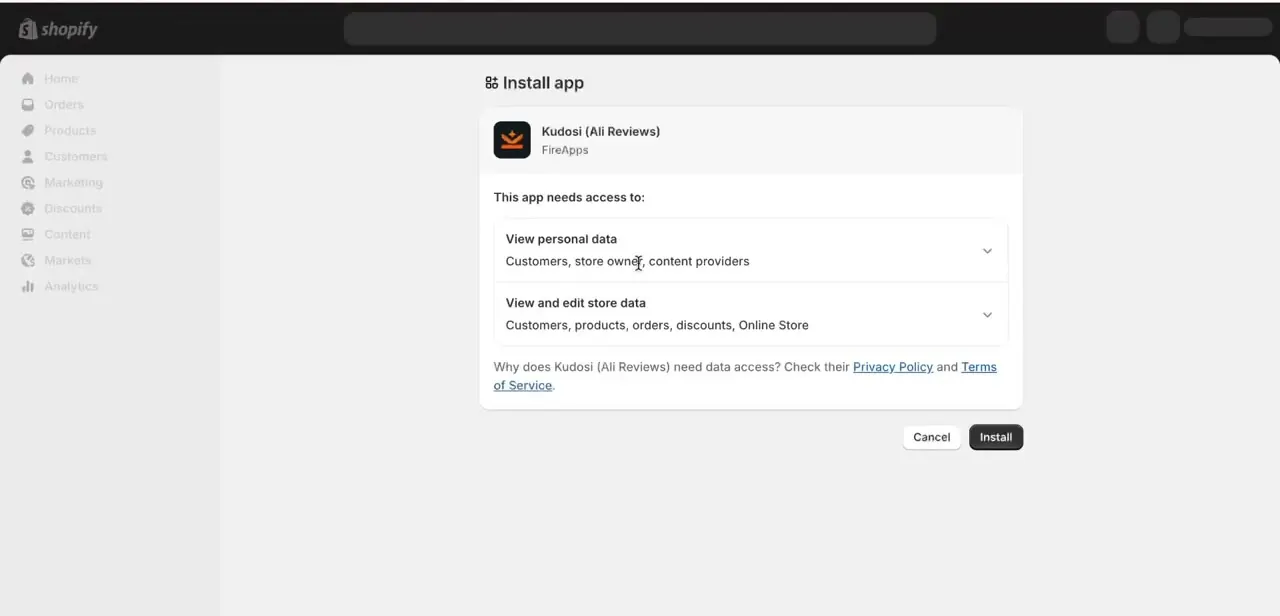
Search the Shopify App Store for Kudosi (Ali Reviews), built by FireApps, and click Install. Before confirming, Shopify shows exactly what the app can access: personal data covering customers, store owner, and content providers, and store data covering customers, products, orders, discounts, and your Online Store.
This is worth reading instead of skipping past automatically. A reviews app genuinely needs product and storefront access to import and display reviews, but it's worth knowing what's being granted before clicking Install.
02Work through the app's setup wizard
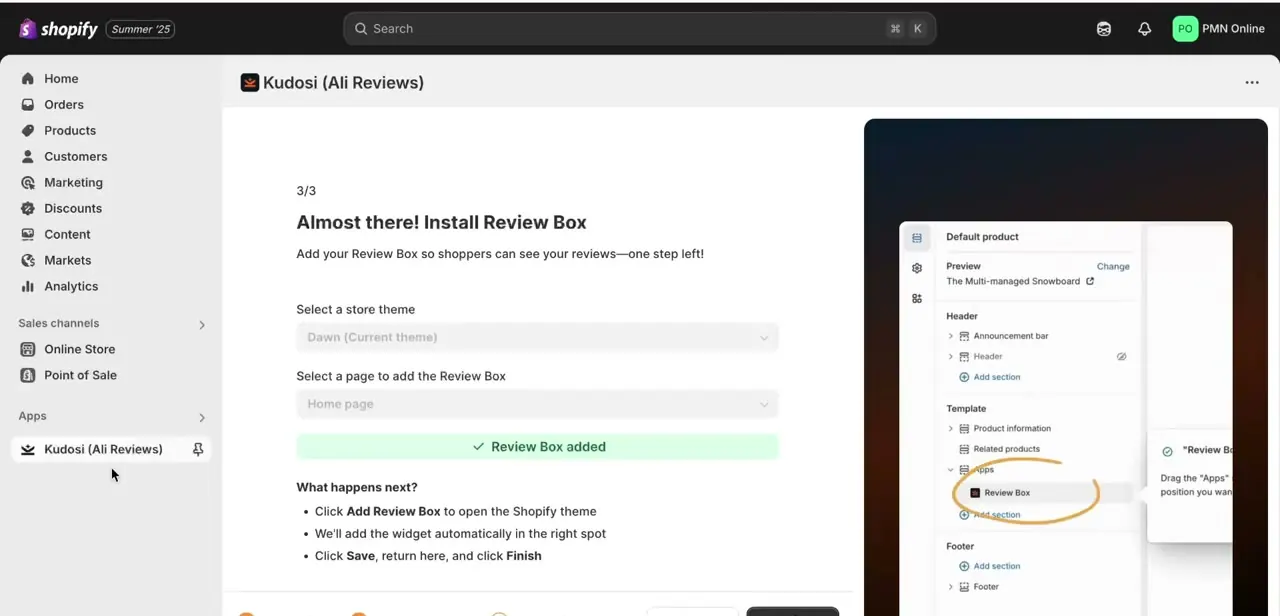
After installing, Kudosi walks you through its own three-step setup rather than dropping you straight into the dashboard. Step 3 of 3 is titled "Almost there!
Install Review Box." You select your store theme (Dawn, in most new stores) and choose which page to add the Review Box to, typically the home page or product pages. A visual preview on the right shows where the box will sit in your theme's layout, circled on a mock product page, so placement isn't a guess.
03Confirm the widget was added
Once you click Add Review Box, the app inserts the widget into the right spot in your theme, and the setup screen confirms with a green "Review Box added" message. Click Save in the theme editor, return to the app, and click Finish to complete setup. From here the display mechanics are handled; the remaining work is getting reviews into the system.
04Use Import Reviews to pull from AliExpress
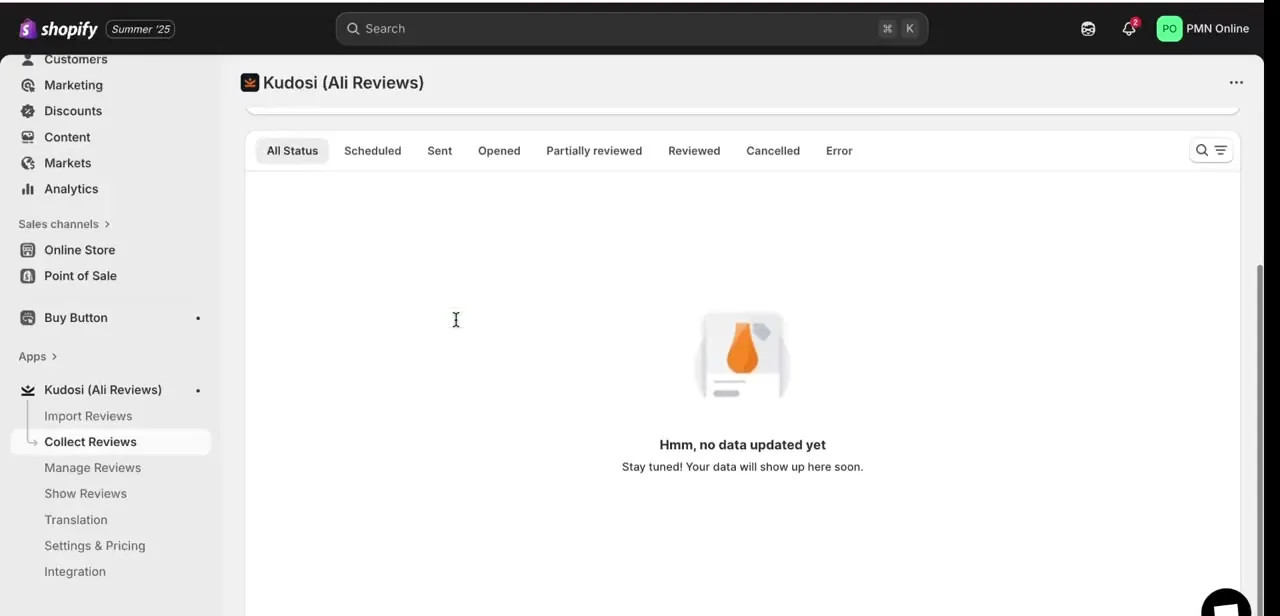
Inside the app, the left-hand menu splits review handling into Import Reviews, Collect Reviews, Manage Reviews, Show Reviews, Translation, Settings & Pricing, and Integration. Import Reviews is built for pulling existing product reviews in, typically by pasting the source product URL so the app can scrape and format matching reviews for your Shopify listing.
Kudosi's current listing also supports Amazon, Temu, eBay, and Etsy through the same section, so a store sourcing from more than one platform doesn't need a separate app for each. Collect Reviews, by contrast, is for gathering new reviews from your own customers going forward; the two features solve different problems, so don't confuse them.
05Check import status before publishing
The reviews list uses status tabs: All Status, Scheduled, Sent, Opened, Partially reviewed, Reviewed, Cancelled, and Error, so you can track exactly where each batch of imported reviews stands. On a fresh install this list is empty, showing "Hmm, no data updated yet" until your first import job runs. Watching the Error tab matters, since a source listing occasionally fails to scrape cleanly and those failures need a retry instead of getting silently skipped.
06Customize how reviews display on your storefront
Once reviews are imported, use Show Reviews to control the layout, star styling, and which reviews surface first on a product page. Matching the widget's font and color scheme to your store's theme matters more than it looks: a review box that reads as bolted on rather than native to the storefront undercuts the trust signal the app was installed to build in the first place.
| Plan | Price | Reviews shown per product | What it adds |
|---|---|---|---|
| Free | $0 | 10 | Unlimited AliExpress importing, basic widgets |
| Basic | $14.95/mo | 150 | Multi-platform import, Google rich snippets |
| Growth | $24.95/mo | 1,500 | AI-generated summaries, advanced translation |
| Advanced | $49.95/mo | Unlimited | Dedicated server, priority support |
Pricing and limits as listed on the Shopify App Store in September 2026. App pricing changes more often than this page does, so check the app's own Settings & Pricing screen for current numbers.
When it doesn't work
An imported batch shows up under the Error tab
Why: Source listings occasionally fail to scrape cleanly, especially if the listing changed after the URL was pasted in.
Fix: Re-run the import against the current product URL instead of assuming the app retries it automatically.
Reviews stop displaying after a batch import
Why: The Free plan shows only 10 reviews per product; anything imported beyond that cap is stored but not displayed.
Fix: Check Settings & Pricing for the current cap, and upgrade if more reviews need to show.
The Review Box doesn't appear on the storefront after the wizard finishes
Why: The widget was inserted into the theme editor, but the theme itself was never saved or published.
Fix: Return to the theme editor, click Save, and publish the theme before checking the storefront again.
Frequently asked questions
What does AI add to the review import process?
Kudosi uses automated scraping and formatting to pull reviews from a source listing and match them to your Shopify products in bulk, cutting out manual copy-paste work, plus AI-assisted translation for stores selling in more than one language.
Is this method free to use?
Kudosi's Free plan doesn't cost anything and includes unlimited AliExpress importing, but it only displays up to 10 reviews per product. Higher caps and multi-platform import need a paid tier, starting at $14.95 a month, each with a 14-day free trial.
Who is this useful for?
Dropshippers, e-commerce sellers, and anyone wanting to build credibility on a Shopify store without paying for an expensive review-collection tool from the start.
What's the difference between Import Reviews and Collect Reviews in the app?
Import Reviews pulls existing reviews from another platform's product listings into your store. Collect Reviews is a separate feature for gathering new reviews from your own customers after they buy.
Can Kudosi import reviews from platforms other than AliExpress?
Yes. The same Import Reviews section also pulls from Amazon, Temu, eBay, and Etsy, so a store sourcing from several platforms doesn't need a separate app for each one.
Sources and last check
Click path and screens come from a recorded install and setup walkthrough. Pricing tiers, the Free plan's 10-review-per-product cap, and multi-platform import support were checked against the app's official Shopify App Store listing in September 2026; the previous version of this guide described the free tier without noting its display cap.
About the author

Impran M N
I've been hooked on technology for as long as I can remember — especially the new tools and AI apps that seem to land every other week. Easy Tech Tuts is where I write up whatever I've just worked out: I do the task in the real product, record the screen, and turn it into the guide I wish I'd found first.



