 Easy Tech Tuts
How to Fix the 'Checkout Unavailable' Issue on Shopify 2026 Easily
By Impran M NLast checked against official docs
A "Checkout Unavailable" message is one of the more alarming things you can see on a live Shopify store: customers who want to give you money can't. It almost always traces back to one of a handful of causes: a trial or plan status that disables checkout on purpose, a payment provider that was never fully activated, a checkout setting fighting with a theme or app, or a domain that lost its SSL connection. This guide checks each of those in order, using the actual admin screens involved, so you find the real cause instead of guessing.
01Understand what breaks checkout
Before changing anything: "Checkout Unavailable" means Shopify is refusing to render the checkout step for a reason on your side, not the customer's. The most literal version of the message, "This store is currently unable to accept payments," points specifically at a missing payment provider.
Beyond that, the usual suspects are a plan or trial status that intentionally disables checkout, a checkout configuration conflicting with a theme or app, and a domain that's lost its secure connection. Working through them in that order avoids digging into theme code when the real problem is a plan setting.
02Confirm your plan and trial status
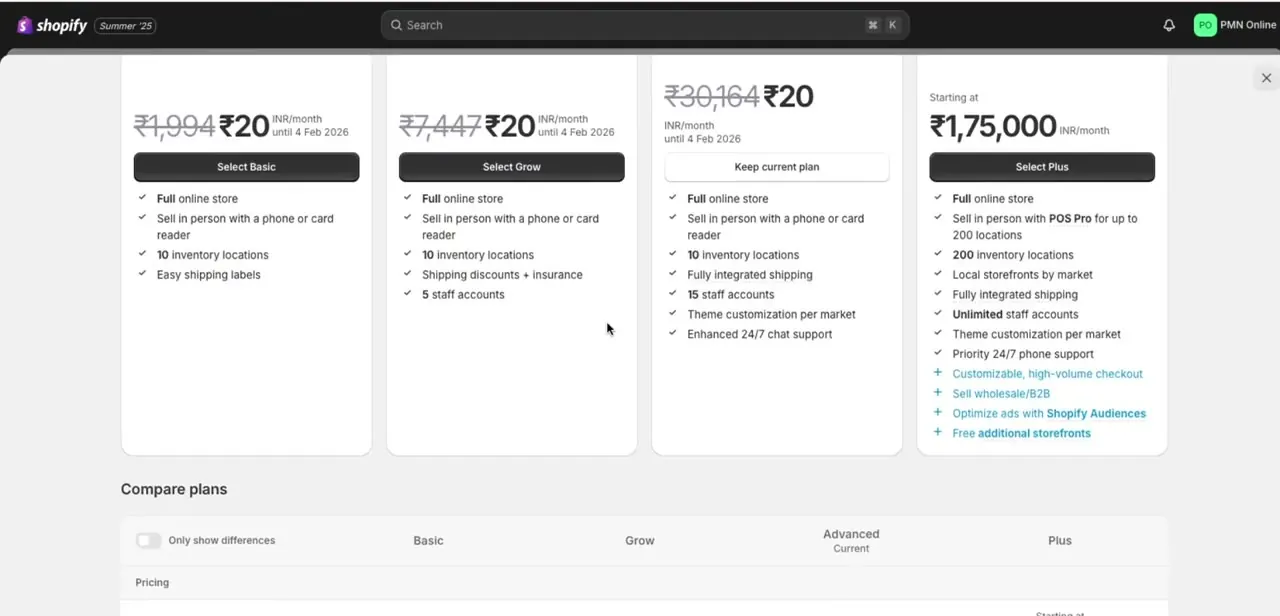
Open your plan page from the admin. Shopify disables checkout by design in two specific situations, not just vaguely when "billing isn't current": while a store is still on its free trial and hasn't picked a paid plan yet, and after a store has switched to the Pause and Build plan, which deliberately deactivates checkout across every sales channel while leaving the admin fully editable. If either applies, picking or changing a plan is the fix, not a settings toggle.
03Activate a payment provider
Go to Settings, then Payments. If there's no active primary payment provider, Shopify shows exactly the message from step one.
A primary provider has to process card payments directly: Shopify Payments where it's available, or a third-party gateway where it isn't. PayPal or a similar wallet can sit alongside a primary provider, but it can't stand in for one on its own. Add or reactivate a primary provider here, and check the Payment capture method setting isn't stuck on a broken manual state that's stalling orders.
04Rule out theme or app conflicts
With payments confirmed active, temporarily disable any recently installed app, especially ones touching checkout, shipping, or currency conversion. If disabling one clears the problem, contact that app's support before reinstalling; the fix is usually a compatibility update, not removing it for good. Switching briefly to Shopify's default theme is also worth doing if you've made recent custom code changes, just to rule the theme out.
05Confirm your domain and SSL status
Under Settings, then Domains, check that your primary domain shows Connected with no pending DNS changes. A custom domain needs its A record pointed at Shopify's IP address; any other IP, or an AAAA record sitting alongside it, blocks the certificate from issuing.
A Cloudflare proxy or DNSSEC in front of the domain can cause the same failure. New or corrected DNS can take up to 48 hours to issue a certificate, so a status of Pending isn't itself a problem yet; Unavailable after that window is.
06Run a full test order to confirm the fix
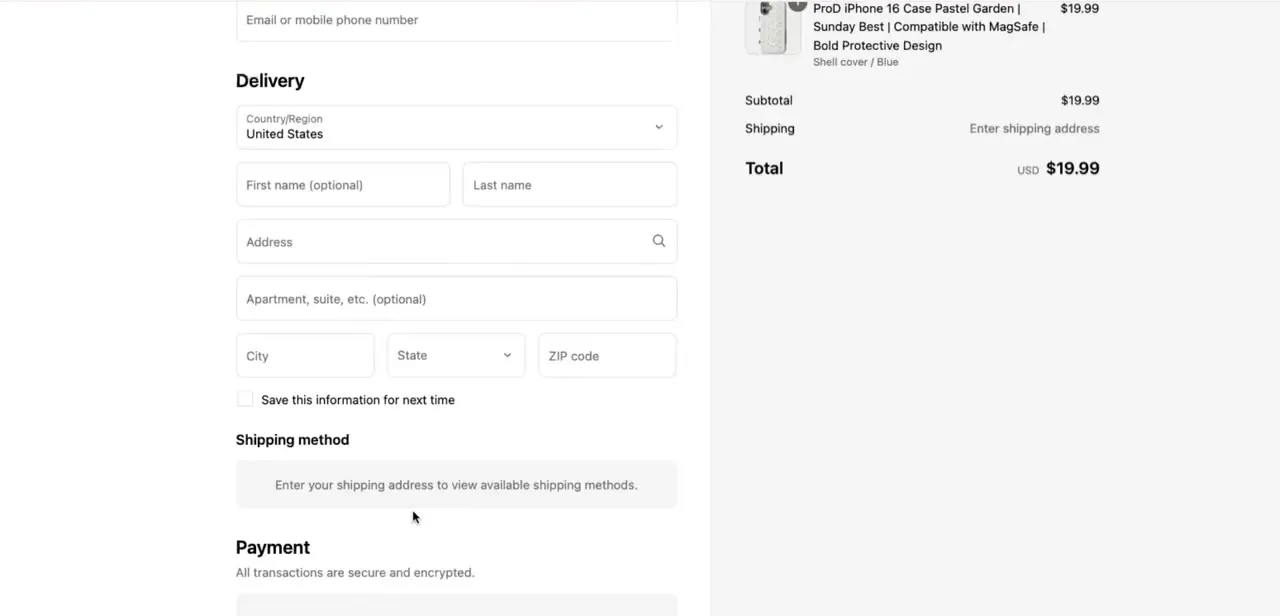
Once you've addressed the likely cause, walk through an actual purchase from product page to confirmation, using a real card or Shopify's Bogus Gateway in test mode. Add an item, proceed to checkout, and fill in delivery details as a customer would. Reaching the payment step and completing an order is the only reliable confirmation the fix worked; if it still fails here, go back through the previous steps in order instead of jumping to a new theory.
When it doesn't work
Checkout shows "This store is currently unable to accept payments"
Why: No active primary payment provider is configured. PayPal or another secondary payment method being active doesn't count as one.
Fix: Go to Settings > Payments and add a primary provider: Shopify Payments, or a third-party gateway if Shopify Payments isn't offered in your country.
Checkout stays disabled even after picking a plan mid-trial
Why: During the free trial, checkout is disabled by default until a monthly plan is selected. This is expected behavior, not a fault.
Fix: Choose a paid plan from the plan page; checkout re-enables once that's confirmed.
Checkout is gone but the admin and product pages still work fine
Why: The store is on the Pause and Build plan, which intentionally disables checkout across every sales channel, including Point of Sale, while keeping the admin editable.
Fix: Switch off Pause and Build to a regular paid plan to bring checkout back.
Domain shows SSL Pending or Unavailable and checkout won't load over HTTPS
Why: Usually a DNS misconfiguration: the A record isn't pointed at Shopify's IP, an AAAA record is present, or a proxy like Cloudflare is intercepting verification.
Fix: Correct the DNS records, remove any proxy in front of the domain, and allow up to 48 hours for the certificate to issue before contacting support.
Frequently asked questions
What usually causes "Checkout Unavailable" on Shopify?
Most often a missing primary payment provider, a trial that hasn't converted to a paid plan, the Pause and Build plan, or a domain that's lost its SSL certificate.
Can my plan or trial status be the actual reason checkout is unavailable?
Yes, and not vaguely: Shopify disables checkout by design during an unconverted free trial, and again on purpose if you switch to the Pause and Build plan. Neither is a bug.
Does SSL status affect checkout availability?
Yes. A custom domain needs its A record pointed at Shopify's IP address; the wrong IP, a stray AAAA record, or a proxy in front of the domain will block the SSL certificate and take checkout down with it.
Can an app cause checkout to break?
Yes. Apps touching shipping, currency, or checkout customization are the most common source of conflicts, so temporarily disabling recently installed ones is a useful early step.
How do I confirm the issue is fixed?
Run a complete test order from adding a product through reaching the payment step. That's the most reliable confirmation, more so than just checking that a setting looks right.
Sources and last check
Screens and the general troubleshooting order come from a walkthrough recorded in August 2026. In September 2026 the causes were re-checked against Shopify's own help articles on payment troubleshooting, free trials, the Pause and Build plan, and domain SSL. That check corrected the vague 'billing isn't current' framing to the two specific, documented cases where Shopify disables checkout on purpose, and added the A-record/AAAA-record detail behind SSL failures.
About the author

Impran M N
I've been hooked on technology for as long as I can remember — especially the new tools and AI apps that seem to land every other week. Easy Tech Tuts is where I write up whatever I've just worked out: I do the task in the real product, record the screen, and turn it into the guide I wish I'd found first.



