 Easy Tech Tuts
How to Fix Sold Out Problem in Shopify even Product has inventory, SHOPIFY SOLD OUT PROBLEM 2026
By Impran M NLast checked against official docs
A Shopify product that displays Sold Out while your backend clearly shows stock almost always comes down to one of a few things: inventory tracked wrong at the variant level, the "continue selling when out of stock" toggle left off when it should be on, or a sales channel or market that isn't including the product. This guide walks through the real inventory and market settings in Shopify admin where these get fixed, so you can find the specific screen that matches what's actually wrong with your listing instead of working through generic troubleshooting steps.
01Check inventory at the variant level, not just the product
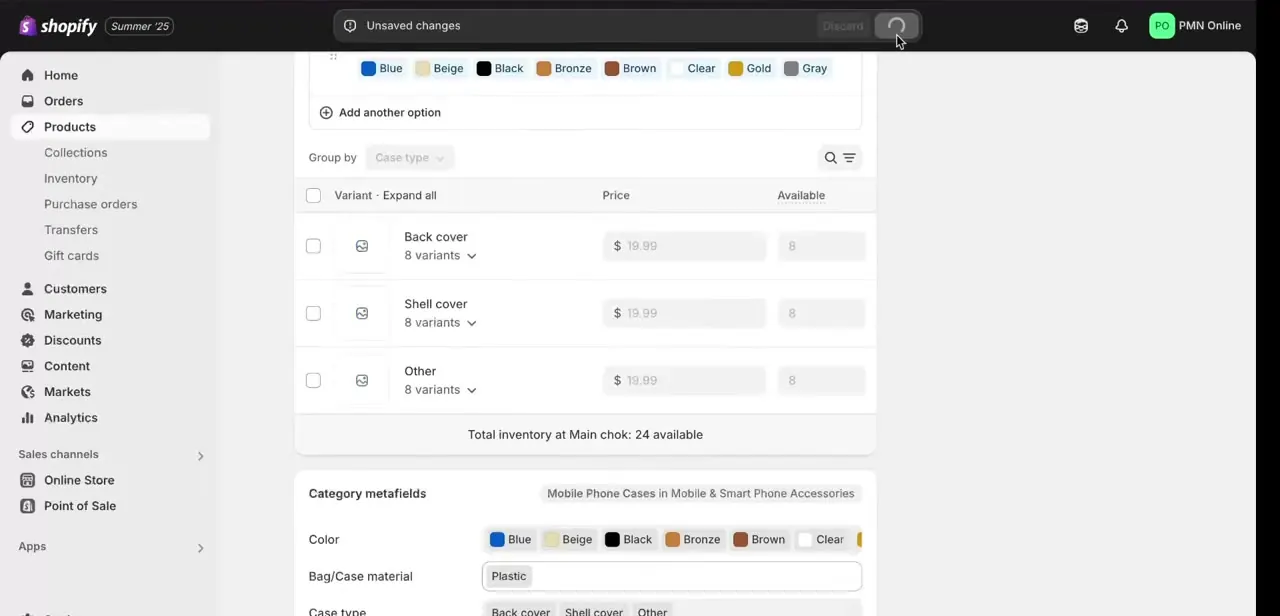
If your product has variants — different covers, colors, or sizes — Shopify tracks inventory per variant, not as one shared number for the whole product. This view lists each variant with its own price and Available count, and the total across all locations shown underneath.
A customer trying to buy a specific variant that shows zero here sees Sold Out even if every other variant, and the product as a whole, is well stocked. Scroll through every variant instead of only checking the top of the list; it's easy to miss one showing zero buried a few rows down.
02Check the Track quantity and continue-selling settings
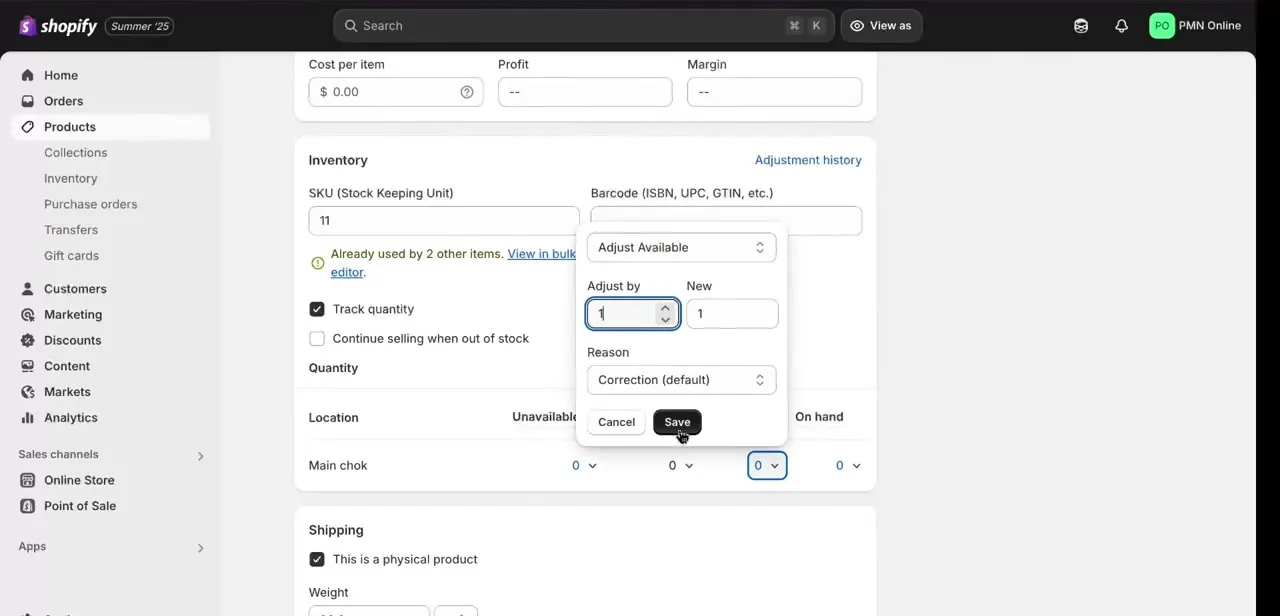
Open a specific variant's inventory panel and look at two settings together: whether Track quantity is checked, and whether Continue selling when out of stock is checked below it. Shopify only lets you turn on Continue selling once Track quantity is on.
With tracking on and continue-selling off, the moment available quantity at a location hits zero, Shopify shows Sold Out no matter what your real stock count is elsewhere. That mismatch, a number that never got updated inside Shopify itself, is a common cause when a product "has inventory" by your own count. Use Adjust Available to correct the quantity at the specific location shown, and confirm the number matches your actual count before saving.
03Confirm which location fulfills online orders
If you sell from more than one location, a warehouse and a retail store, for example, inventory is tracked separately per location. Shopify's own documentation is specific here: a product shows as out of stock online if the location assigned to fulfill online orders has zero inventory, even when other locations that don't fulfill online orders are fully stocked.
Check that the location actually serving your online store carries the quantity you expect. Stock sitting at the wrong location behaves the same as no stock at all from the storefront's point of view.
04Check whether the product is included in the right market catalog
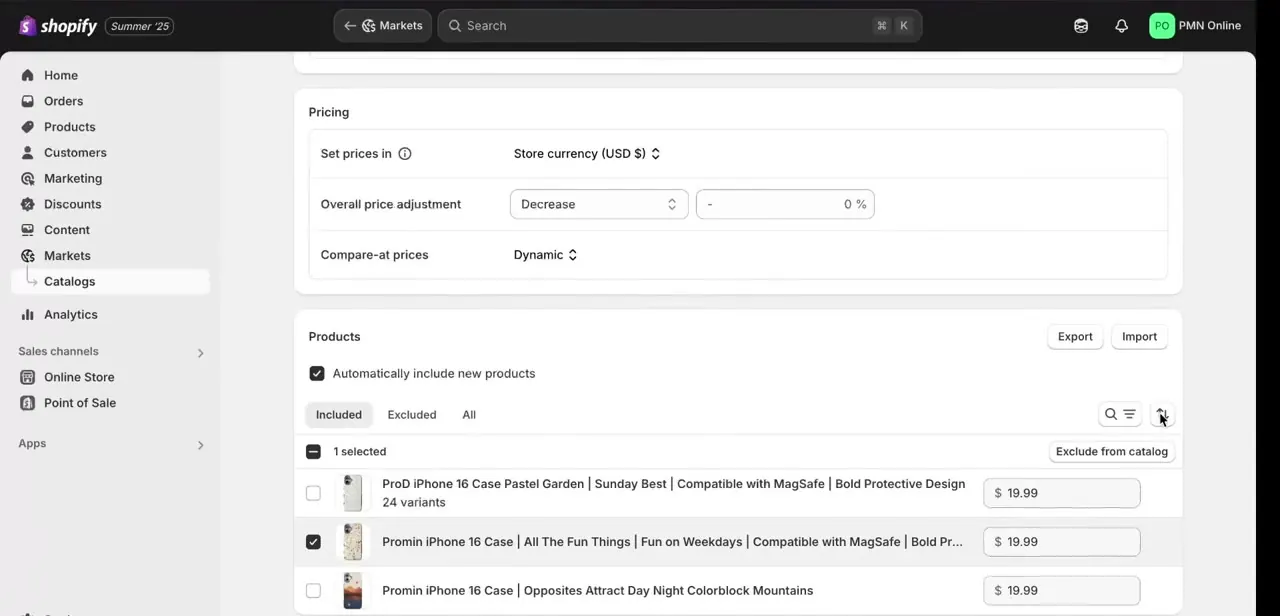
Shopify Markets lets you run separate catalogs per region, each with its own pricing rules and its own list of included or excluded products. By default every product is available in every market; a catalog is what narrows that down.
If a product sits in a market's Excluded list instead of its Included one, Shopify treats it as unpublished in that market: it drops out of search there and a customer who reaches its page directly gets redirected to the store's homepage. Check this if sold-out reports are coming from one specific region rather than everywhere.
05Confirm the sales channel itself is publishing the product
Separate from Markets, each product has its own per-channel publishing status, shown in the product's Publishing section (labelled Sales channels on the Shopify mobile app) covering Online Store, Shop, Facebook, and any other channel you've connected. A product's overall status can be Active and it can still be hidden from a single channel if that channel is unchecked here. Open the product's Publishing section and confirm every channel you actually sell through is selected.
06Save, refresh, and test as a real customer would
After correcting inventory, toggles, location quantities, or channel settings, save the change and reload the storefront in a private browser window instead of trusting the admin preview; caching can occasionally show an old state for a few minutes. Add the specific variant that was showing Sold Out to a cart the way a customer would, not just checking that the product page looks right, to confirm the fix holds through checkout.
When it doesn't work
One variant shows Sold Out while the rest of the product is in stock
Why: Shopify tracks inventory per variant, and Available quantity for that one variant has hit zero at the location serving online orders.
Fix: Open that variant's Inventory panel, use Adjust Available to correct the count for the correct location, or enable Continue selling when out of stock if you intend to sell past zero.
Stock is correct in the backend but the storefront still shows Sold Out
Why: Inventory may be sitting at a location that isn't the one assigned to fulfill online orders, so the online-facing count is still zero.
Fix: Check which location is set to fulfill online orders and confirm stock is recorded there, not only at a warehouse or retail location that doesn't serve the storefront.
The product is in stock everywhere but customers in one country report it as unavailable
Why: The product is on that market's Excluded list in Shopify Markets, or the catalog assigned to that market simply doesn't include it.
Fix: Open the market's Catalogs settings, find the product under the Excluded tab, and move it to Included.
The fix was applied in admin but the storefront hasn't updated
Why: The browser is serving a cached version of the page rather than the current state.
Fix: Reload in a private/incognito window, which bypasses the cached copy, before assuming the setting didn't save.
Frequently asked questions
Why does Shopify show "Sold Out" when I have stock?
Most often a variant has zero tracked quantity at the location serving online orders, or "Continue selling when out of stock" is left off. Both are fixable directly in the variant's inventory panel.
Could this be a variant-specific issue?
Yes. Shopify tracks inventory per variant, so one variant can show as sold out while others, and the product as a whole, have plenty of stock.
Does my sales channel or market setup affect stock display?
Yes. A product unpublished from a specific sales channel, or excluded from a market's catalog, shows as unavailable there regardless of actual stock levels.
Do I need an app to fix inventory tracking?
No. The fixes here happen in Shopify admin's variant inventory settings, location quantities, and Markets catalog settings. No extra app is required.
Does 'Continue selling when out of stock' work everywhere, including in-store?
No. Shopify's documentation notes it doesn't apply to Shopify POS; staff can still oversell at the register, but they get a warning first.
Sources and last check
Click paths and screens come from a recorded walkthrough. The inventory-tracking, multi-location, and Markets-catalog behavior were re-checked against Shopify's official Help Center in September 2026 and match. One correction: the per-channel publishing area is Shopify's Publishing section (Sales channels on mobile), not "Sales channels and apps" as the article previously called it.
About the author

Impran M N
I've been hooked on technology for as long as I can remember — especially the new tools and AI apps that seem to land every other week. Easy Tech Tuts is where I write up whatever I've just worked out: I do the task in the real product, record the screen, and turn it into the guide I wish I'd found first.



