 Easy Tech Tuts
How To Fix 'No Delivery Available' Error At Checkout in Shopify Easily 2026
By Impran M NLast checked against official docs
"No Delivery Available" is one of the most expensive errors a Shopify store can show, because it appears at the exact moment a customer is ready to pay. The message almost never means something is broken.
It means Shopify looked for a shipping rate that covers this customer's address and this specific product, and found none. That makes it a configuration problem with a small number of possible causes: a shipping zone that doesn't include the country, a delivery profile a product was never added to, a market that isn't active, a missing product weight, or a store origin address Shopify can't ship from. This guide walks each of those in the order that finds the problem fastest, so you can stop guessing and get checkout working again in one pass.
01Reproduce the error before you change anything
Start by proving to yourself which combination fails. Add the affected product to your cart, go to checkout, and enter the same country and postcode the customer used.
Then try a second address in a country you know works. If one address produces rates and the other doesn't, the problem is geographic and lives in your shipping zones or markets.
If every address fails but only for one product, the problem is that product's profile or its shipping settings. Doing this first saves you from changing five settings and never knowing which one mattered. Everything after this happens in your Shopify admin, so keep it open in another tab.
02Open your shipping zones and check the country is listed
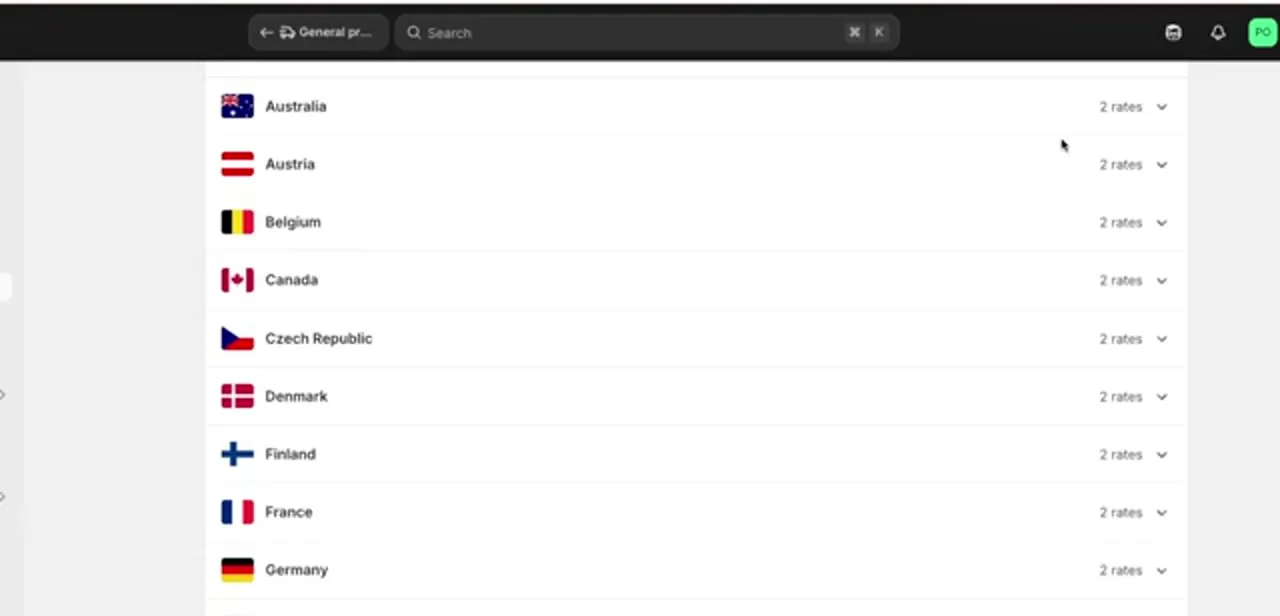
Go to Settings, then Shipping and delivery, and open the General shipping profile. Inside it you'll see your shipping zones, each one holding a list of countries or regions with the number of rates attached to each.
This is the single most common cause of the error: if the customer's country simply isn't in any zone, Shopify has nothing to quote and checkout shows no delivery options at all. Scan the list for the country that failed.
A country can also be present but sitting at zero rates, which fails exactly the same way as being absent. Check the rate count next to each entry, not just whether the name appears.
03Confirm the market covering that region is active
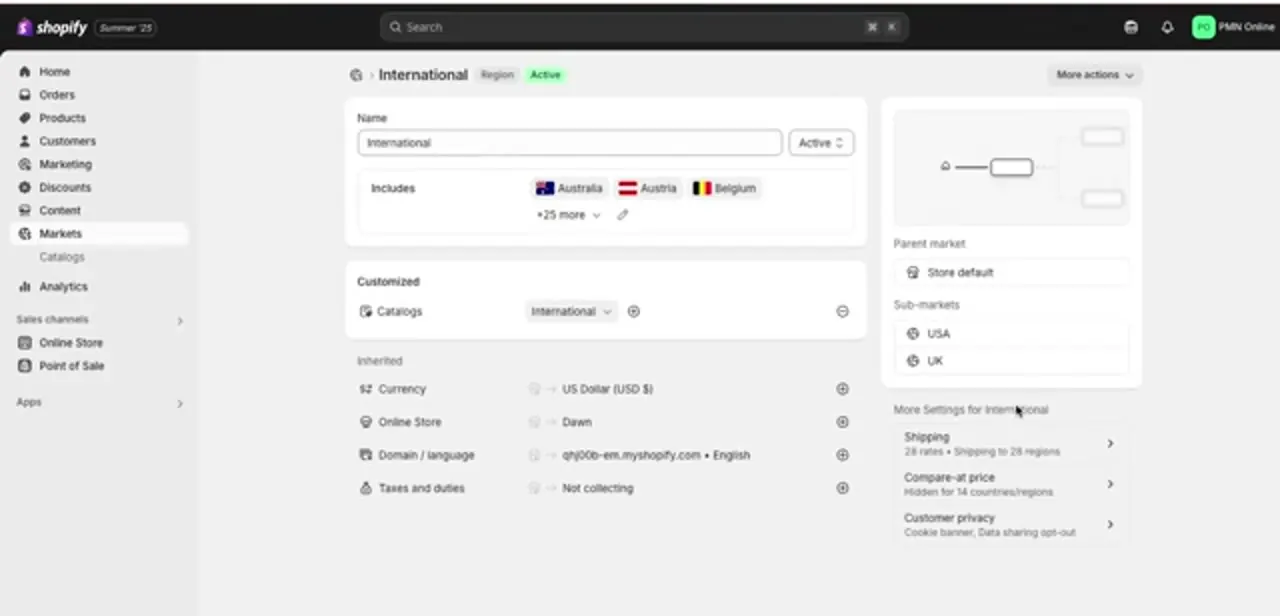
Shipping zones sit underneath Markets, and a zone can be perfectly configured while the market that contains it is switched off. Open Markets from the left menu and check the region the customer is in: the status should read Active, and the region should include their country in its Includes list.
Each market also carries its own shipping settings, shown as a rate and region count you can click into. If you recently added countries to a market, or duplicated a market to experiment with pricing, this is where the mismatch usually hides. The country is in the market list, but the market itself was never activated, so checkout treats it as unsupported.
04Make sure every product belongs to a delivery profile
Delivery profiles let you charge different shipping for different products, and they are the second big source of this error. Any product not explicitly assigned to a custom profile falls back to the General profile, which is fine unless someone created a custom profile, moved products into it, and gave it a narrower set of zones than the general one.
In practice, if a single product fails at checkout while everything else works, it's almost always in a custom profile whose zones don't cover that buyer. Open Shipping and delivery, look at each custom profile, and confirm its zones match the countries you sell to.
05Fix product weight and the physical product setting
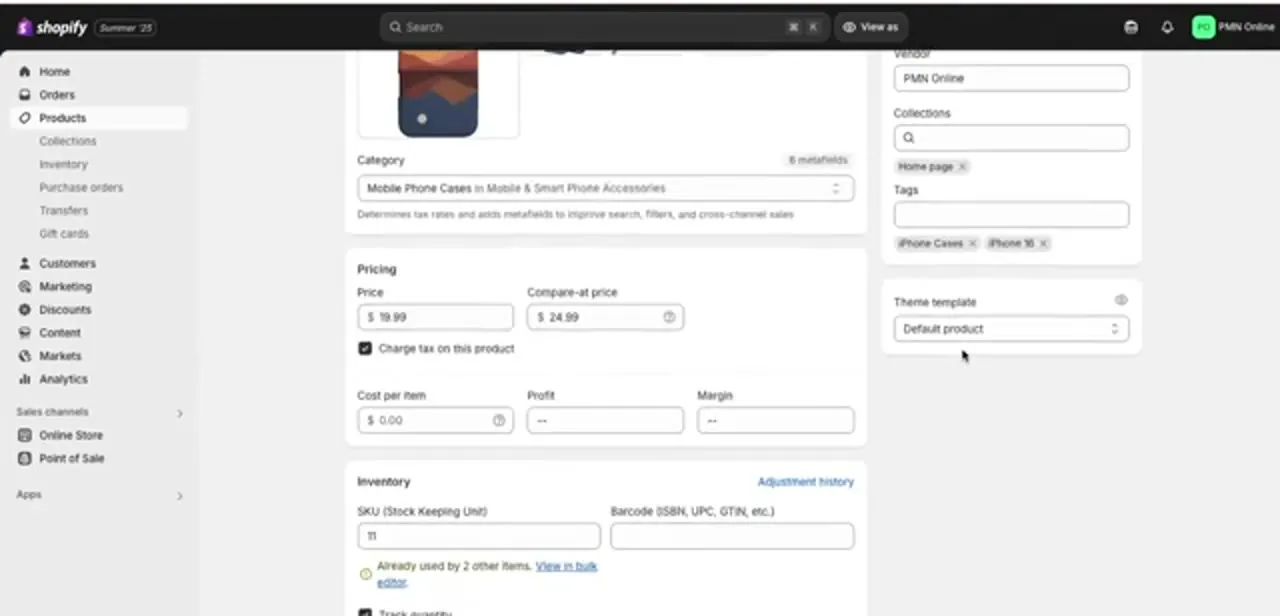
If your rates are weight-based, a product with no weight can quietly fall outside every rate band you defined. Open the product, scroll to the Shipping section, and confirm "This is a physical product" is ticked and a realistic weight is entered.
Two failure modes are worth knowing: a weight of zero can fall below a "0.5 kg and up" rate, and an accidentally huge weight can exceed your top band. Also check the opposite case: if a digital product is marked as physical, Shopify demands a shipping rate for something that never ships. Fix these at the variant level too, since variants each carry their own weight.
06Check your store address, locations, and the checkout method used
Shipping rates are calculated from somewhere, and that somewhere is your locations. Under Settings, check that your store's address is complete and that at least one location has "Fulfil online orders from this location" enabled.
A location with an incomplete address (missing postcode, or an unrecognised region) can prevent rates from generating even when your zones look perfect. If you fulfil from multiple locations, remember Shopify needs a rate that works from the location holding stock for that item, so a product stocked only at a warehouse not set up for online fulfilment fails while identical products succeed. If you use local delivery specifically, also check which payment method the customer chose: local delivery works with Shop Pay, but Shopify doesn't offer it alongside Apple Pay, Google Pay, Amazon Pay or PayPal.
07Re-test checkout and confirm the fix
After each change, run the same test checkout you did at the start instead of saving everything and testing once. That way you learn which setting was at fault, which matters when the error returns in six months.
Test at least three addresses: the one that originally failed, a domestic one, and one in a far-off zone. Clear your cart between attempts, since a stale cart can hold on to a previously calculated rate and mislead you. Once delivery options appear for all three, place a real low-value order end to end to confirm the rate carries through to payment.
When it doesn't work
The country is in a shipping zone, but checkout still shows no delivery options
Why: The zone lists the country but has zero rates attached to it, which fails exactly like the country being absent.
Fix: Open the zone and check the rate count next to the country, not just whether the name is listed, then add at least one rate.
One country works in every other market but fails at checkout even though it's in a zone
Why: The market containing that zone is inactive, or was never activated after countries were added to it.
Fix: Open Markets, find the region, and set its status to Active. Checkout treats an inactive market's countries as unsupported even when the zone underneath is configured correctly.
Delivery disappears only when a customer pays with Apple Pay, Google Pay, Amazon Pay or PayPal
Why: Local delivery works with Shop Pay, but Shopify doesn't support it with any other accelerated checkout.
Fix: Confirm which payment method the customer used before troubleshooting zones or profiles. If every checkout method needs to work for a market, rely on standard shipping rates instead of local delivery there.
Frequently asked questions
Why does "No Delivery Available" appear for only some customers?
Because the cause is usually geographic. Their country either isn't in one of your shipping zones, sits in a zone with zero rates, or belongs to a market that isn't active, while everyone else falls inside a zone that works fine.
Can incorrect product weight cause this error?
Yes, if your rates are weight-based. A product with no weight, or a weight outside every rate band you defined, gives Shopify nothing to match, so it returns no delivery options for that cart.
Why does delivery disappear only when a customer pays with Apple Pay or PayPal?
Local delivery only works with Shop Pay among Shopify's accelerated checkouts. Apple Pay, Google Pay, Amazon Pay and PayPal all skip local delivery as an option, so a customer who picks one of those sees no delivery method even though local delivery is set up correctly for standard checkout.
Do I need a shipping app to fix this?
No. Almost every case is solved inside Settings, Shipping and delivery (zones, rates, and delivery profiles), plus the product's own shipping section. Apps are worth considering only once basic rates work and you want carrier-calculated pricing.
How do I work out which setting is causing it?
Test the same cart against several addresses. If one country fails and others pass, it's zones or markets. If one product fails everywhere, it's that product's delivery profile or weight. If everything fails, look at your store address and locations.
I fixed the setting but the error is still showing. Why?
Usually a stale cart. Empty the cart, start a fresh checkout, and try again in a private window. If it persists, confirm you edited the profile the product belongs to, not the General profile.
Sources and last check
Click path and screens come from a walkthrough recorded in 2025. Re-checked against Shopify's own help center documentation on shipping zones and local delivery in September 2026, which confirmed the zone, market and weight causes already in the article and surfaced one it didn't cover: local delivery is unavailable with Apple Pay, Google Pay, Amazon Pay and PayPal, and only works alongside Shop Pay. That constraint has been added as a step, a troubleshooting entry and an FAQ.
About the author

Impran M N
I've been hooked on technology for as long as I can remember — especially the new tools and AI apps that seem to land every other week. Easy Tech Tuts is where I write up whatever I've just worked out: I do the task in the real product, record the screen, and turn it into the guide I wish I'd found first.



