 Easy Tech Tuts
How to Connect Walmart to Shopify Easily 2026
By Impran M NLast checked against official docs
Walmart Marketplace puts your products in front of shoppers who will never find your standalone Shopify store, and you don't need a second inventory system to get there. A connector app bridges the two platforms so your catalog, stock levels, and orders stay in one place.
This guide walks through installing that connector from the Shopify App Store, what it costs once the trial ends, and linking an approved Walmart seller account. The screens follow the video, checked against the app's own pricing and setup docs.
Before you start
- An approved Walmart Marketplace seller account
- A Shopify store with the products you want to sell already in your catalog
01Search the Shopify App Store for a Walmart connector
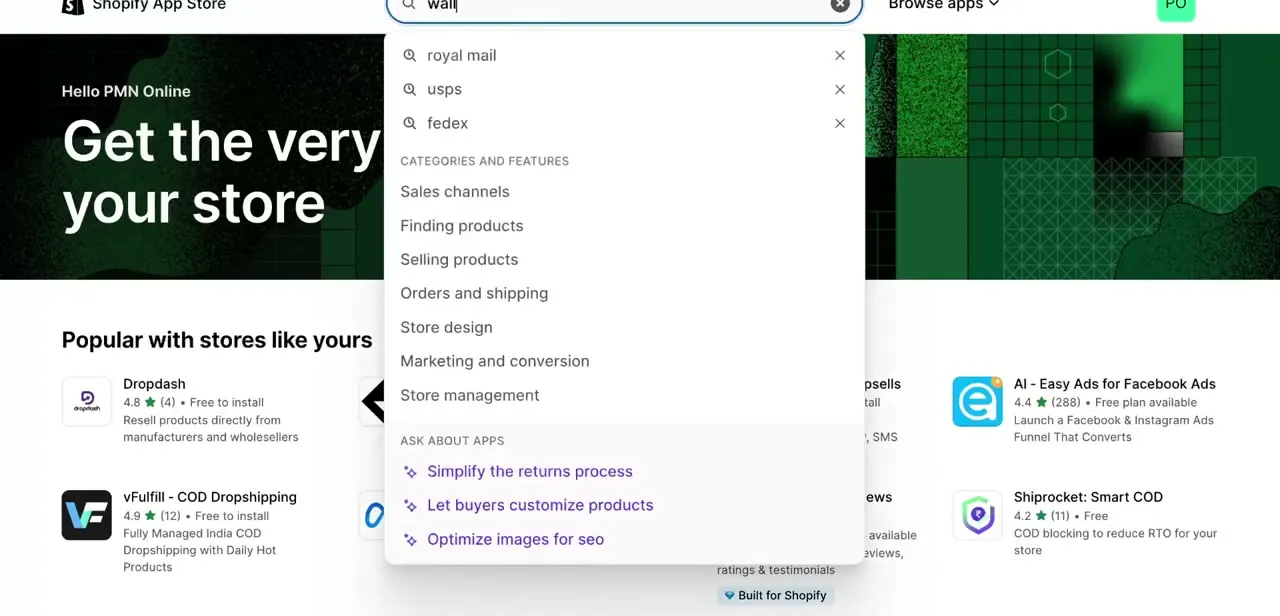
From your Shopify admin, open the App Store and type "walmart" into the search bar. Shopify's autocomplete surfaces related searches like carrier names and category filters such as Sales channels and Selling products before you even finish typing, useful if you want to browse instead of searching directly. Several apps handle the Walmart connection; the video uses CedCommerce Walmart Connector, a long-standing Shopify partner that runs over a dozen marketplace-specific connector apps and is Walmart's own channel integration partner.
02Check the app's real cost before installing
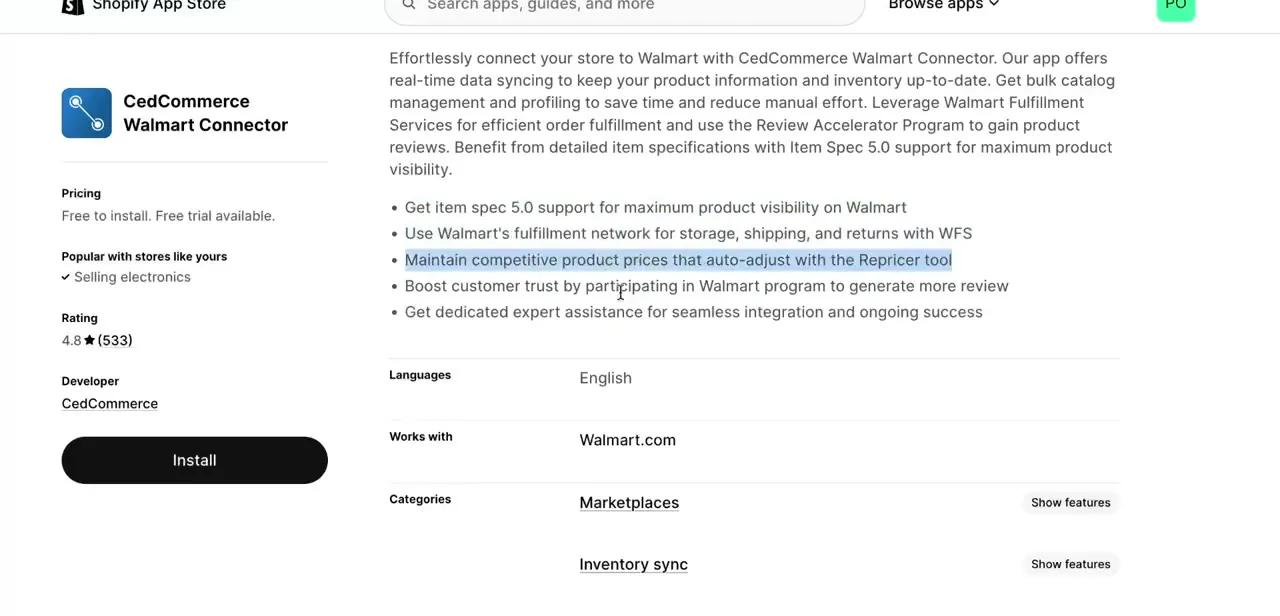
Before installing anything that touches your product and order data, open the app's listing page and read what it claims to handle. CedCommerce's listing describes real-time catalog and inventory syncing, bulk product management, optional use of Walmart Fulfillment Services, and a repricer tool that adjusts your prices automatically.
Installing costs nothing, but using the app past its 7-day trial requires one of four paid tiers, priced by how many SKUs and monthly orders you need to move through Walmart (see the table below). Skimming the listing and the pricing page together tells you whether the app matches what you need: some sellers only want catalog sync, others want Walmart to handle fulfillment too.
03Install the app and approve its permissions
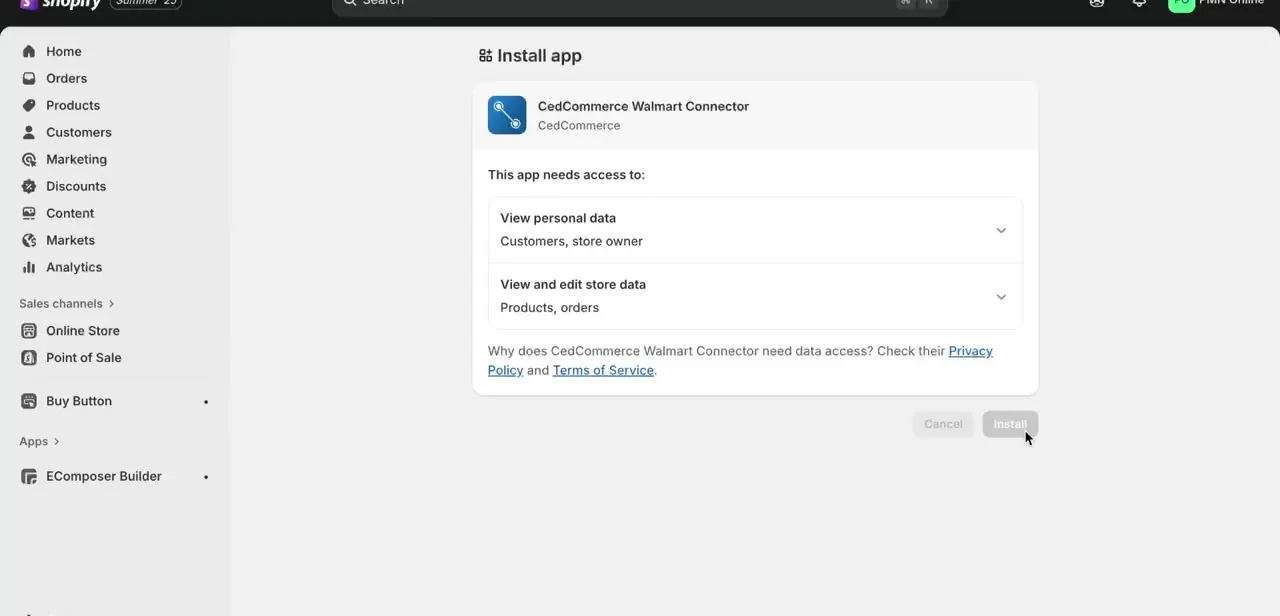
Clicking Install brings up a permissions screen listing exactly what the app can see and change: personal data like customers and store owner details, and store data including products and orders. This is where it pays to read the list instead of clicking through it.
A Walmart connector legitimately needs product and order access to do its job, but you should still know what you're granting. Confirming here installs the app into your Shopify admin, where it appears in your apps list for every future session.
04Connect your approved Walmart Seller account
Once installed, the app walks you through linking your Walmart Seller Center account. CedCommerce's own setup guide describes this as access-token-based authentication: you generate API credentials inside Walmart Seller Center and enter them into the app.
This step only works with an approved Walmart Marketplace seller account already in place. The connector links two existing accounts; it doesn't create a Walmart seller profile for you. If you haven't applied to sell on Walmart Marketplace yet, that application needs to clear first, and Walmart runs its own approval process independently of Shopify or CedCommerce.
05Sync your product catalog
With accounts linked, the app pushes your Shopify products to Walmart, mapping titles, images, pricing, and variants into Walmart's Item Spec 5.0 format. CedCommerce calls this step profiling: matching your Shopify product data to Walmart's category and attribute requirements in bulk.
Review the mapped listings before they go live. Walmart's category and item-spec rules don't always translate cleanly from a Shopify product page, and getting this right the first time avoids a batch of rejected or mismatched listings later.
06Manage Walmart orders from your Shopify admin
Once products are live and selling, Walmart orders flow back into the same admin you already use for Shopify orders, so fulfillment doesn't mean switching between two dashboards. This is the real payoff of the integration: one order queue, one inventory count, and one place to update tracking instead of manually reconciling two separate systems every time something sells.
| Plan | Monthly price | SKU limit | Orders / month |
|---|---|---|---|
| Lite | $9 | 100 | 10 |
| Basic | $29 | 2,000 | 300 |
| Standard | $59 | 5,000 | 500 |
| Premium | $99 | 10,000 | 1,000 |
Every tier includes a 7-day free trial; annual billing saves 5-12%. Figures from the app's Shopify App Store listing, checked September 2026. Confirm current pricing before committing, since app pricing changes independently of this guide.
When it doesn't work
Walmart rejects or flags products after they sync
Why: Walmart's Item Spec 5.0 category and attribute requirements don't match what came over from the Shopify listing.
Fix: Review the mapped attributes in the app's profiling step before pushing products live, and fix category mismatches there instead of after Walmart rejects them.
Syncing stops working after the first week
Why: The 7-day free trial ended without a paid tier selected.
Fix: Pick a plan before the trial expires. The app doesn't keep syncing on an expired trial.
The app can't connect to a Walmart account
Why: Either the Walmart Marketplace seller application hasn't been approved yet, or the API credentials entered into the app are wrong or expired.
Fix: Confirm Walmart Seller Center shows an approved, active account, then regenerate the API credentials and re-enter them in the app.
Frequently asked questions
Do I need a separate Walmart Seller account?
Yes. You need an approved Walmart Marketplace Seller account before you can connect it to Shopify. The connector app links two existing accounts; it can't create a Walmart seller profile for you.
Is the Walmart integration app free?
Installing CedCommerce Walmart Connector costs nothing, and every tier includes a 7-day free trial. After that, pricing runs from $9/month for the smallest tier to $99/month for the largest, based on how many SKUs and orders you need. See the pricing table above.
Will inventory stay in sync between Walmart and Shopify?
Yes. Integration apps like this one sync inventory levels automatically so stock counts stay accurate across both platforms once your catalog is mapped and synced.
Can I fulfill Walmart orders the same way as Shopify orders?
Yes. Once synced, Walmart orders appear in your Shopify admin alongside your regular orders and can be fulfilled using your normal fulfillment process.
What happens if my Walmart seller application isn't approved yet?
The connector has nothing to link to. Walmart's seller approval is a separate process run by Walmart itself, and it needs to clear before any Shopify connector app, CedCommerce included, can authenticate against your Seller Center account.
Sources and last check
Click path and screens come from a recorded walkthrough. Pricing, SKU/order limits, the trial length, and the API-credential connection step were checked against CedCommerce's Shopify App Store listing and its own integration guide in September 2026. That check corrected the earlier 'free to install with a free trial' line, which understated the app's paid tiers.
About the author

Impran M N
I've been hooked on technology for as long as I can remember — especially the new tools and AI apps that seem to land every other week. Easy Tech Tuts is where I write up whatever I've just worked out: I do the task in the real product, record the screen, and turn it into the guide I wish I'd found first.



