 Easy Tech Tuts
How to Block Fake Orders on Shopify | Protect Your Revenue | Easily 2026
By Impran M NLast checked against official docs
Fake and fraudulent orders don't just waste time, they can lead to real financial losses through chargebacks, wasted inventory, and shipping costs on orders that were never legitimate. Most stores don't notice the problem until a chargeback notice arrives weeks after the product already shipped, by which point there's nothing left to recover.
This guide covers how to spot suspicious orders on Shopify and set up blocking before they get fulfilled, instead of relying on catching them after the fact. It's aimed at store owners who want a more secure checkout without adding friction for legitimate customers, especially heading into higher-traffic periods when fraud attempts tend to spike alongside real sales.
01Understand why fake orders are a risk
Fraudulent transactions can lead to chargebacks, lost inventory, and wasted resources, so recognizing the scale of the problem is the first step toward addressing it. A single stolen-card order that ships before the chargeback lands costs you the product, the shipping, and a chargeback fee on top: three losses from one bad order, on top of the processing fees you already paid to accept the payment. Stores running seasonal promotions or flash sales are especially exposed, since fraud attempts spike whenever bot traffic and urgency both increase, and a high enough chargeback rate can eventually put your payment processing account itself at risk.
02Check your admin for existing protection
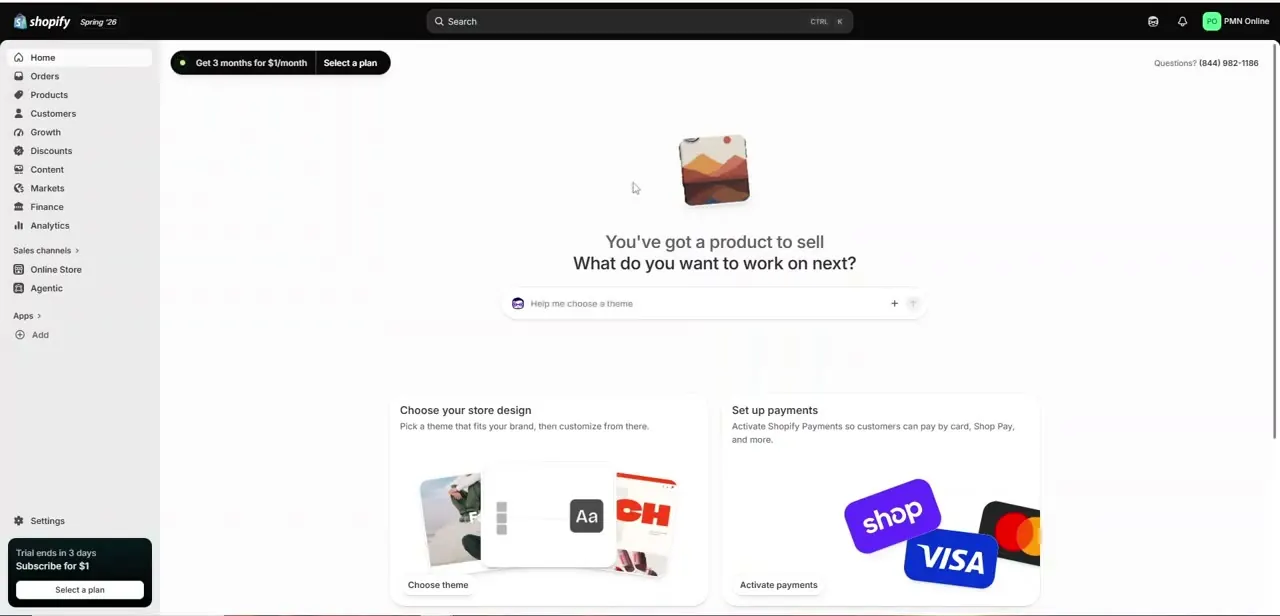
Before adding anything new, look at what's already installed. A fresh or unprotected store's admin shows an empty Apps section under Sales channels, with nothing standing between checkout and fulfillment except Shopify's baseline fraud analysis. That baseline flags some risk on the order page itself, based on signals like address mismatches and unusual purchasing patterns, but it isn't built to actively block traffic the way a dedicated fraud app is, so an empty Apps list is a sign that more active protection is worth adding before volume picks up.
03Identify the signs of a fake order
Learn to spot common red flags in order details so you can catch suspicious transactions before they're fulfilled: mismatched billing and shipping addresses, unusually large orders from brand-new accounts, rapid repeat attempts with slightly different card numbers, and orders placed through a VPN from a country you don't normally ship to. None of these alone proves fraud, but two or three stacking on the same order is a strong signal to hold it for review instead of fulfilling it automatically.
Keep a running note of patterns specific to your store too. A store selling high-value electronics attracts different fraud patterns than one selling low-cost apparel, so your review process should reflect that instead of treating every order type as equally at risk.
04Turn on Fraud Control, or install a third-party app for more
Shopify has its own free, built-in app for this called Fraud Control, found under Apps in your admin. It gives you a dashboard of fraud analytics (chargebacks, cancelled orders, risk exposure) and lets you write checkout-blocking rules based on email address, IP address, or billing address.
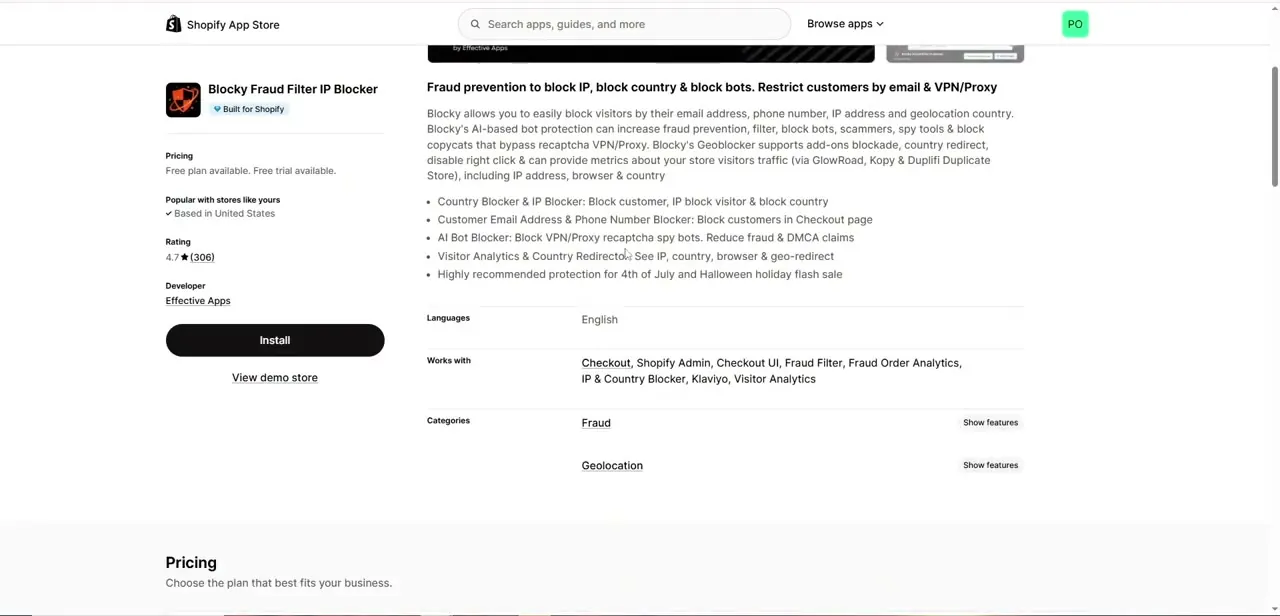
Two things to know before relying on it: its blocking rules only work for stores using Shopify Payments as the payment processor, and it doesn't do country-level blocking or AI bot detection on its own. For those extras, the Shopify App Store carries third-party fraud-prevention apps that add IP and country blocking, email and phone blocklists, and AI-based bot detection to filter scrapers and VPN traffic before checkout.
Most list a free plan to test detection rules against your own order volume before committing to a paid tier. Check the review count and recency before installing, since fraud tactics shift and an app with stale reviews may not reflect how it performs against current attacks.
05Configure blocking rules for your store
Once installed, set up rules that match your actual customer base instead of copying a generic template. If you only ship domestically, blocking international IP addresses and VPN traffic removes a large share of fraud attempts immediately. If you sell globally, lean more on email and phone blocklists plus manual review for orders that trip multiple risk signals, so legitimate international customers who are traveling or using a work VPN don't get turned away at checkout.
06Review flagged orders, then tune your rules over time
Automation should reduce your manual workload, not eliminate your judgment. Build a habit of checking flagged or held orders daily instead of letting them sit, since a delay in review is often what turns a preventable chargeback into an actual loss: inventory already shipped can't be un-shipped.
Most fraud apps surface these in a dedicated queue separate from your normal order list, which makes a quick daily scan realistic even for a small team. When in doubt on a specific order, a manual verification call or email to the customer often resolves ambiguity faster than judging intent from data alone.
After a few weeks of live data, revisit your blocking rules. If legitimate customers are getting caught in your filters, loosen the specific rule causing it instead of disabling protection broadly.
If a fraud pattern keeps slipping through, tighten that one rule instead of rebuilding the whole setup. Keep a simple log of which rule caught which order, even a basic spreadsheet, so you can see which protections are earning their keep and which haven't triggered in months.
When it doesn't work
Fraud Control's checkout-blocking rules don't seem to block anything
Why: Fraud Control's rule-based blocking only functions for stores using Shopify Payments as the payment processor.
Fix: Confirm Shopify Payments is active under Settings > Payments, or use a third-party fraud app instead if you're on a different processor.
Fraud Control shows analytics but nothing gets blocked automatically
Why: Fraud Control surfaces risk data and lets you build rules yourself; it doesn't screen every order automatically the way some third-party apps do.
Fix: Go to Rules > Create rule inside the app and add explicit email, IP, or billing address conditions.
International customers keep getting blocked even though they're legitimate
Why: Country- or IP-based rules are usually too broad for a store with real international traffic.
Fix: Loosen or remove the geographic rule and lean on email and phone blocklists plus manual review instead.
Frequently asked questions
How can I tell if a Shopify order is fake?
Suspicious orders often show mismatched shipping and billing details, VPN or unexpected-country traffic, or rapid repeat attempts with different cards, which is exactly what a fraud-blocking app is built to flag.
Do I need an app to block fraudulent orders?
Shopify's built-in order-risk analysis flags some basics, but active blocking takes more: either Shopify's own free Fraud Control app (its rules only work with Shopify Payments) or a third-party fraud app from the App Store for country-level blocking and bot detection.
Will blocking fake orders affect real customers?
It can if your rules are too broad, so start with the free tier of a fraud app, watch what gets flagged, and tune rules to your actual customer base instead of applying a generic blocklist.
Can AI help reduce fake orders on Shopify?
Third-party fraud apps in the App Store use AI-based bot detection to identify scraper and VPN traffic patterns; Shopify's own native Fraud Control app is rule-based rather than AI-driven.
Are fraud-blocking apps free on Shopify?
Shopify's native Fraud Control app is free. Third-party apps typically offer a free plan with paid tiers unlocking higher order volume or more advanced rules, so check the specific app's pricing before committing.
Does Shopify ever cover the loss from a fraudulent order itself?
The Fraud Control dashboard shows Shopify Protect coverage alongside your other fraud analytics, a program that can cover certain chargeback losses on eligible Shopify Payments orders. Eligibility and coverage are set by Shopify's own criteria for the order.
Sources and last check
Steps and screens come from a recorded walkthrough. Re-checked against Shopify's own Fraud Control help page in September 2026, which corrected a real gap: the article previously described only third-party App Store fraud apps, when Shopify also ships a free native Fraud Control app whose blocking rules require Shopify Payments and don't cover country-level blocking or bot detection the way third-party apps do.
About the author

Impran M N
I've been hooked on technology for as long as I can remember — especially the new tools and AI apps that seem to land every other week. Easy Tech Tuts is where I write up whatever I've just worked out: I do the task in the real product, record the screen, and turn it into the guide I wish I'd found first.



