 Easy Tech Tuts
How to Add Product Reviews to Shopify Store with Ali Reviews & import for Free Easily 2026
By Impran M NLast checked against official docs
A product page with zero reviews asks a shopper to take a leap of faith, and most won't. The Ali Reviews app closes that gap by pulling real reviews from marketplaces you may already source products from: AliExpress, Amazon, eBay, Temu, DSers, and Etsy, straight into your Shopify store.
Only AliExpress import runs on the free plan; the other five need a paid tier. This guide follows the actual setup: finding the app, matching it to your brand, and choosing between the AI-assisted AliExpress import and a CSV upload for everything else.
Before you start
- A Shopify store with the products you want reviews on already added
- Existing reviews on a matching AliExpress, Amazon, eBay, Temu, Etsy, or DSers listing, or a CSV export from a previous reviews app, to import from
01Find and install the app from the Shopify App Store
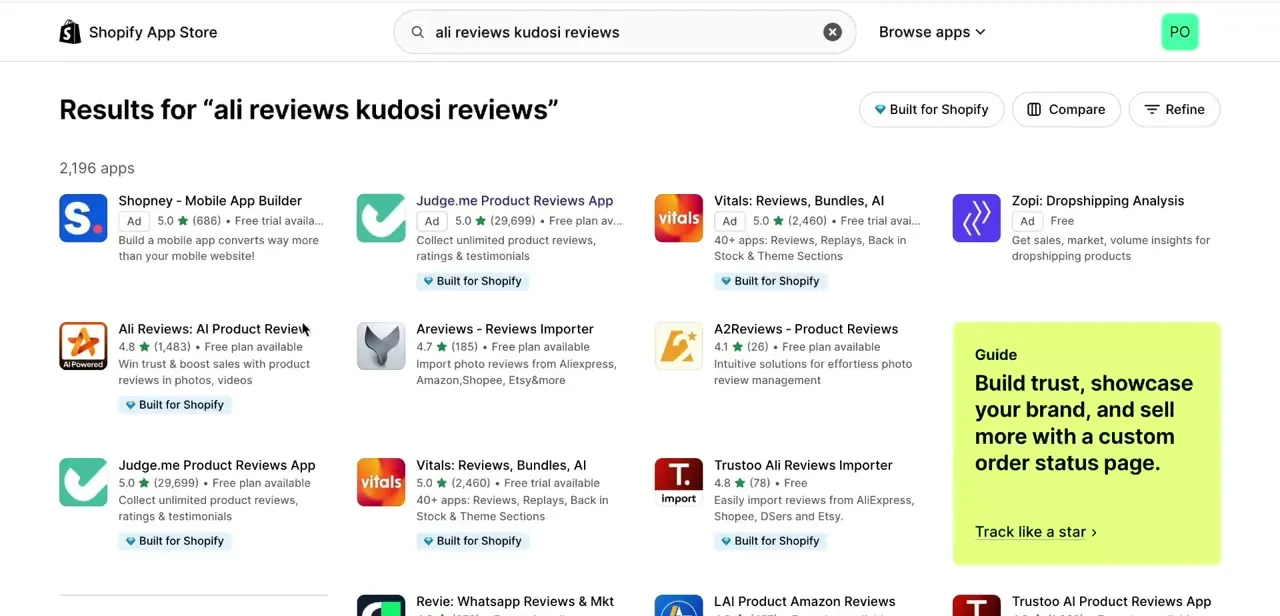
Search the Shopify App Store for Ali Reviews. It's listed as "Ali Reviews: AI Product Review" with a 4.8 rating and a free plan available, sitting alongside similar apps like Judge.me and Vitals. Once installed, it appears in your Shopify admin sidebar under Apps, but branded as Kudosi (Ali Reviews); worth knowing so you're not hunting for a separate "Ali Reviews" entry once it's live.
02Set your brand colors before importing anything
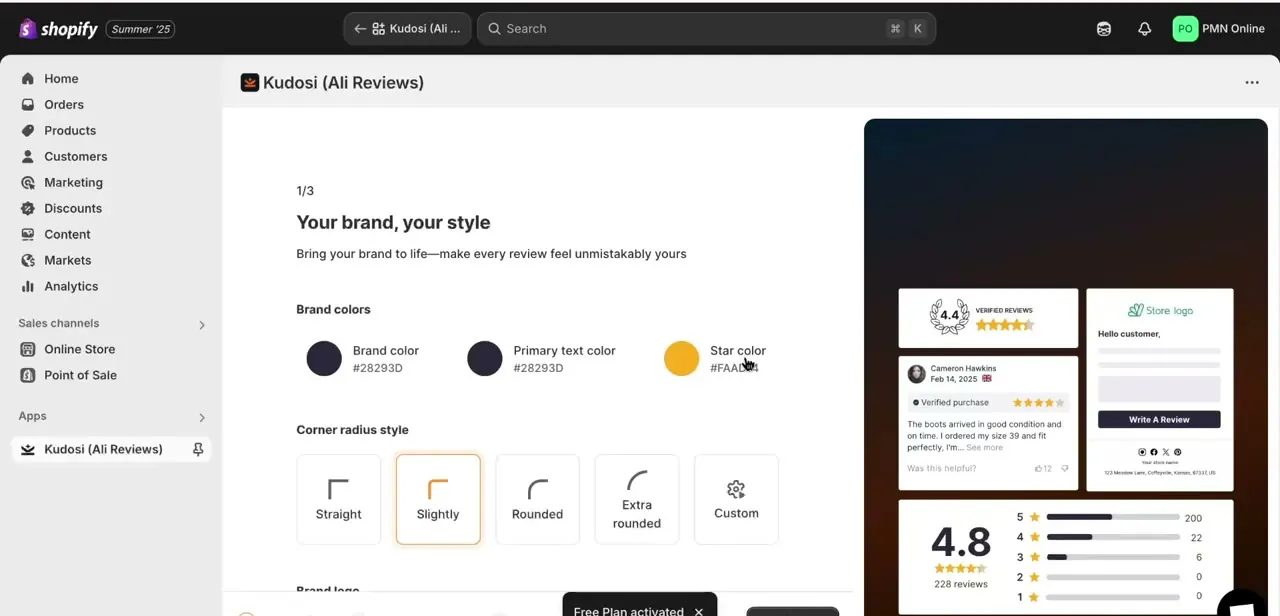
The first setup screen, labeled "Your brand, your style," asks for your brand color, primary text color, and star color, plus a corner-radius style for the review cards: straight, slightly rounded, rounded, or custom. A live preview panel on the right shows how a review card, a rating summary, and a "Write a Review" button will look on your storefront as you adjust these. Getting this right first means every review you import afterward already matches your theme instead of looking like a plugin dropped on top of it.
03Choose your review source
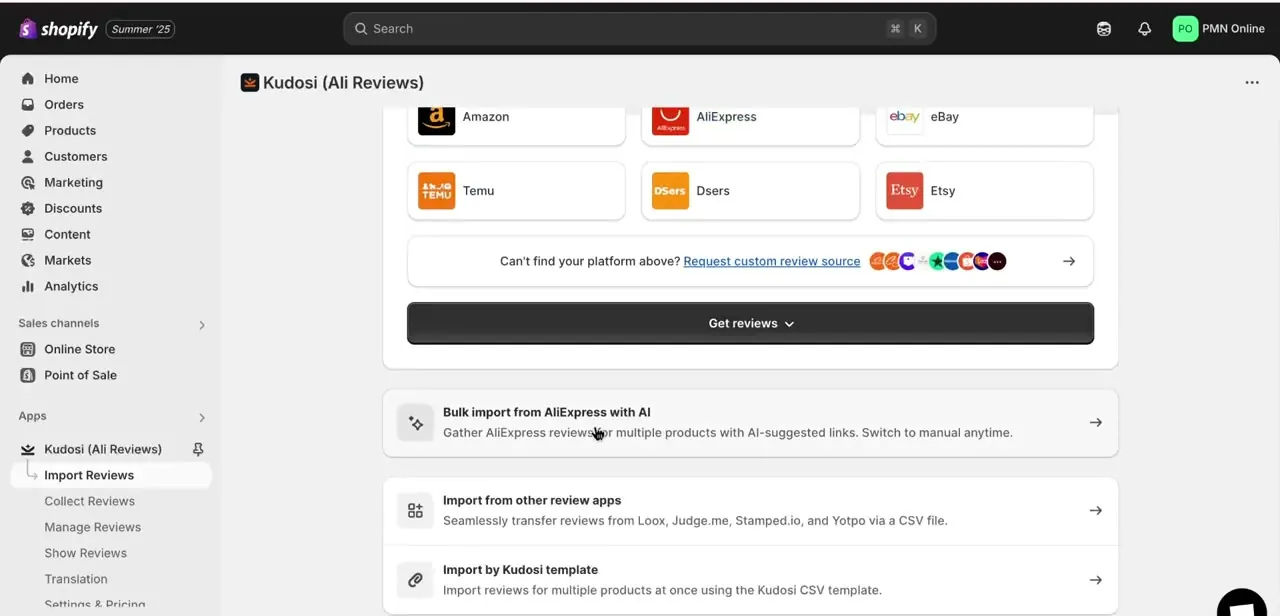
The Get reviews screen lists the platforms you can pull from: Amazon, AliExpress, eBay, Temu, DSers, and Etsy, with a link to request a custom source if yours isn't listed. Of these, only AliExpress runs on the free plan; selecting Amazon, eBay, Temu, DSers, or Etsy prompts an upgrade.
Underneath the source tiles, three import methods are laid out: bulk import from AliExpress with AI, importing from other review apps like Loox, Judge.me, Stamped.io, and Yotpo via CSV, and importing multiple products at once using the Kudosi CSV template. Pick the path that matches where your product reviews currently live, and your plan.
04Use AI bulk import for AliExpress products
If your products are sourced from AliExpress, the "Bulk import from AliExpress with AI" option gathers reviews for multiple products at once using AI-suggested links, matching each of your listings to the right AliExpress product page automatically. You can switch to manual matching at any point if the AI suggests the wrong source product, which matters if you're selling a variant or a rebranded version of something listed differently on AliExpress.
05Import by CSV for everything else
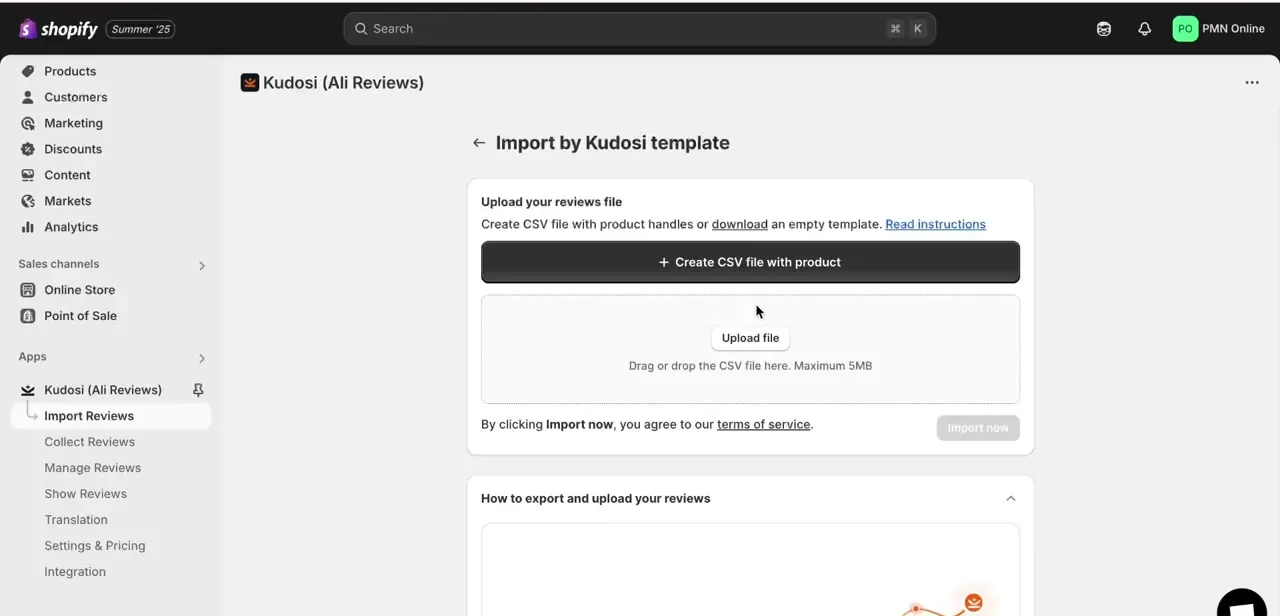
For Amazon, Etsy, eBay, or products you're moving from another reviews app, the CSV route sidesteps needing that marketplace's live scraper. Download the empty Kudosi template, fill it with product handles and review data (or export directly from your previous reviews app if you're migrating), then drag the file into the upload box; it accepts files up to 5MB.
Review the "How to export and upload your reviews" instructions on the same screen before you click Import now, since the column format has to match exactly for the import to map correctly to your products. Kudosi's plan page groups the non-AliExpress marketplaces under paid tiers for its own direct importer; check the app's current plan limits before assuming the CSV path is exempt from that.
06Turn on the display and check your product pages
With reviews imported, use the app's Show Reviews section to turn the widget on for your storefront and confirm it's placed where shoppers will actually see it, typically just below the Add to Cart button. Check a few product pages on both desktop and mobile: a widget that looks right in the admin preview can still crowd out your product description on a narrow screen if the placement isn't adjusted.
When it doesn't work
Trying to import from Amazon, eBay, Temu, Etsy, or DSers doesn't work, or prompts an upgrade
Why: The free plan only supports AliExpress import, capped at 10 published reviews per product. The other five marketplaces sit behind a paid plan.
Fix: Upgrade to a paid tier if you need those sources, or start with AliExpress reviews on the free plan and add the rest later.
A CSV import doesn't map to the right products
Why: The column format in the uploaded file doesn't match the Kudosi template exactly.
Fix: Re-download the current template and fill it in without renaming or reordering columns, or export straight from your previous reviews app instead of building the file by hand.
The review widget crowds the layout on mobile even though it looked fine in the admin preview
Why: The admin preview doesn't always reflect how a narrow mobile viewport renders the widget's position on your specific theme.
Fix: Check a few live product pages on an actual phone-width screen and adjust the widget's placement in Show Reviews if it overlaps the Add to Cart button or the description.
Frequently asked questions
Is Ali Reviews free to use for importing?
Only partly. The free plan imports AliExpress reviews and publishes up to 10 per product. Amazon, eBay, Temu, Etsy, and DSers all require a paid plan.
Which marketplaces can I import reviews from, and which need a paid plan?
The app lists Amazon, AliExpress, eBay, Temu, DSers, and Etsy as direct sources, plus CSV import from other reviews apps like Loox, Judge.me, Stamped.io, and Yotpo. AliExpress is the only one available on the free plan.
Why does the app show up as 'Kudosi' in my Shopify admin?
Kudosi is the in-app branding for Ali Reviews. After installing "Ali Reviews: AI Product Review" from the App Store, it appears in your admin sidebar as Kudosi (Ali Reviews).
Will the reviews match my Shopify theme?
Yes. The setup flow starts with a brand styling step where you set brand color, text color, star color, and corner-radius style, with a live preview so the widget matches your theme before you import anything.
Is this method for beginners or advanced users?
Both. Direct-source import from AliExpress needs no technical steps at all, while the CSV route gives more control for anyone migrating from another reviews app or working from a platform not covered by the free plan.
Sources and last check
Click path and screens come from a real Shopify admin install of the app. The plan gating (AliExpress on the free plan, up to 10 reviews per product; Amazon, eBay, Temu, Etsy, and DSers requiring a paid plan) was re-checked against the app's official Shopify App Store listing and its own help center in September 2026 and corrected; the original draft implied all six sources were free.
About the author

Impran M N
I've been hooked on technology for as long as I can remember — especially the new tools and AI apps that seem to land every other week. Easy Tech Tuts is where I write up whatever I've just worked out: I do the task in the real product, record the screen, and turn it into the guide I wish I'd found first.



