 Easy Tech Tuts
Best App for Bulk Edit Price Shopify For Free Easily 2026
By Impran M NLast checked against official docs
Changing prices on a Shopify store one product page at a time falls apart the moment you have more than a handful of SKUs. A storewide sale or a supplier cost increase can mean touching hundreds of variants by hand.
Sami Bulk Price Editor targets a field, applies a percentage or fixed change, and runs it across a catalog or a single collection in one pass, with a free plan for smaller catalogs. This guide covers installing it, running a task, and the two things its listing states plainly but are easy to miss: the free plan's 100-product cap, and that scheduling and auto-revert aren't part of the free plan at all.
01Install Sami Bulk Price Editor
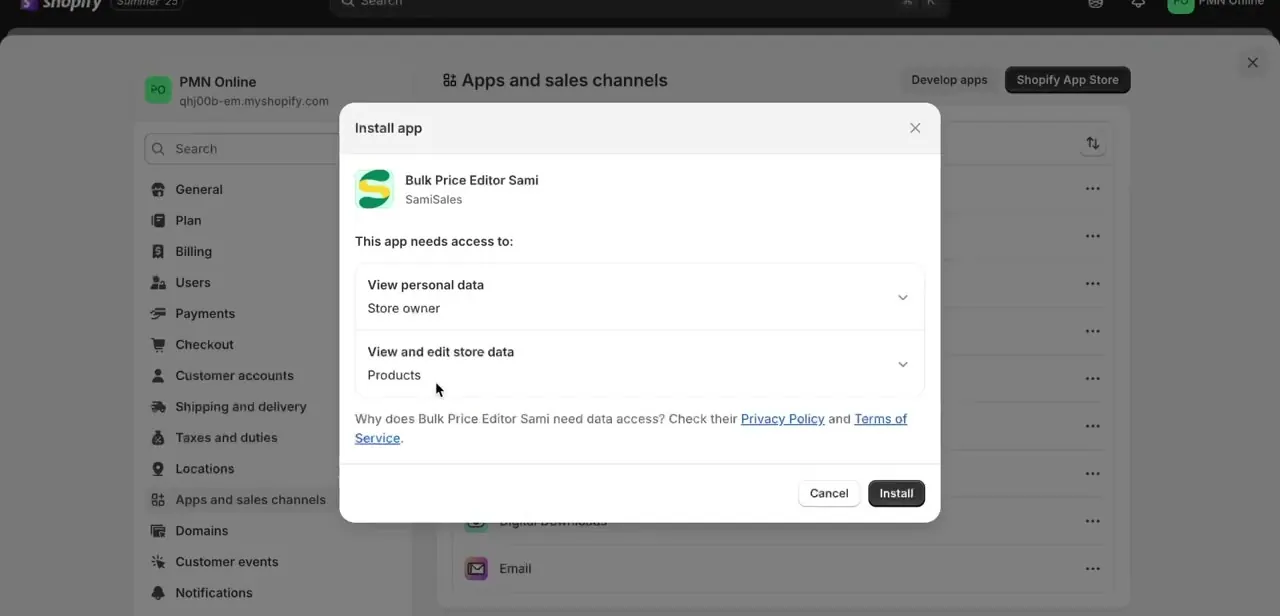
Search the Shopify App Store for "Sami Bulk Price Editor" and click install. Shopify shows a permissions screen before setup completes.
Read it in full: the app's own listing states it requests access to customer data, store owner information, product and collection data, order history going back 60 days, Online Store pages, metaobjects, files, Shopify Markets settings, and sales channel publications. A price editor's actual job only needs product data, so the customer and order access is broader than the task requires. Approve it and the app adds its own section to your Shopify admin sidebar.
02Create a bulk edit task
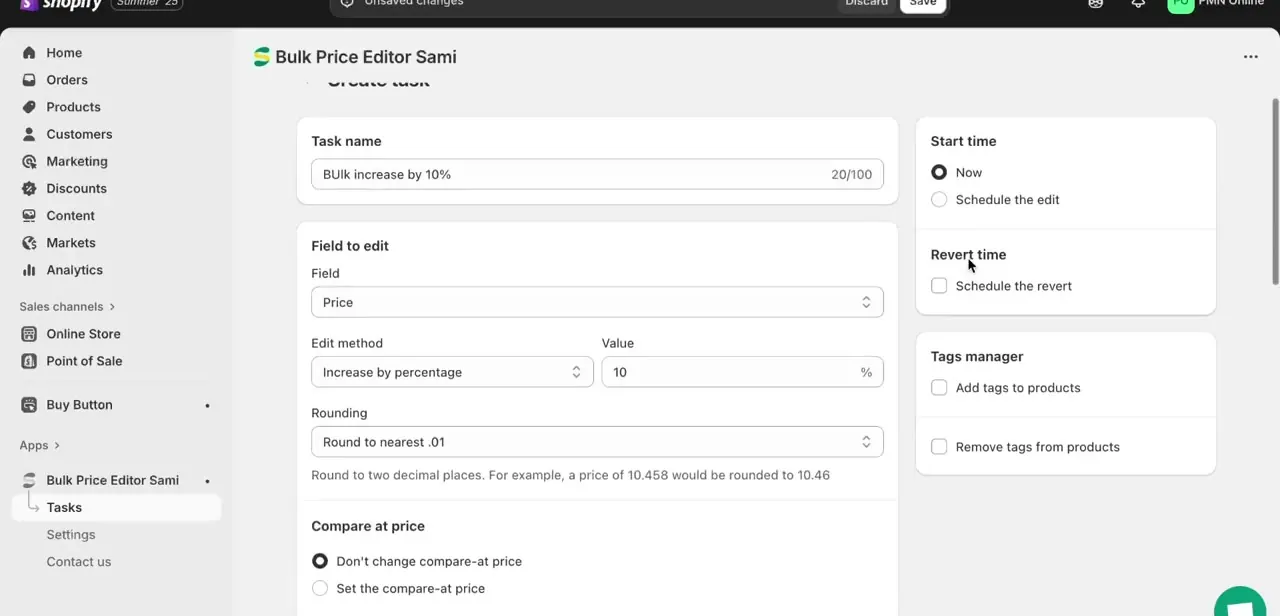
Open the app and start a new task. Name it something you'll recognize later, like "Bulk increase by 10%," since a history of past tasks is easy to lose track of otherwise.
Under Field to edit, choose Price (the app can target other product fields too). Pick a method, increase or decrease by a percentage or set a fixed value, and enter the number.
Rounding lets you round results to the nearest cent or whole number, useful when a percentage produces something like $23.0999. On the free plan, a single task tops out at 100 products. A catalog larger than that needs either multiple free-plan tasks scoped to different collections, or a paid plan: Basic raises the cap to 1,000 per task, Pro to 10,000, and Advanced removes it.
03Decide what happens to compare-at price
Below the rounding setting, the task form asks whether to leave the compare-at price alone or set it explicitly. For a genuine discount, setting compare-at to the old, higher price shows customers a strikethrough saving at checkout.
For a straight price correction after a cost change, leaving compare-at untouched is usually right. Getting this backwards is a common reason a sale shows no discount, or shows one you didn't intend.
04Preview the calculated prices before saving
Instead of running the task blind, the app shows a results table with each product's original price next to the updated price it's about to apply, so you can catch a bad multiplier or rounding surprise before it hits the storefront. In the run shown here, a set of $21.00 variants were about to move to $23.10 apiece, and a $20.99 variant to $23.09, all visible in the same table before confirming. Scroll through more than the first row: a percentage change can behave oddly on very low- or very high-priced items.
05Schedule a change and auto-revert it, if you're on a paid plan
Start time and Schedule the revert let a sale begin and end automatically, without you setting a manual reminder. This pair is Basic-plan and above, not part of the free tier: on Basic ($9.90/month) or higher, set Start time to when the sale begins and check Schedule the revert to have prices snap back the moment it ends. On the free plan, the workaround is two manual tasks: run the increase-style edit yourself when the sale starts, then run a second task reversing it when the sale ends.
| Plan | Price | Products per task | Task history | Scheduling & auto-revert |
|---|---|---|---|---|
| Free | $0 | 100 | 30 days | Not included |
| Basic | $9.90/mo ($99/yr) | 1,000 | 60 days | Included |
| Pro | $19.90/mo ($199/yr) | 10,000 | 90 days | Included |
| Advanced | $39.90/mo ($399/yr) | Unlimited | 180 days | Included |
From the app's official Shopify App Store listing, checked September 2026. Paid plans include a 14-day free trial.
When it doesn't work
Prices don't change after running a task
Why: The wrong field is selected, most often applying the edit method to compare-at price when regular price was intended.
Fix: Reopen the task and check Field to edit before running it again.
Fewer products updated than expected on a large catalog
Why: The free plan caps a task at 100 products; anything past that in the task's scope is silently left out of that run.
Fix: Split the catalog into multiple free-plan tasks by collection, or upgrade to Basic (1,000 per task) or higher.
Specific products were skipped
Why: They're outside the task's scope, whether by collection, tag, vendor, or a filter applied when the task was created.
Fix: Check the task's filter settings and widen the scope to include them, then rerun.
Start time or Schedule the revert are greyed out
Why: Scheduling and auto-revert are Basic-plan features and above; they don't appear on the free plan.
Fix: Upgrade to Basic or higher, or run the start and revert as two separate manual tasks on the free plan.
Frequently asked questions
Is Sami Bulk Price Editor free?
The free plan is genuinely free with unlimited tasks, but each task is capped at 100 products and keeps 30 days of history. Larger catalogs, longer history, and scheduling all sit behind paid plans starting at $9.90/month.
Can I schedule a sale to start and end automatically on the free plan?
No. Scheduling and auto-revert require Basic or a higher plan. On the free plan, run one task to start the sale and a second one to reverse it manually.
Why does the app ask for customer and order data if it only edits prices?
The app's Shopify listing requests broader access than a pure price edit needs, including customer data and 60 days of order history. Read the permission screen before approving if that scope concerns you.
Will bulk editing affect compare-at prices too?
Only if you tell it to. Each task lets you either set the compare-at price explicitly or choose not to change it, so the regular price can move on its own.
Can I apply price changes to just one collection instead of the whole store?
Yes. A task can be scoped to a specific collection or a filtered set of products instead of the entire catalog, which also helps stay under the free plan's 100-product cap.
Why didn't my bulk price edit apply to some products?
The most common causes are the wrong field selected, the free plan's 100-product-per-task cap silently truncating a larger run, or products excluded by the task's scope. Testing on a small collection first makes the setup easy to confirm.
Sources and last check
Click path and screens come from a recorded walkthrough. Pricing, plan limits, and permissions were checked against the app's official Shopify App Store listing in September 2026. That check corrected the app's name (Sami Bulk Price Editor, not Bulk Price Editor Sami), added the free plan's 100-product-per-task cap, and found that scheduling and auto-revert, presented in the original guide as available to everyone, are Basic-plan features and above.
About the author

Impran M N
I've been hooked on technology for as long as I can remember — especially the new tools and AI apps that seem to land every other week. Easy Tech Tuts is where I write up whatever I've just worked out: I do the task in the real product, record the screen, and turn it into the guide I wish I'd found first.



