Easy Tech Tuts
Namecheap Redirect Domain Guide to Fix Namecheap Redirect Not Working 2026 Easily
By Impran M NLast checked against official docs
When a Namecheap domain redirect refuses to work, the cause is almost always sitting in the Nameservers field, not in the redirect settings themselves. Namecheap's redirect tools only function when the domain is pointed at one of Namecheap's own DNS options.
On custom third-party DNS, the redirect option is visible but silently inactive. This guide walks through the Domain List, the exact spot where redirects live inside a domain's management page, the nameserver setting that has to be correct before forwarding will send visitors anywhere, and the separate method Namecheap gives you for choosing between a 301 and a 302.
01Open your domain from the Domain List
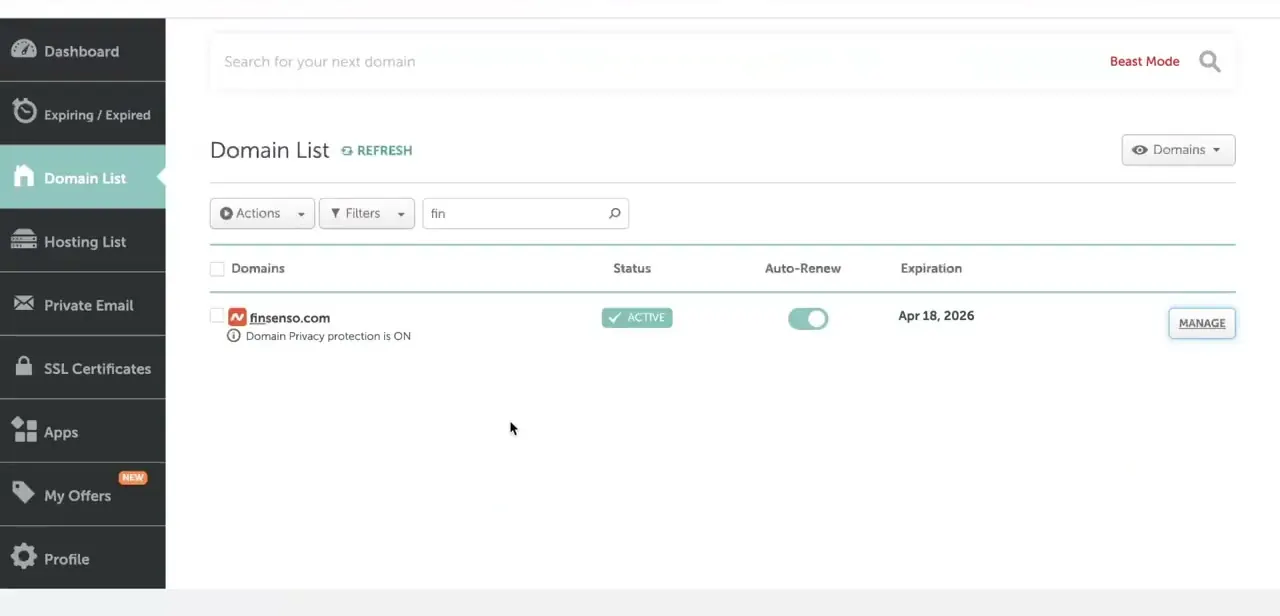
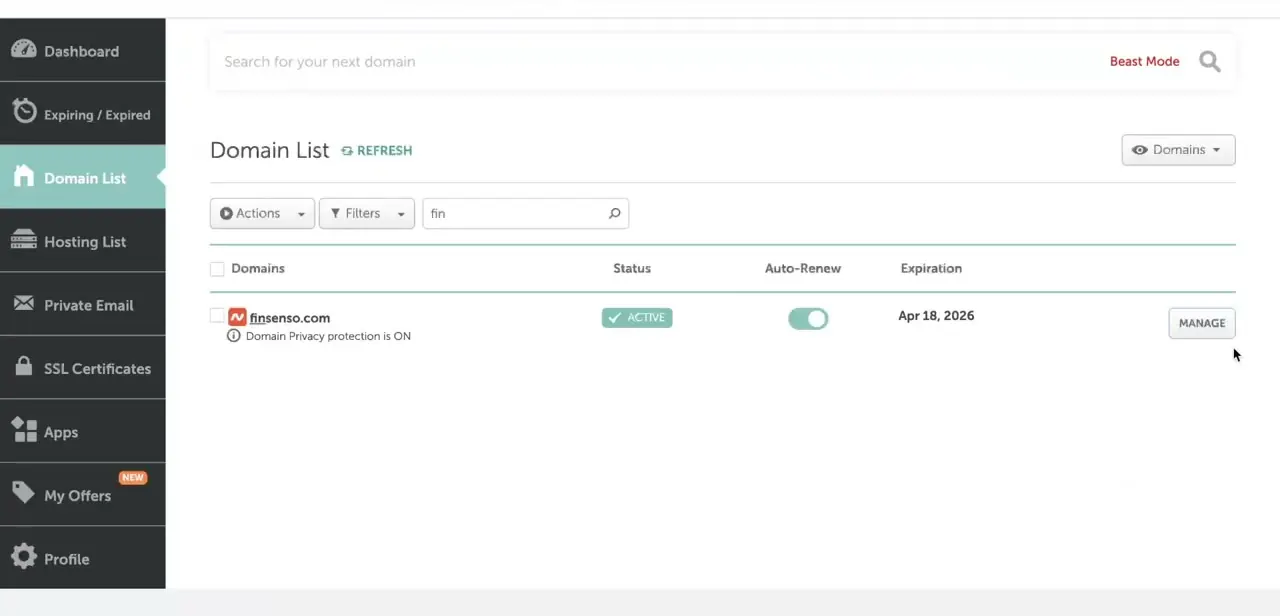
Log in to Namecheap and go to Domain List in the left-hand dashboard menu. You'll see every domain you own with its status, auto-renew setting, and expiration date, and a Manage button on the right side of each row.
Click Manage on the domain whose redirect isn't working. That takes you into the domain's full settings page, where nameservers, DNS records, and the redirect tool all live together.
02Check what your nameservers are set to
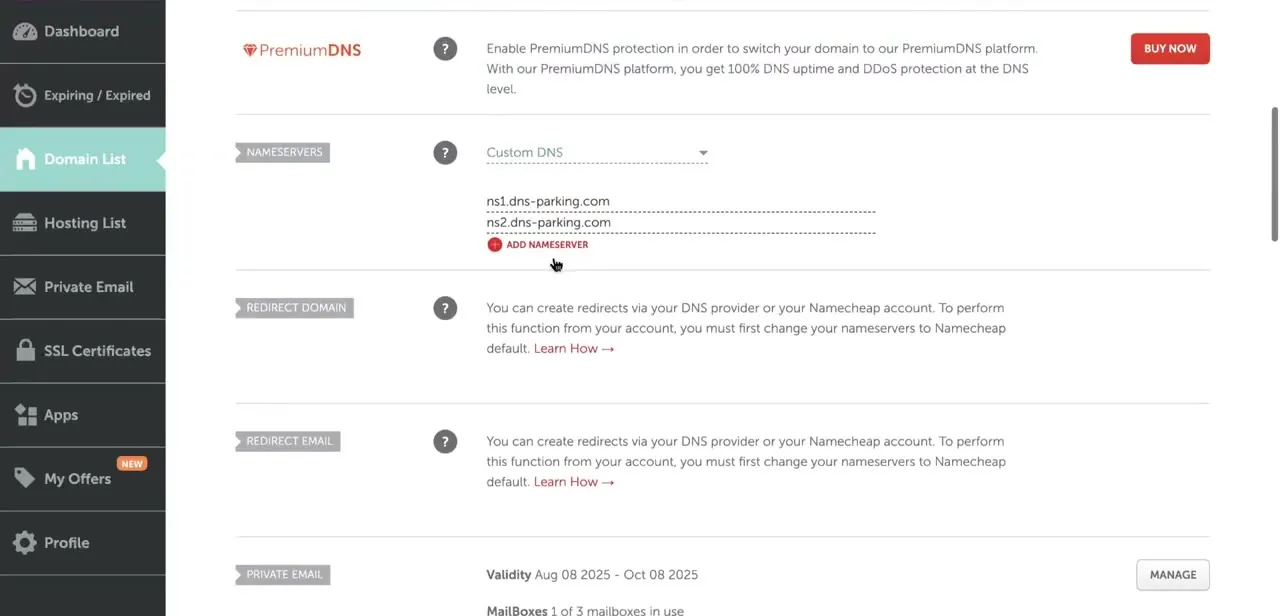
Scroll to the Nameservers section on the domain's management page. If it shows Custom DNS with values like ns1.dns-parking.com and ns2.dns-parking.com, that's very likely why forwarding isn't working.
Namecheap's own support documentation is direct about this: Domain Redirect and Email Redirect records only work on Namecheap BasicDNS, PremiumDNS, or FreeDNS, and stay inactive on any third-party nameserver. Custom nameservers hand DNS resolution off to another provider entirely, so Namecheap's redirect tool has no way to intercept the traffic.
03Switch to Namecheap BasicDNS
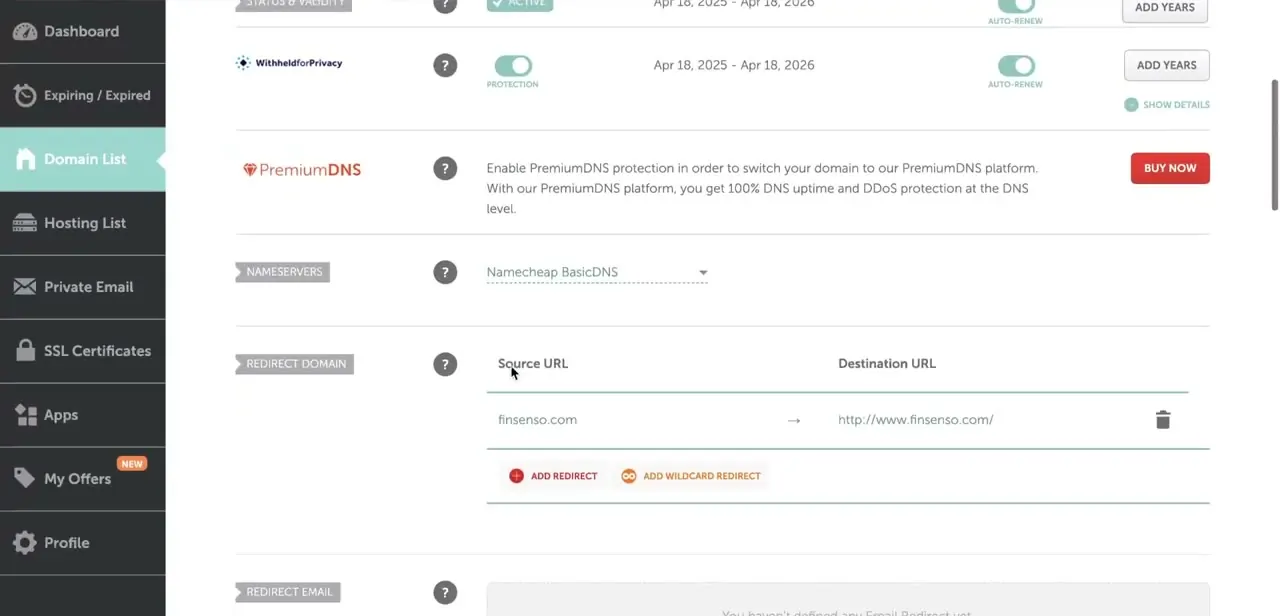
Open the Nameservers dropdown and select Namecheap BasicDNS (FreeDNS and PremiumDNS also unlock redirects, if you already use one of those). This tells Namecheap to handle DNS resolution itself, which unlocks the Redirect Domain section that was previously grayed out.
Give the change real time to take effect: Namecheap's support pages put a move away from third-party nameservers at up to 24 hours to propagate globally, occasionally 48. Switching later between Namecheap's own DNS options (BasicDNS, PremiumDNS, Web Hosting DNS) is faster, typically within an hour.
04Set the redirect's source and destination URL
With Namecheap DNS active, the Redirect Domain section on the Domain tab becomes a working form: a Source URL column showing your domain, and a Destination URL field where you type the full address you want visitors sent to, including the http:// or https:// prefix. Click Add Redirect if there isn't an entry yet, type the destination, and confirm it.
In the example shown here, the domain forwards to its own www version. The same mechanism works the same way for sending visitors to a completely different domain. Namecheap notes the record itself typically activates within about 30 minutes once saved.
05Get real 301 vs 302 control through Advanced DNS
The Redirect Domain panel on the Domain tab doesn't expose a redirect-type choice; it applies a standard forward. If the distinction matters to you, and it does whenever SEO continuity is on the line, use the other official method instead: open the Advanced DNS tab, go to Host Records, click Add New Record, and choose URL Redirect Record as the type.
That form includes a Redirect Type dropdown with Unmasked, Masked, and Permanent (301). A 301 tells browsers and search engines the move is permanent and passes SEO value to the destination.
Unmasked is a standard temporary (302-style) forward. Masked keeps your original domain visible in the address bar while displaying the destination's content, which search engines generally treat less favorably than a clean 301.
06Clear out conflicting DNS records
If the redirect still doesn't fire after nameservers are correct, check the Advanced DNS tab for leftover A records or CNAME entries pointing your root domain or www subdomain somewhere else. A stray A record pointing at an old host will often win out over the redirect rule, since browsers resolve DNS records directly instead of going through Namecheap's forwarding logic. Delete anything that conflicts with the destination you've set, then retest in a fresh incognito window to rule out cached results from before the fix.
When it doesn't work
The Redirect Domain and Redirect Email sections are greyed out
Why: The domain is on custom or third-party nameservers. Namecheap's redirect and email-forwarding records only work on Namecheap BasicDNS, PremiumDNS, or FreeDNS.
Fix: Switch the Nameservers section to one of those three options and wait for it to take effect before trying again.
A redirect was just set up but visitors still land on the old page
Why: Either the nameserver change hasn't finished propagating, or a leftover A/CNAME record on the same host is overriding the redirect.
Fix: Allow up to 24 hours after a nameserver change (up to an hour if you were already on a Namecheap DNS option), then check Advanced DNS for conflicting A or CNAME records and remove them.
The redirect works but doesn't preserve SEO value the way a 301 should
Why: The basic Redirect Domain panel on the Domain tab doesn't let you choose a redirect type; it isn't set up as a 301.
Fix: Delete that entry and instead add a URL Redirect Record from Advanced DNS > Host Records, where the Redirect Type dropdown includes Permanent (301).
Frequently asked questions
Why isn't my Namecheap redirect working even though I set it up?
The most common cause is custom or third-party nameservers. Namecheap's redirect tools only work when the domain uses BasicDNS, PremiumDNS, or FreeDNS, and stay inactive on any other DNS provider.
Should I use a 301 or 302 redirect?
A 301 is for permanent moves and passes SEO value to the destination; a 302 (or the Unmasked option) suits a temporary redirect. The basic Redirect Domain panel doesn't let you pick, so add a URL Redirect Record from Advanced DNS > Host Records instead, where the Redirect Type dropdown includes Permanent (301).
How long does a Namecheap nameserver or redirect change take to work?
Moving away from a third-party nameserver can take up to 24 hours to propagate globally, occasionally 48. Switching between Namecheap's own DNS options is usually within an hour, and a newly added redirect record typically activates within about 30 minutes.
Can conflicting DNS records break a redirect?
Yes. Leftover A or CNAME records on your root domain or www subdomain can override the redirect, since browsers resolve those records directly. Check the Advanced DNS tab and remove anything that conflicts.
What's the difference between Masked and Unmasked redirects?
Unmasked sends visitors to the destination URL and changes the address bar, similar to a standard 302. Masked keeps your original domain showing in the address bar while displaying the destination's content, which search engines generally treat less favorably than a clean 301.
Sources and last check
Click path and screens come from a walkthrough recorded in mid-2025. Re-checked against three of Namecheap's own knowledgebase articles in September 2026. That check corrected the article's claim that 301 vs 302 control isn't available on Namecheap's basic tools: a Redirect Type dropdown (Unmasked, Masked, Permanent 301) does exist, on the Advanced DNS > Host Records > URL Redirect Record form, separate from the simpler Redirect Domain panel on the Domain tab. It also added FreeDNS as a third nameserver option that unlocks redirects, and replaced the vague propagation warning with Namecheap's actual stated windows.
About the author

Impran M N
I've been hooked on technology for as long as I can remember — especially the new tools and AI apps that seem to land every other week. Easy Tech Tuts is where I write up whatever I've just worked out: I do the task in the real product, record the screen, and turn it into the guide I wish I'd found first.