Easy Tech Tuts
How to Redirect Domain to Another Domain Namecheap Easily 2026
By Impran M NLast checked against official docs
Whether you're rebranding, running a promotion, or consolidating multiple web addresses, Namecheap can point one domain straight at another without touching hosting or writing a line of code. There's a prerequisite that trips people up first: the simple redirect tool only works once the domain's DNS is managed by Namecheap itself, not an outside provider.
There's also a limit worth knowing before you start: that same simple tool doesn't let you choose between a permanent and a temporary redirect. This guide covers the nameserver requirement, the actual form, and where to go instead if you need a real 301.
Before you start
- Full control of the domain's nameservers inside Namecheap. If a third party manages DNS on your behalf, they would need to make the nameserver change in step three.
01Open your Domain List and find the domain
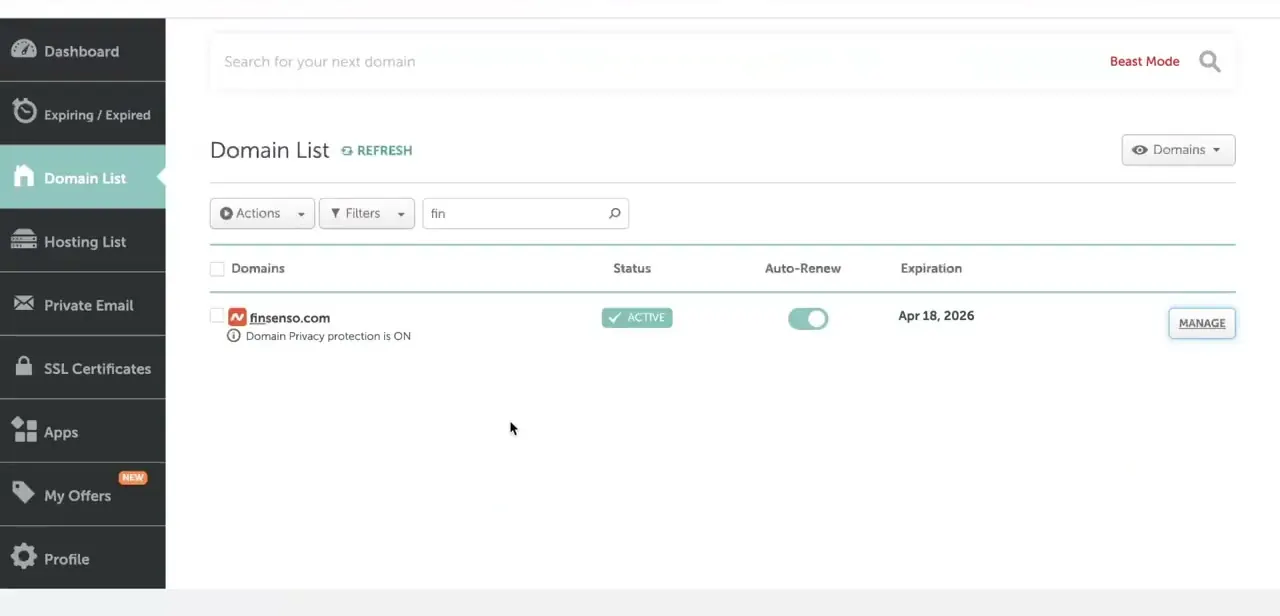
From the Namecheap dashboard sidebar, click Domain List to see every domain on your account, along with its status, auto-renew setting, and expiration date. Click Manage next to the domain you want to redirect. In this example, a domain called finsenso.com is shown Active with domain privacy protection on.
02Check what your nameservers are set to
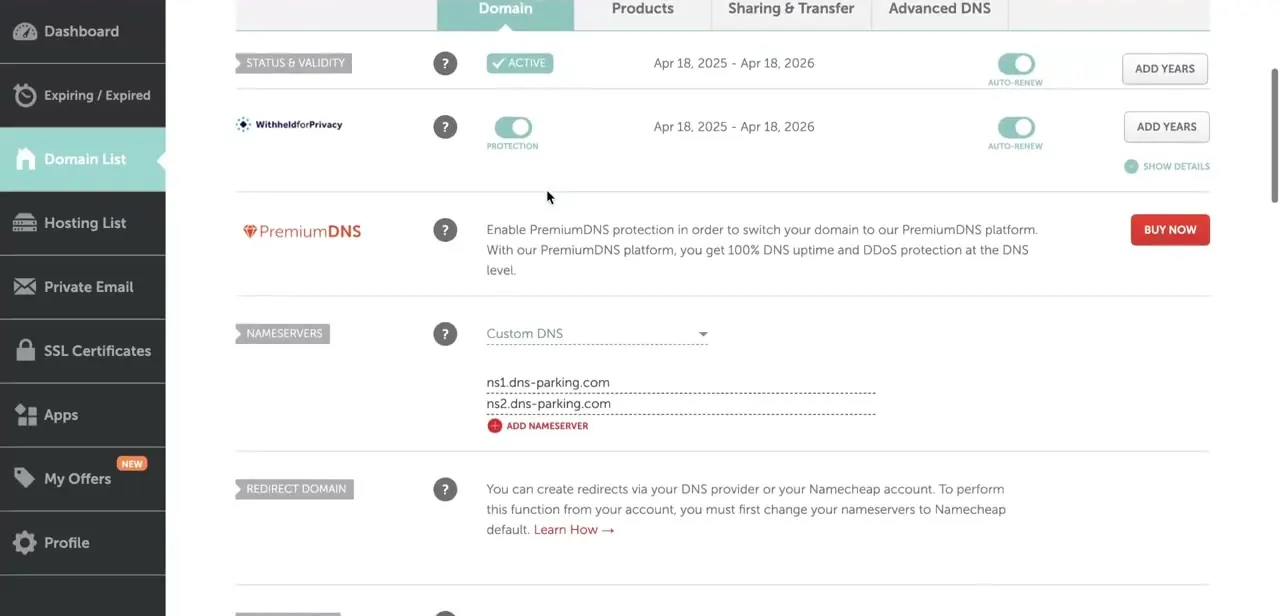
On the domain's management page, the Nameservers section shows what's currently controlling DNS for that domain. If it says Custom DNS with values like ns1.dns-parking.com and ns2.dns-parking.com, the redirect form won't work yet.
Right below it, the Redirect Domain section explains why: "You can create redirects via your DNS provider or your Namecheap account. To perform this function from your account, you must first change your nameservers to Namecheap default." In practice this means any Namecheap-managed DNS: BasicDNS, PremiumDNS, or FreeDNS all satisfy it, not only the free BasicDNS option.
03Switch nameservers to a Namecheap-managed option
Open the Nameservers dropdown and change it from Custom DNS to Namecheap BasicDNS (PremiumDNS or FreeDNS also work, if the domain is set up for either). This hands DNS management back to Namecheap, which is what unlocks the redirect tool. If the domain was previously pointed elsewhere, give the change a little time to take effect before expecting the redirect fields to work reliably.
04Fill in the Source and Destination URLs
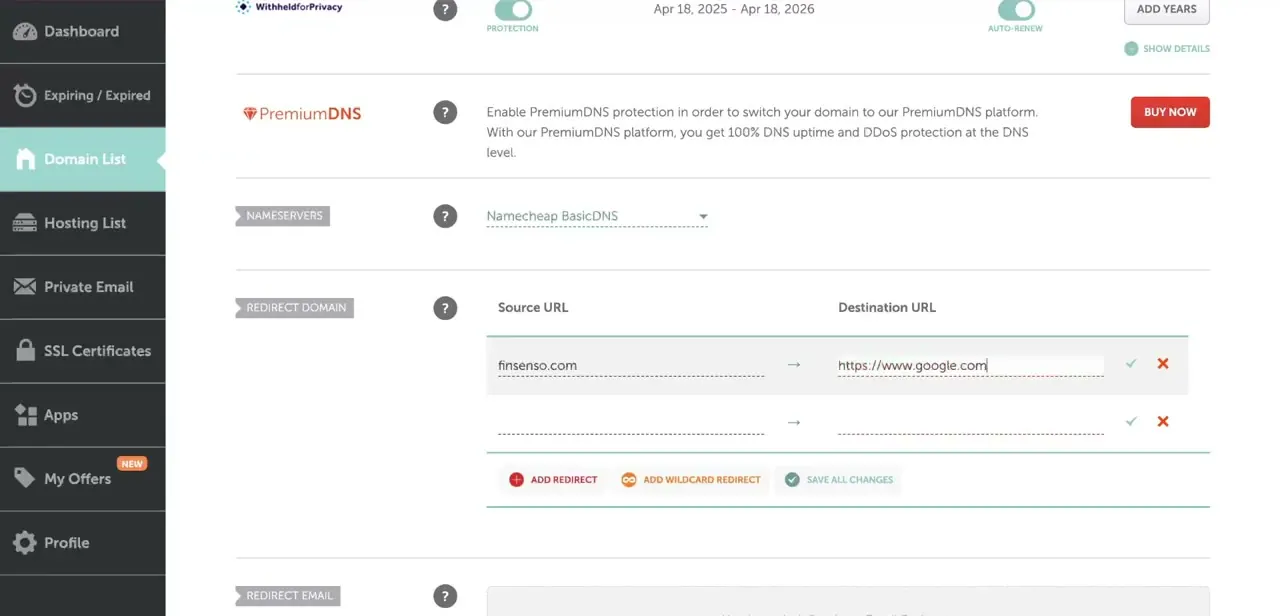
With Namecheap DNS active, the Redirect Domain section becomes a working form with Source URL and Destination URL columns. Enter your domain as the source (finsenso.com here) and the full destination address, including https://, in the second field.
A green checkmark and red X sit next to each row to confirm or delete an entry, and Add Redirect creates another row for forwarding more than one path. Add Wildcard Redirect, next to it, extends a rule to any subdomain of the source instead of just the bare domain, which matters if links to your old domain might carry a www or another prefix.
05Know which redirect type you're actually getting
This is where the simple form has a real limit: the Redirect Domain section shown above does not let you choose between a permanent (301) and a temporary (302) redirect. It applies a default, unmasked forward without exposing that setting.
For most quick redirects that's fine, but if you specifically need a 301, the one search engines treat as a permanent move and use to transfer ranking value to the new address, this form can't set it. For an explicit 301, use Advanced DNS instead: open the Advanced DNS tab, find Host Records, click Add New Record, and choose URL Redirect Record from the Type dropdown.
Enter the host (@ for the root domain, www for the www version, or * for a wildcard), the destination in the Value field, and pick Permanent (301) from the Redirect Type dropdown, which otherwise defaults to Unmasked. A masked option is also available there, though Namecheap's own guidance is to avoid it: framing another site's content behind your URL can create duplicate-content problems for search engines.
06Save your changes and test the redirect
Click Save All Changes once your redirect rows are filled in and confirmed. Namecheap's documentation puts propagation at around 30 minutes once the record is set up correctly.
After that, open a browser and type the source domain directly to confirm it lands on the destination. Do this in a private or incognito window if you've visited the domain recently: a cached copy of the old page can make a working redirect look broken.
| Type | What it does | SEO effect | Where to set it |
|---|---|---|---|
| 301 (Permanent) | Sends visitors and search engines to the destination for good | Transfers most ranking value to the new URL | Advanced DNS > Host Records > URL Redirect Record |
| 302 / Unmasked (default) | Sends visitors to the destination but signals the move as temporary | Search engines keep indexing the original URL | Domain tab > Redirect Domain (this guide's simple form), or Advanced DNS |
| Masked (URL Frame) | Shows the destination's content while keeping the old URL in the address bar | Can create duplicate-content issues | Advanced DNS > Host Records > URL Redirect Record |
Only the Advanced DNS method exposes a 301/302/Masked choice. The simple Redirect Domain form covered in the main steps does not.
When it doesn't work
The Redirect Domain form is blank or won't take the source URL
Why: The domain's nameservers are still on Custom DNS, or on a different registrar's DNS, instead of Namecheap BasicDNS, PremiumDNS, or FreeDNS.
Fix: Switch to a Namecheap-managed DNS option in the Nameservers section and give it time to take effect before retrying.
Search engines still show the old URL after redirecting
Why: The Domain tab's Redirect Domain form doesn't set an explicit 301; it uses a default unmasked redirect that doesn't carry the same permanent-move signal.
Fix: Set up the redirect again through Advanced DNS > Host Records > URL Redirect Record, and choose Permanent (301) from the Redirect Type dropdown.
The domain still shows the old page right after saving
Why: Namecheap's own guidance allows around 30 minutes for a redirect to propagate, and browsers often cache the previous page on top of that.
Fix: Wait roughly 30 minutes, then check again in a private or incognito window.
Frequently asked questions
Can the simple Redirect Domain form set up a 301 redirect?
No. It applies a default unmasked redirect with no type selector. For an explicit 301, use Advanced DNS > Host Records > Add New Record > URL Redirect Record instead.
Will redirecting my domain affect my SEO rankings?
A 301 passes most of the original page's search value to the new destination; the default redirect from the simple form does not carry that same signal, since it isn't a true 301.
Why isn't the redirect tool showing up on my domain?
Namecheap's redirect feature needs the domain's nameservers set to a Namecheap-managed option: BasicDNS, PremiumDNS, or FreeDNS, rather than Custom DNS pointing at an outside provider.
How long does it take for a Namecheap redirect to start working?
Namecheap's documentation puts it at around 30 minutes once the record is configured correctly, plus whatever time your browser takes to drop a cached copy of the old page.
Can I redirect a domain without hosting?
Yes. URL forwarding works independently of hosting, since it just tells browsers where to send visitors when they type your domain.
What's the difference between an unmasked redirect and a masked one?
Unmasked sends the visitor's browser to the real destination URL. Masked keeps your original URL showing in the address bar while displaying the destination's content, which Namecheap itself warns can cause duplicate-content problems in search engines.
Sources and last check
Click path and screens come from the original recording. Re-checked against Namecheap's own knowledge base in September 2026, which surfaced two corrections: the nameserver prerequisite covers any Namecheap-managed DNS (BasicDNS, PremiumDNS, or FreeDNS), not only BasicDNS, and, more importantly, the simple Redirect Domain form used throughout this guide does not actually offer a 301/302 choice as the previous version implied. Setting an explicit 301 requires the separate Advanced DNS > Host Records > URL Redirect Record method, which this version now describes. The propagation estimate was also corrected to Namecheap's documented figure of around 30 minutes.
About the author

Impran M N
I've been hooked on technology for as long as I can remember — especially the new tools and AI apps that seem to land every other week. Easy Tech Tuts is where I write up whatever I've just worked out: I do the task in the real product, record the screen, and turn it into the guide I wish I'd found first.