Easy Tech Tuts
How to Create & Manage Dependencies in Jira, Add Dependency in Issues, Tickets, Tasks Easily 2026
By Impran M NLast checked against official docs
Dependencies in Jira help your team see which tasks need to finish before others can start, so nobody discovers halfway through a sprint that their ticket was waiting on someone else's unfinished work. The link lives inside the issue itself, under a section most people scroll past, and choosing the right direction (blocks versus is blocked by) matters more than it looks like it should. This guide walks through adding a real dependency between two issues, picking the correct link type, and where those dependencies do (and don't) show up once they're set.
Before you start
- A Jira Cloud site with work item linking turned on (a site admin enables this; see troubleshooting below)
- At least two existing issues to link; keep them in the same project if you want the dependency to appear on the Timeline
01Open the issue and find Related work items
A dependency in Jira is a link between two issues that records an order-of-work relationship: something has to happen first, or this issue is itself what's holding another one up. It doesn't move either issue's status on its own; it's informational, so a team can spot a stalled blocker before it quietly delays several other tickets.
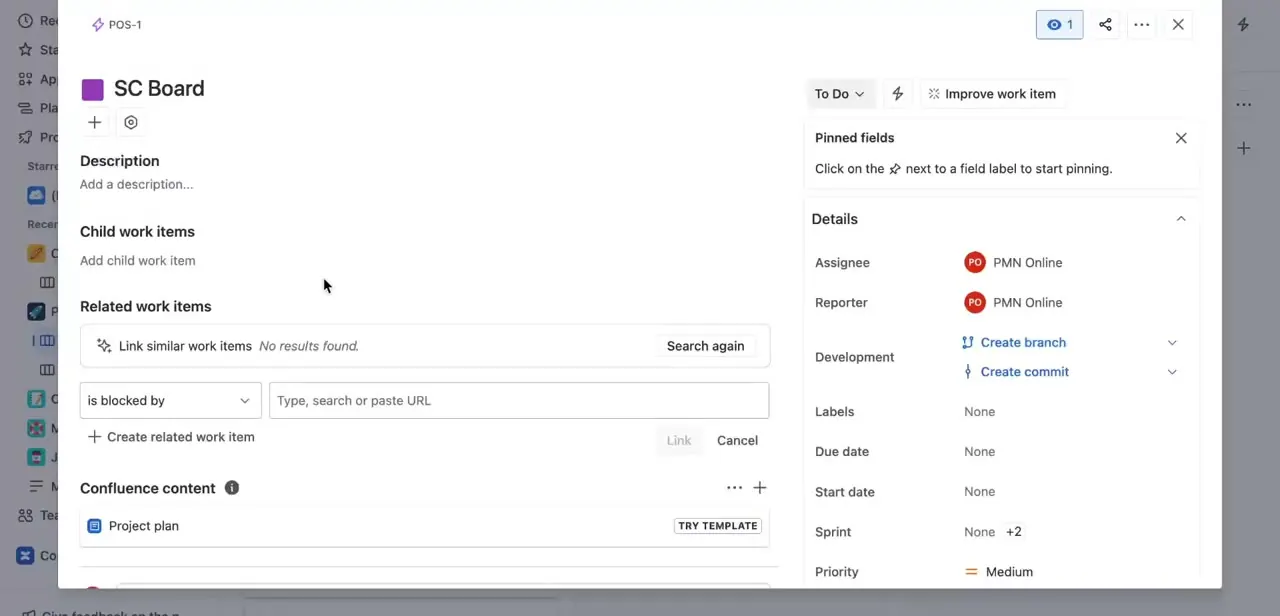
Open any issue and scroll past Description and Child work items to the Related work items section. It starts with a 'Link similar work items' search that Jira runs automatically, plus a manual linking row below it: a link-type dropdown next to a 'Type, search or paste URL' field. This is the section that holds every dependency for the issue, and it's the same place you'll return to when you need to check or edit one.
02Choose the correct link type
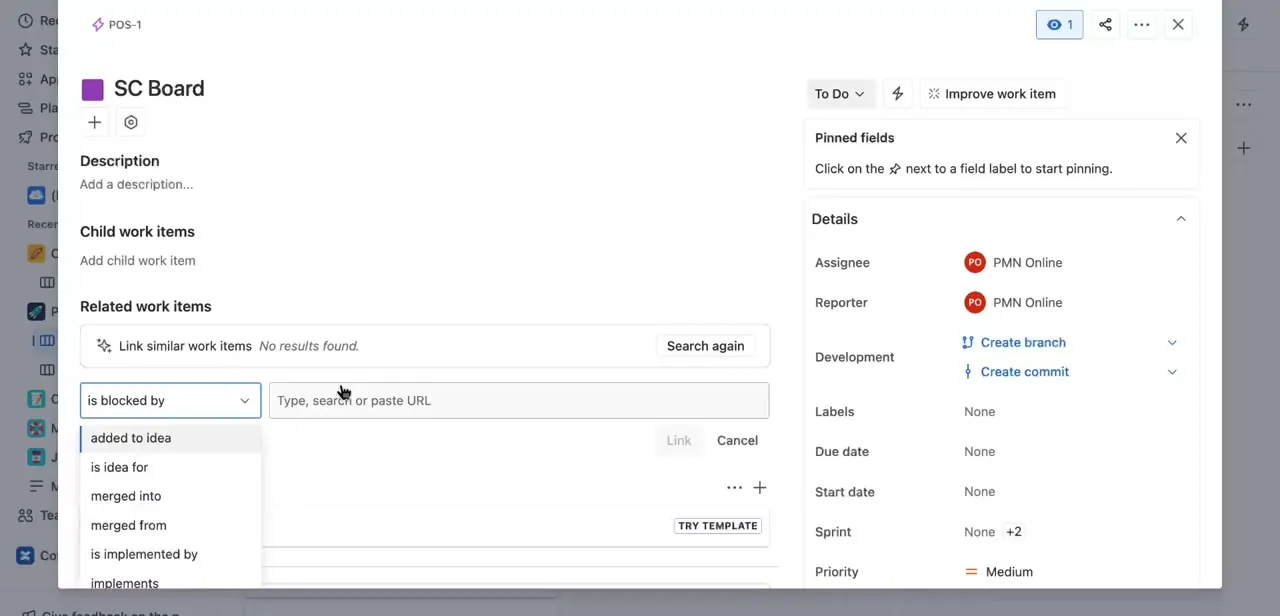
Click the link-type dropdown and Jira shows the full set of relationship types: is blocked by, blocks, and non-dependency options such as relates to, duplicates, added to idea, merged into, and implements. Picking the wrong direction is the most common dependency mistake.
'Is blocked by' means this issue is waiting on the other one; 'blocks' means this issue is what's holding the other one up. Read the sentence the dropdown forms with your issue before confirming; it should describe the real relationship in plain English.
03Search for and select the linked issue
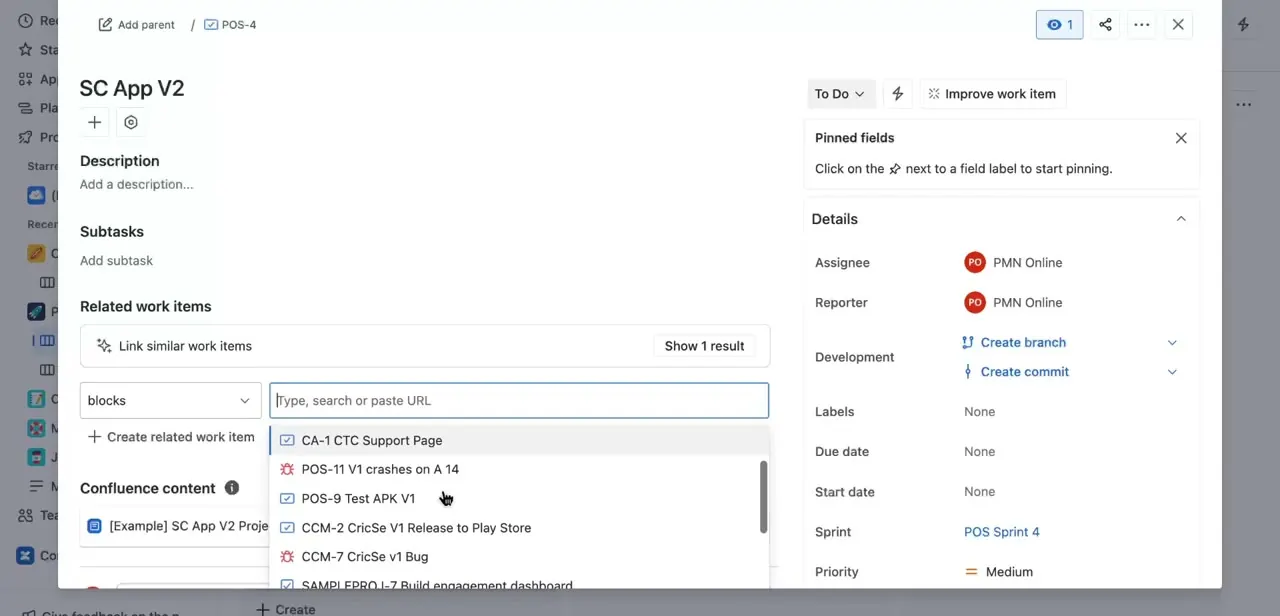
Type into the search field and Jira surfaces matching issues from across your accessible projects as you type. In one example, searching from a ticket in the SC App V2 project returned matches including a support page ticket, a crash report, and a Play Store release ticket from a completely different project.
Click the correct one from the list, then confirm the link. There's no need to know the exact issue key first; a few relevant words is usually enough to find it. Linking across projects like this works for the link itself, but it changes what shows up later: Jira's Timeline only displays dependencies between issues in the same project, covered next.
04See dependencies on the Timeline, one project at a time
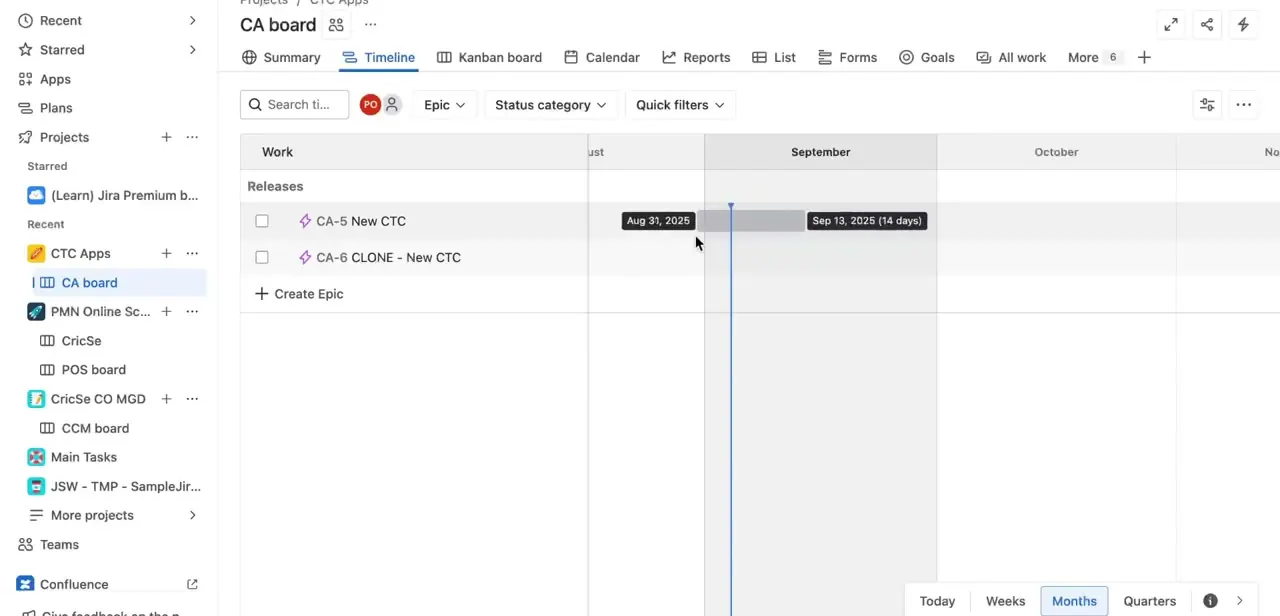
Individual issue links tell you about one relationship at a time; a project's Timeline view shows the bigger picture. Under a board's Timeline tab, epics and releases sit against real dates, so a dependency chain that's pushing a release out becomes visible instead of buried in a list of tickets.
The Timeline only shows work items linked with the Blocks type, and only within a single project. A dependency between issues in two different projects, like the one from the previous step, won't appear here. Tracking dependencies across projects needs Advanced Roadmaps, part of Jira Plans, which requires Jira Premium or Enterprise.
When it doesn't work
A dependency link doesn't show up on the Timeline
Why: The Timeline only displays the Blocks link type, and only for issues inside the same project. A different link type, or a link to an issue in another project, won't appear there even though the link itself is real.
Fix: Check that the link type is Blocks (or is blocked by) and that both issues share a project. For cross-project dependency tracking, use Advanced Roadmaps, which needs a Premium or Enterprise plan.
There's no option to link work items on an issue
Why: A Jira admin has to turn work item linking on for the site before the linking UI appears for anyone.
Fix: Ask a site admin to go to Settings > Work items > Work item Linking and activate it.
The Related work items list has grown too long to trust
Why: Loosely related tickets got linked alongside genuine blockers, so the section stops working as a real signal.
Fix: Link only true blocking relationships, and remove a link once the dependency is resolved instead of leaving it in place.
Frequently asked questions
What's the difference between 'blocks' and 'is blocked by' in Jira?
'Blocks' means the current issue is preventing another from starting. 'Is blocked by' means the current issue can't proceed until another one is resolved. Reading the sentence the dropdown forms with your ticket is the easiest way to check you picked the right direction.
Can I see dependencies on my Jira board or Timeline?
Individual links live in each issue's Related work items section. A project's Timeline view lays out Blocks-type links between issues in the same project against real dates, but it won't show a dependency to an issue in a different project.
Does adding a dependency change an issue's status automatically?
No. Dependencies are informational links, so you still update issue status manually as work progresses. Jira doesn't block a status change just because a linked issue isn't done.
Do dependencies across different projects show up anywhere?
Not on the standard Timeline, which only displays Blocks links within a single project. Seeing dependencies that span projects needs Advanced Roadmaps, a Jira Premium and Enterprise feature.
How do I find an issue to link if I don't know its key?
Type a few relevant words into the search field in Related work items. Jira matches against issue titles across your accessible projects, so you don't need the exact ticket key ahead of time.
Sources and last check
Click path and screens come from a recorded walkthrough. Link types, the Related work items section, and the Timeline's dependency scope were checked in September 2026 against Atlassian's official Jira Cloud documentation on linking work items and timeline dependencies. The original draft's vague claim that 'timeline and roadmap visualizations can vary by plan' has been replaced with the actual constraint found in that documentation: the Timeline only shows same-project Blocks links on every plan, and cross-project dependency tracking needs Advanced Roadmaps on Premium or Enterprise.
About the author

Impran M N
I've been hooked on technology for as long as I can remember — especially the new tools and AI apps that seem to land every other week. Easy Tech Tuts is where I write up whatever I've just worked out: I do the task in the real product, record the screen, and turn it into the guide I wish I'd found first.