Easy Tech Tuts
How to View Instagram Professional Dashboard, Enable it & Meaning 2025
By Impran M NLast checked against official docs
The Professional Dashboard is Instagram's control room for anyone running a Creator or Business account. Reach numbers, growth tools and monetization settings all live in one scrolling panel.
Most people never open it, either because they don't know it exists or because they tapped it once, saw a wall of links, and backed out. This guide shows where the entry point sits on your profile, walks through what each block of the dashboard reports, and follows the path to payout setup, including the tax paperwork Instagram won't pay you without. By the end you'll know what the dashboard means, not just where it is.
Before you start
- A Creator or Business Instagram account (the switch is free, quick, and reversible from Settings)
- For payout setup specifically: the Facebook account linked to your profile, a completed W-9 (US) or W-8BEN (outside the US) tax form, and a bank account, PayPal, or debit card to receive funds
01Switch to a Creator or Business account first
The Professional Dashboard only exists on professional accounts. On a standard personal profile there's nothing to open.
Go to your profile, tap the menu icon in the top right, open Settings, and look for the option to switch to a professional account. Creator suits individuals posting their own content; Business suits shops, brands and anyone who wants contact buttons and shop features.
The switch takes under a minute and isn't a decision worth agonising over. Everything else here assumes it's done.
02Find the dashboard link on your profile
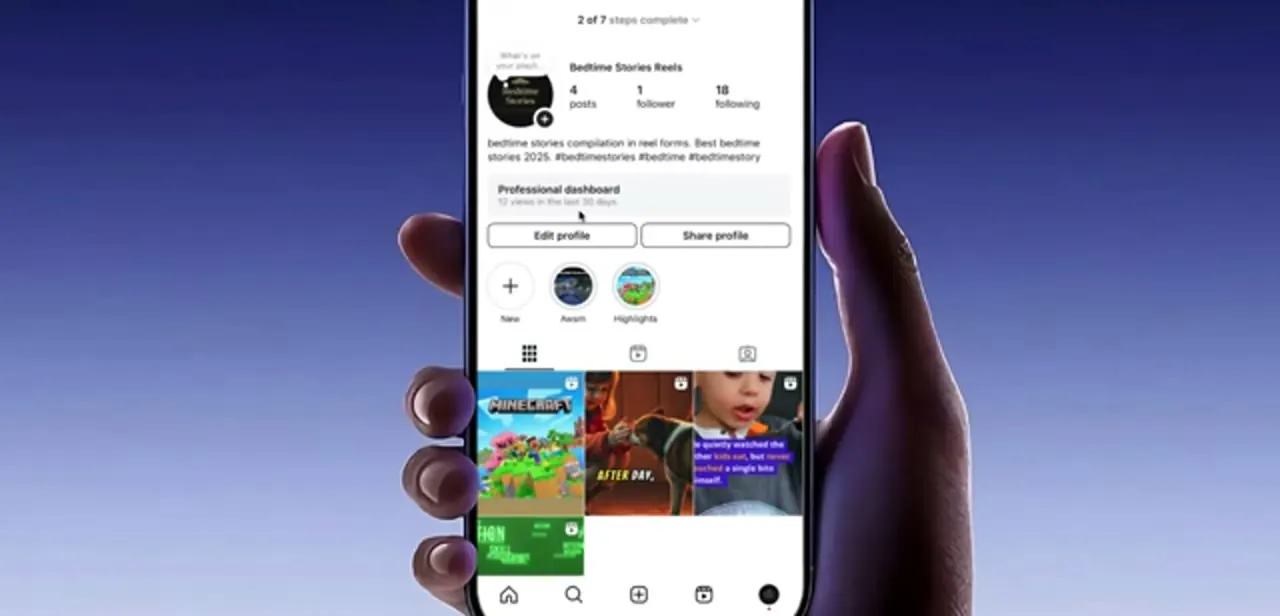
Tap the profile icon in the bottom-right corner to land on your own profile. Directly under your bio you'll see a wide grey strip labelled Professional dashboard with a line of summary text underneath, something like "12 views in the last 30 days." That strip is the entry point, and it sits above the Edit profile and Share profile buttons, which is why people scrolling fast tend to miss it.
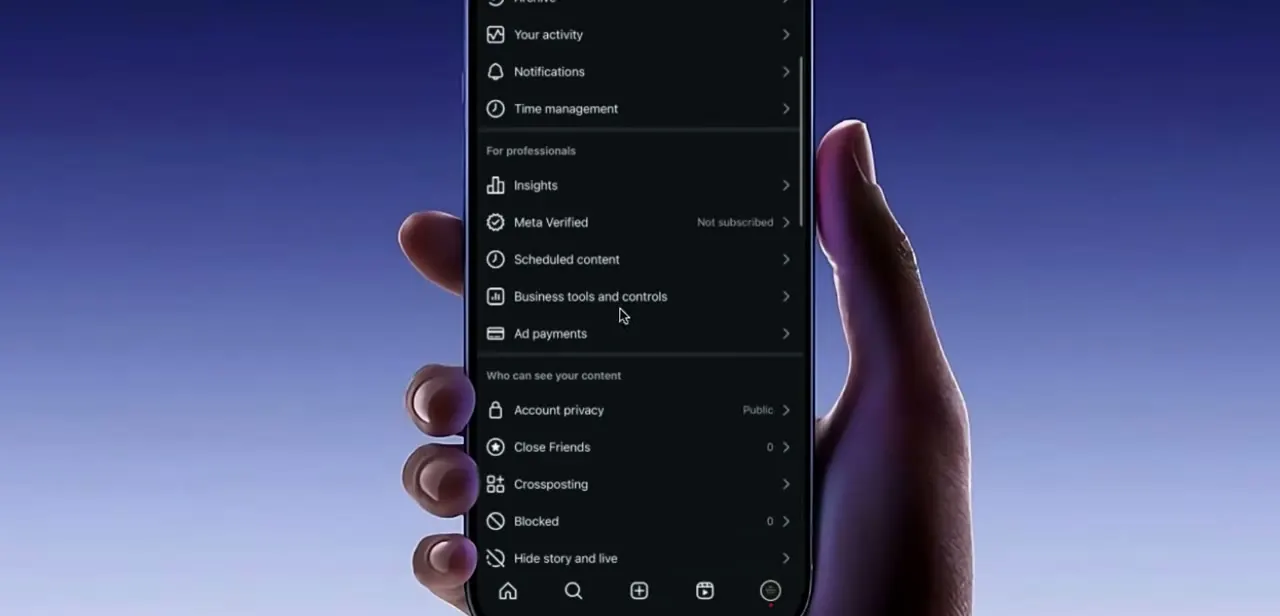
You can also reach the same place through the menu icon in the top right and then Professional Dashboard. Either route opens the same screen.
03Read what the dashboard is telling you
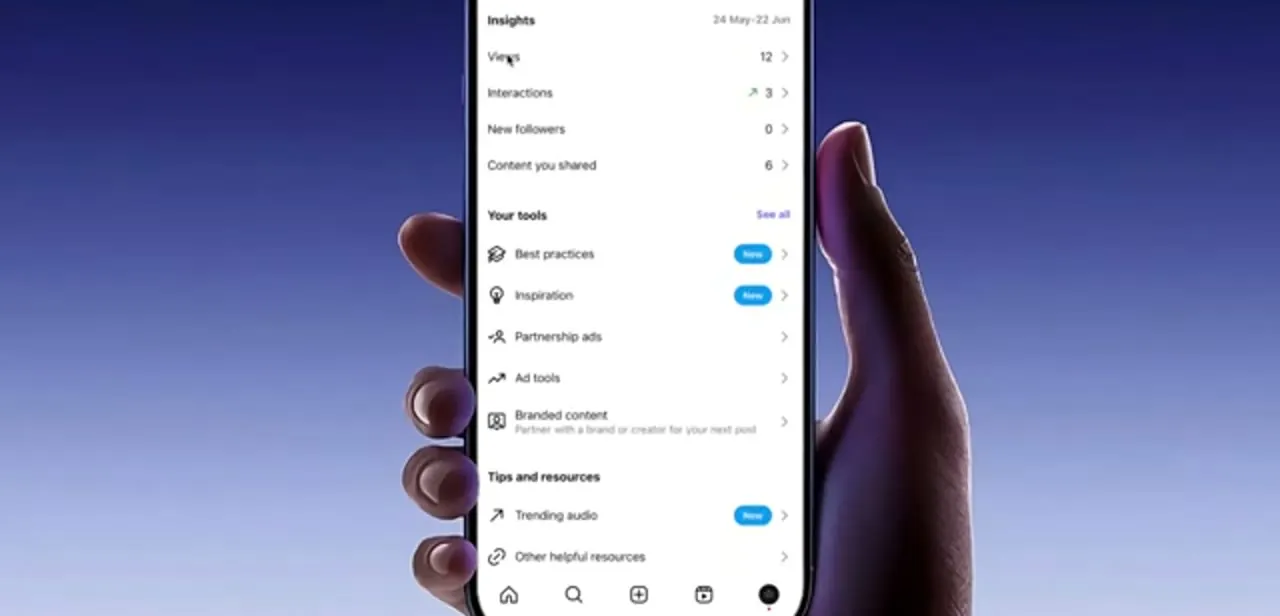
The top block is Insights, with a date range in the corner and four rows beneath it: Views, Interactions, New followers and Content you shared. Views counts how many times your content appeared on screens.
Interactions covers likes, comments, saves and shares. A small green arrow next to a number means it's up on the previous period.
Tapping any row drills into a fuller breakdown by content type and audience. Below that is Your tools, which collects Best practices, Inspiration, Partnership ads, Ad tools and Branded content.
The last two matter most if you plan to earn from the account. A Tips and resources section at the bottom holds Trending audio and other resources.
04Open payout setup from inside the dashboard
Scroll the dashboard down past the tools and look for Set Up Payout Account. This is what most creators are really after when they go hunting for the dashboard, and it's easy to walk past because it sits below the more visually prominent tool tiles.
If it isn't there, the alternative route is Settings, then your Business or Creator section, then Monetization, then Payouts. Same destination, different door. Availability varies by country and by whether your account meets Instagram's eligibility rules, so if the option genuinely isn't present, that's usually eligibility, not a missing setting.
05Verify your identity and submit tax information
Payouts run through Meta's shared account system, so the flow can prompt you to confirm the Facebook account linked to this Instagram profile before it lets you continue. Use the Facebook account genuinely connected to this profile; signing in with an unrelated personal account is a common reason the setup stalls.
Instagram also won't finish activating a payout account without a completed tax form: a W-9 if you're in the US, a W-8BEN if you're not. The name on that form has to match the name you gave during onboarding, since a mismatch is what triggers a manual review later. Skip this step and any balance you build up can expire after six months, unclaimed.
06Choose and link your payout method
With identity and tax details on file, Instagram offers four ways to get paid: sign in to your bank securely through its own login, enter your bank details manually, link a PayPal account, or add a debit card. PayPal is usually the fastest to link since you just authorise the connection and confirm the account email. Whichever you pick, the name on the payout method should match your tax details and your professional account, for the same review-trigger reason as above.
07Know when the money arrives
With a payout method attached, ad revenue is deposited automatically. There's no balance to manually cash out.
Payments run on Meta's own cycle, typically monthly, once your balance clears the minimum threshold for your region, so a small first month may simply roll into the next. Updating your payout details within 5 days of a scheduled payment places a hold on it, releasing the money in the next cycle instead.
Check the Payouts screen, not the main dashboard, for a payment history and pending balance. The dashboard's Insights figures are engagement numbers. Earnings live somewhere else entirely.
When it doesn't work
Payout setup won't move past the identity or tax step
Why: Instagram requires a completed W-9 (US) or W-8BEN (international) form before a payout account activates, and the name on it must match the name used at onboarding.
Fix: Resubmit the tax form using your exact legal name as Instagram has it on file, then reopen Set Up Payout Account.
A payment lands a cycle late after updating bank details
Why: Changing payout information within 5 days of a scheduled payout places a hold, pushing the payment to the next cycle.
Fix: Update payout details well ahead of the payout date, and expect the current cycle's payment to slip if you don't.
The Payouts screen shows nothing despite active Insights numbers
Why: Insights tracks engagement, not earnings, and a balance can expire after six months if the tax form was never submitted.
Fix: Check the Payouts screen specifically for balance, and finish tax verification before assuming there's nothing to collect.
Frequently asked questions
Do I need a Business or Creator account to see the Professional Dashboard?
Yes. The dashboard only appears on Creator or Business accounts. On a personal profile there's no dashboard strip under the bio at all; switch account types in Settings first.
What does the Professional Dashboard show?
Three blocks: Insights (views, interactions, new followers, content you shared for a date range), Your tools (best practices, inspiration, partnership ads, ad tools, branded content), and Tips and resources such as trending audio.
Where is Set Up Payout Account if I can't see it?
Scroll further down the dashboard past the tools section. Failing that, use Settings, then Business or Creator, then Monetization, then Payouts. If it's absent entirely, your account or country may not be eligible yet.
What do I need before Instagram will pay me?
A payout method (bank sign-in, manual bank details, PayPal, or debit card) and a completed tax form: a W-9 if you're in the US, a W-8BEN otherwise. Skip the tax form and an unclaimed balance can eventually expire.
How do I remove the Professional Dashboard?
Switch the account back to a personal profile in Settings. The dashboard strip disappears from your profile along with insights and the professional tools attached to it.
Sources and last check
Click path and screens come from a walkthrough recorded in July 2025. The payout section was re-checked against Instagram's Help Center in September 2026: it previously listed only PayPal and bank transfer and said nothing about tax paperwork. Instagram offers four payout methods (bank sign-in, manual bank entry, PayPal, debit card) and won't activate a payout account without a W-9 or W-8BEN on file, which this version now covers.
About the author

Impran M N
I've been hooked on technology for as long as I can remember — especially the new tools and AI apps that seem to land every other week. Easy Tech Tuts is where I write up whatever I've just worked out: I do the task in the real product, record the screen, and turn it into the guide I wish I'd found first.