Easy Tech Tuts
Fix Boost Post Problem in Instagram 2026 #instagram
By Impran M NLast checked against official docs
The Boost button goes missing for more reasons than most guides list, and Meta publishes the reasons. Its troubleshooting page for Instagram boosting names a specific set: a personal account instead of a professional one, an account holder under 16, an out-of-date app, regional advertising limits in the EU and EEA, a Reel containing tappable elements, a video whose resolution is too low, and iOS ad creation being unavailable.
That list matters because the causes have nothing in common. Some are account settings you fix in a minute.
One is a property of the individual post, so the button will keep working elsewhere and fail only on that Reel. This guide walks the settings screens and the boost flow in the order that isolates the cause fastest, and it covers the fee you pay for boosting inside the iOS app instead of the browser.
Before you start
- An Instagram professional account, either Creator or Business
- An account holder over 16, with the birthday on the account set correctly
- A Facebook personal account added to Accounts Center, which Meta lists as a requirement for boosting from the Instagram mobile app
01Check your account type and the age requirement
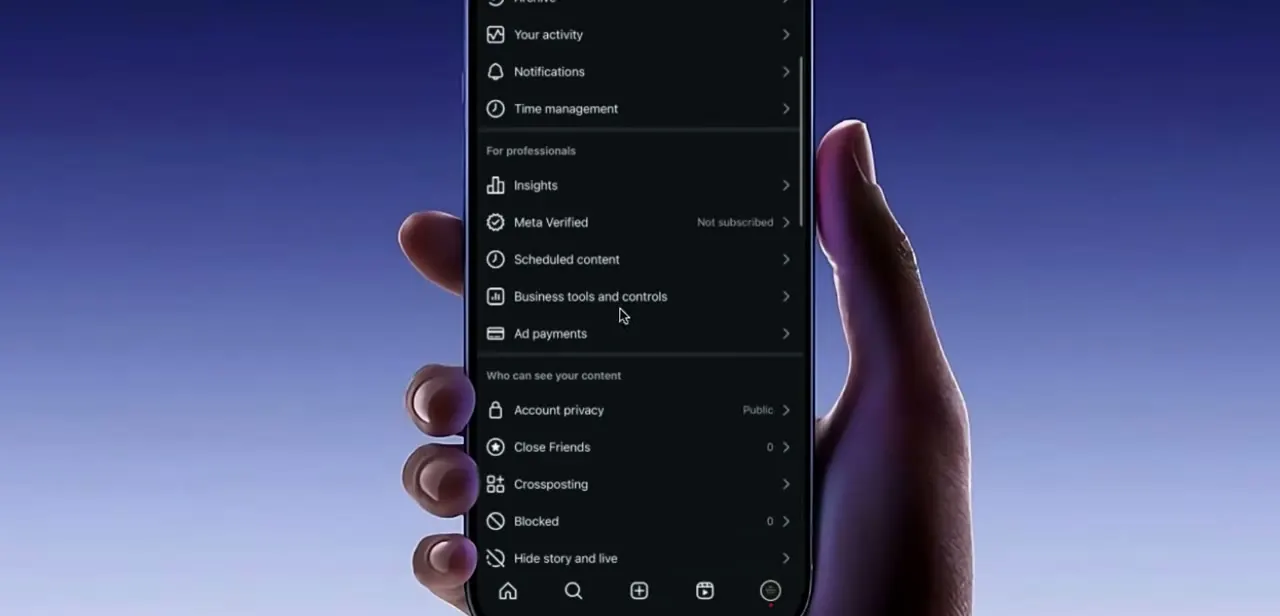
Open Settings and scroll to the "For professionals" section, where Insights, Meta Verified, Scheduled content, Business tools and controls, and Ad payments sit together. If that block is missing or greyed out, the account is not set up as a professional account, and Meta requires one to advertise.
Go to Account type and tools and switch to Creator or Business. It takes under a minute and leaves your followers and posts alone.
The age gate is the cause people never think to check. Meta's troubleshooting page lists an account holder under 16 as a reason the boost option does not appear, and the fix it gives is to add or correct the birthday on the account. An account created years ago with a placeholder birthday will fail this check even when the person behind it is well over 16.
02Work out whether the block is the post, not the account
Before touching any settings, try boosting a different post. If the button works on one and fails on another, the account is fine and the individual post is the problem.
Meta documents two post-level blocks. The first is tappable elements in a Reel.
A Reel carrying interactive stickers cannot be boosted, and the error says so directly. There is no setting to override it; you either publish a version without the sticker or boost something else.
The second is resolution. If the error reads that the video's resolution is too low, the source file is below the bar for ad delivery, and re-uploading a higher-quality export is the only route.
Both of these look identical to an eligibility problem until you test a second post. While you are here, update the app. An out-of-date build is on Meta's list of causes, and it is the cheapest one to eliminate.
03Choose how to boost and connect Accounts Center
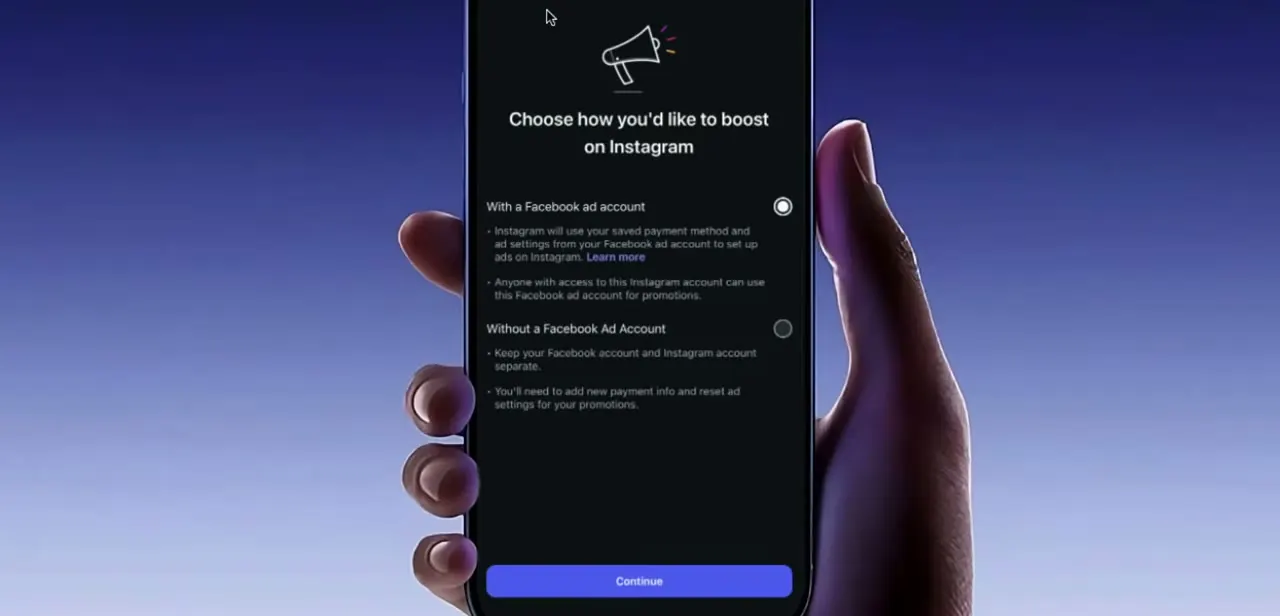
In the boost flow, Instagram asks whether to boost with an existing Facebook ad account or without one. Boosting with one reuses the payment method and ad settings already saved there, and anyone with access to that ad account can also promote your Instagram content through it.
Boosting without one keeps the two separate but means entering payment details and configuring ad settings from scratch. Choose deliberately, because switching later resets your promotion settings.
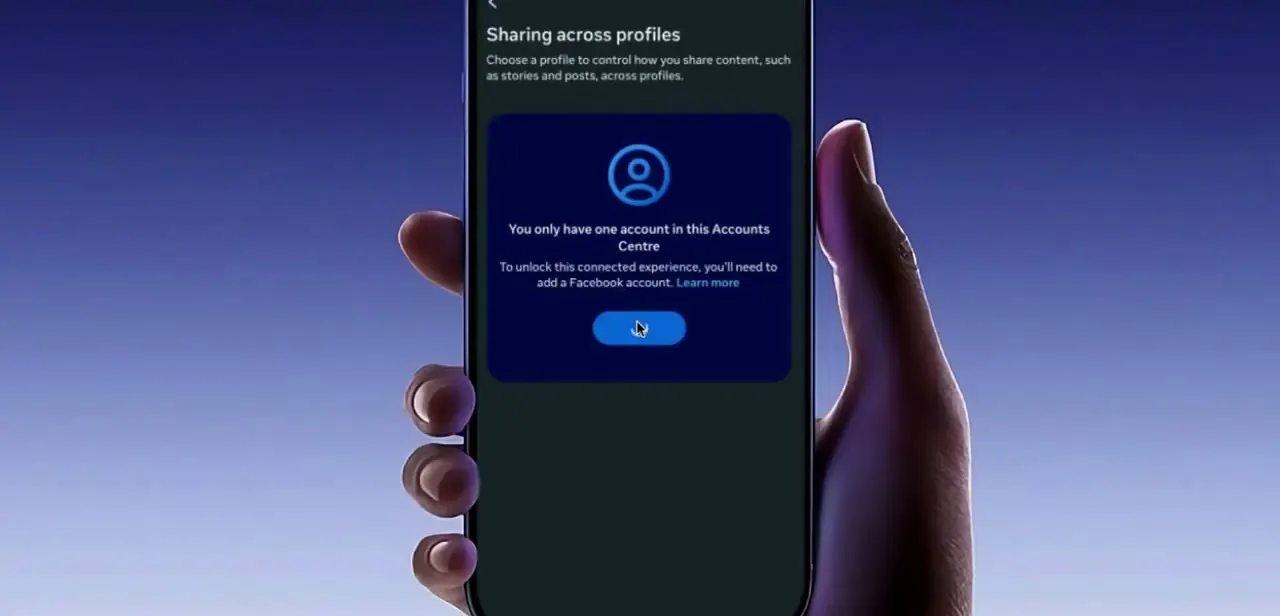
Either way, boosting from the mobile app runs through Accounts Center. Meta's documentation lists an Instagram business or creator account and a Facebook personal account as the requirements, and you may be prompted to add your account to Accounts Center and confirm the connection partway through.
One constraint catches people managing several accounts: only one Instagram account can be connected to a personal Facebook account at a time for boosting in the mobile app. If a personal Instagram account is already linked to that Facebook account, it has to be removed before the business account can take its place.
04Confirm your Page connection and admin role
A professional account connected to a Facebook Page still fails if your role on that Page is wrong. Meta's guidance is specific here: having a professional account is not enough if you are not an admin of the Facebook Page connected to it.
Being able to post to a Page is a different permission from being able to advertise for it. Check both halves.
Confirm the Page is still linked, and confirm your role on it is admin. A Page unlinked during an old cleanup will not reconnect on its own, and a role downgraded when someone tidied up permissions produces a boost failure that looks nothing like a permissions problem from inside Instagram.
05Sort out payment, and boost from the browser if you can
Boosts that die at the payment step usually trace to the ad account: an expired card, a method that failed a previous charge, or an account flagged for review. Open Ad payments in settings and confirm a valid method is on file before retrying, since a failed boost does not always name payment as the blocker.
Where you boost from matters too. Meta's troubleshooting page lists an error stating that creating ads in the Instagram iOS app is unavailable, and its own fix is to use instagram.com, Ads Manager, or Meta Business Suite instead.
That same route is worth taking even when the app is working, because it avoids the 30% Apple service fee described above. If you are in the EU, the EEA, or Switzerland, check your regional position as well: Meta notes that advertising and monetisation can be limited for accounts on subscription plans that turn ads off.
06Submit, then confirm it went through and passed review
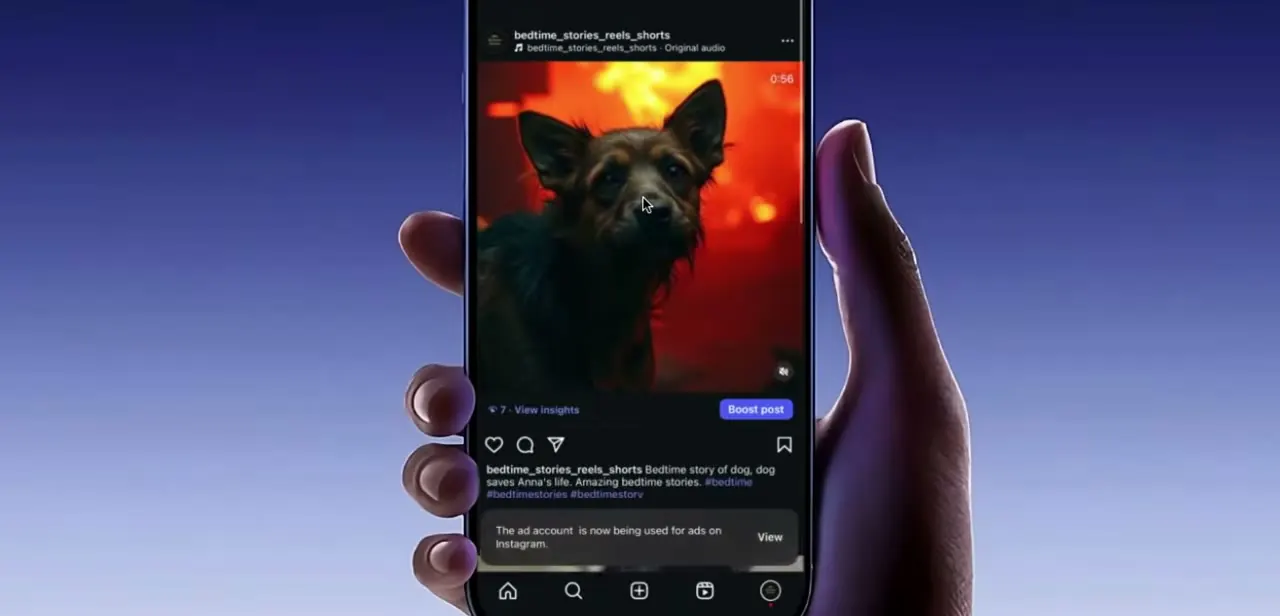
With eligibility and payment sorted, Boost post appears directly under the post's engagement stats, beside View insights. Set your goal, audience, budget and duration, use Preview ad to check placements, then submit.
Submitting is not the same as running. Meta states that an ad begins running after it has been reviewed and approved, so a boost sitting idle shortly after submission is normal, not a failure.
Instagram surfaces a banner confirming the ad account is now in use for ads, with a View link for checking status, and that banner is your evidence the boost submitted instead of quietly dropping. If review rejects it, the rejection is about ad policy and content, and it is a separate matter from every eligibility check above.
When it doesn't work
"Reels containing tappable elements cannot be boosted"
Why: The Reel carries an interactive sticker. Meta blocks boosting on those, and the block belongs to that post alone.
Fix: Boost a different Reel, or publish a version without the tappable element. No account setting changes this.
"This video's resolution is too low"
Why: The uploaded file falls below the quality bar Meta requires for ad delivery.
Fix: Re-export the video at a higher resolution and upload it again, or boost a different post.
The Boost option is missing on an account that looks correctly set up
Why: Meta lists an account holder under 16 among the causes, and an incorrect or placeholder birthday on the account trips the same check.
Fix: Add or correct the birthday in your Instagram account settings, then confirm the account type is Creator or Business.
"Creating ads in the Instagram iOS app is unavailable"
Why: Ad creation is not offered in the iOS app for that account or region.
Fix: Boost from instagram.com, Meta Ads Manager, or Meta Business Suite. This also avoids the Apple service fee on iOS payments.
The account is professional and the Page is linked, but boosts still fail
Why: Your role on the connected Facebook Page is not admin. Posting rights and advertising rights are separate permissions.
Fix: Have a Page admin raise your role to admin, then retry the boost.
Frequently asked questions
Why is the Boost Post button not showing on my Instagram post?
Meta's troubleshooting page lists several causes: a personal instead of professional account, an account holder under 16, an outdated app, regional advertising limits in the EU and EEA, a Reel with tappable elements, or a video whose resolution is too low. Testing a second post tells you quickly whether the problem is the account or that one post.
Can personal accounts boost posts?
No. Meta requires a professional account, Creator or Business, to advertise on Instagram. A personal account does not show the Boost button.
Does boosting cost more inside the app?
In most regions, yes. Meta's documentation describes an Apple service fee of 30% of the total ad payment when funds are added inside the Instagram iOS app, retained by Apple. Boosting from instagram.com in a browser avoids it.
Do I need a Facebook account to boost Instagram posts?
For boosting from the mobile app, Meta lists an Instagram business or creator account plus a Facebook personal account, connected through Accounts Center. Only one Instagram account can be linked to a given personal Facebook account at a time for this.
Why does Instagram keep rejecting my boosted ads?
Rejection happens at the ad review stage and is about ad policy and content, which is a different matter from the eligibility checks that hide the Boost button. Meta states an ad runs once it has been reviewed and approved, so check the notification explaining the rejection instead of resubmitting unchanged.
Why did my payment fail when trying to boost a post?
Usually an expired card, a method that failed a prior charge, or an ad account flagged for review. Open Ad payments in settings and confirm a valid method before retrying the same boost.
Sources and last check
The settings and boost-flow screens come from a walkthrough recording. The eligibility rules were re-checked in September 2026 against Meta's troubleshooting page for Instagram boosting and its help pages on boosting a post, Accounts Center and ways to advertise. That check added causes this guide did not previously carry: the under-16 age gate, Reels with tappable elements, videos rejected for low resolution, iOS ad creation being unavailable, and EU and EEA advertising limits. It also added the Apple service fee of 30% that Meta documents for ad payments made inside the Instagram iOS app, which the guide had not mentioned at all.
About the author

Impran M N
I've been hooked on technology for as long as I can remember — especially the new tools and AI apps that seem to land every other week. Easy Tech Tuts is where I write up whatever I've just worked out: I do the task in the real product, record the screen, and turn it into the guide I wish I'd found first.