Easy Tech Tuts
How To Setup Payout Account On Instagram 2026
By Impran M NLast checked against official docs
A payout account is the piece that turns Instagram earnings into money in a bank. Bonuses, subscriptions and gifts all accrue without one, but nothing leaves Meta until the account exists and clears verification.
There is a deadline on that, and most guides do not mention it. Meta's own guidance for creators sets a five-month window to get a payout account set up, caps what you can accumulate without one at $1,500 across monetization tools, and says earnings are forfeited if six months pass with no account in place.
Setting this up on the day you become eligible costs ten minutes. Leaving it costs the balance. What follows is the sequence inside the Professional dashboard, plus the details Meta asks for at each stage.
Before you start
- A professional account on Instagram (Creator or Business). The monetization section does not appear on personal accounts.
- Your legal name, address, phone number and email as they appear on official records
- A tax identification number appropriate to your country and whether you are set up as an individual or a business
- A bank account or PayPal account in a supported country
01Open Monetization in the Professional dashboard
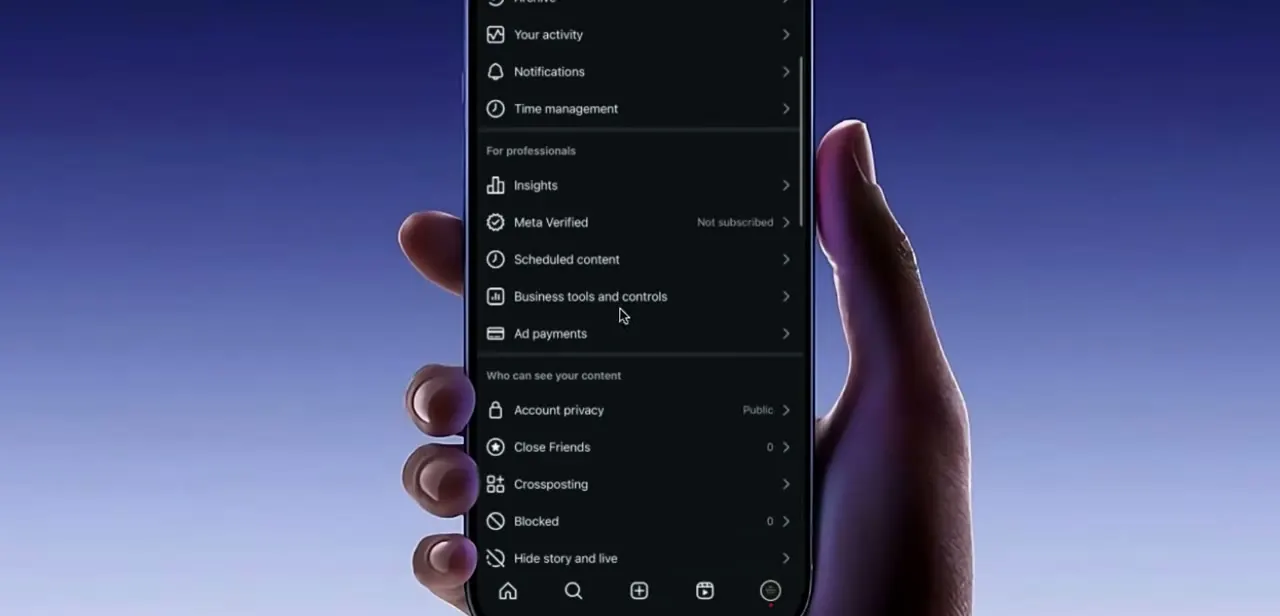
Payout controls sit in the Professional dashboard, apart from the general Settings menu where most people look first. On a phone, go to the Professional dashboard, open Monetization, and look for the option to set up your payout account.
On a computer, the same flow lives in the Monetization section of Meta Business Suite, which is often easier for the tax and bank stages because typing an account number on a phone keyboard invites mistakes. If Monetization is missing entirely, the account is still a personal one. Switch it to Creator or Business and the section appears.
02Read the status screen before you start filling anything in
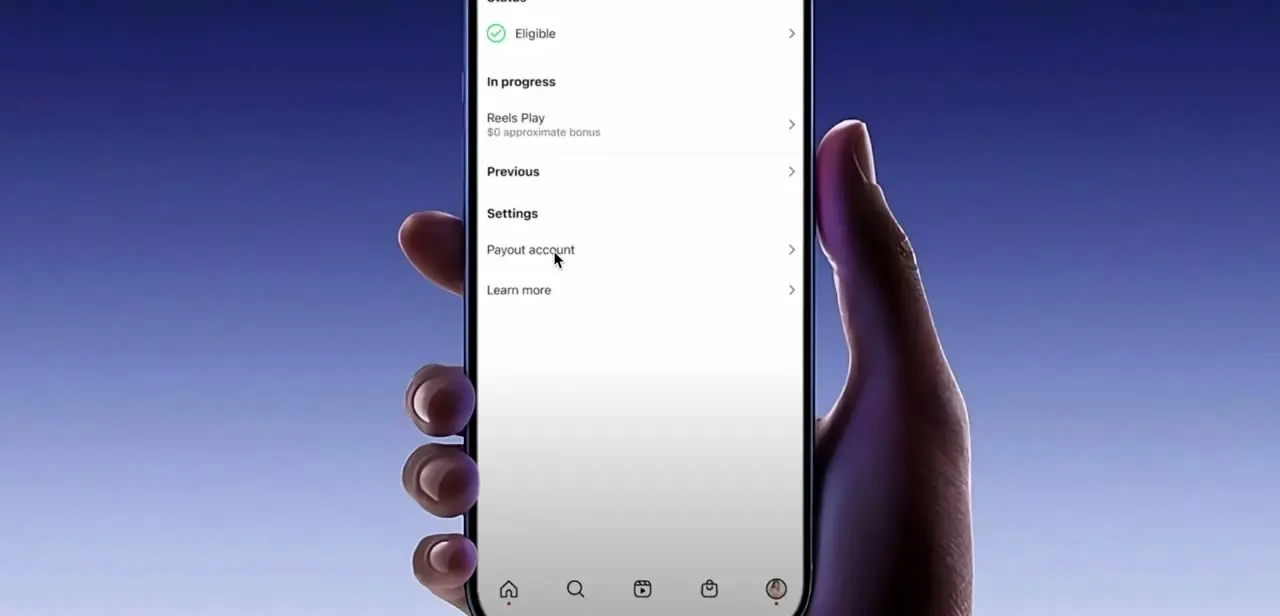
The top of the monetization screen carries a Status line. Eligible with a green check means Meta has cleared the account to earn.
Anything else means a requirement is outstanding, and no amount of payout setup will release funds until that clears. Underneath, In progress lists the bonus programs currently attached to your account with a running estimate, and Previous holds what has finished.
Payout account sits below those in its own Settings group. One caution about bonuses: the programs change.
The Reels Play bonus visible in older walkthroughs, this one included, was paused by Meta in March 2023 and is not what a creator would be offered now. Bonus programs since then have generally been invite-only and time-limited, so treat any specific program name in a guide as an example of where the number appears, not as something you can go and enrol in.
03Give your country, business type and tax details
The setup flow opens with country and business type. Those two answers decide which payout methods appear, which tax form you are asked for, and which programs are available where you live, so a careless answer here reshapes every screen after it.
Meta then asks for legal identification: name, address, phone and email. Tax details follow, and the form depends on the answers you just gave.
Meta's guidance describes a Social Security number for individuals in the US, an EIN for US businesses, and a foreign tax identification number for creators elsewhere. Use the name on your government ID or business registration, not a handle or a stage name. Meta files this information with tax authorities, and a mismatch between the name on the form and the name on the receiving bank account is one of the ordinary reasons a payout account sits in review for weeks.
04Link the account that receives the money
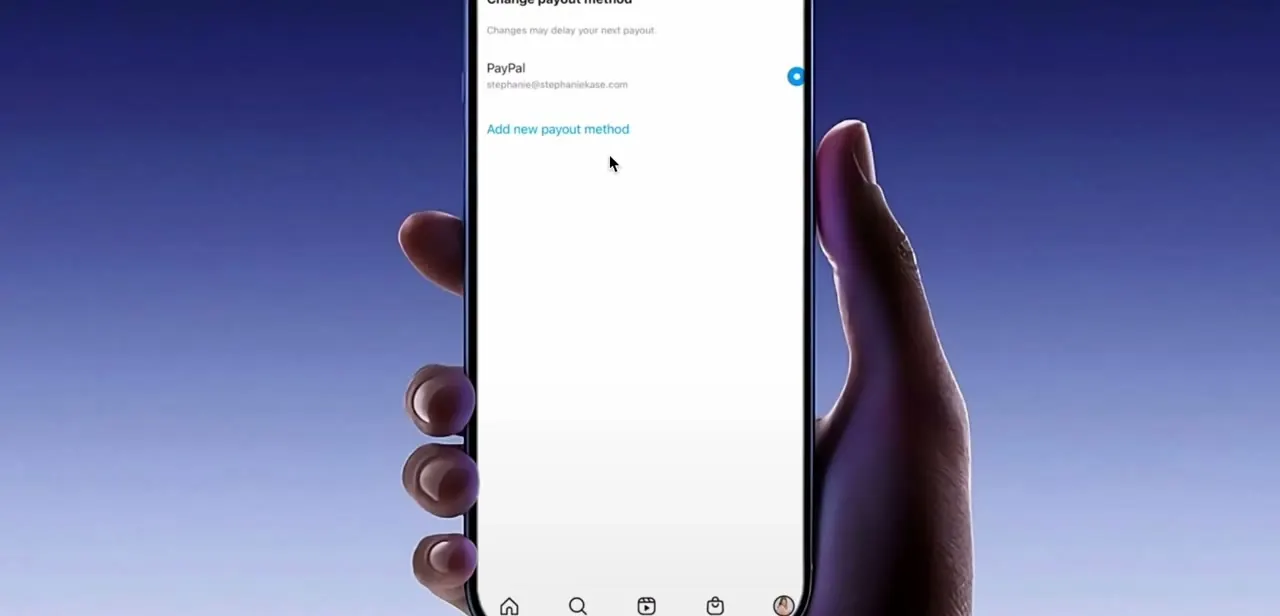
Meta offers three routes: signing in to your bank through a secure connection, entering bank details manually, and connecting a PayPal account. The recording below shows a PayPal address already linked, with the option to add another method underneath.
A note on that screen warns that changing your payout method can delay your next payout. If a transfer is already pending, let it land before switching banks.
One detail worth knowing if you run a shared account: only people with the financial admin role can edit payout settings. If the option is greyed out for you, the permission is the problem, not the browser. Meta also allows a separate payout account per monetization tool, which matters for creators splitting subscription income and bonus income across different accounts.
05Finish it before the clock runs out
Check the country, business type, tax number and payout account once more before you confirm. A transposed digit in a tax ID is invisible on screen and expensive to unwind.
Then finish the flow rather than saving it half-done. Meta's guidance for creators is explicit about the window: a payout account within the first five months, a $1,500 ceiling on what you can accumulate across monetization tools without one, and forfeiture of monetization earnings if no account is set up within six months. An account left in a partially verified state is not a set-up account for that purpose.
When it doesn't work
Earnings have stopped accruing partway through the year
Why: Meta caps what you can build up without a payout account at $1,500 across monetization tools.
Fix: Complete payout setup. The cap lifts once the account exists and is verified.
The payout settings are visible but not editable
Why: Editing payout details is restricted to the financial admin role on the account.
Fix: Have whoever holds financial admin make the change, or have them assign you that role.
The payout account has been in review for weeks
Why: Usually a mismatch between the legal name or tax number submitted and the name on the receiving bank or PayPal account.
Fix: Reopen the payout account details and align the legal name, tax ID and bank account holder exactly. Fix the source of the mismatch instead of resubmitting the same values.
There is no Monetization section in the dashboard
Why: The profile is still a personal account. Payouts are only offered on professional accounts.
Fix: Switch to a Creator or Business account, then reopen the Professional dashboard.
Frequently asked questions
How long do I have to set up a payout account?
Meta's guidance for creators gives a five-month window, caps accumulated earnings at $1,500 across monetization tools until an account is in place, and states that monetization earnings are forfeited if no payout account is set up within six months. Do it as soon as you become eligible.
Why can't I find the payout option at all?
It lives in the Professional dashboard under Monetization, not in Settings, and it only appears on Creator and Business accounts. On desktop the same flow is in the Monetization section of Meta Business Suite.
Which payout methods can I link?
Meta describes three: signing in to your bank through a secure connection, entering bank details manually, or connecting a PayPal account. Which of them appear depends on the country you selected at the start of setup.
Can a team member change the payout details?
Only someone with the financial admin role can edit payout settings. Meta also permits a separate payout account per monetization tool, so income from different tools can be routed to different accounts.
Sources and last check
Screens and click path come from a walkthrough recorded inside the Professional dashboard. In September 2026 the requirements were re-checked against Meta for Business's official lesson on setting up and managing a payout account, which supplied the five-month setup window, the $1,500 accumulation cap, the six-month forfeiture rule, the tax identification requirements by country and business type, the three payout methods, and the financial admin restriction. None of that was in the earlier version of this guide. The Reels Play bonus shown in the recording was checked separately and confirmed paused by Meta in March 2023 through contemporaneous press reporting; Meta's own help articles on Instagram payouts did not render as readable pages at the time of checking, so no figure here is sourced from them.
About the author

Impran M N
I've been hooked on technology for as long as I can remember — especially the new tools and AI apps that seem to land every other week. Easy Tech Tuts is where I write up whatever I've just worked out: I do the task in the real product, record the screen, and turn it into the guide I wish I'd found first.