Easy Tech Tuts
How To Fix the Audio Track in Your Reel is No Longer Available Instagram Error 2026
By Impran M NLast checked against official docs
When Instagram shows "the audio track in your reel is no longer available," it's usually because the sound was removed for copyright reasons, a regional restriction, or a change in Meta's licensing agreements with a rights holder. The reel is stuck until you deal with it. This guide covers what that error looks like inside the app, what your one-time replacement option does, and how to pick a new track without losing the reel entirely.
01Recognize the error message
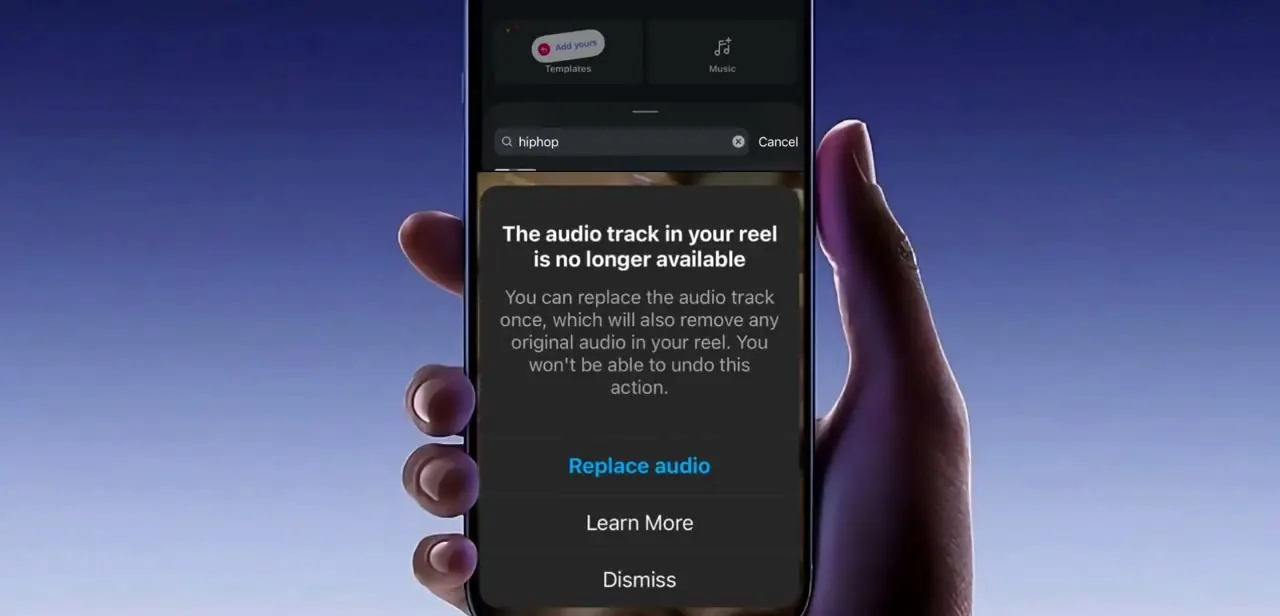
The error shows up as a dark pop-up card layered over your reel's editing screen, with the heading "The audio track in your reel is no longer available" and a short explanation underneath. Instagram states the tradeoff plainly: you can replace the audio track once, doing so also removes any original audio you had in the reel, and the action can't be undone.
Read that warning before tapping anything. If your reel had its own recorded sound mixed in, replacing the track wipes that out along with the missing music.
02Tap Replace audio to open the picker
Below the warning text are three options: Replace audio in blue, Learn More, and Dismiss. Tapping Replace audio lets you fix the reel instead of just closing the message; Dismiss only hides the card and leaves the reel unpublishable with its broken track still attached. Learn More routes you to Instagram's own help content on why tracks get pulled, before you commit to swapping anything out.
03Search for a replacement track
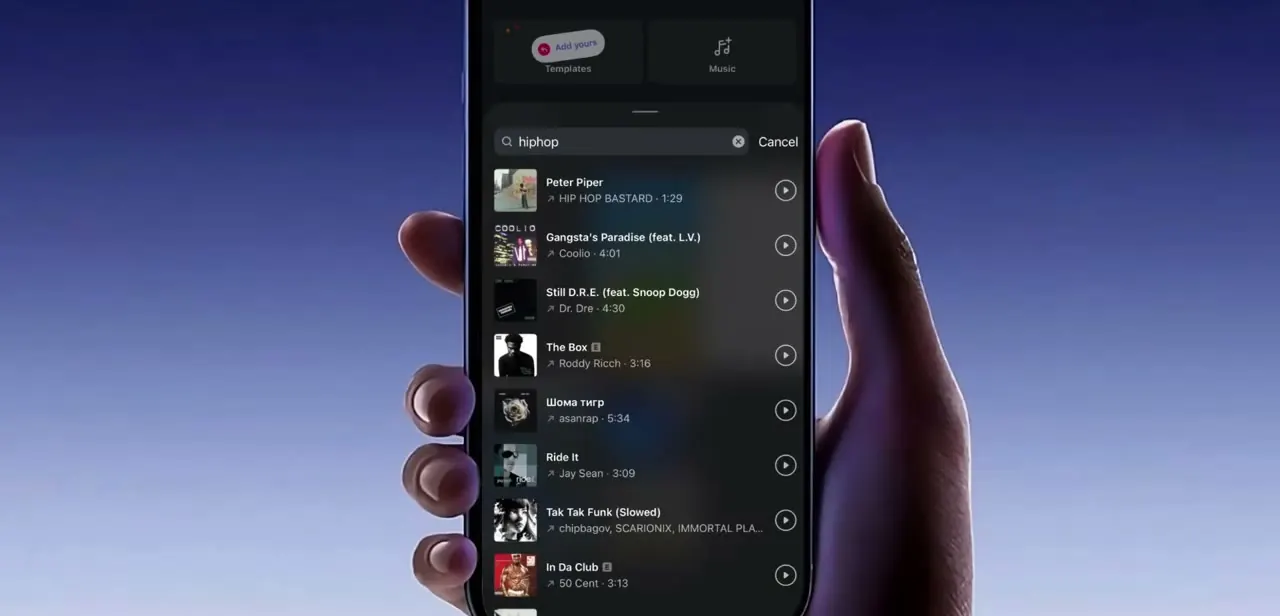
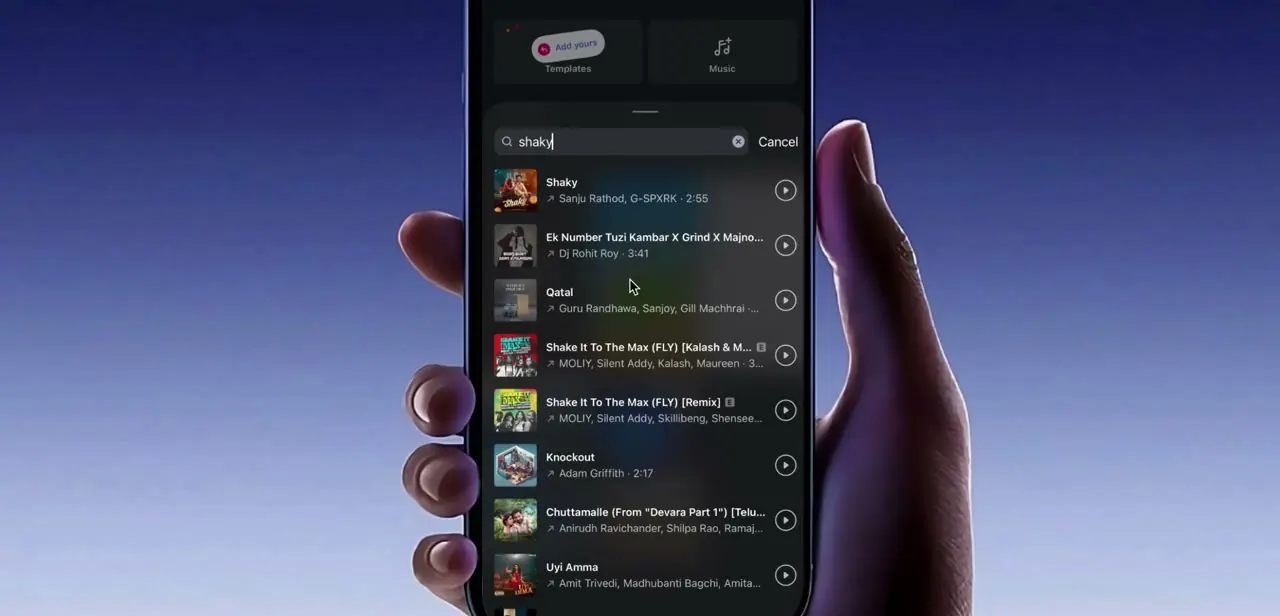
Once you choose to replace the audio, Instagram drops you into its normal music search screen, with a search bar and a scrollable list of matching tracks, each showing the artist name and clip length next to a play button. Type a keyword related to the mood or genre you want, or search the original song's title in case a re-licensed or regional version is now listed.
If the exact original track still doesn't appear, picking something in a similar tempo keeps the reel's pacing close to what it was, even though the audio itself is different. Note that the replacement can only come from Instagram's own audio library, not an uploaded file.
04Consider switching to original sound instead
If you'd rather not risk a new licensed track disappearing again later, switching to your own original sound (voiceover, ambient audio, or no music at all) sidesteps the licensing issue entirely, since original audio isn't subject to the same regional and copyright restrictions as trending tracks. This is the more durable option for reels tied to a business account, where losing audio access repeatedly can quietly hurt reach on content that's already published.
05Check whether your account type is a factor
Business and Creator accounts commonly have a narrower music library than personal accounts, because commercial use of a track needs separate licensing clearance from the ordinary personal-use library. If you're consistently hitting this error on tracks that work fine for other creators, it's worth checking your account type and whether that's limiting your available library instead of assuming every instance is a one-off removal.
06Save and republish the reel
After picking a replacement, preview the reel to make sure the new audio lines up reasonably well with your clips, then save and publish as usual. Instagram's own help documentation notes that a reel can still be viewed even after its audio has been muted, so a track pulled from an already-published reel shows up silent rather than taking the reel down. It's worth checking older published reels occasionally instead of assuming a past upload is unaffected just because you haven't seen an error on it directly.
07Avoid the same error on future reels
Favor tracks with a high usage count or ones already trending broadly; heavily used audio is less likely to get pulled suddenly than a niche or freshly uploaded clip. If a track matters enough that you don't want to risk losing it later, record a short original clip of yourself or ambient sound as a backup layer, so a licensing removal doesn't leave the reel silent while you scramble for a replacement.
When it doesn't work
Replace audio was already used once and the reel needs a new track again
Why: Instagram's own help documentation states the replacement can only be done one time per reel.
Fix: There's no second in-app replacement. Re-record or re-export the reel with a new track chosen from the start, or switch to original sound, which isn't affected by this limit.
A published reel plays silently with no error shown
Why: Instagram mutes a reel's audio when the track's rights agreement changes after publishing, rather than pulling the reel down entirely.
Fix: Open the reel's editing options; a muted, already-published reel typically shows its own "Audio unavailable" prompt that leads to the same one-time replacement flow.
A popular trending track never shows up in the replacement search
Why: The account is a Business or Creator account, which is commonly limited to a smaller, commercially cleared subset of Instagram's full music library.
Fix: Search by mood or genre instead of the exact title, or use original sound, which sidesteps library restrictions entirely.
Frequently asked questions
Why did Instagram remove the audio from my reel?
Most often because of a copyright restriction, a regional licensing limit, or a change to Meta's agreement with the rights holder for that specific track.
Will my reel stay muted if I don't fix the audio?
Yes. Instagram's own help documentation confirms a reel can still be viewed even with its audio muted; it plays silently until you replace the track through the Replace audio option.
Can I undo replacing the audio once I've done it?
No. Instagram's warning states you can replace the audio track once, that doing so also removes any original audio in the reel, and that the action can't be undone.
Does my account type affect which audio I can use?
It can. Business and Creator accounts are commonly limited to a smaller, commercially cleared portion of Instagram's music library, so a track available to a personal account may not show up for a business one.
Can this happen to reels that are already published?
Yes. A previously published reel can lose its audio if the track becomes unavailable afterward, and Instagram's documentation notes the reel stays viewable but plays muted rather than disappearing.
Sources and last check
Click paths and screens for the in-editor error card come from a recorded walkthrough. The core mechanic (one replacement per reel, original audio removed, action can't be undone, replacement must come from Instagram's own library, and a track pulled after publishing leaves the reel muted rather than removed) was checked against Instagram's official Help Center article on replacing muted reel audio in September 2026 and matches what the article already said. No factual correction was needed to that mechanic; the Business/Creator account library note is left as a general pattern rather than a vendor-confirmed number, since Meta's Sound Collection page did not return readable content in this session.
About the author

Impran M N
I've been hooked on technology for as long as I can remember — especially the new tools and AI apps that seem to land every other week. Easy Tech Tuts is where I write up whatever I've just worked out: I do the task in the real product, record the screen, and turn it into the guide I wish I'd found first.