Easy Tech Tuts
How to Fix issue of Instagram Stories not sharing to Facebook stories 2026
By Impran M NLast checked against official docs
Cross-posting Stories from Instagram to Facebook is a Meta "connected experience", and it sits three screens deep in Accounts Center. Most guides quote a two-screen path and stop, which is why people go looking for a toggle that is one tap further in than they expect.
This guide follows the recorded walkthrough for the Sharing across profiles screen, and adds the rules Meta publishes about which direction sharing works in and which account types can post where. Those rules explain a good share of the cases where the toggle is on and nothing arrives.
Before you start
- An Instagram account and a Facebook profile or Page you control
- For a professional Instagram account: admin access to the Facebook Page you want stories to land on
01Open the right screen: Connected experiences, then Sharing across profiles
Story sharing is configured in Meta's Accounts Center, the shared hub linking your Instagram, Facebook, Threads, and WhatsApp accounts. Meta's documented path is Accounts Center, then Connected experiences, then Sharing across profiles.
That middle screen is the one most write-ups leave out, and skipping it is why the setting seems missing. Instagram's own app settings hold no equivalent switch, so hunting through the Stories privacy options gets you nowhere.
02Check which accounts are in this Accounts Center
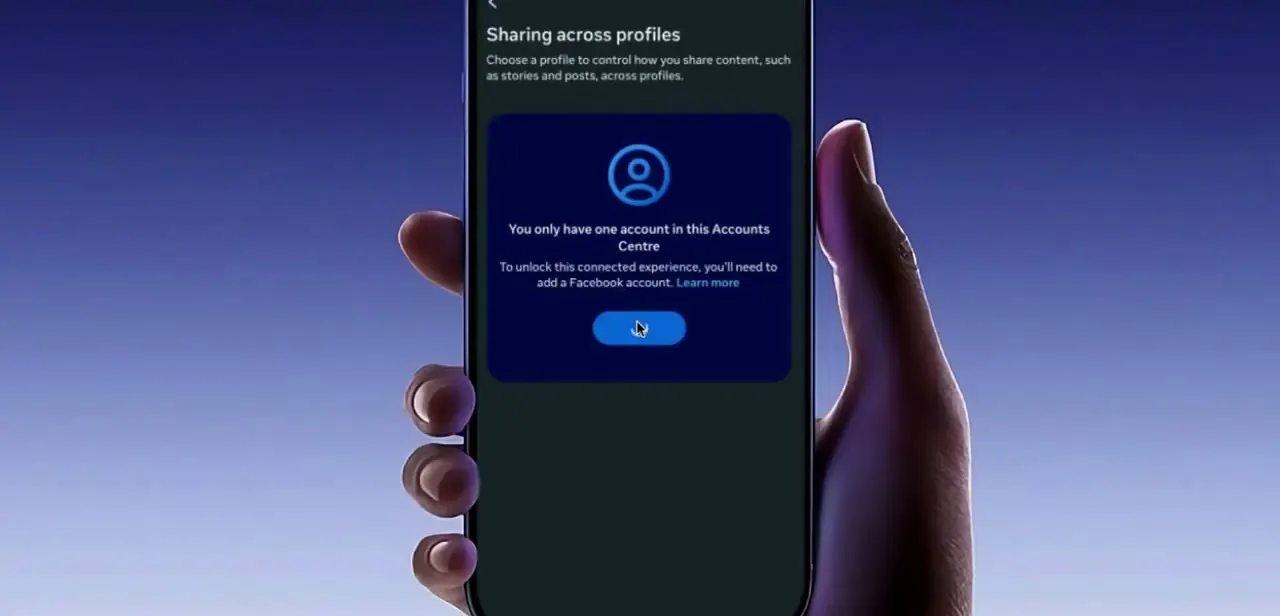
Open Sharing across profiles. If no Facebook account has ever been added, Instagram says so directly: "You only have one account in this Accounts Centre, to unlock this connected experience, you'll need to add a Facebook account." That message is the most common root cause, and no amount of toggling elsewhere works around it.
One qualification the earlier version of this guide got wrong: Accounts Center is not the only route. A professional Instagram account can be connected straight to a Facebook Page, and Meta documents that connection as enabling sharing of posts and stories between the Page and the account. Personal accounts do need the Accounts Center link.
03Add the Facebook account, or connect the Page
If you saw that message, tap through to add a Facebook account, sign in, and confirm the connection. A link that used to work and has vanished is re-created the same way.
There is no hidden switch that revives an old connection. Running a professional account instead?
Connect the Facebook Page to the Instagram account directly. Meta lists sharing posts and stories between the two as one of the things that connection unlocks, alongside a shared inbox and running ads from the Page.
04Set the direction, the destination, and the toggle
Sharing across profiles is configured per pair of profiles, not as one global switch. Meta's instructions are to tap the profile you want to share from, tap the profile you want to share to, then turn Automatically share on.
Pick the destination carefully if you have several. An Instagram post or story can be sent to a Facebook personal profile or to a Page, and choosing the wrong one produces exactly the symptom people describe: the toggle reads as on, and the stories land somewhere nobody is looking. Instagram business accounts avoid that trap by design, because Meta restricts them to cross-posting onto a Page.
05Test with a fresh story on the destination you selected
The setting applies going forward and never retroactively, so post something new and check the specific profile or Page you chose in the previous step. Give it a couple of minutes before deciding it failed.
If you are the only person who touches both accounts, that check takes seconds. Where several people share access to an Instagram account and a Page, Meta specifically warns that content meant for the Page can end up on someone's personal Facebook profile, so the destination is worth confirming rather than assuming.
| From | To | Supported |
|---|---|---|
| Instagram personal or creator account | Facebook personal profile | Yes, via Accounts Center |
| Instagram professional account | Facebook Page | Yes, via Accounts Center or a direct Page connection |
| Facebook personal profile | Yes | |
| Facebook business Page | No, Meta states Page posts and stories cannot be shared to Instagram | |
| WhatsApp Status | Facebook or Instagram Stories | Yes |
Summarised from Meta's Accounts Center help pages, September 2026.
When it doesn't work
The toggle is on but nothing appears on your Facebook Page
Why: Sharing was enabled toward a Facebook personal profile instead of the Page. The pair is chosen explicitly on the Sharing across profiles screen.
Fix: Reopen Connected experiences, then Sharing across profiles, select the Instagram account, and check which destination profile the automatic sharing switch belongs to.
Sharing across profiles offers nothing to switch on
Why: Only one account exists in this Accounts Center, so there is no second profile to pair with.
Fix: Add the Facebook account to the same Accounts Center, or connect a Facebook Page directly if the Instagram account is a professional one.
Stories go to a colleague's personal Facebook profile
Why: A shared Instagram account was linked through the Accounts Center of whoever signed in, so the personal profile became a valid destination. Meta flags this specific risk for teams.
Fix: Connect the Facebook Page to the Instagram account directly instead of routing through a personal Accounts Center, or remove the Instagram account from the Page to stop cross-posting entirely.
Frequently asked questions
Where is the story sharing setting?
Accounts Center, then Connected experiences, then Sharing across profiles. The Connected experiences screen is the step most guides omit, which is why the setting feels like it has disappeared.
Do I need a Facebook account linked in Accounts Center?
For a personal or creator Instagram account, yes. A professional Instagram account has a second option: connect it to a Facebook Page directly, which Meta documents as enabling post and story sharing between the two.
Can I share the other way, from a Facebook Page to Instagram?
No. Meta states that posts and stories made on a Facebook business Page cannot be shared to Instagram. Sharing from a Facebook personal profile to Instagram does work.
Why do my stories keep landing on the wrong Facebook profile?
Automatic sharing is set for one specific pair of profiles, and an Instagram account can target a personal profile or a Page. Open the pair on the Sharing across profiles screen and confirm the destination.
Sources and last check
The Sharing across profiles screen and its wording come from a walkthrough recorded in 2025. In September 2026 the click path and the sharing rules were re-checked against Meta's Accounts Center help pages and Instagram's cross-posting troubleshooting page. Two things changed as a result: the path now includes the Connected experiences screen that the earlier version skipped, and the claim that cross-posting is impossible without a Facebook account in Accounts Center has been qualified, since professional Instagram accounts can connect to a Facebook Page directly. Two unsupported causes from the earlier version, silently revoked permissions and app-version bugs, were removed because no Meta documentation backs them.
- Meta Help Center: Manage connected experiences in an Accounts Center (tap path and sharing rules)
- Instagram Help: Troubleshoot Instagram cross-posting issues with Accounts Center
- Instagram Help: About connecting your professional Instagram account to a Facebook Page
- Facebook Help: Connected experiences across your accounts in an Accounts Center
About the author

Impran M N
I've been hooked on technology for as long as I can remember — especially the new tools and AI apps that seem to land every other week. Easy Tech Tuts is where I write up whatever I've just worked out: I do the task in the real product, record the screen, and turn it into the guide I wish I'd found first.