Easy Tech Tuts
How to Recover Hostinger Account, if you forgot or lost access to Email Easily 2026
By Impran M NLast checked against official docs
Losing access to the inbox tied to your Hostinger account is one of the more panic-inducing login problems, because the usual "forgot password" link just sends a reset email you can no longer read. Hostinger built a separate recovery flow for exactly this.
This guide covers where that option lives on the login screen, what identity proof the recovery form asks you to upload, and how long review takes once you submit it. It's aimed at anyone locked out because an old email was deleted, forgotten, or abandoned.
Before you start
- The email address that was on the account, even if you can no longer open it, or the knowledge that you've forgotten it entirely
- A payment receipt for something purchased through Hostinger (a bank statement or payment processor confirmation) — this document is mandatory for verification
- A second identity document: a government-issued ID, a photo of the card used to pay (with only the first 6 and last 4 digits visible), or business registration paperwork
- An alternate email address you can check, since Hostinger sends the outcome there instead of to the account you're recovering
01Find the "Can't Access Your Account?" link
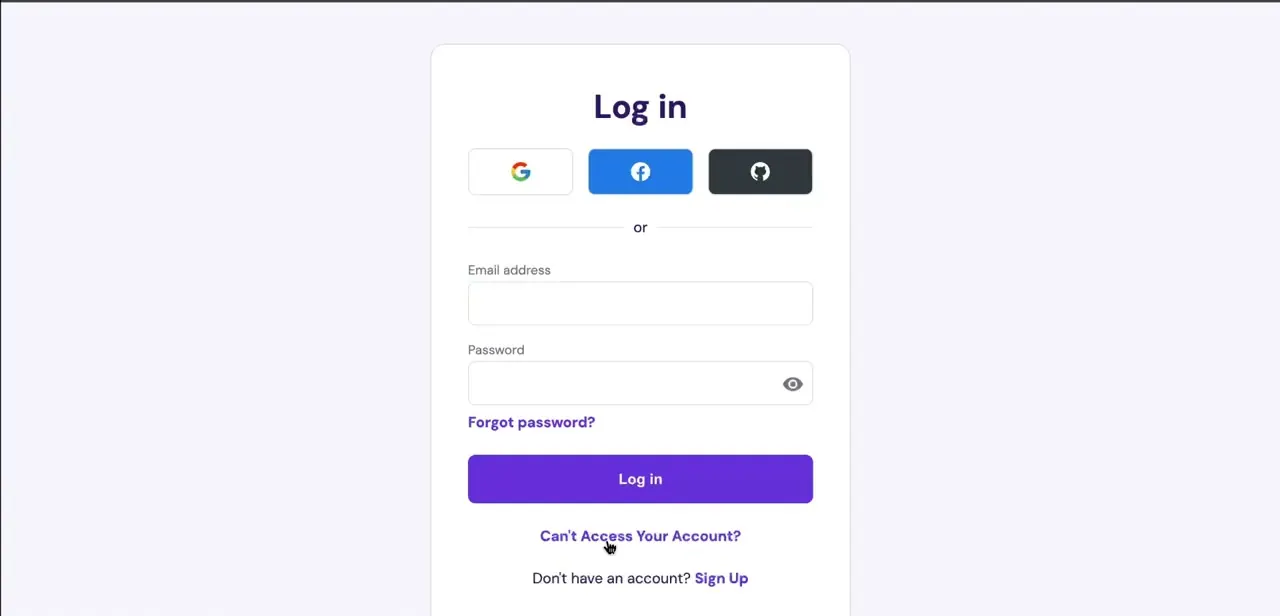
On the standard Hostinger login page, underneath the Email address and Password fields, there's a "Forgot password?" link right below the password box. That isn't what you want if the email itself is the problem.
Below the main Log in button sits a second link, "Can't Access Your Account?", on its own beneath the login form. That's the entry point for the whole recovery flow, and it's easy to miss because it reads as secondary to the password reset option above it.
02Open Account recovery and pick your scenario
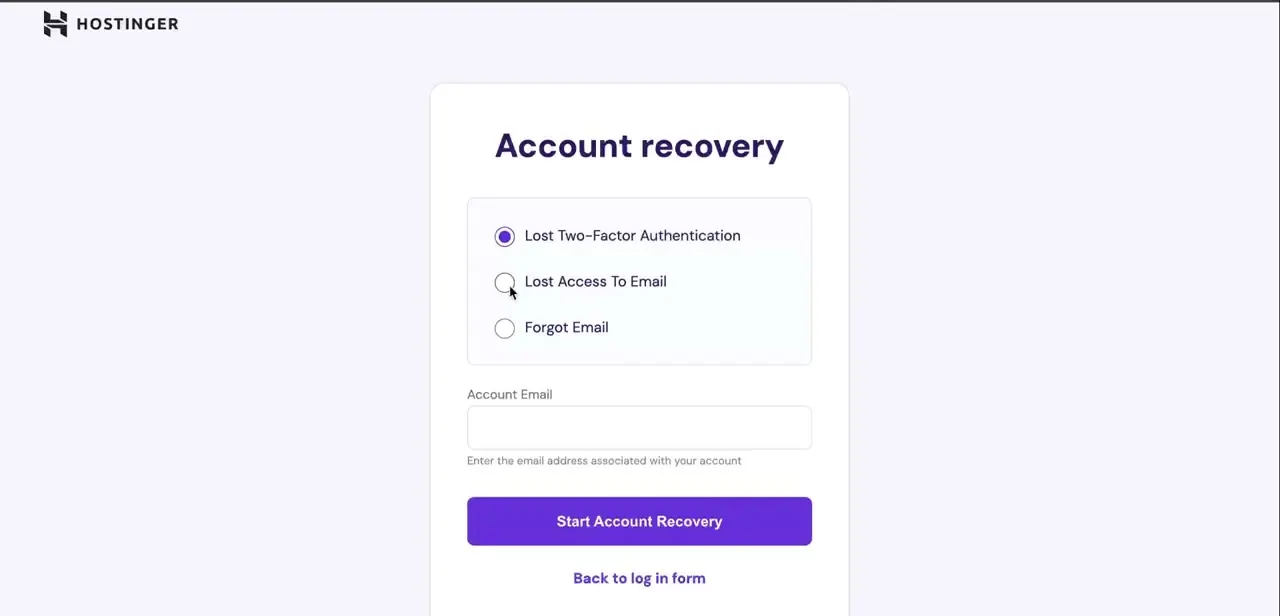
Clicking that link lands you on a dedicated Account recovery page with three radio-button options: Lost Two-Factor Authentication, Lost Access To Email, and Forgot Email. If you still know your email address but can no longer receive messages there, select Lost Access To Email.
If you've forgotten the address itself, choose Forgot Email instead. The two lead to different verification paths, so picking the right one up front saves a wasted attempt.
03Enter the account email and submit
Below the three options is an Account Email field with a note reading "Enter the email address associated with your account." Type in the address on file even if you can no longer log into it. Hostinger uses this to look up the account, not to send you something you'd need to open.
Once filled in, click Start Account Recovery to move on. The form also asks for an alternate email address it can reach you at, since that's where the outcome of your request eventually arrives.
04Upload proof that you own the account
Because there's no working inbox to confirm your identity, Hostinger asks you to upload documents instead of answering security questions. A payment receipt, a bank statement or payment processor confirmation showing a Hostinger transaction, is mandatory.
Alongside it, submit one more document: a government-issued ID, a photo of the card you paid with (first 6 and last 4 digits visible, the rest covered), or business registration paperwork if the account is registered to a company. Each file has to be a JPG, PNG or PDF, capped at 2MB per file and 8MB in total. Screenshots of SMS or email confirmations, hPanel screenshots, Hostinger invoices, and photos of virtual cards without an accompanying bank statement are all rejected, so don't submit those in place of the documents above.
05Wait for manual review
Recovery requests go to a human reviewer instead of resolving instantly, and Hostinger states a turnaround of roughly two business days. The response lands in the alternate email you provided in step three, not the old account address. Check that inbox, and its spam folder, instead of the one you're trying to recover.
06Update your registered email once you're back in
The moment you regain access, go to your profile, open Account Information, then Account settings, and add a recovery email under Recovery email. It only takes a minute, and it means a future lockout can be solved with a reset link sent to that second address instead of going through document review again.
When it doesn't work
Hostinger rejects the document you upload
Why: The file is one of the excluded types (an SMS or email screenshot, an hPanel screenshot, a Hostinger invoice, or a virtual card photo with no bank statement), or the mandatory payment receipt is missing entirely.
Fix: Resubmit with an accepted payment receipt (bank statement or payment processor confirmation) plus one more valid document from the accepted list, saved as JPG, PNG or PDF.
The upload form won't accept the file
Why: The file is larger than 2MB, or the combined upload is over the 8MB total limit, or it's in a format other than JPG, PNG or PDF.
Fix: Compress or re-export the file within those limits before uploading again.
No reply days after submitting the request
Why: Review takes up to roughly two business days, and the response goes to the alternate email address entered on the form, not the address being recovered.
Fix: Check the alternate email's spam folder, and wait out the full review window before contacting support again.
You don't remember the account's email address at all
Why: Lost Access To Email assumes you know the address; picking it without knowing the exact email leads to a lookup that can't match.
Fix: Go back and choose Forgot Email instead, which uses a different lookup path for people who don't know the address itself.
Frequently asked questions
What if I no longer have access to the email on my Hostinger account?
Use the "Can't Access Your Account?" link on the login page, choose Lost Access To Email or Forgot Email on the Account recovery screen, and verify ownership by uploading identity documents instead of confirming an email.
How long does Hostinger account recovery take?
Hostinger reviews recovery requests manually and states a turnaround of roughly two business days. There isn't an instant automated path since the review is document-based.
What documents does Hostinger accept for identity verification, and what's rejected?
A payment receipt (bank statement or payment processor confirmation) is mandatory, plus one of: a government-issued ID, a photo of the payment card with only the first 6 and last 4 digits visible, or business registration paperwork, all as JPG, PNG or PDF up to 2MB each and 8MB total. SMS or email screenshots, hPanel screenshots, Hostinger invoices, and virtual card photos without a bank statement are all rejected.
What's the difference between "Lost Access To Email" and "Forgot Email"?
Lost Access To Email is for when you know the address but can't receive messages there. Forgot Email is for when you don't remember the address itself. They're separate options on the same Account recovery page.
Should I add a recovery email after getting back in?
Yes. Adding one under Profile, Account Information, Account settings, Recovery email means a future lockout can often be solved with a reset link instead of another document review.
Sources and last check
The login screen link, the three Account recovery radio options, and the Account Email field come from screenshots of the actual flow. The identity-verification step was re-checked against Hostinger's official support article in September 2026 and rewritten: the original draft described verification loosely as providing "domain or payment info," when Hostinger's documented process is a document upload (a mandatory payment receipt plus one more accepted document, JPG/PNG/PDF, 2MB per file and 8MB total) with a stated list of unacceptable substitutes. The claim that self-service recovery "can resolve in minutes" was also removed; Hostinger's own documentation describes manual review with a turnaround of roughly two business days, not an instant automated path.
About the author

Impran M N
I've been hooked on technology for as long as I can remember — especially the new tools and AI apps that seem to land every other week. Easy Tech Tuts is where I write up whatever I've just worked out: I do the task in the real product, record the screen, and turn it into the guide I wish I'd found first.