Easy Tech Tuts
How to Connect Godaddy Domain to Google Workspace & use Gmail Easily 2026
By Impran M NLast checked against official docs
Sending mail from you@yourdomain.com instead of a generic address is one of the fastest credibility upgrades a small business can make, and Google Workspace does the heavy lifting once your domain is verified. The part that trips people up isn't Gmail itself, it's the handoff between GoDaddy, where the domain lives, and the Google Admin Console, where you tell Workspace to use it.
This guide walks through that handoff: adding the domain in the Admin Console, verifying ownership, and getting mail flowing through the correct MX record. Google Workspace itself is a paid subscription (a 14-day free trial is available), so budget for that before starting.
01Open Manage domains in the Admin Console
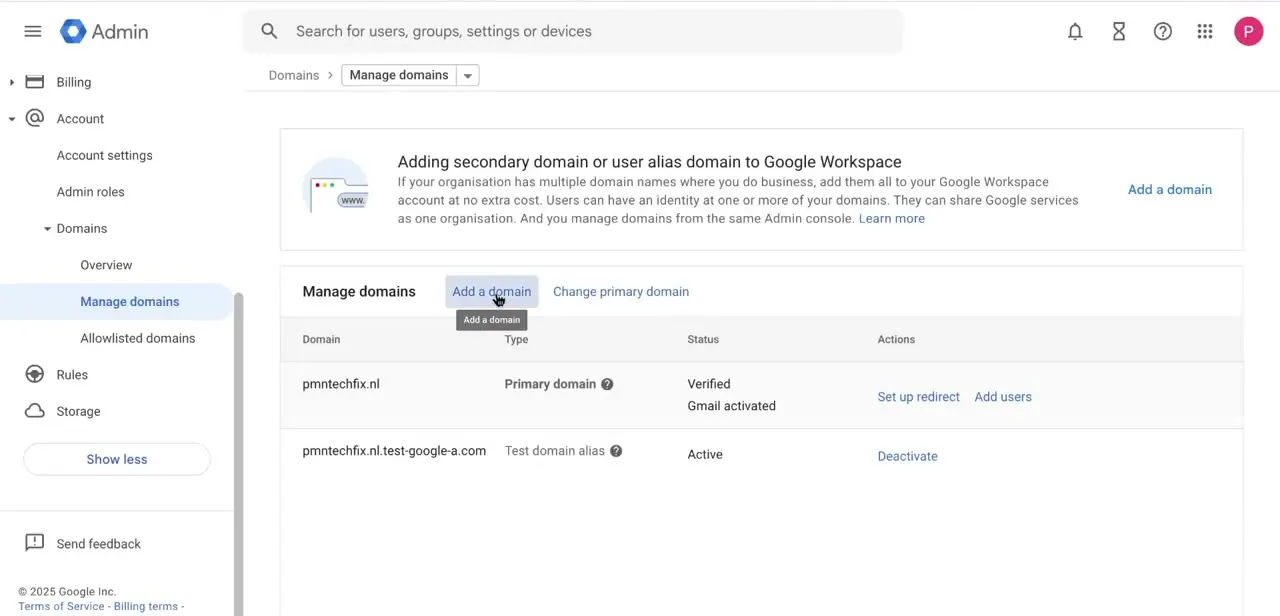
Everything starts in the Google Admin Console under Account > Domains > Manage domains. This is where Workspace tracks every domain tied to your organization: your primary domain shows its verification and Gmail status, with any secondary domains or aliases below it. For a GoDaddy domain you're connecting for the first time, click Add a domain.
02Choose a secondary domain or a user alias domain
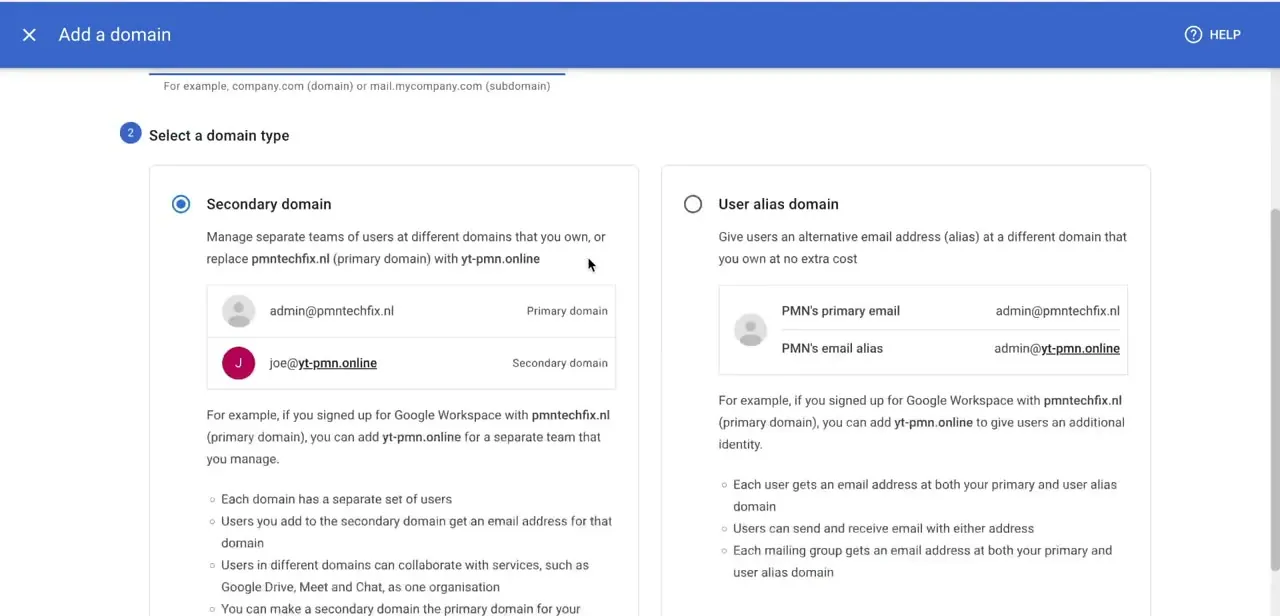
Adding a domain asks you to pick one of two setups, and the choice changes how the domain behaves once connected. A secondary domain gives you a fully separate set of users with their own addresses, useful for a distinct brand or team.
A user alias domain gives your existing users a second address at the new domain while keeping one shared inbox, the simpler option if you just want you@yourdomain.com landing in your current mailbox. Read both descriptions before continuing; switching later means redoing verification.
03Verify ownership with a TXT record
Google needs proof you own the domain before activating any Workspace service on it. The Admin Console gives you a unique TXT record value to copy.
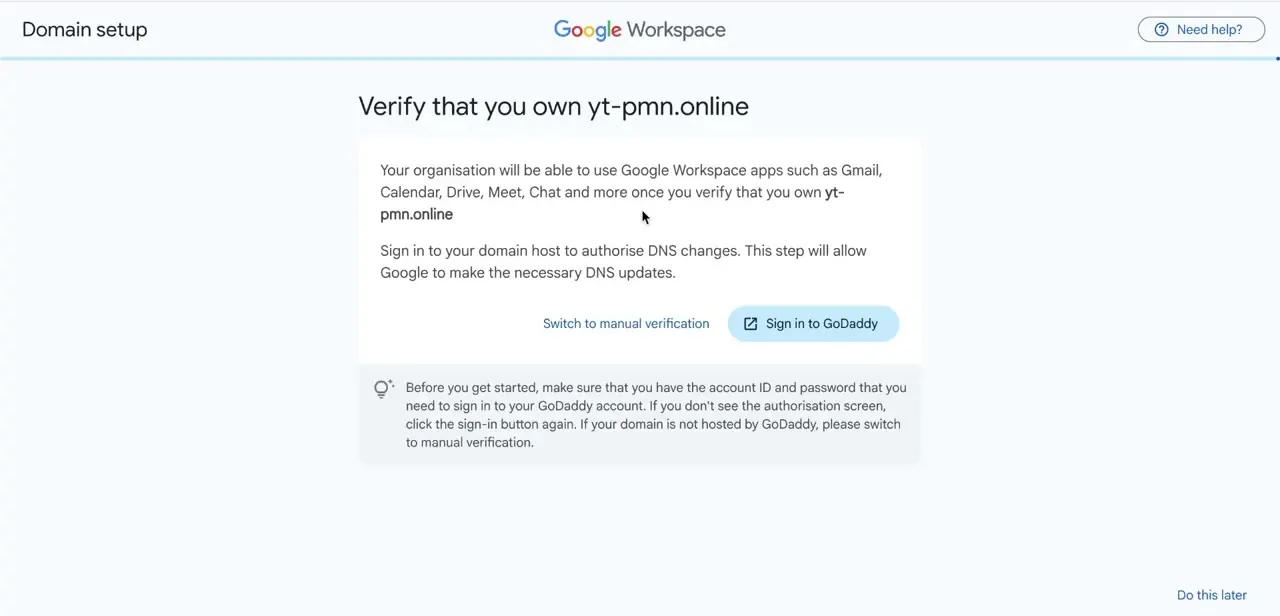
Sign in to GoDaddy separately, open DNS management for the domain, and add a TXT record with that value, then return to the Admin Console and click Verify. Google's Admin Console has, at various points, offered a one-click "sign in to your registrar" shortcut that adds this record for you automatically.
Google's current official domain-verification documentation describes only the manual TXT-record method above, with GoDaddy listed as one of several registrars linked out to their own DNS instructions. If an automatic sign-in option appears on your screen, using it is fine; if it doesn't, the manual TXT record is the documented path and works the same way.
04Point the domain's DNS at Google with the MX record
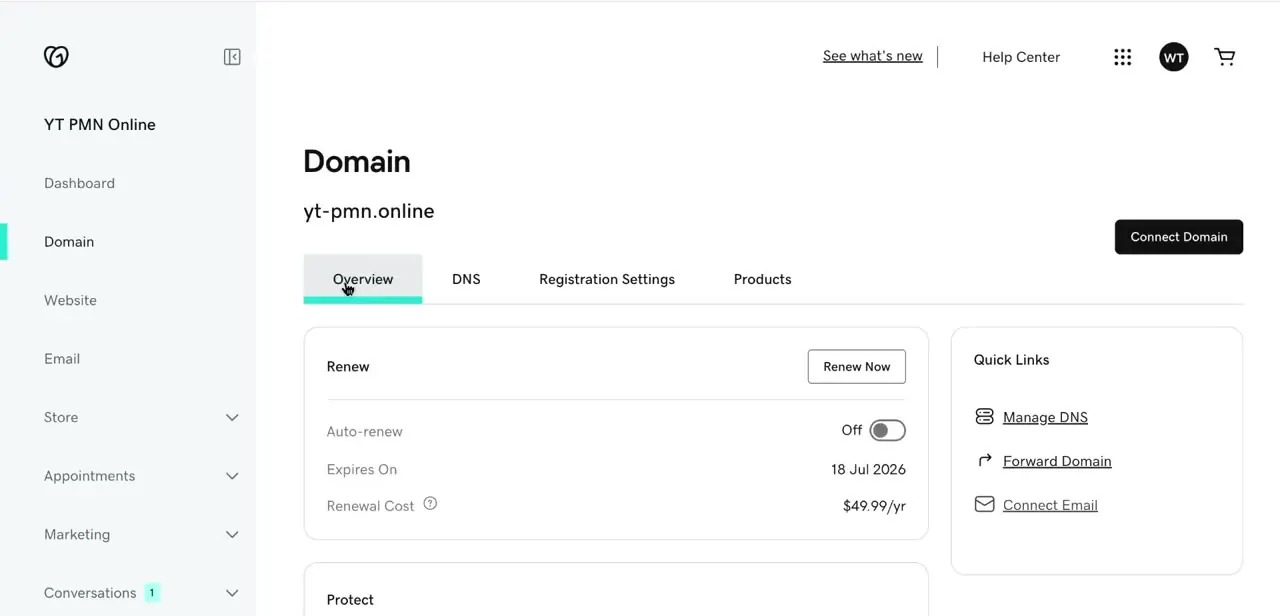
Back in GoDaddy, open the domain's DNS management (Quick Links on the Overview tab has a direct shortcut). Remove any MX records left over from a previous email provider, then add Google's record.
For a domain being set up now, Google's current recommendation is a single MX record: priority 1, pointing at smtp.google.com. Domains configured before 2023 may already be running the older five-record setup (ASPMX.L.GOOGLE.COM and its ALT variants); Google's documentation says that if mail is already working on that setup, you don't need to change it. Don't mix the two — leftover records from either an old provider or the legacy setup are the most common reason Gmail doesn't start receiving mail.
05Add SPF and DKIM for deliverability
MX records get mail flowing; SPF and DKIM are what keep it out of spam. In the Admin Console under Apps > Google Workspace > Gmail, generate the DKIM key and copy the TXT record into GoDaddy's DNS panel, then add the SPF TXT record Google provides alongside it. Neither is required for Gmail to function, but skipping them measurably increases the odds of outgoing mail getting flagged, especially in the first weeks on a new domain.
06Send a test email to confirm everything works
DNS changes can take anywhere from a few minutes up to 72 hours to fully propagate. Once the Admin Console shows the domain verified and Gmail active, send a test message to an outside address and reply to it, to confirm mail flows both ways. If it doesn't, the DNS tab in GoDaddy is where to look first; a stray leftover MX record is almost always the cause.
| Setup | Record | Priority | When to use it |
|---|---|---|---|
| Current (recommended for new domains) | smtp.google.com | 1 | Any domain being connected to Workspace now |
| Legacy (pre-2023 domains) | ASPMX.L.GOOGLE.COM | 1 | Only if this setup is already in place and mail is working |
| Legacy (pre-2023 domains) | ALT1.ASPMX.L.GOOGLE.COM / ALT2.ASPMX.L.GOOGLE.COM | 5 | Same as above |
| Legacy (pre-2023 domains) | ALT3.ASPMX.L.GOOGLE.COM / ALT4.ASPMX.L.GOOGLE.COM | 10 | Same as above |
Use one setup or the other, never both. Values from Google's official MX record documentation, checked September 2026.
When it doesn't work
Domain shows verified but Gmail still isn't receiving mail
Why: Leftover MX records from a previous email provider, or a mix of the modern single record and the legacy five-record setup, are both still present.
Fix: Open GoDaddy's DNS management, delete every MX record that isn't Google's, and keep to one setup: either the single smtp.google.com record or the full legacy set, not both.
There's no "sign in to GoDaddy" automatic verification button
Why: Google's current domain-verification flow is documented as a manual TXT record you copy into GoDaddy's DNS yourself; a registrar-specific automatic option isn't part of the current official instructions.
Fix: Copy the TXT record value from the Admin Console, add it in GoDaddy's DNS settings, and click Verify in the Admin Console. This works regardless of whether an automatic shortcut appears.
Outgoing mail lands in recipients' spam folders
Why: SPF and DKIM records haven't been added, which is common on a domain that's new to sending mail.
Fix: Generate the DKIM key under Apps > Gmail in the Admin Console and add both the DKIM and SPF TXT records to GoDaddy's DNS.
Verification or MX changes don't seem to take effect
Why: DNS propagation hasn't finished. Google's documentation allows up to 72 hours.
Fix: Wait before troubleshooting further, then click Verify or recheck the MX records once that window has passed.
Frequently asked questions
How long does it take for GoDaddy DNS changes to activate Gmail?
DNS propagation can take anywhere from a few minutes up to 72 hours per Google's current documentation, so give it time before assuming something's wrong.
Which MX record should I use in 2026?
For a domain being connected now, use a single MX record: priority 1, value smtp.google.com. The older five-record ASPMX setup still works and doesn't need changing if it's already in place and functioning.
Is there still a one-click "sign in to GoDaddy" verification option?
Google's current official domain-verification documentation only describes the manual TXT-record method, with GoDaddy listed as one of several registrars linked to their own DNS instructions. An automatic option may still appear in some accounts; if it doesn't, the manual TXT record is the documented path.
Do I need to remove my old GoDaddy email records first?
Yes. Existing MX records from a previous email service should be removed so they don't conflict with Google Workspace's records.
Are SPF and DKIM records required or optional?
Optional for Gmail to function, but strongly recommended. Skipping them noticeably raises the odds of outgoing mail being flagged as spam.
Should I choose a secondary domain or a user alias domain?
Pick a secondary domain for a separate set of users and addresses; pick a user alias domain if you just want existing users to also receive mail at the new domain in the same inbox.
Sources and last check
Click path and screens come from a recorded walkthrough. Domain verification and MX record guidance were re-checked against Google's current official documentation in September 2026. Two corrections came out of that check: Google's documented verification method is now a manual TXT record, not a guaranteed one-click GoDaddy sign-in (the old registrar-specific help pages now redirect to the generic TXT-record instructions), and the currently recommended MX setup is a single smtp.google.com record, not the legacy five-record ASPMX configuration this guide previously presented as the default.
About the author

Impran M N
I've been hooked on technology for as long as I can remember — especially the new tools and AI apps that seem to land every other week. Easy Tech Tuts is where I write up whatever I've just worked out: I do the task in the real product, record the screen, and turn it into the guide I wish I'd found first.