Easy Tech Tuts
How to Buy Domain on Godaddy Auction, Godaddy Auctions Domain Purchase Explained 2026
By Impran M NLast checked against official docs
GoDaddy Auctions is where expired, premium, and otherwise unavailable domain names change hands, and it works nothing like grabbing a fresh .com off the standard search page. You're bidding against other buyers, working against a countdown clock, and weighing signals like traffic and backlink authority before you commit money. This guide walks through signing in, reading the Auctions dashboard, and understanding what the numbers next to each listing mean before you place a bid.
01Sign in to your GoDaddy account
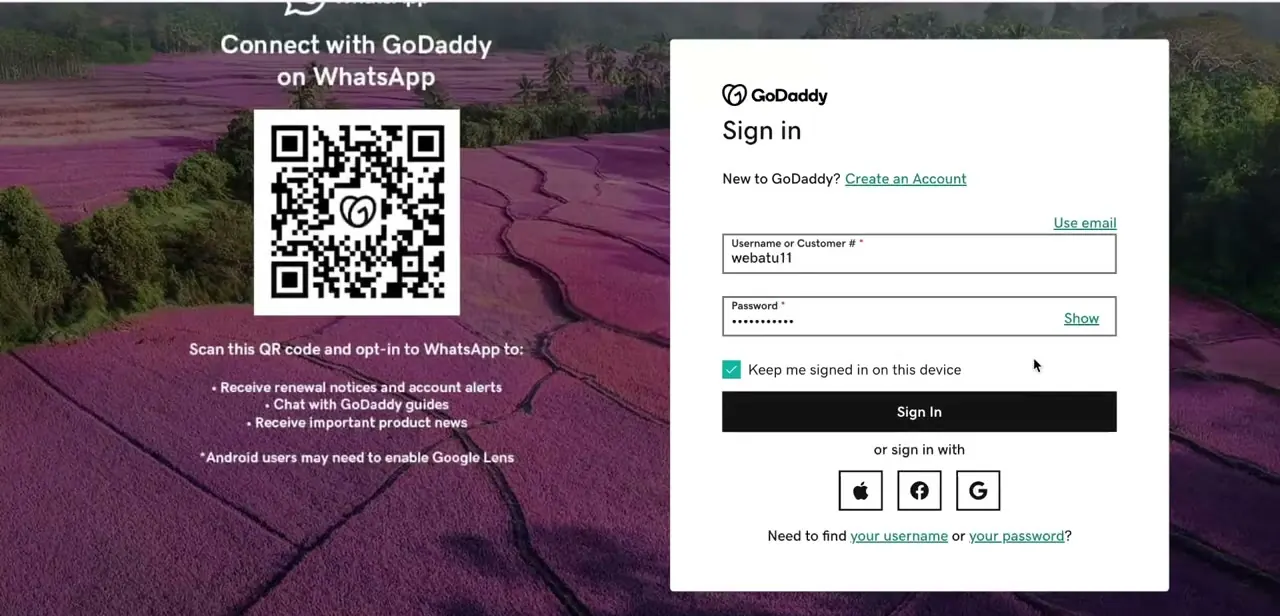
Go to GoDaddy's sign-in page and enter your username or customer number along with your password. The same account you use for domains, hosting, and email works here; there's no separate Auctions login.
You can also sign in with Apple, Facebook, or Google if you originally set your account up that way. The "Keep me signed in on this device" checkbox is worth using if you plan to check auctions regularly, since some listings move fast enough that re-logging in costs you time you don't have.
02Open the Auctions dashboard
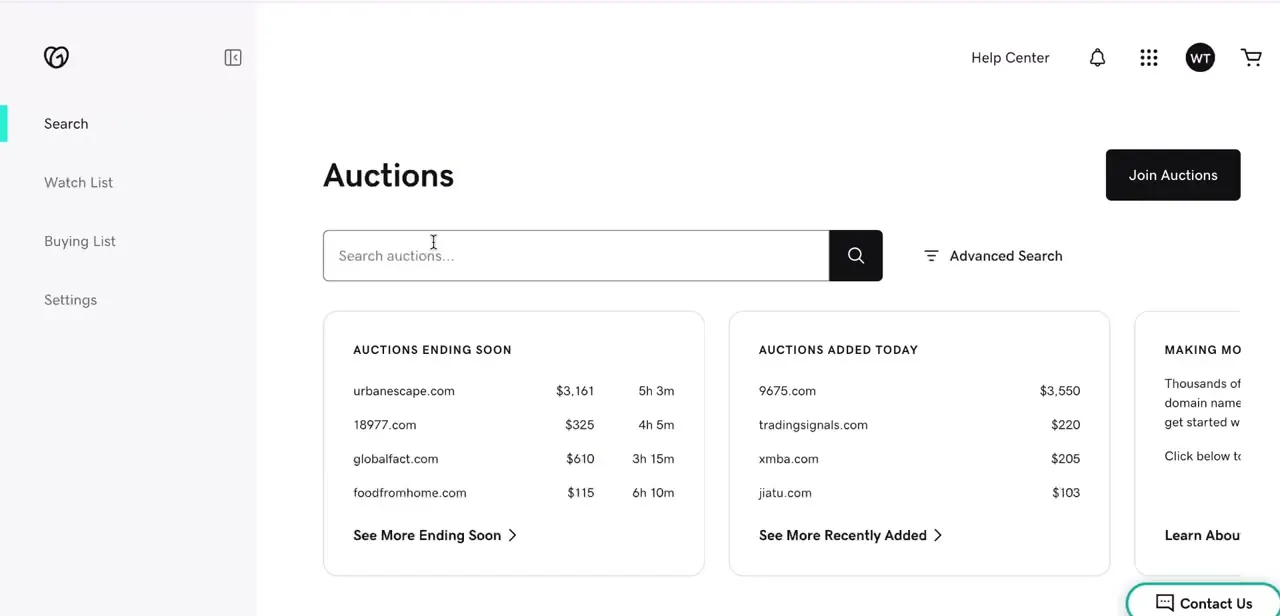
Once signed in, navigate to Auctions, which opens into its own dashboard with a left-hand menu for Search, Watch List, Buying List, and Settings. The main page surfaces two panels right away: "Auctions Ending Soon," which lists domains with a live countdown next to their current price, and "Auctions Added Today," showing what's freshly listed. A prominent Join Auctions button also sits at the top; that's the membership gate covered in the cost note above, separate from just having a standard GoDaddy account.
03Read the listing columns before you bid
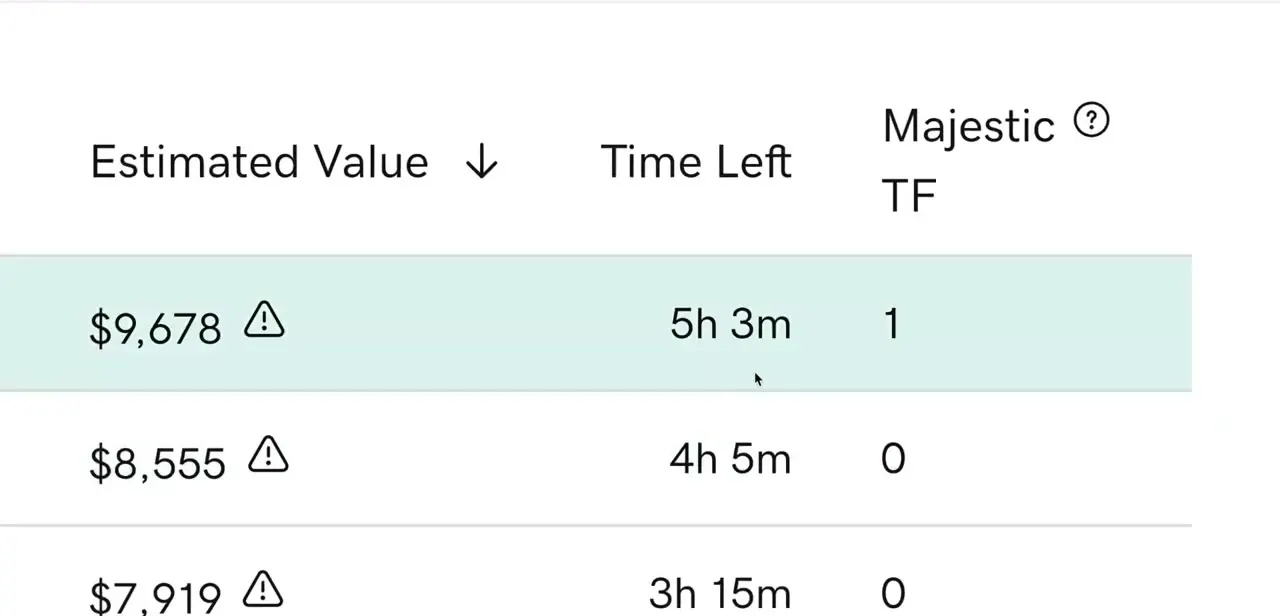
Use Advanced Search or the column headers to sort by Estimated Value, Time Left, or Majestic TF, a third-party trust flow metric that gives a rough sense of a domain's existing backlink authority. A domain with a Majestic TF of 1 or higher has at least some link history, which can matter if you're buying for SEO value and not just the name; a value of 0 means it's starting from scratch in Google's eyes regardless of how good the name sounds.
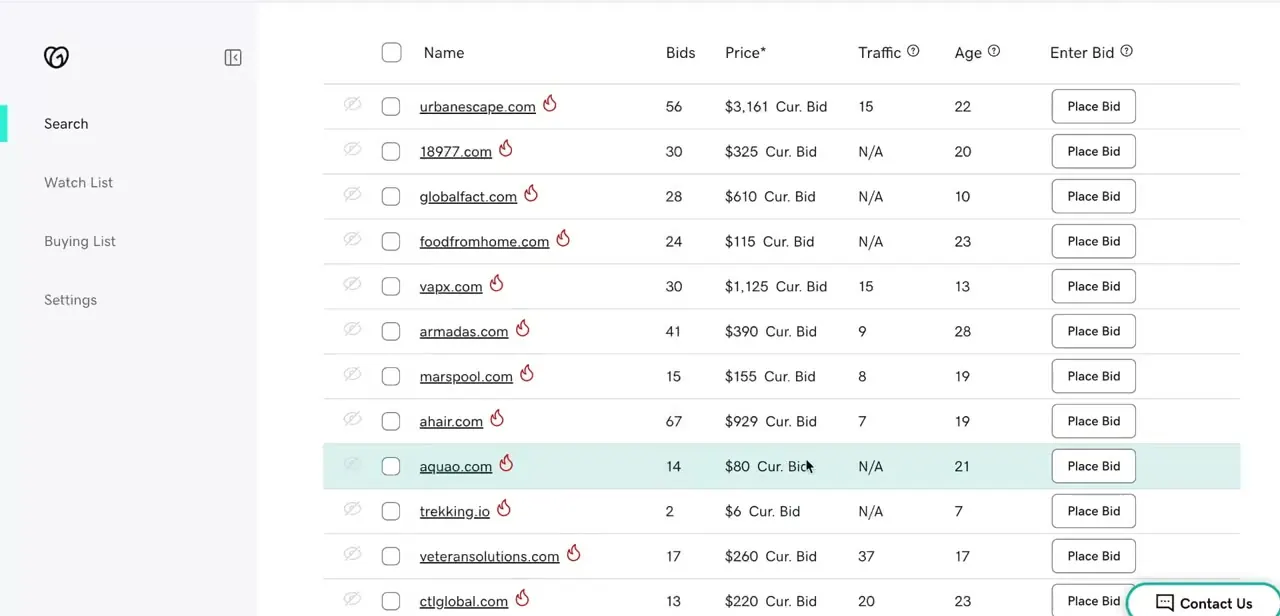
Opening the full listing adds Bids, Price, Traffic, and Age columns. Bids tells you how contested a listing already is: a domain with dozens of bids and climbing will keep moving, while one with only two might still be gettable near its current price.
Traffic and Age are populated for expired-domain auctions specifically, so a blank or N/A in either column on other listing types means no data was tracked, not zero. Age is the domain's registration length in years, which matters because older domains can carry more trust with search engines than a brand-new one, independent of backlinks.
04Place a bid or buy instantly
GoDaddy Auctions runs on proxy bidding, not a simple "type a number, that's your bid" system. Clicking Place Bid asks for the maximum you're willing to pay; the system then bids only the smallest amount needed to keep you in the lead, and automatically raises your bid step by step as others outbid you, up to that maximum.
You're notified if someone eventually outbids your max entirely. Some listings instead show a fixed Buy Now price, letting you skip bidding and purchase immediately if you don't want to risk losing the domain to a late bid.
Buy-now purchases go through GoDaddy's normal cart and checkout. Decide which approach fits the domain before you start: buy-now suits a name you can't afford to lose, bidding suits one you'd like but won't chase past your own ceiling.
05Check membership and verification limits before you bid seriously
Bidding on expired or premium listings requires joining GoDaddy's Auctions program through the Join Auctions button. Separately, your account's verification status caps how much you can commit: an unverified account is limited to two active bids totalling $1,500 combined, while buy-now or make-offer purchases under that amount don't require verification at all. If you plan to chase something above that ceiling, complete bidder verification before you get attached to a specific domain, not at the moment you try to place the bid.
06Complete payment securely once you win
Winning a bid or completing a buy-now purchase moves you into GoDaddy's standard checkout, where payment is processed the same way as any other GoDaddy purchase. Domains bought through auction still need to be transferred into your account and, if you want continuity, pointed at your existing hosting or DNS. Budget a little time after the purchase completes for that transfer to finish before the domain is fully usable.
When it doesn't work
The price barely moves after placing a bid
Why: GoDaddy's proxy bidding only raises your bid the minimum amount needed to stay ahead. The number you entered is your ceiling, not the amount that gets shown as the current price.
Fix: Check your maximum in the Buying List instead of assuming the listing price reflects what you offered; it climbs on its own as others bid, until it reaches your cap.
A bid gets rejected, or you can't place a second one
Why: Unverified accounts are limited to two active bids totalling $1,500 combined.
Fix: Complete GoDaddy's bidder verification if you want to bid on more auctions at once or commit above that combined total.
Traffic or Age shows blank on a listing you're interested in
Why: Those two columns are populated for expired-domain auctions specifically; other auction types don't carry that history.
Fix: Treat a blank field as unknown, not zero, and check traffic independently with a third-party tool if it matters to the purchase.
Frequently asked questions
Do I need special membership to bid on GoDaddy Auctions?
Bidding on expired-domain and premium listings needs GoDaddy's Auctions program membership, joined via the Join Auctions button on the dashboard. Buy-now and make-offer purchases under $1,500 don't need it.
How does bidding actually work, do I just enter a price?
You enter a maximum bid, not a fixed offer. GoDaddy's proxy bidding system bids the smallest amount necessary to keep you ahead and keeps raising it automatically as others bid, up to your maximum.
What does "buy now" mean on an auction listing?
It lets you skip bidding entirely and purchase the domain immediately at a fixed price, instead of risking being outbid before the auction closes.
What does Majestic TF mean on a listing?
Majestic Trust Flow is a third-party metric estimating a domain's existing backlink authority. A TF of 0 means little to no link history, while a higher number suggests some established SEO value.
Is there a limit on how much I can bid?
Yes, until your account is verified: unverified accounts are capped at two active bids totalling $1,500 combined. Verification removes that cap.
Is GoDaddy Auctions good for beginners?
It's accessible for beginners, though reading the Bids, Traffic, and Age columns, and understanding that bids are maximums and not fixed offers, takes a little practice before you can judge whether a listing's price is reasonable.
Sources and last check
Click path and screens come from a walkthrough recorded in 2026. Membership gating, the $1,500/two-bid unverified limit, the proxy-bidding mechanism, and the Age/Traffic column scope were checked against excerpts of GoDaddy's own help center indexed by search in September 2026; GoDaddy's help pages returned HTTP 403 to direct fetching in this session, so no help-center URL is linked here, but the corrections themselves (the proxy-bidding description in particular, which this guide previously described as a flat bid amount) are based on that material, not on assumption.
About the author

Impran M N
I've been hooked on technology for as long as I can remember — especially the new tools and AI apps that seem to land every other week. Easy Tech Tuts is where I write up whatever I've just worked out: I do the task in the real product, record the screen, and turn it into the guide I wish I'd found first.