Easy Tech Tuts
How to Set Email Forwarding & Routing in Gmail in Google Workspace Admin Console 2026 Easily
By Impran M NLast checked against official docs
Forwarding and routing rules let admins automatically redirect incoming mail, manage shared inboxes, or handle employee transitions without losing messages. Unlike the forwarding option inside a personal Gmail account, this version lives in the Admin Console and applies at the organization level, so one misconfigured rule can affect everyone at once. This guide walks through where the setting actually lives, how to build a working forwarding rule with a real recipient map, and what to double-check before you save it.
Before you start
- A Google Workspace admin account with rights to manage Gmail service settings
- The destination address for each forwarded mailbox already decided, since Google rejects a row in the address map that's left empty
01Open the Admin Console and go to Google Workspace
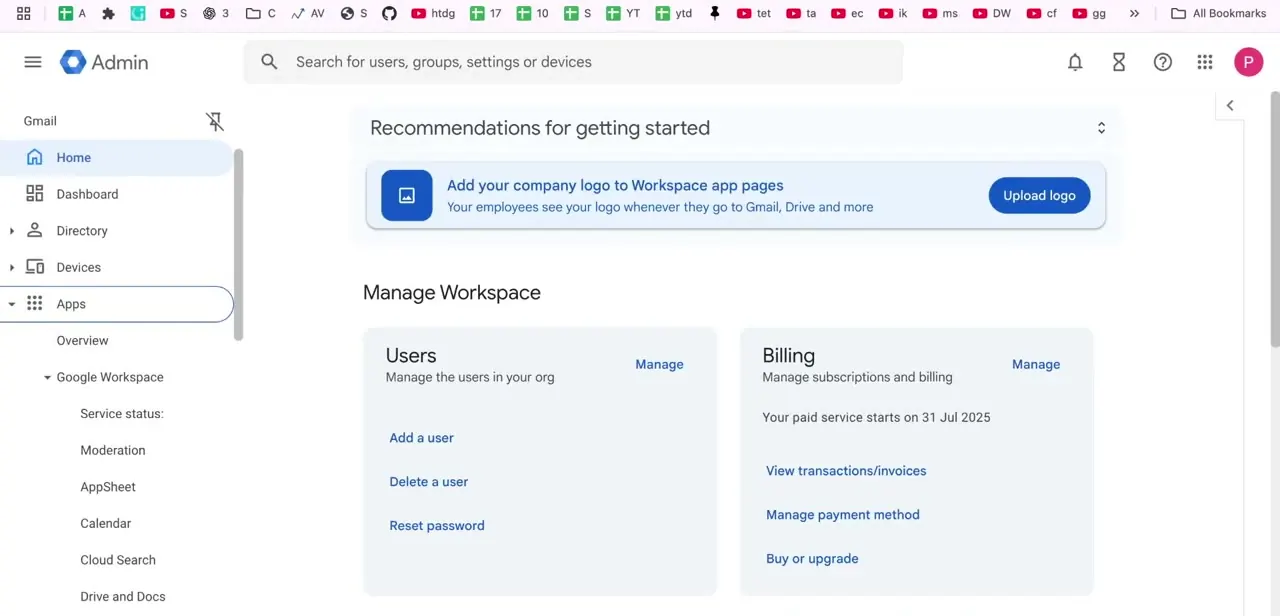
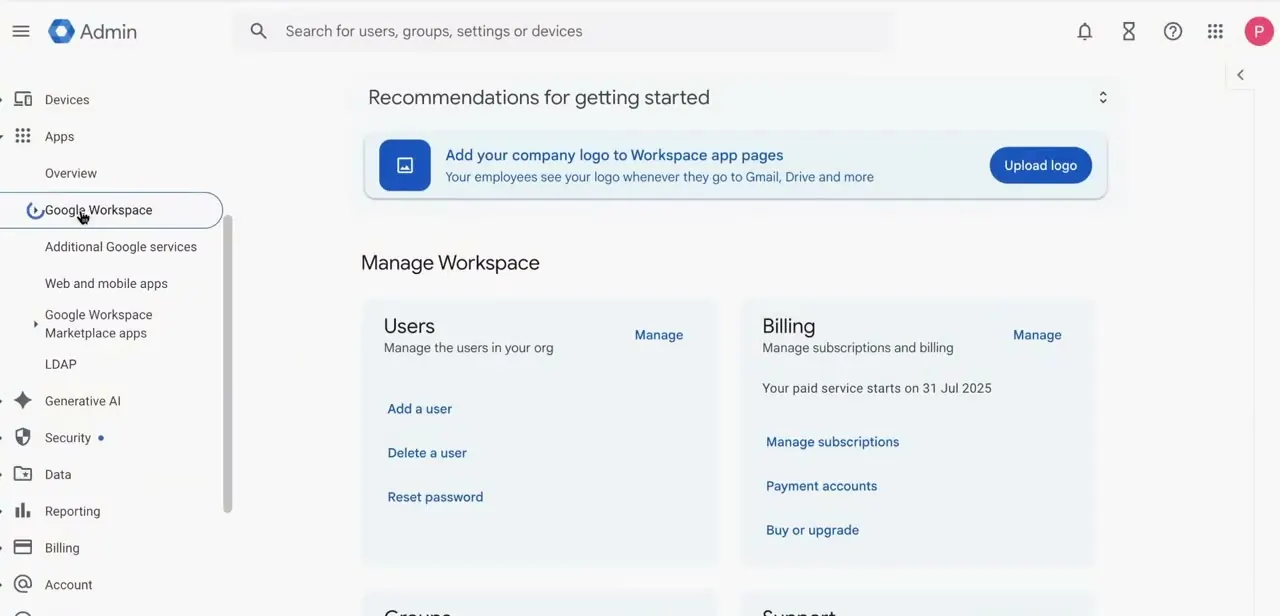
Sign in with an administrator account and land on the Admin Console home screen, which shows the Recommendations panel plus quick links for managing Users and Billing. Routing settings aren't on this landing page; you get there through the Apps section. In the left sidebar, expand Apps, then Google Workspace, and you'll see the full list of Workspace services, including Gmail, Calendar, Drive and Docs, and Google Chat underneath it.
02Open Gmail settings and find Routing
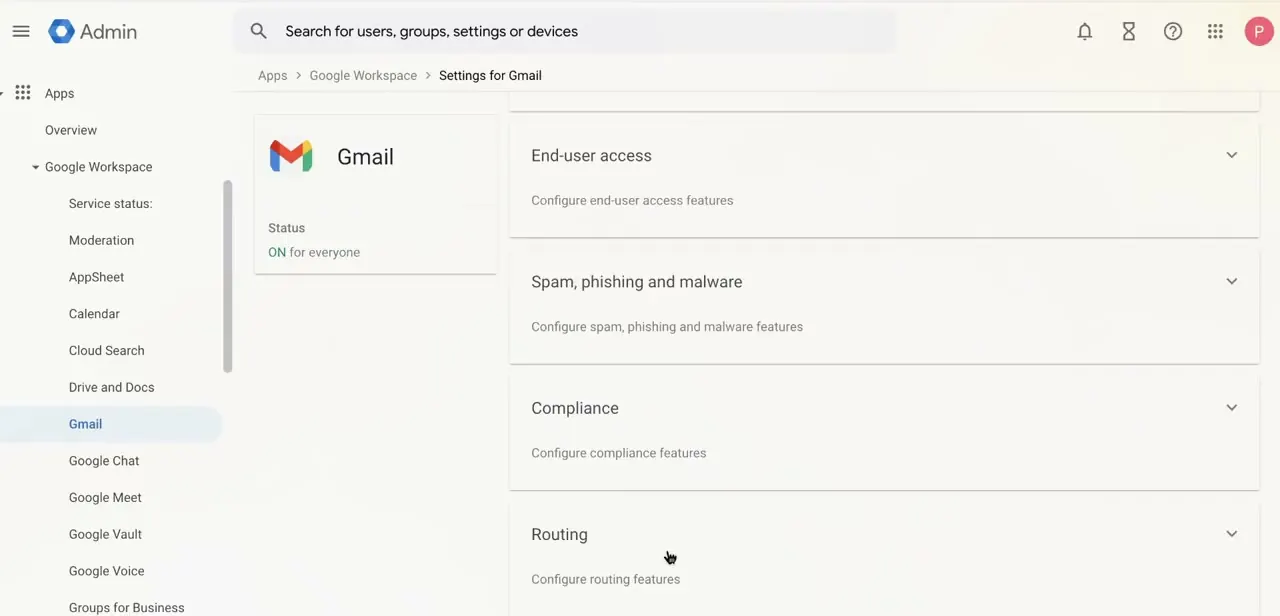
Click Gmail under Google Workspace to reach Settings for Gmail, where you'll see a status card confirming Gmail is ON for everyone, followed by a stack of expandable sections: End-user access, Spam, phishing and malware, Compliance, and Routing near the bottom. Routing is where both forwarding rules and SMTP relay settings live, so it's easy to miss since it's the last item and collapsed by default. Note that Routing is a different setting from Default routing higher up the list; click to expand Routing before continuing.
03Add a forwarding setting and map the recipient
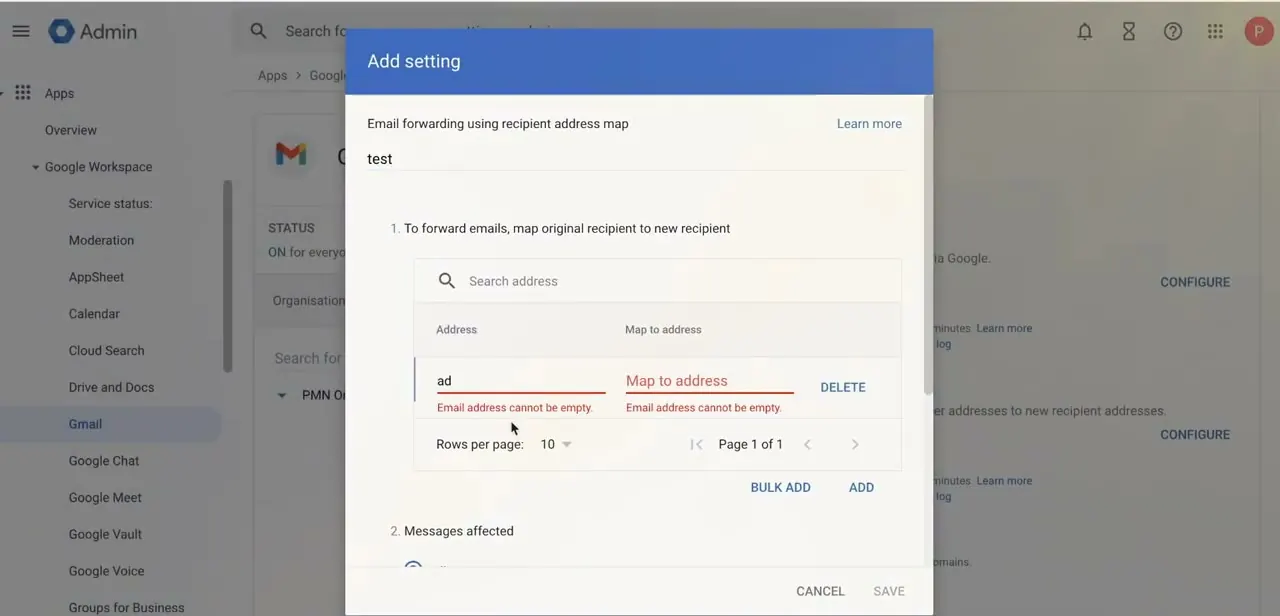
Inside Routing, click Add setting and choose "Email forwarding using recipient address map." This opens a dialog where you build the mapping: an Address column for the original recipient and a Map to address column for where mail should land. Give the setting a name, then use Search address or Bulk add to populate the map.
Bulk add takes comma-delimited entries, which is faster than typing rows one at a time if you're pasting from a spreadsheet, and Google caps the total at 5,000 recipient addresses across all address maps combined. Every row needs both fields filled in; Google flags an empty address with "Email address cannot be empty" and blocks the save until it's fixed.
04Choose which messages are affected and set routing options
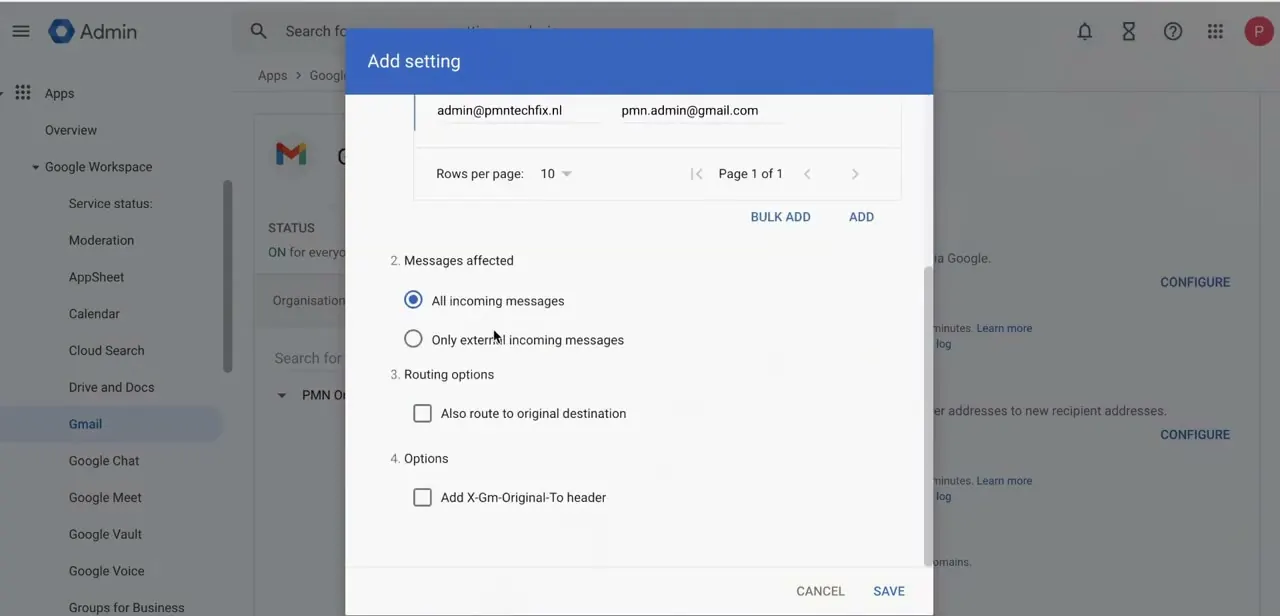
Scroll down inside the same dialog to see the mapped rows you've added, for example admin@pmntechfix.nl mapped to pmn.admin@gmail.com, followed by two sets of choices. Under Messages affected, pick All incoming messages to catch everything sent to that address, internal or external, or Only external incoming messages if mail from inside your domain should stay put.
Under Routing options, Also route to original destination keeps a copy in the original mailbox instead of redirecting it entirely, which is the safer choice while you're still testing. Add X-Gm-Original-To header sits next to it and writes the original recipient into the message header, useful if the receiving mailbox needs to tell forwarded messages apart from its own mail.
05Scope the rule and save
Before saving, check the organizational unit shown in the left panel. Routing settings in the Admin Console apply at whatever OU level you're currently viewing, so confirm you're not about to push a rule meant for one shared inbox out to the entire company.
Click Save once everything looks right. Google states changes can take up to 24 hours to apply, though in practice they usually land sooner, and any change you make is recorded in the audit log if a rule behaves unexpectedly later.
06Test before rolling it out broadly
Send a handful of test emails to the addresses covered by your new rule and confirm they land where you expect, especially if you enabled both forwarding and Also route to original destination at once. If you're setting this up ahead of an employee's last day, test the rule a day or two early instead of the morning they leave, since a typo in the recipient map still needs time to be caught and fixed.
07Monitor delivery and adjust as needed
Use the Email Log Search link at the top of the Routing panel to check how a specific message was handled if something looks off. Revisit the rule after organizational changes, such as a domain move or a new hire replacing someone whose mail was being forwarded, since stale routing rules are a common source of "why didn't I get that email" support tickets.
When it doesn't work
Google blocks the save with "Email address cannot be empty"
Why: A row was added to the address map with the Address or Map to address field left blank, often from a bulk-add paste that didn't line up cleanly.
Fix: Scroll through every row in the map and fill in or delete the incomplete one before saving again.
A rule meant for one inbox forwarded mail for the whole company
Why: The rule was created while the wrong organizational unit was selected in the left panel; routing settings apply to whichever OU is active when you save.
Fix: Delete or edit the setting from the correct OU, and confirm the OU shown in the left panel before saving any routing change.
The rule was saved but mail still isn't forwarding an hour later
Why: Google's own guidance is that routing changes can take up to 24 hours to apply, even though most take effect much sooner.
Fix: Wait before assuming the rule is broken, and use Email Log Search to confirm whether a specific test message actually failed to route.
Frequently asked questions
Can I set up forwarding for just one user instead of the whole organization?
Yes. Routing rules in the Admin Console can be scoped to a specific organizational unit instead of applying company-wide; check the OU selected in the left panel before saving to confirm the scope.
What's the difference between forwarding and routing in Gmail?
Forwarding sends a copy of incoming mail to another address using a recipient address map. Routing settings are the broader category and can also reject mail, send it through an outbound gateway, or split delivery based on conditions.
Will forwarding rules affect email security?
Set up carelessly, a forwarding rule can expose sensitive information, so route mail only to trusted, verified addresses and review the audit log after making changes.
Can I use routing rules when an employee leaves the company?
Yes, this is a common use case. Routing an outgoing employee's mail to a manager or shared inbox with a recipient address map ensures nothing important is missed.
How long does it take for a new routing rule to start working?
Google's documentation states changes can take up to 24 hours, though they typically apply faster. Send a test email before relying on the rule for anything time-sensitive.
Is there a limit to how many addresses I can map?
Yes. Google caps the total at 5,000 recipient addresses across all of a domain's address maps combined, which only matters for very large bulk-forwarding setups.
Sources and last check
Click paths and screens come from a recorded walkthrough. The routing setting fields, the Messages affected and Routing options checkboxes, the 5,000-address cap, and the propagation timeline were re-checked against Google Workspace's official admin help in September 2026. One correction: the article previously said changes take effect within a few minutes; Google's documentation states changes can take up to 24 hours, though they typically apply sooner.
About the author

Impran M N
I've been hooked on technology for as long as I can remember — especially the new tools and AI apps that seem to land every other week. Easy Tech Tuts is where I write up whatever I've just worked out: I do the task in the real product, record the screen, and turn it into the guide I wish I'd found first.