Easy Tech Tuts
How to Activate Gmail in Google Workspace, Fix We are sorry, but you do not have access to Gmail...
By Impran M NLast checked against official docs
Seeing "We are sorry, but you do not have access to Gmail" almost always traces back to one thing: Gmail's service status is switched off for that user, either domain-wide or for their specific organizational unit. This guide covers the Admin Console screens where that toggle lives, how to tell whether the problem is global or scoped to one OU, and what else to check if flipping the switch doesn't clear the error right away. It's written for admins fixing this for someone else and for end users who've been asked to check their own account.
Before you start
- Admin Console access with the Service Settings admin privilege (Super Admins have this by default)
- The affected user's email address and organizational unit, if the domain-wide fix doesn't resolve it for everyone
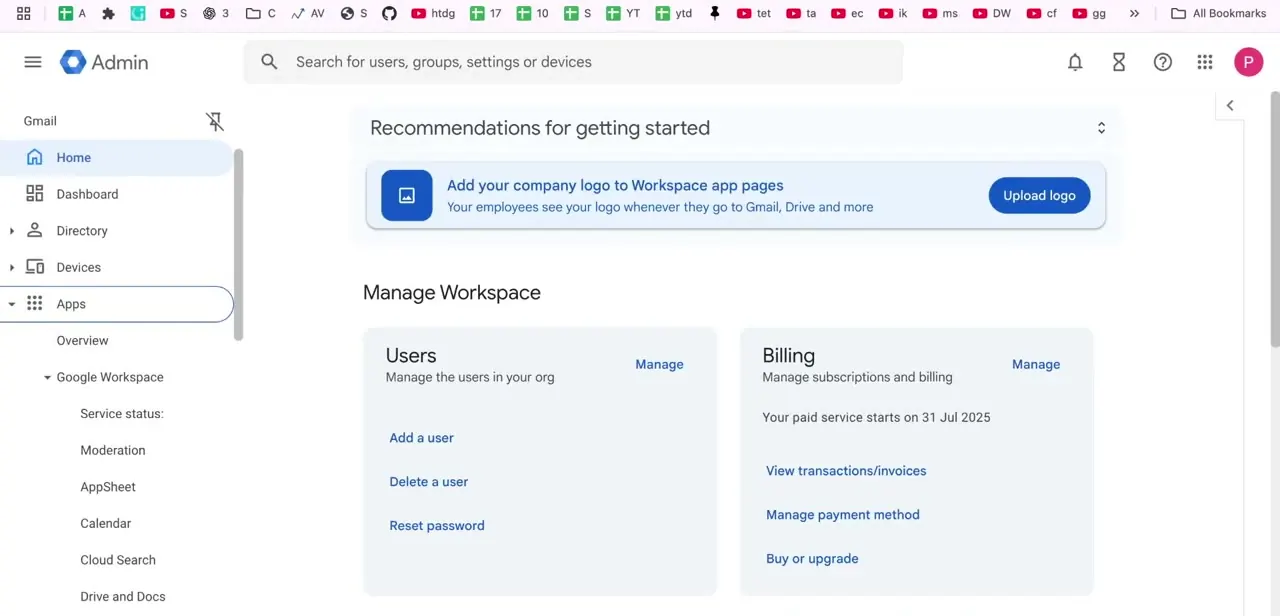
01Go to Apps and open Google Workspace
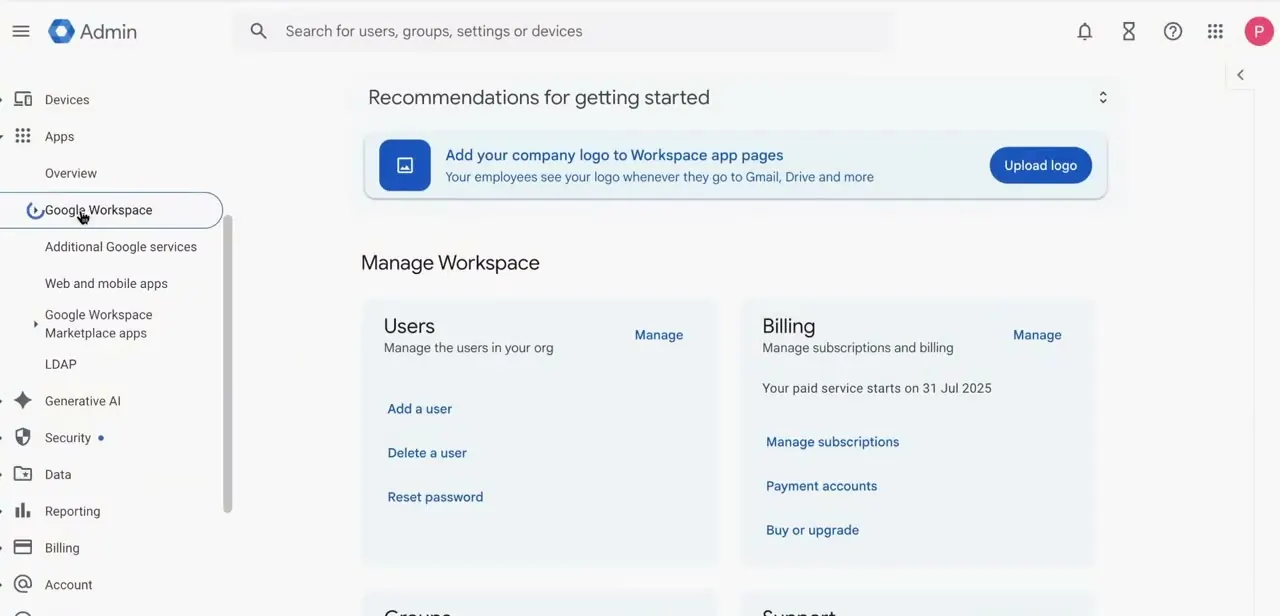
In the Admin Console, open Apps in the left sidebar, then Google Workspace. This expands into a list of individual services: Service status, Moderation, AppSheet, Calendar, Cloud Search, Drive and Docs, and further down, Gmail.
Each service has its own settings page instead of one shared toggle, so enabling Drive doesn't touch Gmail, and the reverse is true too. You need the Service Settings admin privilege to change anything here; Super Admins have it by default.
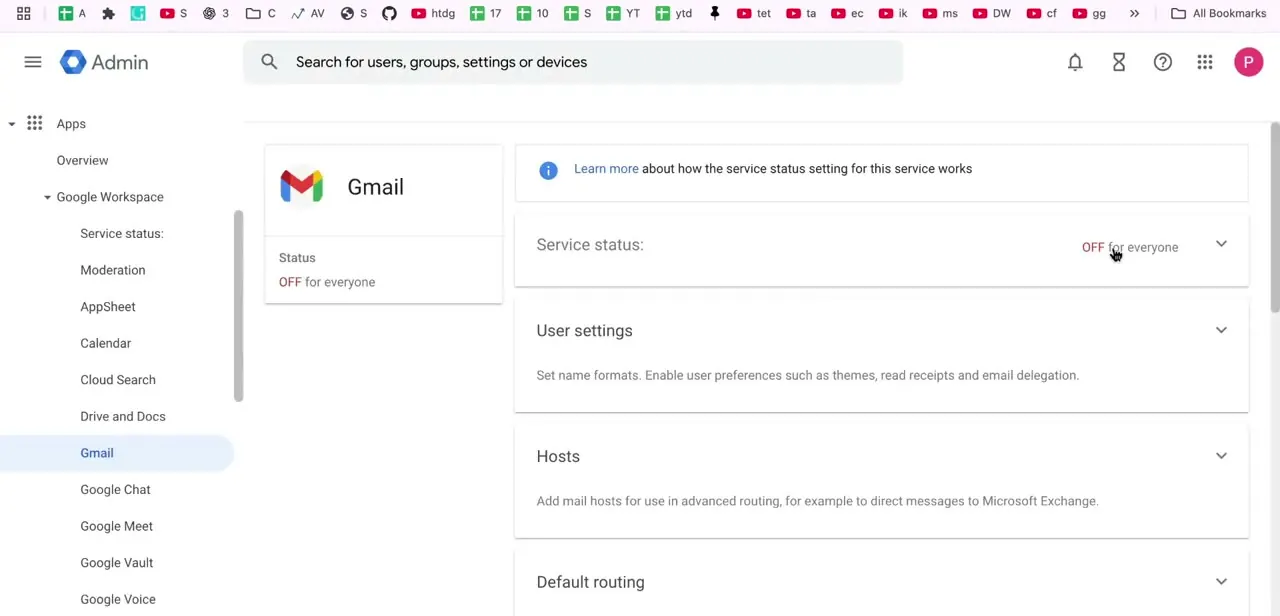
02Open Gmail's settings and check its status
Click into Gmail from that list. The page shows its current Status at the top — in a broken setup this reads "OFF for everyone," which is the direct cause of the access error.
Below it sit collapsible sections for Service status, User settings (name formats, themes, read receipts, delegation), Hosts (for routing mail through something like Microsoft Exchange), and Default routing. For a plain access error, Service status is the only section that matters for now.
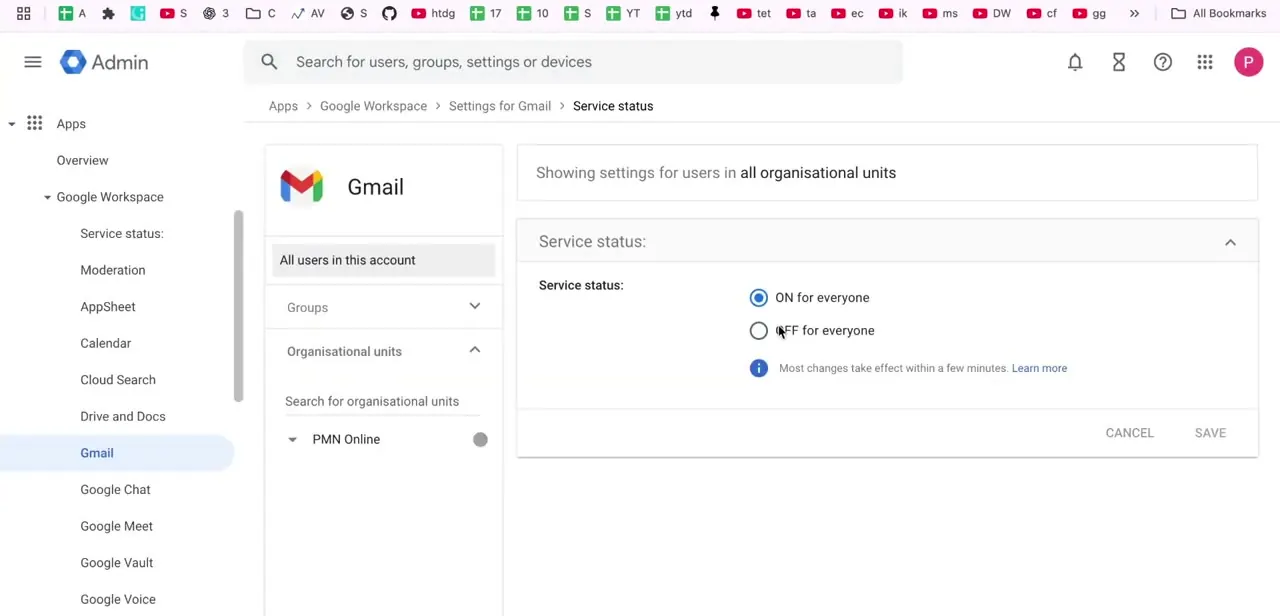
03Turn Gmail on for the right scope
Expand Service status. It offers two options: On for everyone and Off for everyone.
Before saving, check the Organizational units panel on the left. It defaults to showing all organizational units, but if your domain has separate OUs, the change you make only applies to whichever one is selected there.
A child OU can override whatever the parent organization has set, so switching Gmail on at the top level doesn't guarantee every user underneath gets access. If the affected person sits in a specific OU, such as Students or Contractors, select that OU here and check its own Gmail status directly instead of assuming it inherited the domain-wide setting. Google's own documentation notes that service-status changes can take up to 24 hours to apply, though they typically happen sooner.
04If the error persists, look outside Service status
A confirmed "On for everyone" setting that still produces the error usually points somewhere else. Check Hosts and Default routing on the same Gmail settings page for a misconfigured entry, confirm the domain's MX records point at Google, and for one isolated user, check their individual account status and license assignment. Each of these produces a message that looks identical to a disabled service, so rule them out before assuming it's a propagation delay.
When it doesn't work
Gmail is on for everyone at the domain level, but one user still can't get in.
Why: A child organizational unit can override an inherited Service status setting. The user's specific OU may have Gmail forced off even though the parent organization has it on.
Fix: Select that user's OU in the Organizational units panel on Gmail's settings page and check its Service status independently. If it shouldn't be overriding the parent, switch it back to Inherit.
The error is still there right after switching Service status to On.
Why: Google's documentation states that service-status changes can take up to 24 hours to apply, even though most land sooner.
Fix: Wait before making further changes, then recheck. If it's still broken after a few hours, move on to checking Hosts, Default routing, and MX records rather than re-toggling the setting.
Everything above checks out, but one specific user is still locked out.
Why: A suspended account or a missing Workspace license produces the same "you do not have access to Gmail" message even when every service-level setting is correct.
Fix: Open that user's record in the Admin Console's Users list and confirm both the account status and the license assignment.
Frequently asked questions
Why does Gmail say I don't have access?
Gmail's Service status is set to Off, either for the whole domain or for the specific organizational unit the user belongs to.
How do I enable Gmail for one specific user without turning it on for everyone?
Select that user's organizational unit in the Organizational units panel on Gmail's settings page before switching Service status to On. A change made at the domain level can still be overridden by a more specific OU.
How long does the fix take to apply?
Google's documentation says changes can take up to 24 hours, though they usually apply well before that. If the error hasn't cleared within a few hours, check Hosts, Default routing, and MX records instead of waiting longer.
I turned Gmail on everywhere and it's still not working for one person. What else could it be?
Check that user's account status and license assignment directly. A suspended account or a missing Workspace license triggers the same error message even when every service-level toggle is correct.
Sources and last check
Click path and screens come from a recorded walkthrough. Re-checked against Google's official Workspace Admin Help in September 2026: the earlier claim that changes apply within a few minutes was wrong. Google's own documentation states changes can take up to 24 hours, though they typically happen sooner, and that correction now runs through the relevant step, troubleshooting entry, and FAQ. The organizational-unit override behavior in the original draft matched Google's documented inheritance model and was left as written.
About the author

Impran M N
I've been hooked on technology for as long as I can remember — especially the new tools and AI apps that seem to land every other week. Easy Tech Tuts is where I write up whatever I've just worked out: I do the task in the real product, record the screen, and turn it into the guide I wish I'd found first.