Easy Tech Tuts
How to Get Your Freshdesk API Key
By Impran M NLast checked against official docs
Freshdesk's API key lives on your personal profile page, not in Admin settings, which is where most people look first. Each agent has their own key, and anything that uses it acts with that agent's permissions.
This guide covers where the key sits, the captcha newer accounts show before revealing it, how to test it with a single request, and what to do if it leaks. It also covers the two reasons the key doesn't appear at all: a Free plan, or an agent account that hasn't been verified yet.
Before you start
- A Freshdesk account on a paid plan. Freshdesk's help centre states API access starts on paid plans and the key isn't shown on the Free plan
- A verified agent account (the key is only displayed once the agent is verified)
01Open Profile Settings
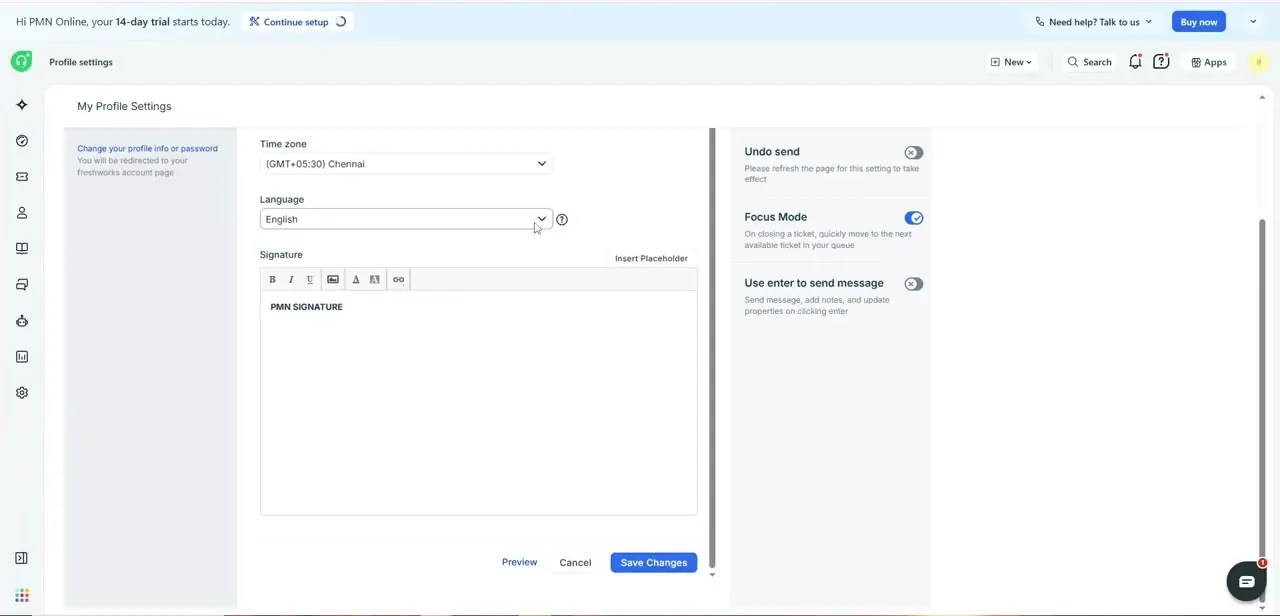
Click your profile picture in the top-right corner of Freshdesk and choose Profile Settings. The page is titled My Profile Settings and holds settings tied to you as an individual agent: time zone, language, email signature, and preferences such as Focus Mode and Undo send. Account-wide Admin settings are a separate area and don't contain the key.
02Reveal and copy the key
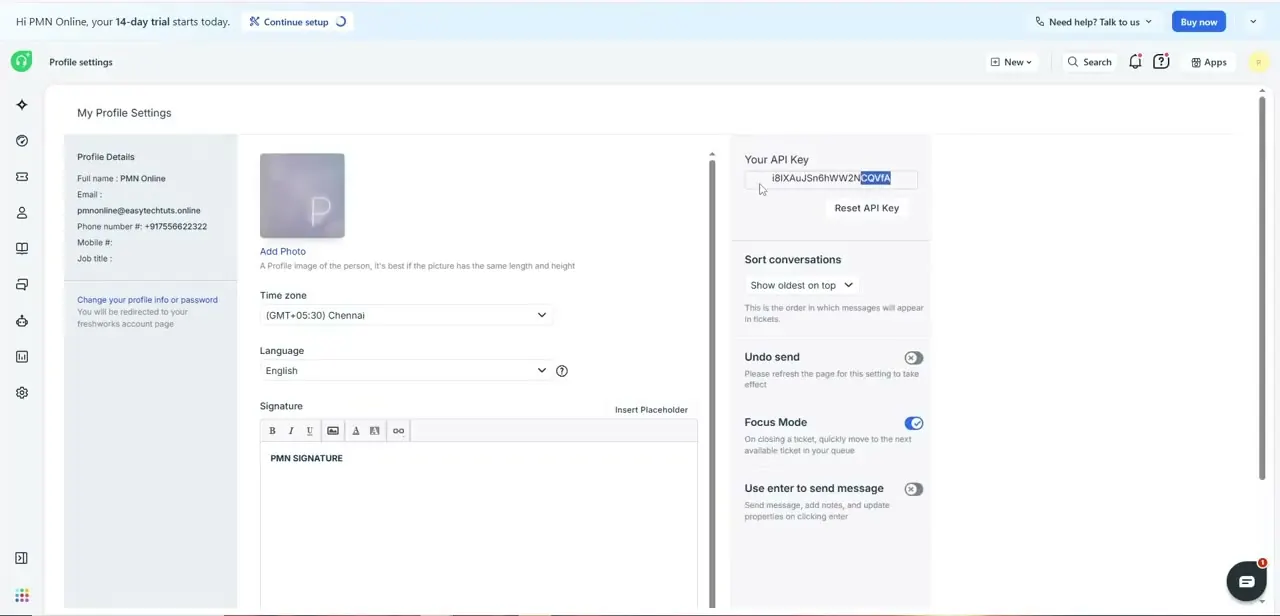
The key sits in the right-hand pane, in a card labelled Your API Key next to Profile Details (name, email, phone). On the account in the recording the key is displayed directly.
Freshdesk's current help article describes a View API key option instead, which asks you to complete a captcha before showing the string. If you see that button, click it and finish the captcha.
Copy the key straight into the tool, script or password manager that needs it. Don't park it in a plain text file or a chat thread. The key authenticates as you, with your role's permissions, so anyone holding it can read and change Freshdesk data as you.
03Test it with one read request
Freshdesk's API uses HTTP basic authentication with the API key as the username and any placeholder as the password. The developer docs use X.
A quick test from a terminal looks like this: curl -u YOUR_API_KEY:X https://yourdomain.freshdesk.com/api/v2/tickets Requests must go over HTTPS, and every endpoint lives under https://yourdomain.freshdesk.com/api/v2/. If you're building the Authorization header by hand, Base64-encode the whole apikey:X string first.
A missing encoding step is the usual reason a correct key gets rejected. Run a read like this before wiring up anything that writes data.
04Reset the key if it's exposed
If the key ends up in a public repository, a screenshot or anywhere it shouldn't be, click Reset API Key under the key on the same page. Resetting revokes the old key, and Freshdesk notes it disconnects every app that was using it.
Each of those integrations stops working until you paste in the new key, so make a list of where the key is used before you reset. For integrations a whole team depends on, consider a dedicated agent account for the connection. That way one person leaving or resetting their key doesn't break it.
When it doesn't work
There's no API key on the Profile Settings page
Why: The account is on the Free plan, where Freshdesk doesn't provide API access, or the agent hasn't been verified yet.
Fix: Check the plan under Admin billing and confirm the agent has completed verification. Freshdesk also suggests trying another browser or clearing cache and cookies if the key still doesn't appear.
Requests return 401 even though the key was copied correctly
Why: The key and password placeholder weren't Base64-encoded in the Authorization header, or the request went to HTTP instead of HTTPS.
Fix: Send apikey:X Base64-encoded, or let your HTTP client handle basic auth (curl -u does this). Make sure the URL starts with https:// and uses your own Freshdesk subdomain.
Several integrations broke at the same time
Why: Someone clicked Reset API Key, which disconnects every app using the old key.
Fix: Copy the new key from Profile Settings and update each integration.
Frequently asked questions
Where is the Freshdesk API key?
Profile picture (top right) > Profile Settings, in the right-hand pane. It's on your personal profile, not in Admin settings. Newer accounts show a View API key button with a captcha before the key appears.
Does every agent get their own key?
Yes. Each agent has a separate key, and API calls made with it follow that agent's role permissions. Freshdesk's help centre notes that installing marketplace apps and setting up integrations needs an administrator's key.
Can I use the API on Freshdesk's Free plan?
No. Freshdesk states API access is available from paid plans onwards, and the key isn't visible on Free accounts.
What goes in the password field?
Anything. Freshdesk's API docs use X. The API key goes in the username field of basic authentication.
Sources and last check
Screens and the click path come from the original walkthrough recording. The location of the key, the View API key captcha, the verified-agent and paid-plan requirements, reset behaviour and the basic-auth format were re-checked against Freshdesk's support articles and API reference in September 2026. That check added the Free-plan and verification caveats and the View API key step, which the recorded account did not show.
About the author

Impran M N
I've been hooked on technology for as long as I can remember — especially the new tools and AI apps that seem to land every other week. Easy Tech Tuts is where I write up whatever I've just worked out: I do the task in the real product, record the screen, and turn it into the guide I wish I'd found first.