 Easy Tech Tuts
What Happens When You Block a Buyer on eBay & Can You Block Buyers on eBay? ANSWERED 2026
By Impran M NLast checked against official docs
Dealing with a problematic buyer is stressful, and it helps to know exactly what blocking them on eBay does and doesn't restrict before you rely on it. Blocking isn't a single toggle; eBay's Buyer Management page has several distinct block conditions, and the platform states plainly, in its own words, what a blocked buyer loses access to. This guide walks through that page, what eBay's documentation says happens once someone is blocked, and where the claim runs narrower than a lot of other guides suggest.
01Open Buyer Management from your seller settings
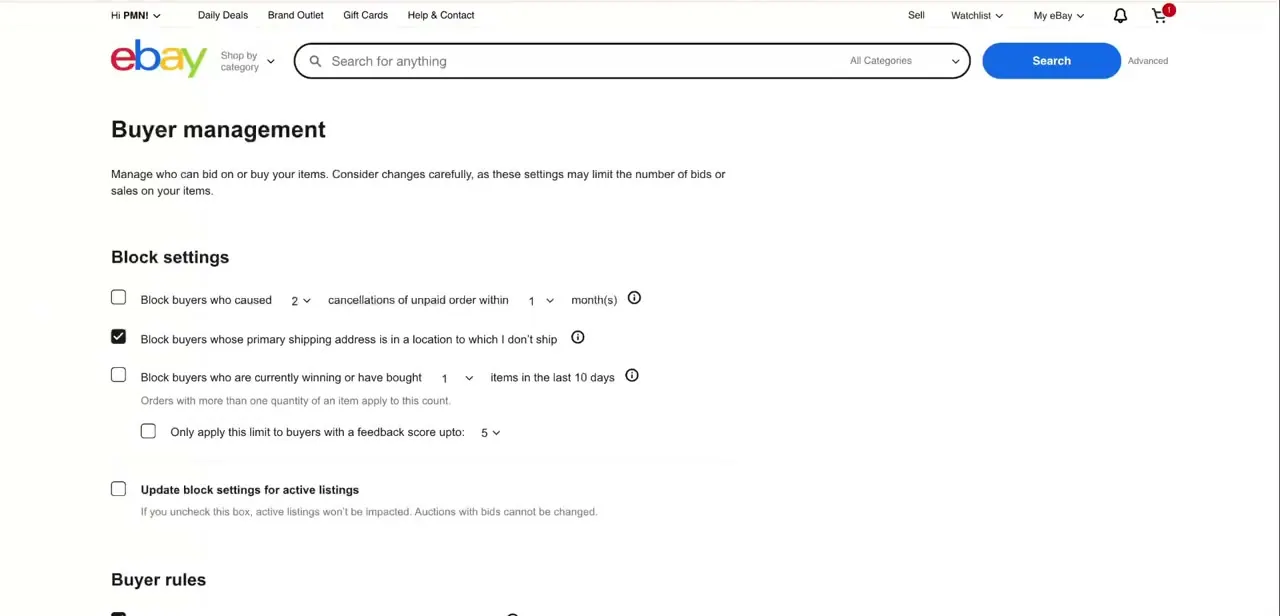
Buyer Management is the page eBay uses to control who can bid on or buy from your listings. At the top, it opens with a warning worth reading before you touch anything: changes here can limit the number of bids or sales on your items.
Blocking isn't purely upside. Every restriction you turn on here also shrinks your potential buyer pool, so it pays to know which condition you need before checking boxes.
02Choose which condition triggers a block
Under Block settings, eBay offers several automatic rules instead of one blanket switch: blocking buyers with a history of canceled orders because they didn't pay, blocking buyers whose delivery address falls in a location you've excluded from shipping, and blocking buyers who are currently winning or have bought a set number of your items in the last 10 days. A separate checkbox, labeled Apply above settings to active and future listings, decides whether a new rule reaches listings that are already live. Leave it unchecked and only new listings pick up the change.
03Understand exactly what blocking restricts
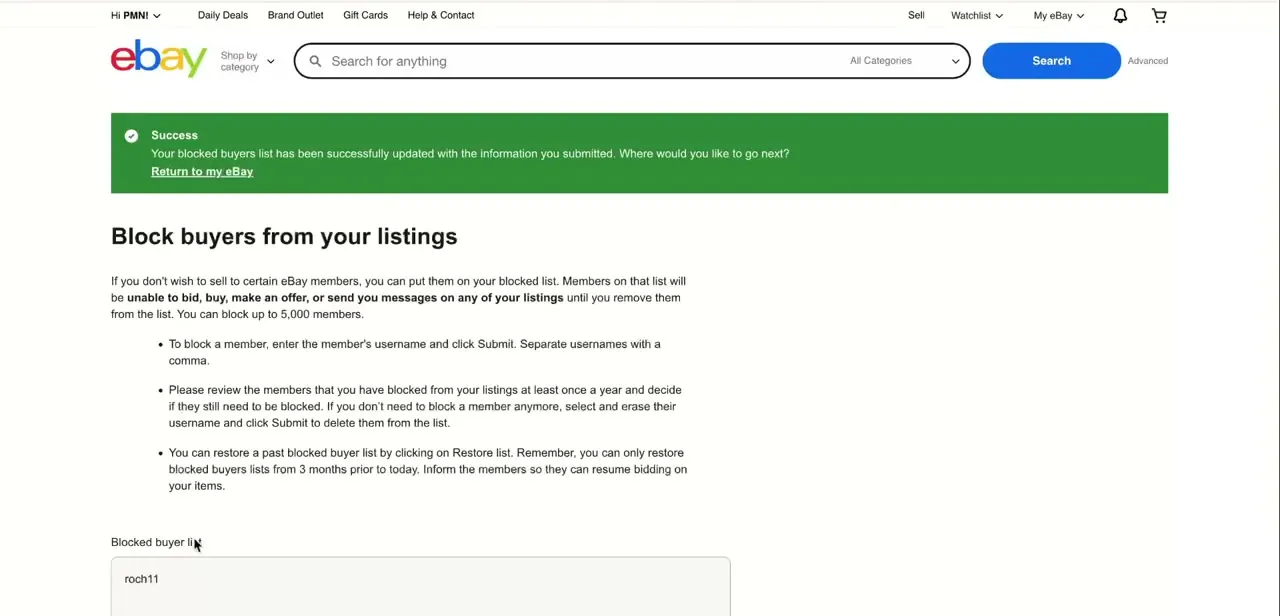
eBay states this on its own Buyer Management page, and the wording is narrower than a lot of guides suggest: blocked members "will be unable to place bids or buy from you until you remove them from the list." That's the restriction eBay documents directly, bidding and buying on your listings. You can block up to 5,000 members, add them by entering usernames separated by commas, and remove someone later by deleting their username from the list and submitting again.
04Know what blocking does not do
Because the restriction is scoped to bidding and buying, a blocked buyer isn't erased from eBay entirely. They can still browse the site and view your listings the way any visitor would, and they can interact with other sellers normally.
Blocking also doesn't retroactively cancel an order that already went through before you blocked them. If the issue is an existing order instead of future activity, blocking alone won't undo it; that needs eBay's separate cancellation or resolution tools.
05Check eBay's help center for related policies
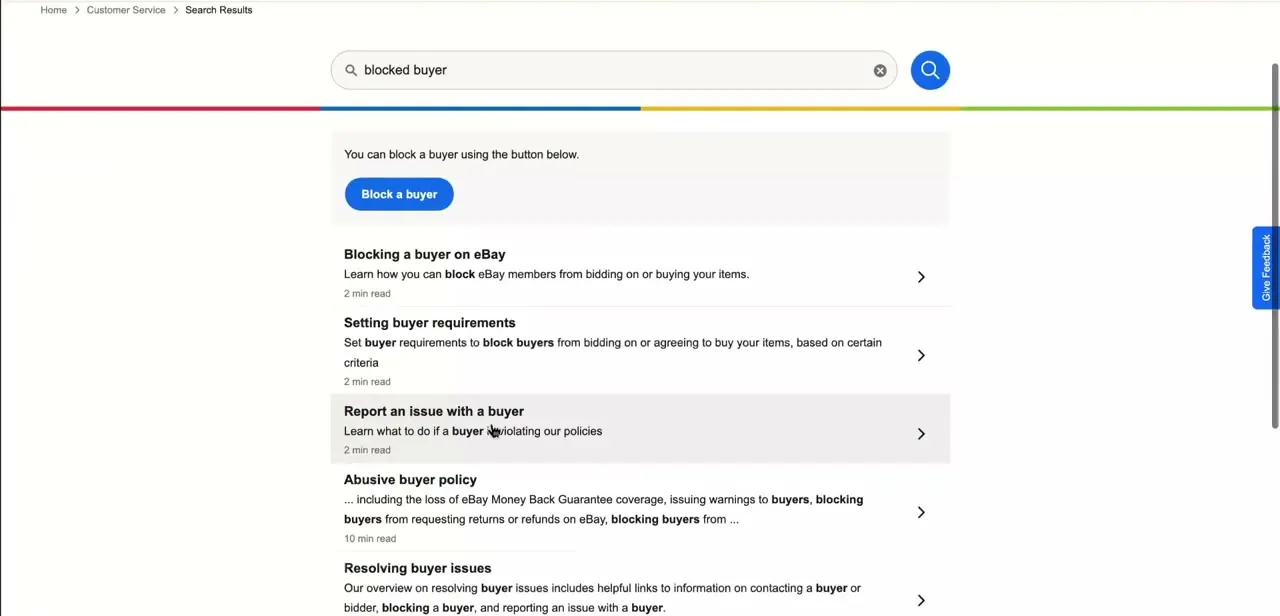
Searching "blocked buyer" in eBay's Help Center surfaces related tools worth knowing about: Setting buyer requirements (the same Buyer Management page from a different entry point), Report an issue with a buyer, and the Abusive buyer policy, which covers eBay Money Back Guarantee coverage and warnings issued to buyers who violate policies. A direct "Block a buyer" button sits next to these results, confirming Buyer Management is where all of this routes back to.
06Restore a list if you need to undo a change
You can restore a previous blocked list at any point using the Restore list option next to Block settings. That's useful if you unblock someone by mistake, or want to revert after a bulk change. If you do lift a block, letting the buyer know is a reasonable courtesy, though eBay's page doesn't require it.
When it doesn't work
A new block rule doesn't seem to apply to a listing that's already live
Why: Apply above settings to active and future listings wasn't checked when the rule was saved.
Fix: Reopen Block settings, enable that checkbox, and submit again.
A buyer I blocked can still see and browse my listings
Why: Blocking only restricts bidding and buying, which is the restriction eBay documents directly. It was never a way to hide your listings from someone.
Fix: This is expected behavior. If the concern is harassment instead of purchasing, eBay's buyer-issue reporting tools are the right next step, not blocking.
I want to undo a block I set by mistake
Why: The username is still on the blocked list.
Fix: Go back to Buyer Management, delete their username from the list, and submit again, or use Restore list to recover an entire previous list.
Frequently asked questions
Can a blocked buyer still view my listings?
Yes. Blocking restricts bidding and buying on your listings; it doesn't stop someone from browsing or viewing them.
Does blocking a buyer cancel an order they already placed?
No. Blocking only affects future activity on your listings. An existing order needs to be handled through eBay's cancellation or resolution tools instead.
How do I block a buyer on eBay?
Go to the Buyer Management page, enter the buyer's username under the blocked buyer list, and click Submit. You can block up to 5,000 members this way, separating multiple usernames with commas.
Can I set up automatic blocking instead of blocking buyers one at a time?
Yes. Buyer Management's Block settings include automatic rules: blocking buyers with a history of unpaid-order cancellations, blocking buyers whose delivery address falls in a location you've excluded from shipping, or blocking buyers who've bought a set number of your items in the last 10 days.
What exactly stops when I block someone?
eBay's own Buyer Management page states blocked members "will be unable to place bids or buy from you" — that's the restriction eBay documents directly. It doesn't separately call out messaging or offers the way some third-party guides describe, so treat bidding and buying as the two things eBay confirms are blocked.
Sources and last check
Screens and the click path come from a recorded walkthrough. The restriction wording, the automatic block conditions, the 5,000-username cap, and the 'apply to active and future listings' checkbox were re-checked against eBay's official Buyer Management and buyer-requirements help pages in September 2026. That check corrected two claims the article previously carried without a source: that blocking also stops offers and messages (eBay's page states only bidding and buying), and that eBay recommends an annual review of the blocked list and lets you restore lists from up to three months back. Neither claim appears on eBay's current help pages, so both were removed.
About the author

Impran M N
I've been hooked on technology for as long as I can remember — especially the new tools and AI apps that seem to land every other week. Easy Tech Tuts is where I write up whatever I've just worked out: I do the task in the real product, record the screen, and turn it into the guide I wish I'd found first.



