Easy Tech Tuts
How to Issue a Refund on Ebay 2026, Refund as a Seller Easily
By Impran M NLast checked against official docs
Send refund sits on the order, in the same dropdown as Contact buyer and Sell similar. There is no refunds section to go looking for.
Two things about it surprise sellers. It has a deadline: eBay allows full or partial refunds through this route for 90 days after the original transaction.
And it vanishes the moment a case exists. Open a cancellation request, return request, Money Back Guarantee case, item-not-received report, or an external payment dispute, and eBay removes Send refund from that order, because the refund now has to go through the case instead.
The other thing worth knowing before you click is that refunding on eBay usually gets you a proportional slice of your final value fee back, and refunding the buyer off-platform gets you none of it. This guide covers the flow, the funding, and the fees.
01Check the refund is still yours to issue
Two gates decide whether the manual route is even open to you. The first is time. eBay lets sellers issue full or partial refunds on an order for 90 days after the original transaction.
Past that, Send refund is not the tool. The second is whether a case already exists.
If the buyer has opened a cancellation request, a return request, a Money Back Guarantee claim, an item-not-received report, or a payment dispute with their card issuer, eBay withdraws the Send refund option from that order on purpose. The refund has to be issued from inside the case, so that eBay's record of the outcome matches what happened.
Sellers who cannot find the button on a problem order are usually looking at this, not a glitch. If you are unsure whether a claim should be honoured at all, eBay's Customer Service search is the fastest route to the governing policy. Typing a few words such as "refunding bu" surfaces the relevant articles before you commit to a number.

02Open the order and select Send refund
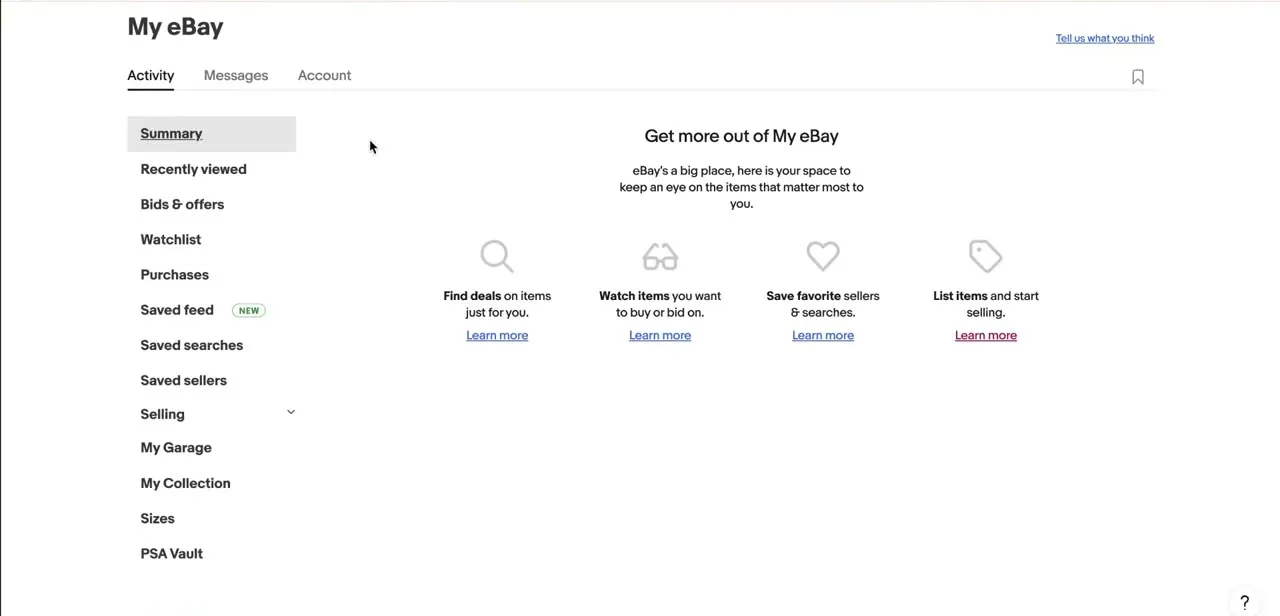
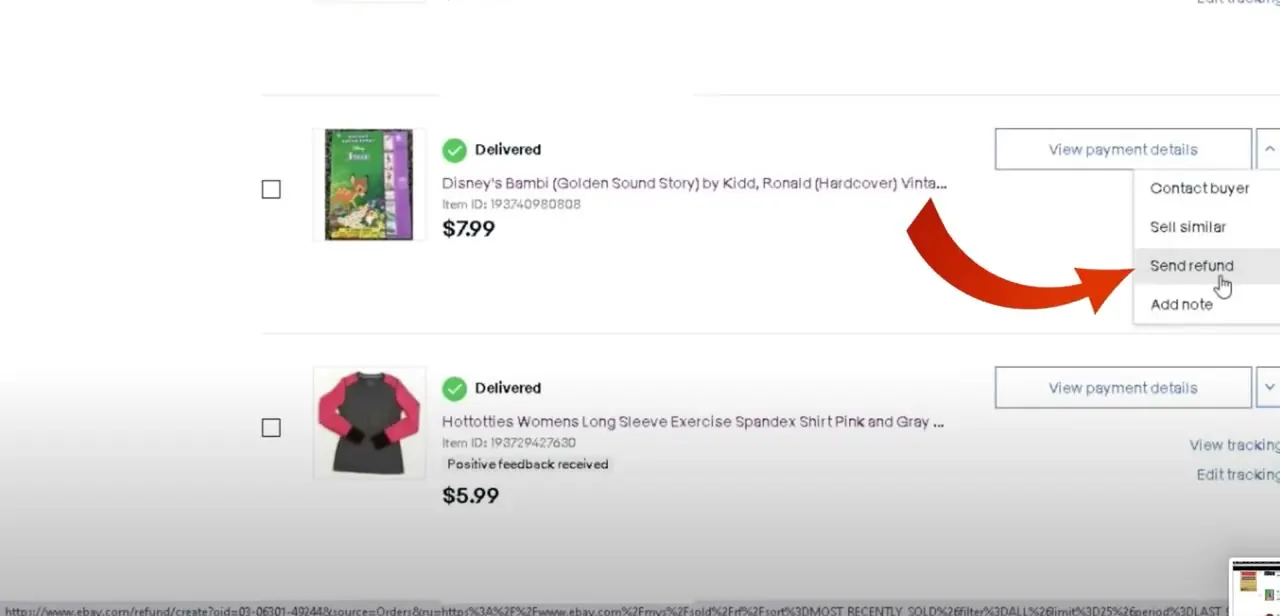
In Seller Hub, or in My eBay Orders, find the order. Each line has a dropdown next to it, labelled around the payment details, and opening it lists Contact buyer, Sell similar, Send refund, and Add note.
Send refund is the whole entry point. The process runs identically from Seller Hub and from My eBay, so it does not matter which one you happen to be in.
03Choose a reason, and decide full or partial
eBay asks for a refund reason before anything else. This is not a formality.
The reason is recorded against the transaction and feeds into what happens to your fees afterwards, so pick the one that describes what really happened. Then decide the shape.
A full refund suits a lost item, a wrong item, or a return you are accepting outright. A partial refund fits a buyer keeping an item with a minor defect at a reduced price, or a goodwill adjustment on shipping. Settle the number before the next screen, which asks for exact figures, not a yes or no.
04Set the amounts on the refund calculator
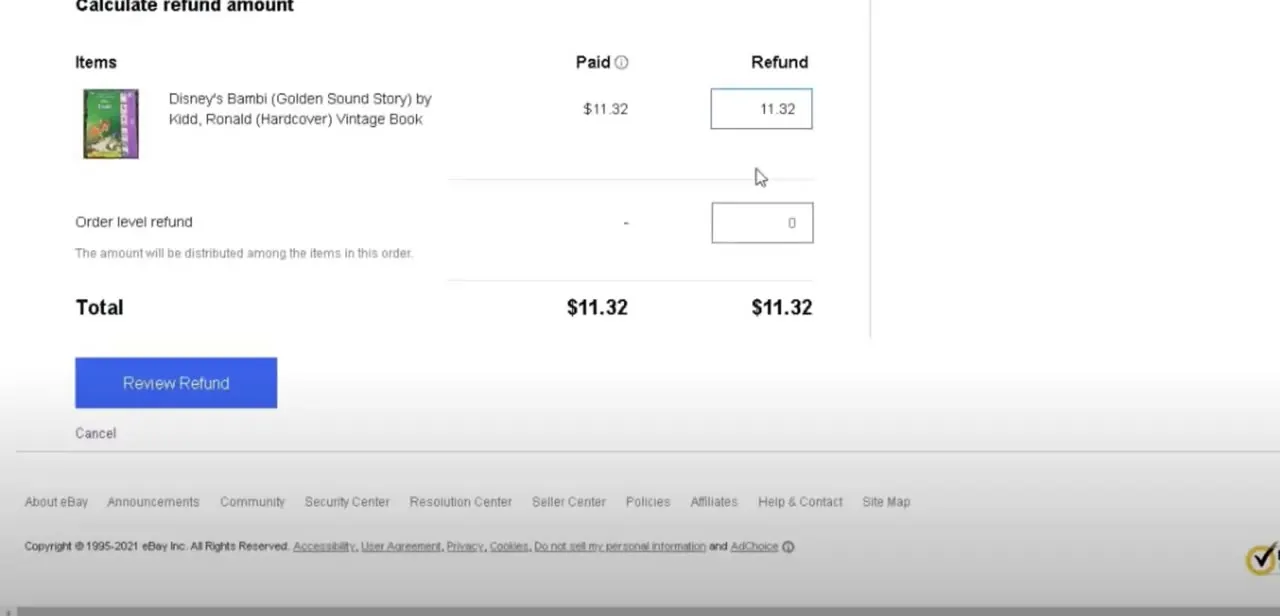
The Calculate refund amount screen lists every item on the order with its Paid amount beside an editable Refund field, pre-filled with the full amount paid. Under the item list sits an Order level refund field.
Anything entered there is distributed across the items in the order, which is the clean way to hand back part of the shipping or a bundled discount without unpicking each line. The Total at the bottom recalculates live, so the figure you are about to send is on screen before you send it.
Read it once against the buyer's message. Overpaying a refund by a decimal place is a support conversation, not a quick undo.
05Confirm, and know where the money is coming from
eBay shows a summary of exactly what is going where before anything moves, and the final action is Send refund. You get one email confirming the refund has been initiated and a second when it completes, and the amount then appears in the order's details.
The funding order matters if your balance is thin. eBay draws first on your Available and Processing funds, then on funds held for that specific transaction, and if the total still is not covered it charges your linked checking account or the payment method on file. A $100 refund against an $80 balance takes $20 from the bank.
One related behaviour catches sellers out on returns. eBay may refund the buyer before the item is back with you, then recover the money once the return is delivered. If you have been given a window to refund and let it lapse, eBay deducts the amount from your Available, Processing, and on-hold funds without waiting for you.
06Collect the final value fee credit
Refunding through eBay usually earns back a share of what you paid to sell the item, and this is the part most sellers never check. On a full refund for a buyer-preference return (ordered by mistake, wrong size, changed their mind) or a defect return (damaged, not as described), eBay credits your final value fees.
On a partial refund the credit is proportional to what the buyer got back, so a 20% refund returns credits for 20% of the eligible fees. Most credits land in your available funds straight away, though eBay says the per-order fixed amount can take up to 10 days to show in your transaction history.
Three things forfeit the credit. Refunding the buyer outside eBay, by sending money through PayPal for instance, means eBay has no record of a refund and issues nothing.
Having eBay step in and close the case for you also removes eligibility. So does deducting an amount because the item came back used or damaged.
The per-order fixed fee is separately excluded when you cancel an order because you were out of stock or the item was damaged. The practical version: settling with a buyer off-platform to keep things simple costs you the fee credit on top of the refund.
Frequently asked questions
How long do I have to refund a buyer on eBay?
eBay allows sellers to issue full or partial refunds on an order for 90 days after the original transaction. After that the Send refund route is closed.
Can I issue a partial refund?
Yes. On the Calculate refund amount screen you can lower the Refund figure on individual items, or use the Order level refund field to spread an amount across the whole order, which is the tidier way to hand back part of the shipping.
Do I get my selling fees back when I refund?
Usually, and proportionally. eBay credits final value fees on eligible full refunds, and on partial refunds the credit matches the share the buyer received. Most credits post to available funds immediately, but the per-order fixed amount can take up to 10 days to appear.
Why has Send refund disappeared from the order?
An open case removes it. Cancellation requests, return requests, Money Back Guarantee claims, item-not-received reports, and external payment disputes all route the refund through the case instead of through the order.
Can I just PayPal the buyer their money back?
You can, and it costs you. eBay does not issue fee credits for refunds made outside eBay, so you lose the final value fee credit you would have received by refunding through the platform, and eBay has no record of the refund if the buyer later opens a case.
Sources and last check
The Seller Hub screens and click path come from a walkthrough recorded in 2025. In September 2026 the refund flow, the deadline, the funding order, and the fee-credit rules were re-checked against eBay's own help pages. Three things this guide previously left out were added from that check: the 90-day limit on issuing a refund from the order, the refund reason step, and the fact that eBay removes Send refund entirely while a cancellation, return, Money Back Guarantee, item-not-received, or payment dispute case is open. The earlier claim that refund speed feeds directly into seller performance metrics was removed, as eBay's published documentation does not state it.
About the author

Impran M N
I've been hooked on technology for as long as I can remember — especially the new tools and AI apps that seem to land every other week. Easy Tech Tuts is where I write up whatever I've just worked out: I do the task in the real product, record the screen, and turn it into the guide I wish I'd found first.