 Easy Tech Tuts
How to View Your Purchase History on Ebay 2026 Easily
By Impran M NLast checked against official docs
If you've ever needed to track a shipment, request a return, or reorder something you bought months ago, digging through eBay's menus for your past orders can feel like more work than it should be. Purchase History is the one place that holds your past orders, filterable by year, order status, or keyword so you're not scrolling endlessly. This guide walks through exactly where that page lives in the eBay menu structure, what you can do once you're there, and what to check if an order seems to be missing.
01Open the My eBay menu
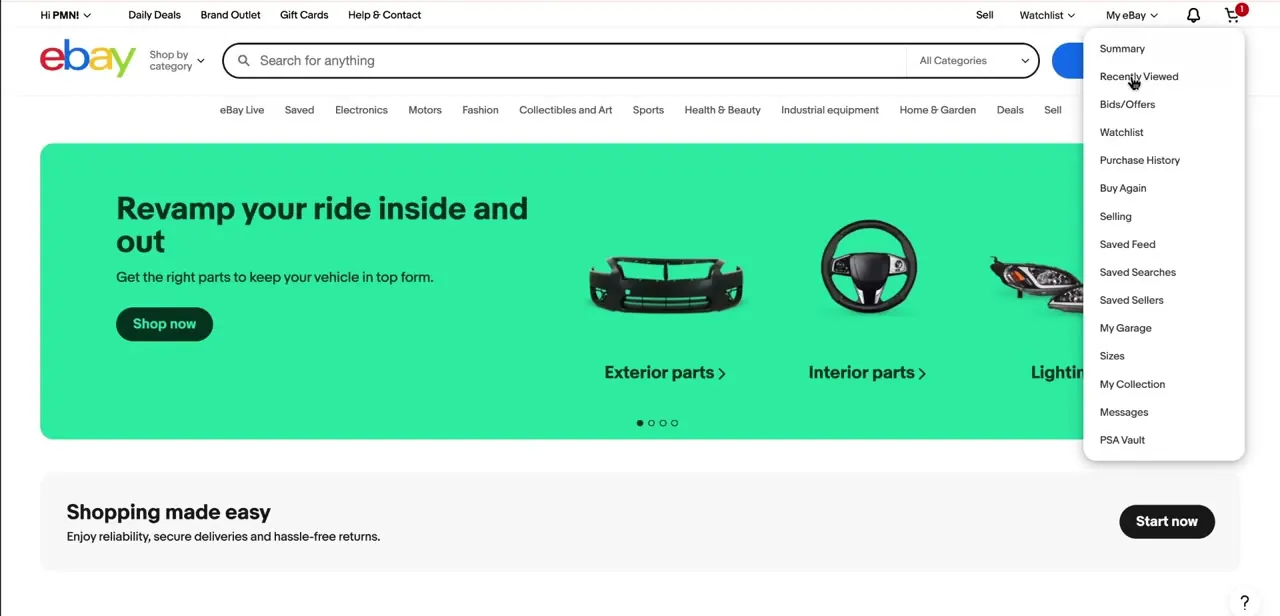
From any page on eBay while signed in, hover over "My eBay" in the top-right corner of the navigation bar. A dropdown appears with your account activity split into sections: Summary, Recently Viewed, Bids/Offers, Watchlist, and further down, Purchase History alongside Buy Again and Selling.
This menu is the fastest route to your order data because eBay doesn't surface a persistent "Orders" tab the way some other marketplaces do. It's tucked inside this hover menu instead.
02Click into Purchase History
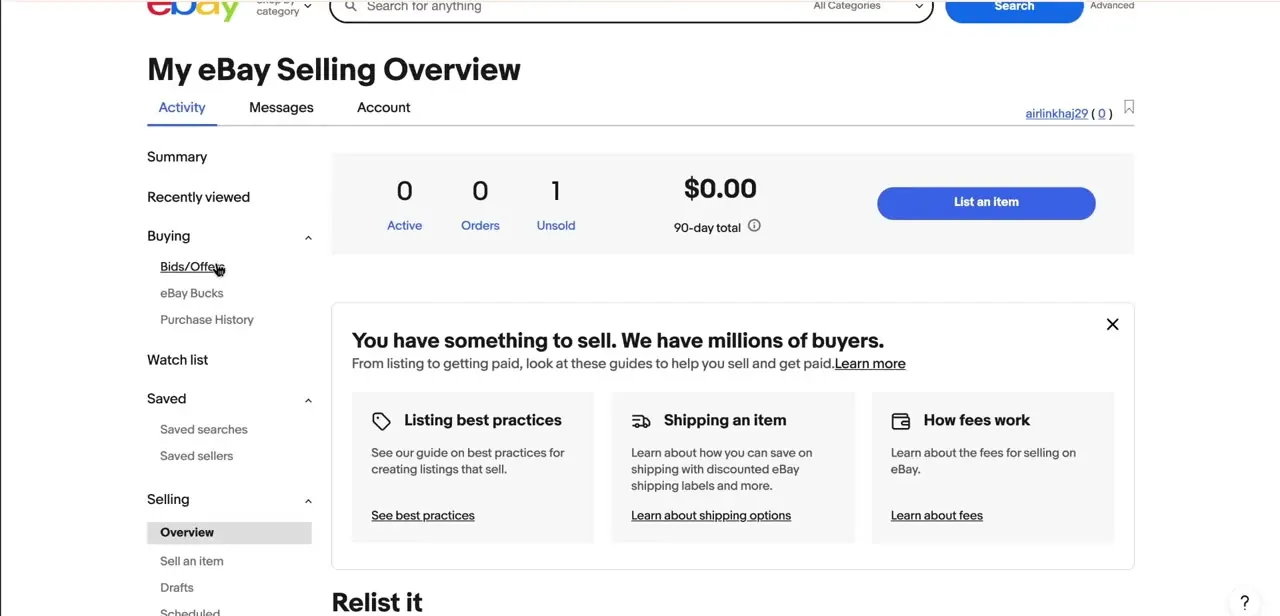
Selecting Purchase History from the dropdown takes you to a list of what you've bought, most recent first, defaulting to the last 60 days. Each entry shows the item, seller, price paid, and current order status, so you can tell at a glance whether something has shipped, delivered, or is still pending. This same section also appears in the left-hand sidebar when you're browsing other parts of your account overview, listed under "Buying" alongside Bids/Offers and eBay Bucks, useful if you land on a different account page first and need a second way in.
03Filter orders by year, status, or keyword
The page opens on your last 60 days of orders, not your full history. To go further back, use the "See orders from" dropdown near the top and pick a year; eBay's own help documentation says the list covers the past 7 years and updates automatically once you select one. You can also narrow by order status, such as awaiting shipment or delivered, or search by keyword if you remember the item name but not when you bought it. eBay's search on this page works best combined with a year: pick the year first, then search the keyword, since keyword search alone can miss results across a long history.
04Track shipments and manage returns from the same view
Each order row links out to the details you need day to day: tracking numbers for anything in transit, an option to print or download an invoice, and a direct path to request a return or refund if the item didn't work out. Because these actions live right next to the order itself, you don't have to jump between a separate tracking page and a separate returns center. That's why Purchase History is worth checking before contacting a seller directly with a shipping question.
05Check hidden orders, or an earlier year, if something's missing
If an order you're sure you placed isn't showing up, there are two different reasons, not one "archived" bucket. First, the page defaults to the last 60 days, so anything older needs the "See orders from" year dropdown from the previous step.
Second, you can hide individual orders from the default view using More actions next to an item, but eBay only allows hiding items bought in the last 60 days, and hiding is reversible: a toggle near the top switches between Hidden and Not Hidden, with an Undo Hide option on each item. Nothing in Purchase History can be permanently deleted, per eBay's own help page, so a missing order is filtered out, not gone.
06Do the same from the mobile app
The eBay app mirrors this structure closely: tap the My eBay icon, then Purchase History, and you'll see the same filterable list with the same shipping, return, and invoice actions. This is handy if a package shows up at your door and you want to confirm the order details on the spot instead of waiting until you're back at a desktop.
When it doesn't work
An order from a few months ago isn't in the default list
Why: Purchase History defaults to the last 60 days on both web and app.
Fix: Use the "See orders from" dropdown and select the year the order was placed.
An order is missing even after picking the right year
Why: It may have been hidden with More actions > Hide order. Hiding is only available for orders from the last 60 days, but a hide applied within that window stays hidden afterward.
Fix: Use the Hidden / Not Hidden toggle near the top of the list to reveal hidden orders, then select Undo Hide on the one you need.
You want to remove an order from your history entirely
Why: eBay doesn't support permanent deletion of purchase history entries.
Fix: Hide the order instead if it was bought within the last 60 days. There's no way to erase it outright.
Frequently asked questions
Where do I find my purchase history on eBay?
Hover over My eBay in the top navigation bar and select Purchase History from the dropdown, or find it in the Buying section of your account sidebar.
How far back does eBay purchase history go?
Up to 7 years, according to eBay's own help documentation. The page defaults to the last 60 days, so use the "See orders from" dropdown to reach earlier years.
Can I filter my past orders?
Yes. Filter by year with the "See orders from" dropdown, by order status, or by keyword. Combining a year with a keyword search tends to work better than a keyword alone.
Can I permanently delete an order from my purchase history?
No. eBay's help page states purchase history items can't be permanently deleted; you can only hide items bought in the last 60 days, and hiding can be undone.
What if a purchase doesn't show up in my history?
Check the year first using "See orders from," since the page defaults to the last 60 days. If it's still missing, check the Hidden/Not Hidden toggle in case it was hidden.
Does purchase history work the same on mobile?
Yes, the eBay app has the same Purchase History section with the same filtering, tracking, and return options as the desktop site.
Sources and last check
Click path and screens come from a walkthrough recorded in mid-2025. Re-checked against eBay's official help page in September 2026, which corrected two claims: the date filter is a year-by-year "See orders from" dropdown, not a free date-range picker, and hiding an order only works within 60 days of purchase and never permanently deletes it (the article previously implied a generic archive with no such limit).
About the author

Impran M N
I've been hooked on technology for as long as I can remember — especially the new tools and AI apps that seem to land every other week. Easy Tech Tuts is where I write up whatever I've just worked out: I do the task in the real product, record the screen, and turn it into the guide I wish I'd found first.



