 Easy Tech Tuts
How to Use eBay Local Pick up, How does local pickup work on ebay on buy & Sell 2026
By Impran M NLast checked against official docs
Shipping a couch, a table saw, or a car across the country makes no sense when the buyer lives twenty minutes away, and that's exactly the gap eBay Local Pickup fills. It lets a seller list an item as pickup-only or pickup-plus-shipping, and lets a buyer search for exactly those listings near their zip code.
Done right, it saves the seller packing time and shipping fees, and lets the buyer inspect the item before the sale is finalized. Payment itself still runs through eBay checkout beforehand, not cash at the curb; what happens in person is confirmed with a pickup code, not a handshake over money. This guide walks through what a local pickup listing looks like from both the search side and the item page, then covers the parts of the process that happen off-screen: enabling it, paying and getting the code, coordinating the meet-up, and closing out the order with that code.
01Filter search results to local-pickup-only listings
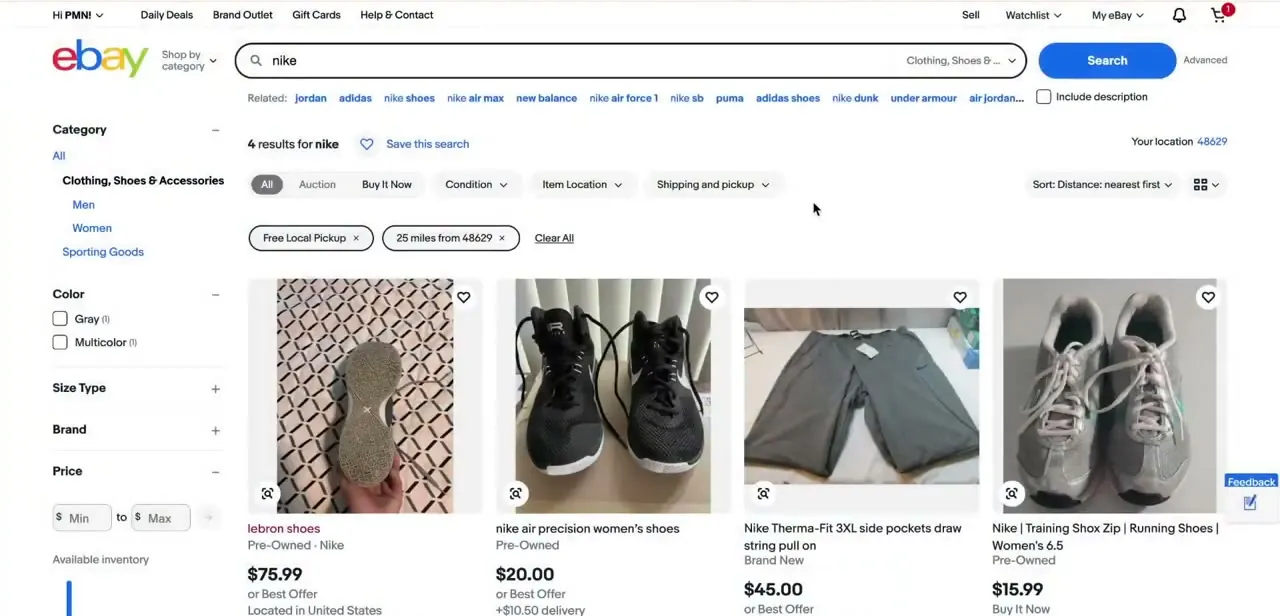
As a buyer, the fastest way to find pickup items is eBay's own filters instead of scanning listings one by one. On a search results page, the "Shipping and pickup" control lets you narrow to "Free Local Pickup" and set a radius from your saved location.
In the example here, results are capped to 25 miles from a Michigan zip code. Once that filter is on, every card in the grid is guaranteed to be pickup-eligible near you, and eBay adds a "Your location" indicator up top so you know which address it's measuring distance from. This is worth doing before you fall in love with a listing three states away that turns out to be pickup-only.
02Read the pickup details on the item page
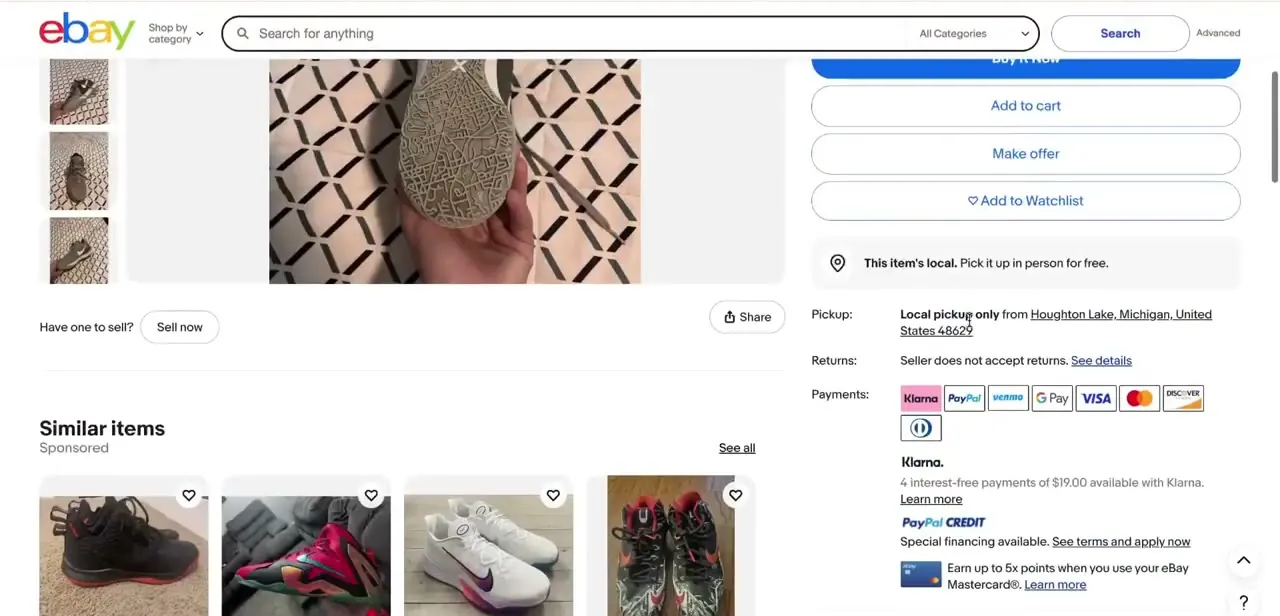
Open a listing and look just below the Buy It Now and Make Offer buttons, where eBay states the pickup terms plainly. A pin icon and the line "This item's local.
Pick it up in person for free" confirms the option, and the Pickup row underneath spells out the exact city, state, and zip the seller expects you to travel to. This is also where you'll see whether the seller accepts returns and which payment methods they support, since pickup doesn't change eBay's usual buyer protections: the Money Back Guarantee still applies even when there's no shipping label involved. Check this section before messaging the seller so your first message can go straight to scheduling instead of asking questions the page already answers.
03Pay through eBay checkout, then get your pickup code
Local pickup doesn't mean paying in person. Buyers still complete the purchase through eBay's normal checkout, choosing "Free local pickup" as the delivery method and paying with any method the seller has listed.
Once the order confirms, eBay generates a unique pickup code in two formats: a QR code and a 6-digit number, both available in My eBay's purchase history or in the order confirmation email. That code is what closes out the transaction later. Have it pulled up on your phone before you leave for the pickup; it's not something to hunt for once you're standing in a driveway.
04Enable local pickup as a seller
If you're listing an item, the delivery section of the listing form defaults to "Shipping and local pickup," with "Pickup only" and "Shipping only" as the alternatives. Choosing a pickup option adds your general area (not your exact address) to the listing; the full address only becomes visible to a buyer after they've paid.
Not everything qualifies: eBay excludes items covered by Authenticity Guarantee and anything requiring age verification, such as alcohol, from local pickup. Set this before you publish, since changing delivery terms on a live listing can reset watchers' expectations.
05Message the buyer or seller to lock in details
Local pickup only works if both sides agree on a when and where, and that conversation happens through eBay's messaging system instead of exchanging phone numbers up front. Sellers should propose a couple of windows and confirm the pickup address; buyers should confirm which day works and ask about parking or building access if it's an apartment. Keeping this in eBay's messages, not a personal number, keeps a record eBay can reference if the meet-up goes sideways or the item doesn't match the listing.
06Meet up, inspect the item, then share your code
For anything beyond a quick front-porch handoff, pick a public, well-lit spot: a police station's designated exchange zone, a busy parking lot, or a bank lobby during business hours are all common choices. Bring a second person along for higher-value items.
As a buyer, inspect the item on the spot before you show your pickup code, since sharing the code is what finalizes the sale, not payment (that already happened at checkout). If something looks different from the listing, it's easier to walk away before the code is confirmed than to start a return afterward.
07Confirm the handover with the pickup code
Once the buyer is satisfied, they show the QR code or read out the 6-digit code, and the seller scans or enters it on the order details page in the eBay app. That single action marks the order Picked Up, closes out the transaction, and, per eBay's seller documentation, typically releases the seller's funds within about 48 hours.
Skipping this step, or trying to substitute a verbal "got it, thanks" for the code, leaves the order open on eBay's side even though the item already changed hands. If a buyer walks away without confirming, follow up in Messages first before escalating to eBay support.
| Option | What it means |
|---|---|
| Shipping and local pickup | The default. Buyers can choose either shipping or picking up in person. |
| Pickup only | No shipping option is offered; every buyer has to collect the item in person. |
| Shipping only | The standard, no-pickup listing most sellers already use. |
From eBay's official seller documentation on offering local pickup, checked September 2026.
When it doesn't work
A buyer shows up without the pickup code
Why: eBay's local pickup system relies on the QR code or 6-digit code generated at checkout to confirm the handover; nothing else closes out the order the same way.
Fix: The buyer can pull the code up on their phone from My eBay purchases or the order confirmation email on the spot; it doesn't need to be printed in advance.
The seller confirms pickup but the payout doesn't show up right away
Why: eBay documents a processing window, commonly cited as up to about 48 hours, between scanning the code and the funds landing.
Fix: Wait out that window before contacting eBay support about a missing payout.
The pickup option won't show up when creating a listing
Why: eBay excludes certain categories from local pickup, including items covered by Authenticity Guarantee and age-verified items like alcohol.
Fix: Check the item's category against eBay's exclusions before assuming the delivery-options toggle is broken.
Frequently asked questions
Is local pickup a good option for expensive items on eBay?
Yes. It lets buyers inspect the item in person before the pickup code is confirmed, which adds confidence for higher-value purchases where photos alone aren't enough to verify condition.
Do I pay the seller in person during local pickup?
No. Payment happens through eBay's normal checkout when you place the order, the same as any other purchase. The in-person part is just the handover, confirmed with a pickup code instead of an exchange of cash or card.
What is the eBay pickup code, and do I really need it?
It's a QR code and matching 6-digit code eBay generates once you pay, found in My eBay purchases or the order confirmation email. The seller scans or enters it to confirm the handover, which is what officially closes the sale, so bring it with you.
What happens if a buyer doesn't show up for a scheduled pickup?
Sellers should keep the arrangement documented in eBay messages and follow up there first; if a no-show turns into a dispute, that message history is what eBay support will ask for.
Is local pickup safe for meeting strangers?
It can be, if you treat it like any other in-person exchange with someone you met online: meet in a public, well-lit location and bring another person for larger items. Since payment is already handled through eBay, no cash needs to change hands at the meet-up.
How do I find only local-pickup listings when searching?
Use the "Shipping and pickup" filter on the search results page, select Free Local Pickup, and set your distance radius. eBay will then show only listings within that range of your saved location.
Sources and last check
Search-filter and item-page screenshots come from a live eBay search and listing; the mismatched search-filter image previously attached to the seller step has been moved to the search step it shows. The mechanics of payment, the pickup code, seller-side setup, and category exclusions were checked against eBay's official Help Center in September 2026. That check corrected this guide's earlier version on two points: local pickup does not involve paying the seller in person (payment runs through eBay checkout beforehand), and closing out the order isn't a generic "mark as received" tap; it requires the QR/6-digit pickup code eBay generates at checkout, which the seller scans or enters to finalize the sale.
About the author

Impran M N
I've been hooked on technology for as long as I can remember — especially the new tools and AI apps that seem to land every other week. Easy Tech Tuts is where I write up whatever I've just worked out: I do the task in the real product, record the screen, and turn it into the guide I wish I'd found first.



