 Easy Tech Tuts
How To Turn off Automatic Relisting on eBay 2026 Easily With PROOF
By Impran M NLast checked against official docs
Automatic relisting can quietly rack up clutter in your eBay store when unsold items keep reposting without your say-so. eBay doesn't offer one global switch that turns the feature off for every listing at once; the documented control sits on each listing's Active-tab actions menu, and it can be applied to several listings in one pass. This guide covers that path, plus the seller-tier rule that decides whether you see the auto-relist option in the first place, and how Good 'Til Cancelled listings behave differently from auction-style ones.
01Get to your Selling area through My eBay
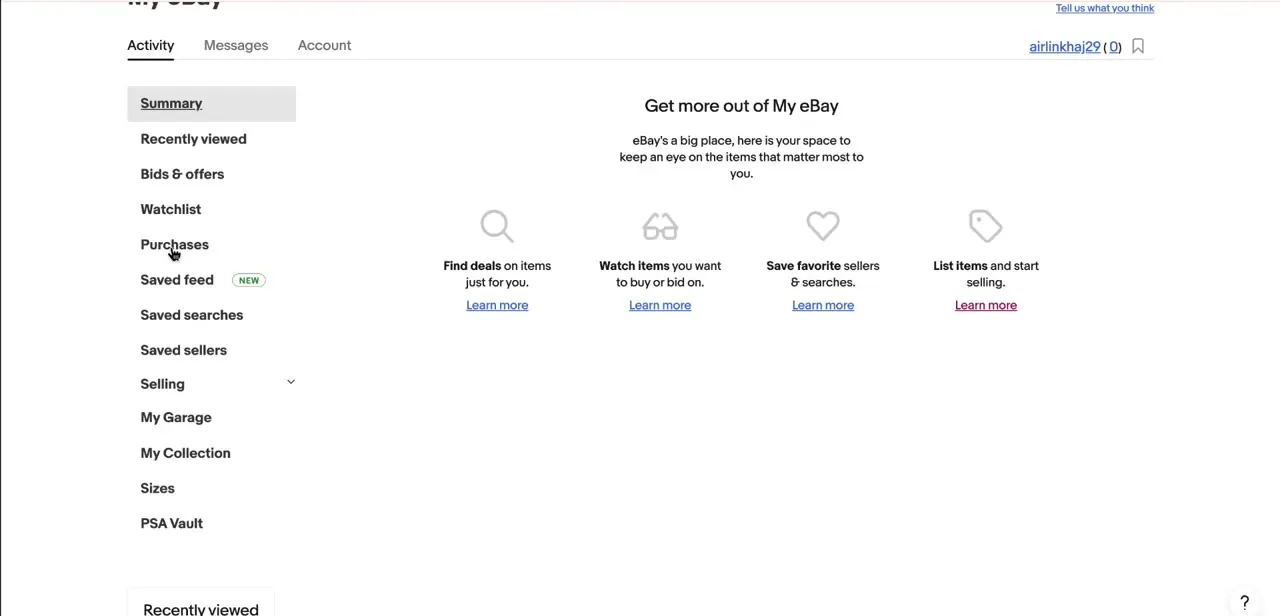
From the My eBay Activity page, reachable from the account menu at the top of any eBay page, the left sidebar lists Summary, Recently viewed, Bids & offers, Watchlist, Purchases, and further down, Selling. Selling is the entry point for everything in this guide, since relisting behavior is a per-listing seller setting, not something a buyer ever sees.
02Open Seller Hub's Active tab and select the listings you want to change
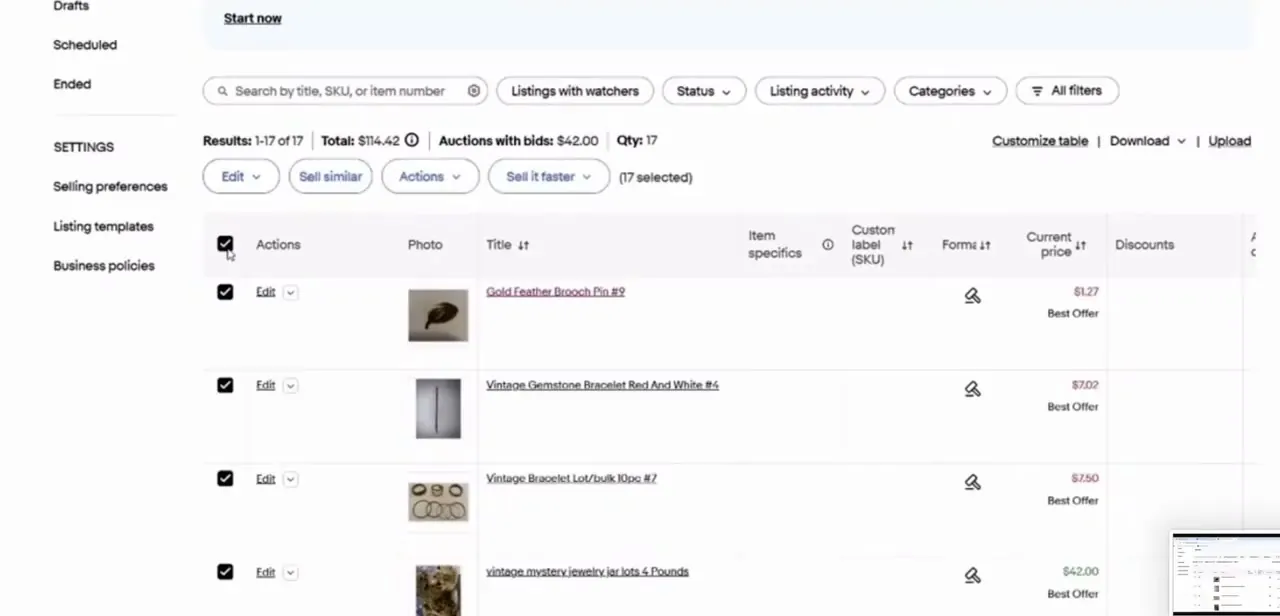
Selling opens into Seller Hub, where the listings table shows each active item with its own checkbox, plus a header checkbox to select everything in view, a totals summary (Results, Total value, Qty), and an Actions button above the table. Check one listing to change it alone, or select several at once and use Actions to apply the change in bulk, which is the fastest route if relisting is switched on across a large batch of unsold items.
03Choose Remove Automatic Relisting
eBay's own instructions for this are specific: from My eBay, go to Selling, open the Active tab, find the listing, and choose "Remove Automatic Relisting" from the item's actions menu, then save. There is no single account-wide toggle in Selling preferences that switches relisting off for every listing; it's applied listing by listing, or to a bulk selection, using this action. Removing it stops the next scheduled renewal, but it doesn't end the listing's current cycle early, so an item can still be live for the rest of the period it already paid for.
04Check whether you even have the auto-relist option
eBay limits the per-listing "relist automatically up to 8 times" checkbox, the one offered when creating an auction-style listing, to new and occasional sellers. Once a seller's account moves past that tier, the checkbox stops appearing on new listings entirely. If you can't find an auto-relist setting to remove, that's often why: there's nothing switched on to turn off, and any repeat postings you're seeing are more likely Good 'Til Cancelled renewals than auction auto-relists.
05Know why Good 'Til Cancelled listings keep coming back
Fixed-price listings default to Good 'Til Cancelled (GTC), which renews automatically on the same date every month until the item sells or you end it; this renewal is built into the listing duration itself, not a separate on/off feature. The same "Remove Automatic Relisting" action from the Active tab stops future GTC renewals too. If you plan to restock instead of stopping sales on the item altogether, eBay's out-of-stock option (in Selling preferences, under multi-quantity listings) keeps the listing's history and item ID without it showing to buyers, which is often a better fit than ending it outright.
When it doesn't work
There's no "Automatically Relist" toggle in Selling preferences
Why: eBay doesn't have one. The documented control is per listing (or per bulk selection) on the Active tab's actions menu, not a single account-wide switch.
Fix: Go to My eBay > Selling > Active, select the listing(s), and choose Remove Automatic Relisting from the actions menu.
The auto-relist checkbox never shows up when creating an auction listing
Why: eBay restricts this specific option to new and occasional sellers; it disappears once an account moves past that seller tier.
Fix: Nothing to turn off in that case. Recheck whether the repeat postings you're seeing are Good 'Til Cancelled fixed-price renewals instead.
The item still shows as active right after removing automatic relisting
Why: Removing the setting stops the next renewal; it doesn't end the listing's current, already-paid-for cycle.
Fix: If you need it gone immediately, end the listing directly instead of only removing automatic relisting.
Frequently asked questions
Where do I turn off automatic relisting on eBay?
My eBay > Selling opens Seller Hub's Active tab. Select the listing (or several, using the checkboxes), then choose Remove Automatic Relisting from the actions menu. There's no single global toggle for this in Selling preferences.
Can I remove automatic relisting from several listings at once?
Yes. Check the box on each listing you want to change, or the header checkbox to select everything in view, then apply Remove Automatic Relisting from the Actions button above the table.
Why don't I see an auto-relist option when I create an auction listing?
eBay only offers the up-to-8-times auto-relist checkbox to new and occasional sellers. Once an account moves past that tier, the option no longer appears on new listings.
What's the difference between Good 'Til Cancelled and auction auto-relist?
Good 'Til Cancelled is the default duration for fixed-price listings and renews monthly on its own until it sells or is ended, that's built into the listing format itself. Auction auto-relist is a separate, opt-in checkbox available only to new and occasional sellers, capped at 8 automatic relists.
If I remove automatic relisting, does the listing end right away?
No. It stops the next renewal but leaves the current cycle running. To end the listing immediately, do that separately instead of relying on removing automatic relisting alone.
Is there a fee every time an item relists automatically?
Auction-style auto-relists are free except in vehicle categories, and Good 'Til Cancelled renewals are billed as part of that listing's normal monthly cycle instead of as a new fee each time.
Sources and last check
Click paths and screens come from a walkthrough recorded in 2025. The relisting mechanism was re-checked against eBay's official Help Center in September 2026, which describes removing automatic relisting per listing (or in bulk) from the Active tab's actions menu, not a single Selling-preferences toggle as this article previously implied. The new-and-occasional-seller restriction on auction auto-relist, and the distinction from Good 'Til Cancelled renewal, were added from the same source.
About the author

Impran M N
I've been hooked on technology for as long as I can remember — especially the new tools and AI apps that seem to land every other week. Easy Tech Tuts is where I write up whatever I've just worked out: I do the task in the real product, record the screen, and turn it into the guide I wish I'd found first.



