 Easy Tech Tuts
How to Track an Order on Ebay for Any Carrier 2026 Easily
By Impran M NLast checked against official docs
Once an item ships, eBay pulls the carrier's scan history directly into your order page instead of leaving you to copy a tracking number and check it somewhere else. That only works, though, when the seller used a tracked shipping service in the first place: eBay's own help page is explicit that tracking is only available when a seller chooses a tracked delivery service and uploads the number. This guide follows the real purchase history and shipment details screens, what the status bar actually means, and where to go if a package seems stuck or a seller never added tracking at all.
01Open Purchase History and find the order
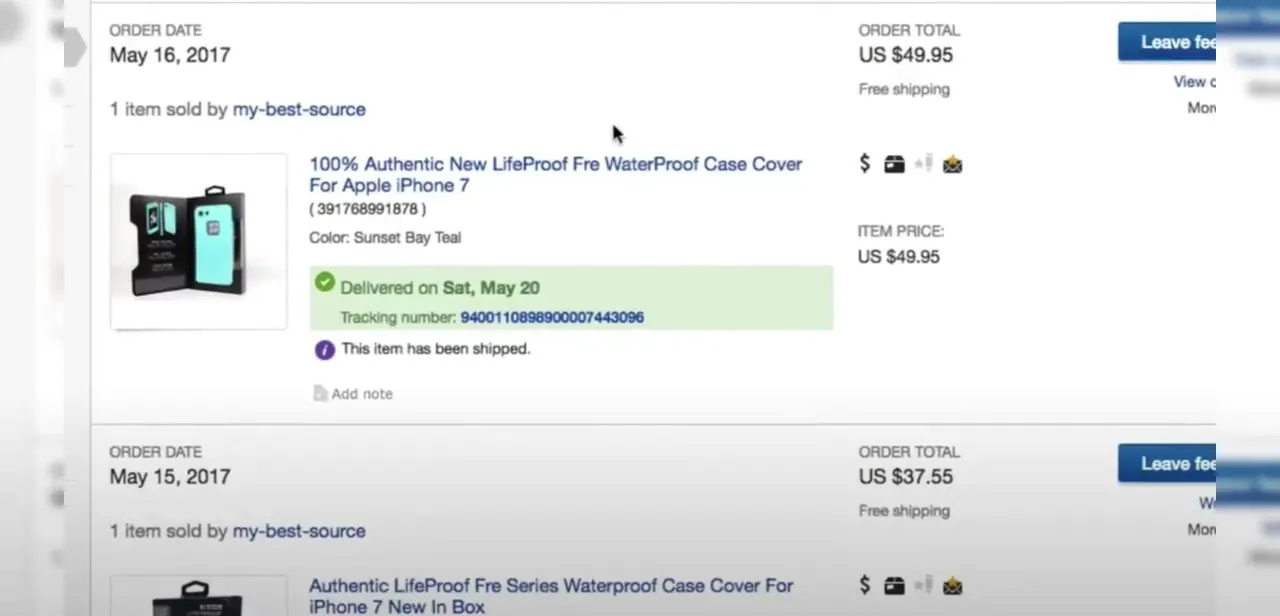
From My eBay, go to Purchase History to see every order you've placed, each listed with its order date, item, seller, and total. A shipped and delivered order shows a green confirmation banner right in the list, "Delivered on [date]," along with the tracking number itself, so in many cases there's no need to click into the order at all to know it arrived.
02Open the shipment details for the full scan history
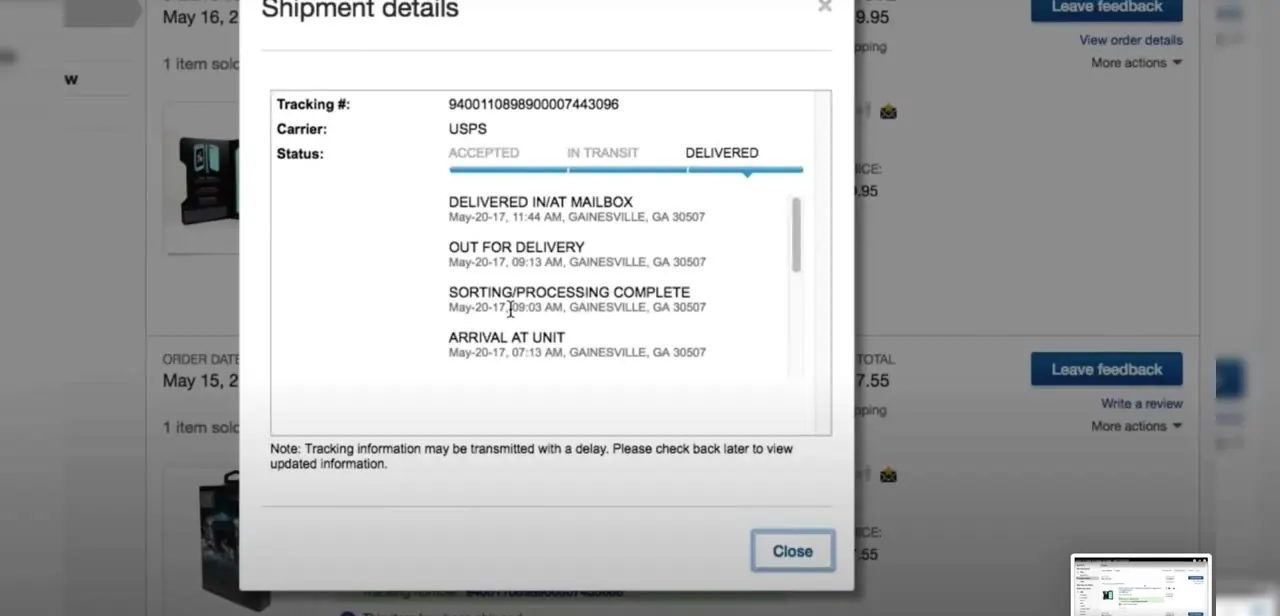
Click the tracking number and a Shipment details window opens showing the carrier (USPS, FedEx, UPS, or another service), the tracking number again for reference, and a progress bar moving through Accepted, In Transit, and Delivered. Below that sits the full scan-by-scan history: sorting and processing complete, arrival at unit, out for delivery, delivered in or at mailbox, each with its own timestamp and location. This is detail eBay's own order list doesn't show, and it's the fastest way to see where a package actually is.
03Check the carrier's own site for the newest scan
eBay's shipment details window notes that tracking information may be transmitted with a delay, so for the absolute latest scan, paste the same tracking number into the carrier's own site: USPS, FedEx, or UPS. This matters most in the final stretch of delivery, when eBay's cached view can sit a scan or two behind the carrier's live system.
04Read the status correctly, and know tracking isn't guaranteed
The three-stage bar (Accepted, In Transit, Delivered) simplifies a longer scan history underneath it. Accepted means the carrier has the package but hasn't started moving it; In Transit can run from hours to several days depending on distance and service; Out for delivery means it's on a vehicle that day.
None of this appears, though, unless the seller chose a tracked shipping service to begin with. eBay's help centre states plainly that an order's progress can only be tracked if the seller uses a tracked delivery service and uploads the tracking number. Sellers aren't required to ship that way, so some orders never get a tracking number at all, which isn't the same thing as tracking being broken.
05Global Shipping Program orders track the same way
If an order routed through eBay's Global Shipping Program because it came from an international seller, it still generates its own tracking number and shows up in Purchase History the same way; the shipment details popup works identically. GSP packages often show two tracking legs though: one to the GSP facility, and a second for the final domestic leg.
06Get help if tracking stalls or shows delivered but missing
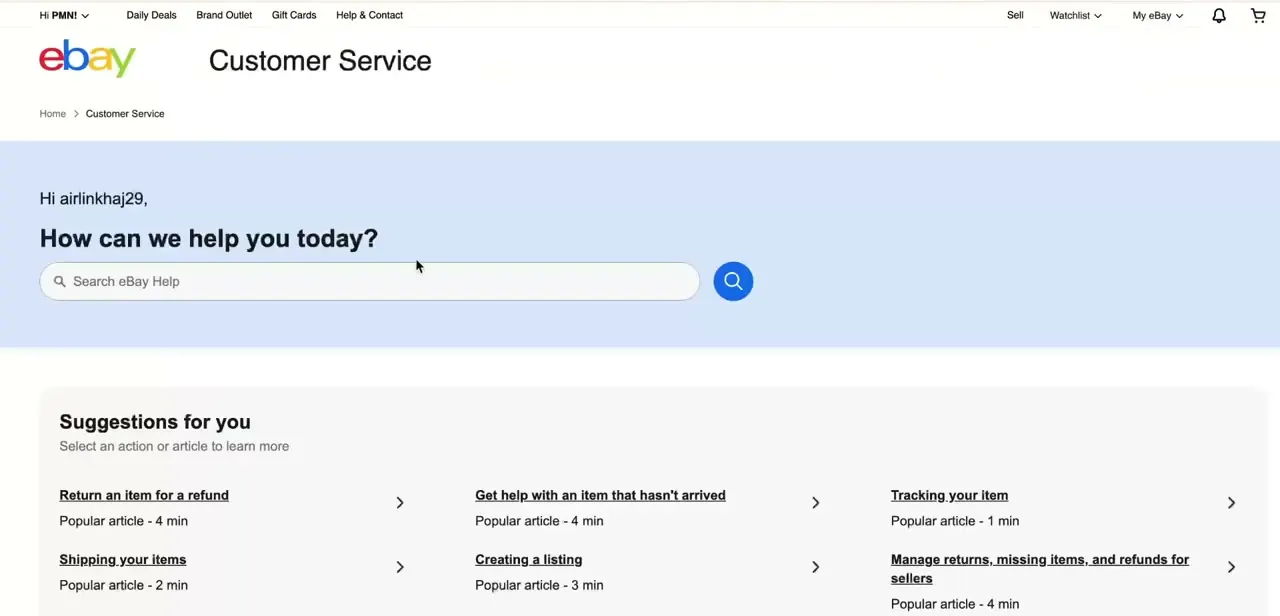
If a shipment shows no movement well past its estimated delivery date, or a tracking number never appeared at all, start by messaging the seller through the order page. Most delays and missing-tracking cases get resolved at this stage. eBay's Customer Service section also lists direct help articles for this, including "Get help with an item that hasn't arrived" and "Tracking your item," flagged as popular rather than buried in a general search.
If the seller doesn't respond within a reasonable window, or tracking says delivered but nothing arrived, eBay's buyer protection and resolution tools sit in the same Customer Service area. Check with neighbors or a building's mail room first for a delivered-but-missing package; that resolves a surprising number of cases before a formal case is needed.
When it doesn't work
No tracking number shows on the order at all
Why: The seller didn't use a tracked shipping service. eBay doesn't require one.
Fix: Wait out the seller's stated handling time, then message them through the order page to ask directly.
Status shows "In Transit" with no change for several days
Why: Normal variation in carrier transit times, or eBay's view lagging behind the carrier's own live system.
Fix: Check the same tracking number on the carrier's site directly, and hold off escalating until past the estimated delivery date.
Tracking shows delivered but the package never arrived
Why: Misdelivery, a held package at a mail room or front desk, or, rarely, an inaccurate delivered scan.
Fix: Check with neighbors and any building mail room first, then contact the seller, then open a case through eBay's buyer protection if it's still unresolved.
Frequently asked questions
What if my eBay order has no tracking number at all?
Sellers aren't required to use a tracked shipping service, so some orders never get one; that's different from tracking being delayed. If it's been longer than the seller's stated handling time with no tracking and no delivery, message them through the order page.
Why does my tracking status say 'in transit' for days?
This is common with standard carrier services and doesn't necessarily mean a problem, but if it persists well past the estimated delivery date, check the carrier's own site or contact the seller.
Can I track eBay's Global Shipping Program packages the same way?
Yes, GSP shipments generate their own tracking number that appears in Purchase History and opens the same Shipment details view, though they often show two separate tracking legs.
What should I do if tracking shows delivered but I never received it?
Check with neighbors or your building's mail room first, then contact the seller, and if it's still unresolved, use eBay's Customer Service help articles to open a case through buyer protection.
Does eBay's tracking show live carrier updates?
Not always instantly. eBay notes tracking information can arrive with a delay, so for the most current scan, check the same tracking number directly on the carrier's own site.
Sources and last check
Click path and screens come from a recorded purchase history and shipment-details walkthrough. Re-checked against eBay's official help page in September 2026, which confirms tracking only appears when a seller chooses a tracked shipping service and uploads the number; that constraint, missing from the previous version, is added here.
About the author

Impran M N
I've been hooked on technology for as long as I can remember — especially the new tools and AI apps that seem to land every other week. Easy Tech Tuts is where I write up whatever I've just worked out: I do the task in the real product, record the screen, and turn it into the guide I wish I'd found first.



