 Easy Tech Tuts
How To Send an Invoice on Ebay 2026 Easily
By Impran M NLast checked against official docs
Sending an invoice on eBay is what you use whenever the automatic checkout total isn't quite right for the order: a buyer wants two items combined under one shipping charge, you're offering a small discount, or you just need to finalize a sale before the buyer pays. It only takes a minute once you know where the option lives, but getting the shipping and adjustment numbers wrong before you send it means a second round of messages with the buyer. This guide walks through finding the order, editing the charges, and sending a clean invoice the first time.
Before you start
- An eBay seller account with at least one order awaiting payment
- The sale must have ended within the last 30 days — eBay removes the Send Invoice option after that
01Open the order in My eBay or Seller Hub
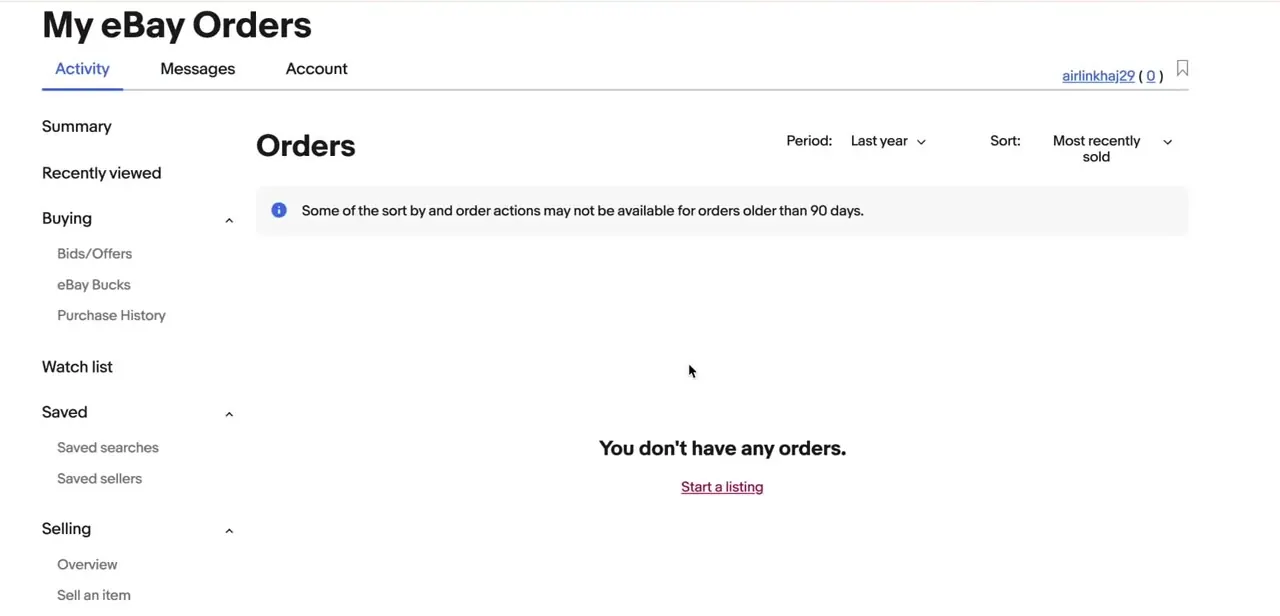
In Seller Hub, go to Orders, filter to Awaiting Payment, and pick Send Invoice from that order's Actions menu. In My eBay, go to Orders and choose Send Invoice from Actions there instead.
Both lists split Buying and Selling into their own sections in the left sidebar, so confirm you're looking at Selling before you search. One real constraint to know before you start: eBay won't let you send an invoice once more than 30 days have passed since the listing ended. Past that window, Send Invoice disappears from the Actions menu entirely, for both a first invoice and adding items to one already sent.
02Select the items to combine
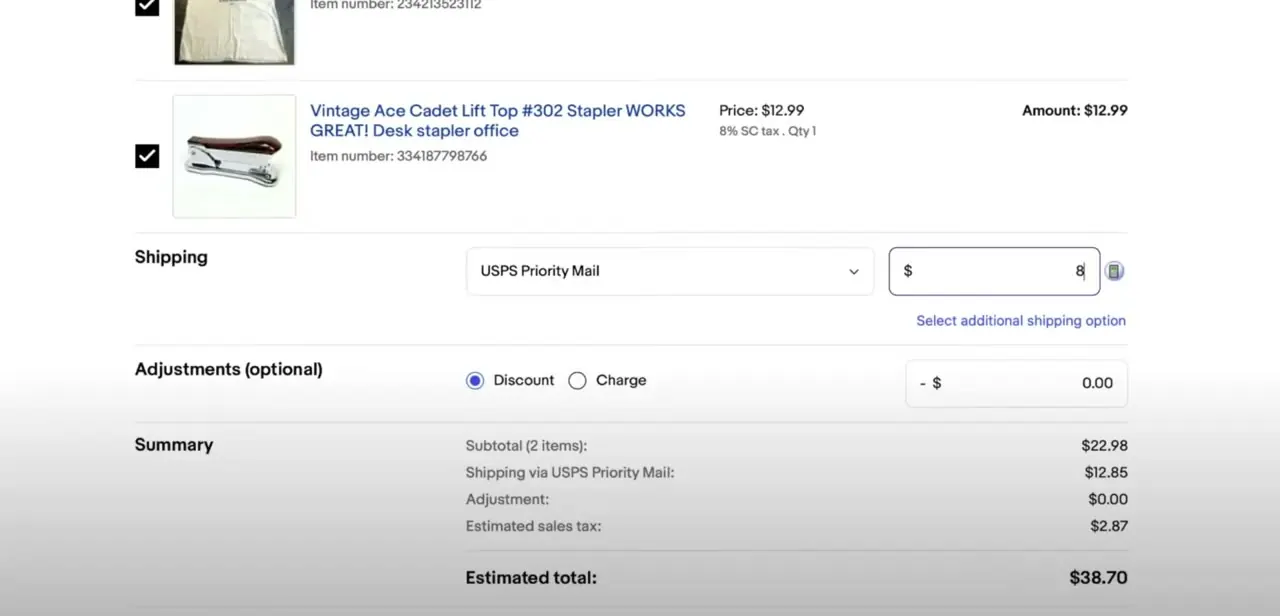
Tick the checkbox next to each item you're invoicing. This matters most when a buyer has bought more than one thing and you want to fold them into a single charge. Once you've checked the items, choose Send Invoice. eBay pulls in the item photos, titles, item numbers, prices and quantities on its own, so there's nothing to retype; your job on this screen is only to correct the shipping and add any adjustment.
03Set the correct shipping cost
The Shipping section lets you pick the carrier service, such as USPS Priority Mail, and type in what you're actually charging for the combined shipment. This is the figure that most often needs manual correction: eBay's default is calculated from each listing's original shipping setting, not from what postage costs once the items are boxed together. Enter the real combined rate here instead of leaving the original per-item estimate, especially if you've promised the buyer a lower combined-shipping total.
04Apply a discount or extra charge, then send
Below shipping, the Adjustments section has a Discount and a Charge option: use Discount for combined-shipping savings, promotional pricing, or a goodwill gesture, and Charge for something like an extra fee the buyer already agreed to. Both take a flat dollar amount, not a percentage.
The Summary panel updates as you edit these fields, showing Subtotal, Shipping, Adjustment, estimated tax and the Estimated total, so you can check the math before sending instead of after. Most invoice screens also include an optional message field.
Use it to say what you adjusted and why, since a short note here heads off a buyer message later asking why the total changed from what they saw at checkout. Once the total looks right, send the invoice.
The buyer gets a notification and can pay directly from it, and the checkout screen on their end updates to the new total so they can no longer pay the original amount. If you need to fix a figure before they pay, resending the invoice overrides the version they currently see.
When it doesn't work
Send Invoice isn't in the Actions menu for an order
Why: eBay removes the option once more than 30 days have passed since the listing ended.
Fix: Message the buyer directly through eBay to arrange payment, or reference the order details manually — the automated invoice tool won't work past that window.
The shipping total looks wrong on the invoice
Why: eBay pre-fills the shipping field from each listing's original shipping setting, not from what a combined, boxed-together shipment actually costs.
Fix: Overwrite the pre-filled figure with the real combined rate before sending.
A discount doesn't come out to the amount expected
Why: The Discount and Charge fields only accept a flat dollar amount. Entering "10" meaning 10% applies a $10 adjustment instead.
Fix: Calculate the dollar value first and enter that, not a percentage.
Frequently asked questions
Why send an invoice instead of letting eBay checkout handle it?
Automatic checkout doesn't know to combine shipping across multiple purchases or apply a one-off discount. Sending an invoice lets you correct the shipping cost and add adjustments before the buyer pays.
Can I combine multiple items into one invoice?
Yes. Select all the eligible items for that buyer from your Orders list, then choose Send Invoice. eBay groups them into a single order with one shipping field and one adjustment field.
Is there a deadline for sending an invoice?
Yes. eBay's help documentation states you can't send an invoice if it's been more than 30 days since the listing ended. After that, the option is no longer available for that order.
What's the difference between a Discount and a Charge on the invoice?
Discount subtracts a flat dollar amount from the total, commonly used for combined-shipping savings. Charge adds a flat dollar amount, used when an extra fee needs to be folded into the final total. Neither field takes a percentage.
Can I edit an invoice after sending it?
Yes, as long as the buyer hasn't paid yet. Resending an invoice with new figures overrides the version they currently see.
Does the invoice affect unpaid item timelines?
An invoice can also serve as a payment reminder for an unpaid order, so sending it soon after the sale keeps that process moving rather than stalling on a buyer who has forgotten to pay.
Sources and last check
Click path and screens come from a recorded walkthrough. Re-checked against eBay's official help pages in September 2026, which corrected this guide's earlier claim of a 90-day window on older orders — the real limit is 30 days since the listing ended, after which Send Invoice is removed from Actions entirely. The Discount/Charge fields were confirmed to take flat dollar amounts only, not percentages.
About the author

Impran M N
I've been hooked on technology for as long as I can remember — especially the new tools and AI apps that seem to land every other week. Easy Tech Tuts is where I write up whatever I've just worked out: I do the task in the real product, record the screen, and turn it into the guide I wish I'd found first.



