 Easy Tech Tuts
How to List Multiple Sizes on Ebay, Add more variations Easily in iPhone, App, Site 2026
By Impran M NLast checked against official docs
If you sell clothing, shoes, or anything with multiple options, listing every size as its own separate item wastes time and clutters your store with near-duplicate pages. eBay's variation listings combine sizes, colors, or materials into a single product page that buyers pick from with a dropdown, with a real limit on how many combinations one listing can hold. This guide covers where the tools live in Seller Hub, the actual steps for turning on variations, and one constraint that trips people up: building a variation listing needs a computer or a mobile browser at the full eBay.com site. The app itself can't create one.
Before you start
- A fixed-price listing (variations aren't available on auction-style listings)
- Item specifics such as size, color, or material already set for the category you're listing in
01Find the Selling tools in your account
Everything for managing listings sits under the Selling section of My eBay, reached from the account menu: Overview, Sell an item, Drafts, Scheduled, Active, Sold, Unsold, Payments, and Shipping labels are all grouped here. Right below Selling, the Sizes section of the account menu sets your default measurement preferences, which matters once you're entering multiple size values on a variation listing so eBay displays them the way your buyers expect.
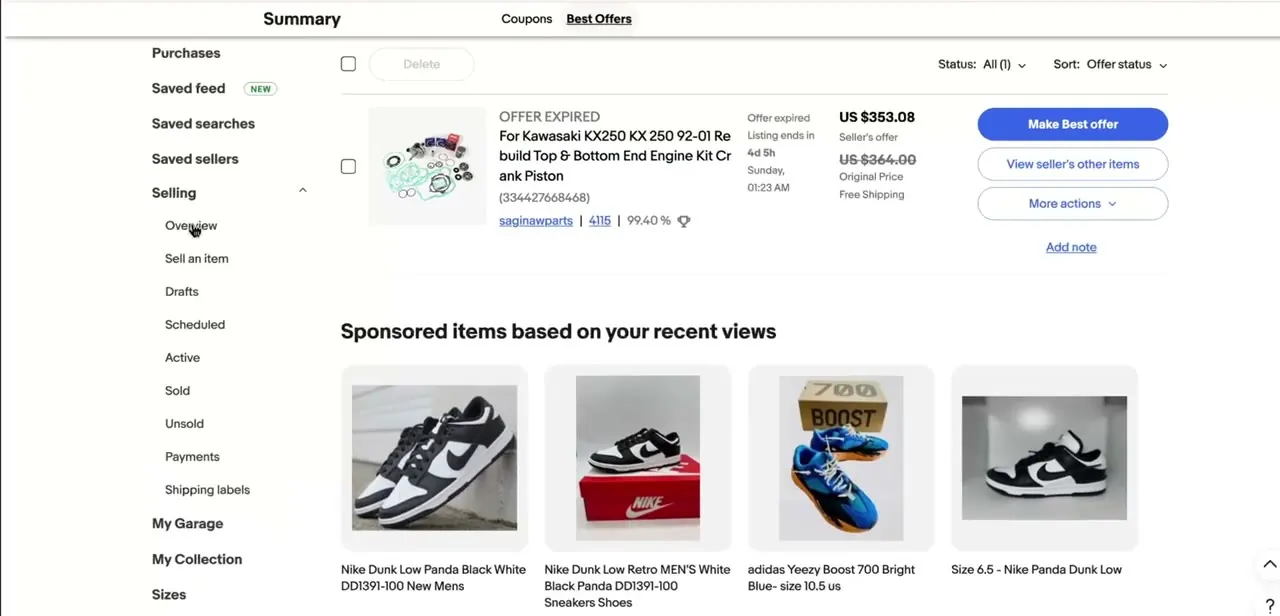
02Set the listing format, then turn on variations
Variations only work on fixed-price listings; they're not available for auction-style ones, so confirm the Format field is set to Fixed price before anything else. Next, make sure item specifics are filled in for whichever attributes apply, since eBay uses those specifics to build the selectable dropdowns buyers see on the page.
Once the format and item specifics are set, the listing flow shows a dedicated variations toggle that switches from a single fixed set of details into a grid covering several sizes or colors under one product. A listing can carry up to 5 variation attributes (size, color, material, and so on), up to 50 values per attribute, and up to 250 total variations, all at no extra listing fee.
03Fill in each size, its stock, and its photos
Inside the variation grid, each row gets its own quantity and, if needed, its own price, useful when certain sizes cost more due to demand or limited stock. You can attach up to 24 photos per variation, which matters most for color options where buyers need to see the actual shade rather than one generic product photo standing in for every choice.
04Save as a draft if you're not finishing in one sitting
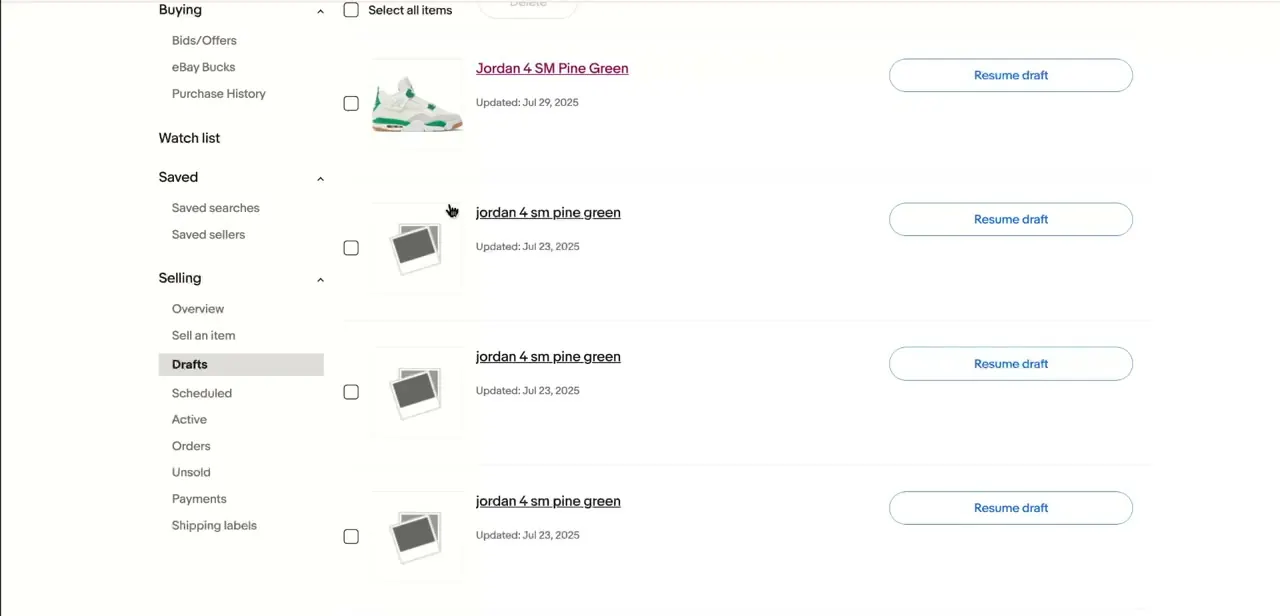
Filling out a full variation grid with photos for every size takes longer than a single-item listing, so eBay saves incomplete listings to Drafts automatically. Each draft shows a Resume draft button that takes you back into the listing where you left off, with whatever sizes and photos you'd already entered intact.
05Use a computer or the full site, not the app, to build it
eBay's iPhone and Android apps don't support creating a listing with variations; that option only appears in Seller Hub or the advanced listing tool on a computer, or the full eBay.com site loaded in a phone's browser rather than the app itself. If you don't see a variations option while listing on your phone, that's why — switch to a browser tab at ebay.com and the toggle from step two shows up.
When it doesn't work
The variations toggle never appears while creating the listing
Why: Either the listing Format is set to Auction instead of Fixed price, or the category isn't set up to support variations at all.
Fix: Switch Format to Fixed price first. If the option still doesn't show, that category doesn't support variation listings.
There's no way to add variations from the eBay app
Why: eBay's mobile app doesn't include the variations feature; only Seller Hub or the full site on a computer or mobile browser does.
Fix: Open a browser and go to ebay.com to build or edit a variation listing, rather than the app.
Some sizes or colors won't fit in the grid
Why: eBay caps variation listings at 5 attributes, 50 values per attribute, and 250 total variations.
Fix: Trim to the sizes or colors that actually sell, or split an oversized range into a second listing.
Frequently asked questions
Can I add size variations from the eBay iPhone app?
No. Creating a variation listing needs Seller Hub or the full eBay.com site on a computer or phone browser. The app itself doesn't have this option.
Do I need separate photos for each size?
It's recommended for color variations especially, since buyers want to see the actual option they're picking. You can attach up to 24 photos per variation, but it's not mandatory for every row.
Can I set different stock levels and prices for each size?
Yes. Each row in the variation grid gets its own quantity, and price if it needs to differ, so you can track which sizes are selling out without touching the rest of the listing.
How many sizes or colors can one listing hold?
Up to 5 variation attributes, 50 values per attribute, and 250 total variations, all at no extra fee.
What happens to a variation listing I don't finish?
eBay saves it to Drafts under Selling, where a Resume draft button lets you pick back up with the sizes and details you already entered.
Sources and last check
Click path and screens come from a walkthrough recorded in 2025. Re-checked against eBay's official help pages in September 2026, which corrected the guide's central claim: variation listings cannot be created from eBay's app, only from Seller Hub or the full site on a computer or mobile browser. The variation limits (5 attributes, 50 values each, 250 total, fixed-price only, up to 24 photos per variation) were confirmed against the same pages.
About the author

Impran M N
I've been hooked on technology for as long as I can remember — especially the new tools and AI apps that seem to land every other week. Easy Tech Tuts is where I write up whatever I've just worked out: I do the task in the real product, record the screen, and turn it into the guide I wish I'd found first.



