 Easy Tech Tuts
How to List Multiple Items on eBay, Multi Quantity & Variations in 2026 Easily
By Impran M NLast checked against official docs
Listing multiple identical items, or products that come in different sizes, colors, or designs, works differently on eBay than a single one-off listing. The setting that controls it sits inside your seller preferences, not on the listing form itself.
This guide covers where the multi-quantity settings live, what happens to your listing's visibility when stock hits zero, and the format and size limits eBay puts on variation listings. It's built for sellers handling apparel, electronics, or any product line with multiple versions.
Before you start
- An active eBay seller account with Seller Hub access
01Open your Seller Hub and find Selling Preferences
From your Seller Hub, open Account settings and look for the preferences menu on the left. You'll see a short list: Business Policies, Shipping Preferences, Selling Preferences, and Seller disclosures, with a separate Donation Preferences section below it. Selling Preferences is the one that matters here. eBay tucks the multi-quantity controls into this menu instead of placing them on the listing creation screen itself.

02Turn on multi-quantity listing behavior
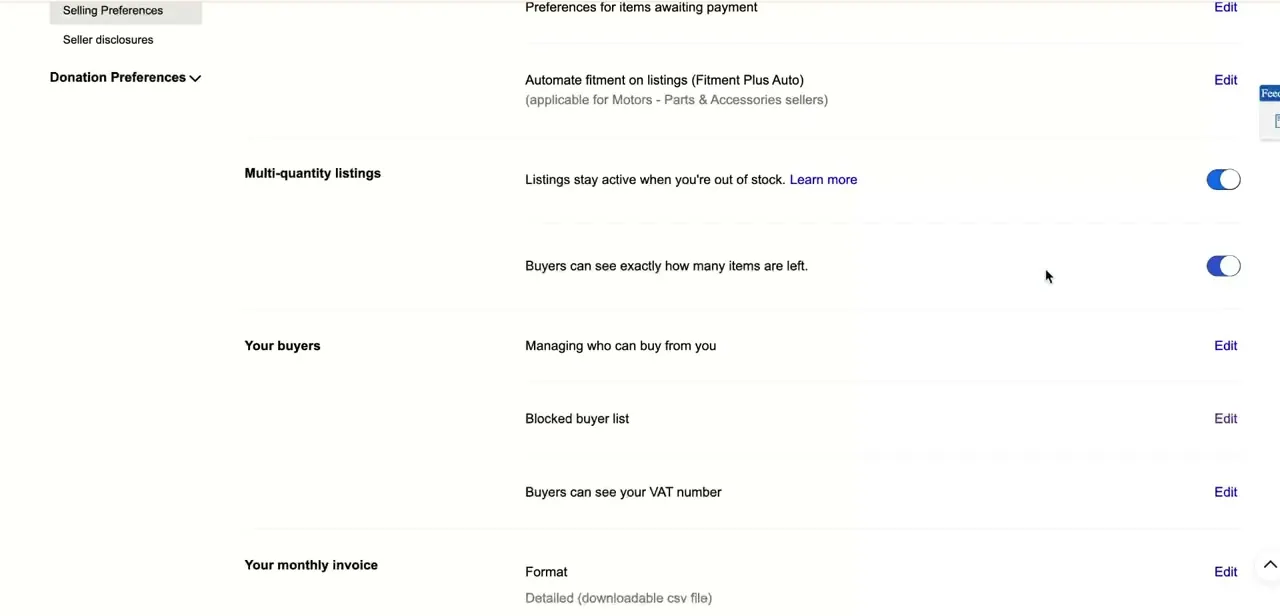
Inside Selling Preferences, scroll to the Multi-quantity listings section. Two toggles live here.
The first, "Listings stay active when you're out of stock," keeps a Good 'Til Cancelled listing running instead of ending it when quantity hits zero, but eBay hides that listing from search results until you restock; it reappears automatically once quantity is back above zero. The second toggle controls whether buyers see your exact quantity remaining or a rounded "more than 10 available" message instead.
Turning the first toggle on can also help your seller performance stats, since eBay credits some insertion and upgrade fees for a listing that sits at zero quantity for a full billing cycle. Switch it on if you restock regularly; leave the second on if a shrinking count helps sell your particular product.
03Set quantity for identical items
With preferences configured, the quantity field on the listing form tells eBay how many identical units you're offering. Enter your real stock count there instead of creating a separate listing per unit. eBay decrements the count automatically as items sell, and if the out-of-stock toggle is on, the listing stays alive, just hidden from search, while quantity reads zero.
04Add variations, and know eBay's limits on them
For products that come in different versions, not just different quantities of the same unit, use eBay's variations feature. This groups every size, color, or design option under one listing page: buyers pick their version from a dropdown instead of hunting through near-duplicate listings.
Variations only work on fixed-price listings; auction-style listings can't carry them. A single listing can hold up to 5 variation types (color, size, material, and so on), up to 50 values per type, and up to 250 total variations at no extra fee. Each variation can carry its own price, its own quantity, and up to 24 of its own photos, but shipping cost and accepted payment methods must stay the same across every variation in the listing. eBay also won't let you list the same item both as a single unit and inside a variation listing at the same time, so pick one.
| Limit | Maximum |
|---|---|
| Variation types per listing | 5 (for example color, size, material) |
| Values per variation type | 50 |
| Total variations per listing | 250, no extra fee |
| Photos per variation | 24 |
Figures from eBay's official variations help page, current as of September 2026.
When it doesn't work
My listing disappears from search when I run out of stock
Why: The "stay active when out of stock" toggle keeps a Good 'Til Cancelled listing alive, but eBay still hides it from search results while quantity reads zero.
Fix: Restock the item. The listing reappears in search automatically once quantity is above zero again; there's no need to relist it.
The Create variation option isn't there when I make a listing
Why: Variations only appear for fixed-price listings, and some categories don't support them at all.
Fix: Switch the listing format to Fixed price. If the option still doesn't appear, the category you picked doesn't support variations.
I can't set a different shipping cost for one color or size
Why: eBay requires the same shipping cost and payment methods across every variation in a single listing.
Fix: Use one shipping price for the whole listing, or move the version that needs different shipping into its own separate listing.
eBay won't save my listing because the item already exists elsewhere
Why: An item can't be listed as both a standalone single-unit listing and inside a variation listing at the same time.
Fix: End the single-unit listing, or remove that version from the variation listing before saving.
Frequently asked questions
What's the difference between listing quantity and variations on eBay?
Quantity is for multiple identical units of the same item. Variations let you offer different versions, such as size or color, of a product under a single listing page.
What happens to my listing when I run out of stock?
If "Listings stay active when you're out of stock" is turned on in Selling Preferences, eBay keeps the listing running as a Good 'Til Cancelled listing but hides it from search results until quantity is above zero again. It reappears automatically once you restock; you don't need to relist it.
Can I add variations to an auction-style listing?
No. eBay's variations feature only works with fixed-price listings. An auction is built around one winning bid for a single item, so bulk quantity and variation options both require fixed-price format.
How many variations can one listing have?
Up to 5 variation types (for example color, size, and material), each with up to 50 possible values, for a maximum of 250 total variations in one listing at no extra fee.
Do all variations in a listing need the same shipping cost?
Yes. eBay requires the same shipping cost and payment methods across every variation in a listing. If one version genuinely needs different shipping, give it its own separate listing.
Can I manage multi-quantity listings from my phone?
Yes. Quantity counts and variation stock can be updated from the eBay mobile app as well as the desktop Seller Hub.
Sources and last check
Click path and screens come from a walkthrough recorded in 2026. The out-of-stock toggle's search-visibility behavior, the fixed-price requirement for variations, and the numeric variation limits (5 types, 50 values each, 250 total, 24 photos) were re-checked against eBay's official help pages in September 2026. The original draft did not mention that an out-of-stock listing gets hidden from search, or state any of the variation limits.
About the author

Impran M N
I've been hooked on technology for as long as I can remember — especially the new tools and AI apps that seem to land every other week. Easy Tech Tuts is where I write up whatever I've just worked out: I do the task in the real product, record the screen, and turn it into the guide I wish I'd found first.



