 Easy Tech Tuts
How to List and Sell Digital Products on Ebay, Sell Downloads, NFT, E Books 2026 Easily
By Impran M NLast checked against official docs
eBay is built around shipping physical items, so digital goods sit under a narrower set of rules than a normal listing. Most eBooks, templates and software have to go through the Classified Ad format unless you apply for approval, a handful of categories (tickets, domain names, digital trading cards, gaming items, NFTs) skip that requirement entirely, and NFTs carry their own price cap and format restrictions on top. This guide follows eBay's actual policy for electronically delivered items: which category your item falls into, how to set the listing up correctly, and the practical side eBay's flow doesn't handle for you, like file hosting and delivery timing.
Before you start
- An eBay seller account in good standing (a US address is required to sell digital items on ebay.com)
- The file itself hosted somewhere outside eBay, such as Google Drive or Dropbox, with sharing permissions set correctly
01Work out which rule applies to your item
eBay's Electronically Delivered Items Policy splits digital goods into two groups. Electronic tickets, digital trading cards, domain names, virtual items for online gaming, and NFTs can be listed in any format (Auction, Buy It Now, Best Offer) with no pre-approval needed.
Everything else, eBooks, software, templates, music files, has to go through the Classified Ad format in the Everything Else > Information Products category unless you separately apply for approval to list it elsewhere. Classified Ad format works differently from a normal listing: eBay is a lead generator only, the sale itself is negotiated and completed directly between you and the buyer, and eBay's Money Back Guarantee doesn't apply to it. Check which group your item is in before you build the listing, since it changes almost everything downstream.
02Start your listing and search for the closest match
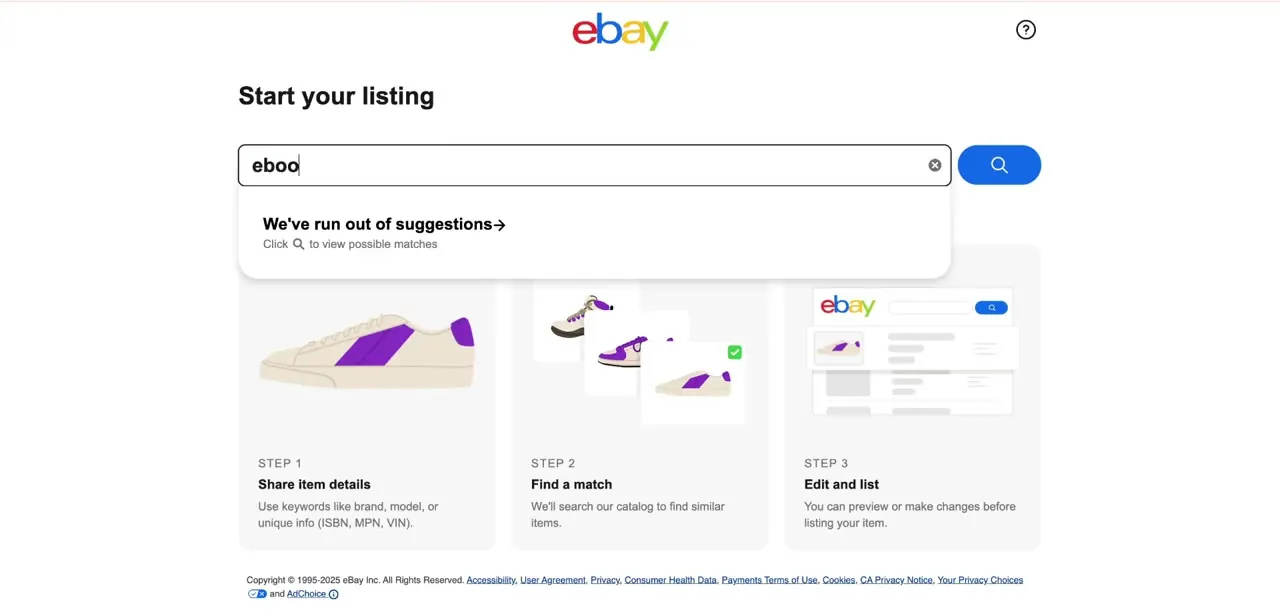
From Start your listing, type a description of what you're selling into the search box: brand, format, or keywords for the item type. eBay's flow shows three steps on the page: Share item details, Find a match against its catalog, and Edit and list once a match is found or skipped. For something like an eBook or a template, a generic search often won't return a strong catalog match, and that's fine; the flow lets you continue without one.
03If it's an NFT, follow the extra rules that apply only to NFTs
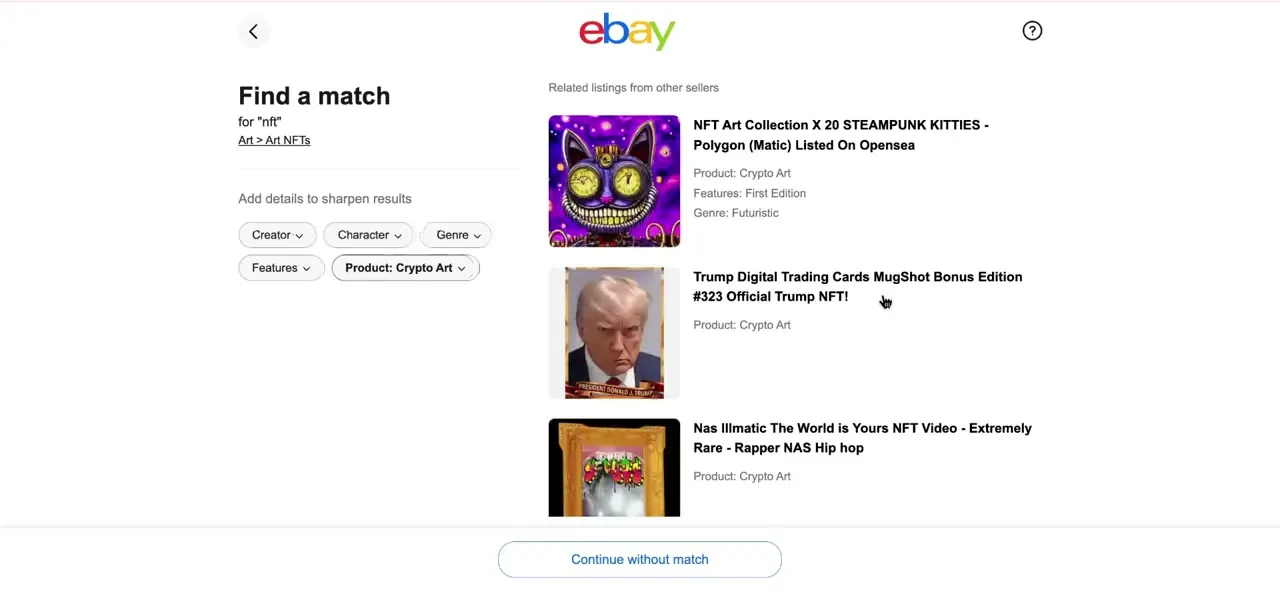
NFTs need pre-approval from eBay before you can sell them, and even once approved, the listing has to stay under $10,000, can't use Auction or Best Offer format (Buy It Now only), must sit in a single NFT category, not be cross-listed, and can't be bundled with a physical item. Searching a term like "NFT" during the Find a match step pulls up related listings tagged with a Product field of Crypto Art, which is a useful way to see how approved sellers categorize theirs before you apply.
04Set the item condition to Digital Good
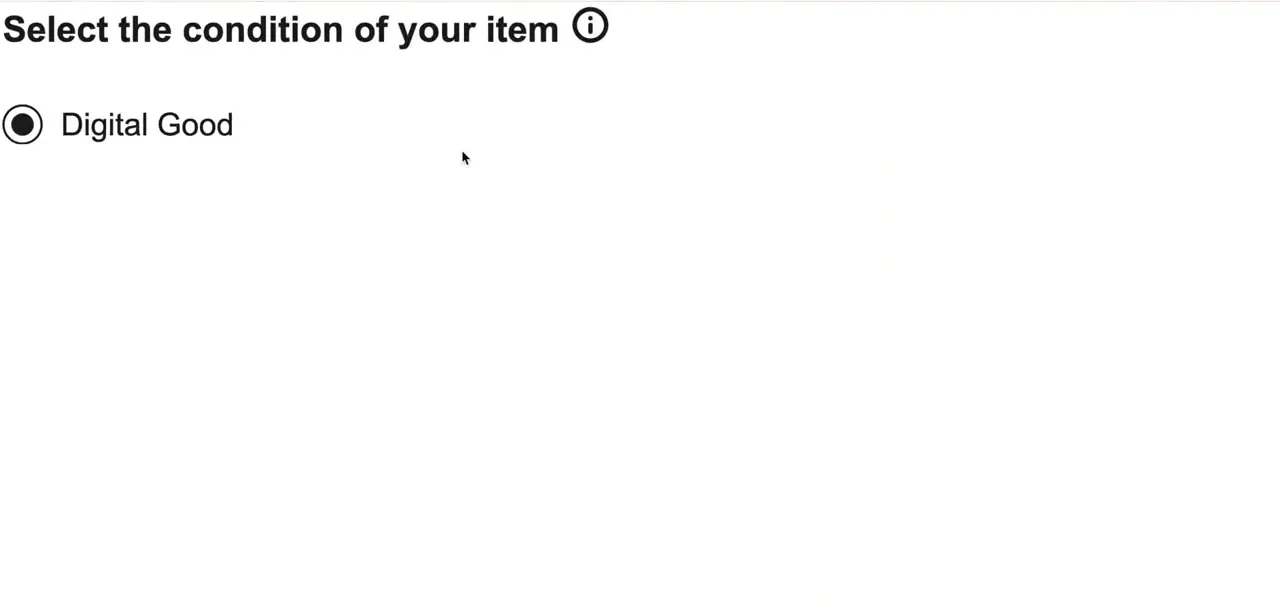
Further into the listing form, the Select the condition of your item step includes Digital Good as an option. This field marks the listing as non-physical, which affects how eBay handles shipping fields later in the form; you generally won't need to fill in package weight or dimensions. It applies to any electronically delivered asset, NFTs included.
05Host the file and deliver only after payment
eBay's listing tool handles the sale, not file storage. There's no built-in way to attach a downloadable file to a listing, so upload your eBook, template, or NFT metadata to Drive or Dropbox and keep the link ready to send instead of posting it publicly in the description; a public link invites people to grab the file without paying.
Once a buyer pays, send the link through eBay's messaging system or the email tied to the order. Waiting for payment confirmation first protects you, since a digital product can't be reclaimed the way a physical item can be if a chargeback follows.
06Disclose delivery terms and what the buyer is getting
Spell out the file format, delivery timing, and any license or usage terms in the description; because there's no physical item to point to, the description carries more weight than usual. Say plainly that eBay's Money Back Guarantee doesn't cover digital or electronically delivered items, and that what the buyer receives is a license to use the file under whatever terms you set, not unrestricted ownership of it. For NFTs, add the blockchain the asset lives on and any wallet-transfer steps the buyer needs, since eBay's category fields don't capture that for you.
| Item type | Approval needed? | Listing format allowed |
|---|---|---|
| Electronic tickets, digital trading cards, domain names, virtual gaming items | No | Any format: Auction, Buy It Now, or Best Offer |
| NFTs | Yes, pre-approval required | Buy It Now only, capped at $10,000, single NFT category |
| Everything else (eBooks, templates, software, music files) | No, if using Classified Ad in Everything Else > Information Products; otherwise yes | Classified Ad by default, or apply for approval to list elsewhere |
Based on eBay's Electronically Delivered Items Policy as published in September 2026.
When it doesn't work
A digital listing gets removed or flagged shortly after publishing
Why: It's a non-exception item (eBook, software, template) listed in Buy It Now or Auction format without eBay's approval. Only approved sellers can do that outside the Classified Ad format.
Fix: Relist it as a Classified Ad in Everything Else > Information Products, or apply for approval to sell it in another format.
A buyer opens an eBay Money Back Guarantee case demanding a refund
Why: The Guarantee explicitly excludes digital and electronically delivered goods.
Fix: State this in the listing description before the sale, so buyers know disputes go through you directly, not eBay's guarantee.
An NFT listing gets rejected
Why: It's priced above $10,000, listed as an Auction or with Best Offer, cross-listed in more than one category, or the seller isn't pre-approved for NFT sales.
Fix: Apply for NFT approval first, keep the price at or under $10,000, use Buy It Now only, and list in one correct category.
Frequently asked questions
Do I need eBay's approval to sell an eBook or digital download?
Only if you want to list it outside the Classified Ad format. Without approval, eBooks, software and similar downloads go in Everything Else > Information Products as a Classified Ad, where eBay acts as a lead generator and the sale is completed directly with the buyer.
Can I sell NFTs on eBay?
Yes, but sellers need pre-approval, the price is capped at $10,000, the format has to be Buy It Now (no auctions or Best Offer), and the listing must sit in a single NFT category.
What condition setting should I use for a digital download?
Digital Good, found in the item condition step of the listing form. It marks the listing as non-physical and generally removes the need to fill in shipping weight or dimensions.
Does eBay's Money Back Guarantee cover digital products?
No. eBay's policy excludes electronically delivered items from the Money Back Guarantee. State that clearly in your own listing so buyers know where disputes go.
How do I deliver a file to a buyer?
Host it on a platform like Google Drive or Dropbox, then send the link through eBay's messaging system or order email once payment clears. Don't post the link publicly in the listing itself.
Sources and last check
Click path and screens come from a walkthrough recorded in July 2025. The listing rules were re-checked against eBay's official Electronically Delivered Items Policy and its digital-items guide in September 2026, which corrected this guide's earlier assumption that most digital goods can list normally with just a Digital Good condition; in practice most non-exception items require Classified Ad format or separate approval, and eBay's Money Back Guarantee doesn't cover digital goods at all.
About the author

Impran M N
I've been hooked on technology for as long as I can remember — especially the new tools and AI apps that seem to land every other week. Easy Tech Tuts is where I write up whatever I've just worked out: I do the task in the real product, record the screen, and turn it into the guide I wish I'd found first.



