 Easy Tech Tuts
How to Issue Partial Refund on Ebay 2026 Easily
By Impran M NLast checked against official docs
Not every buyer complaint needs a full return. A missing accessory, a small scuff, or a late delivery is often settled faster by refunding part of the price and letting the buyer keep the item.
That skips return shipping for both sides and usually closes the issue before it turns into a formal case. This guide covers where eBay's refund tool sits inside My eBay, the button eBay currently calls it, and the two limits (a 90-day window and a 100% cap) that decide whether it's even available on a given order.
Before you start
- The order must not have an open cancellation request, return request, Money Back Guarantee case, item-not-received report, or outside payment dispute attached to it. Any of those routes the refund through that request instead of the general refund tool.
- The order must be within 90 days of the original transaction.
- Enough available balance, or a linked payment method eBay can draw from, to cover the refund.
01Open My eBay and head into Selling
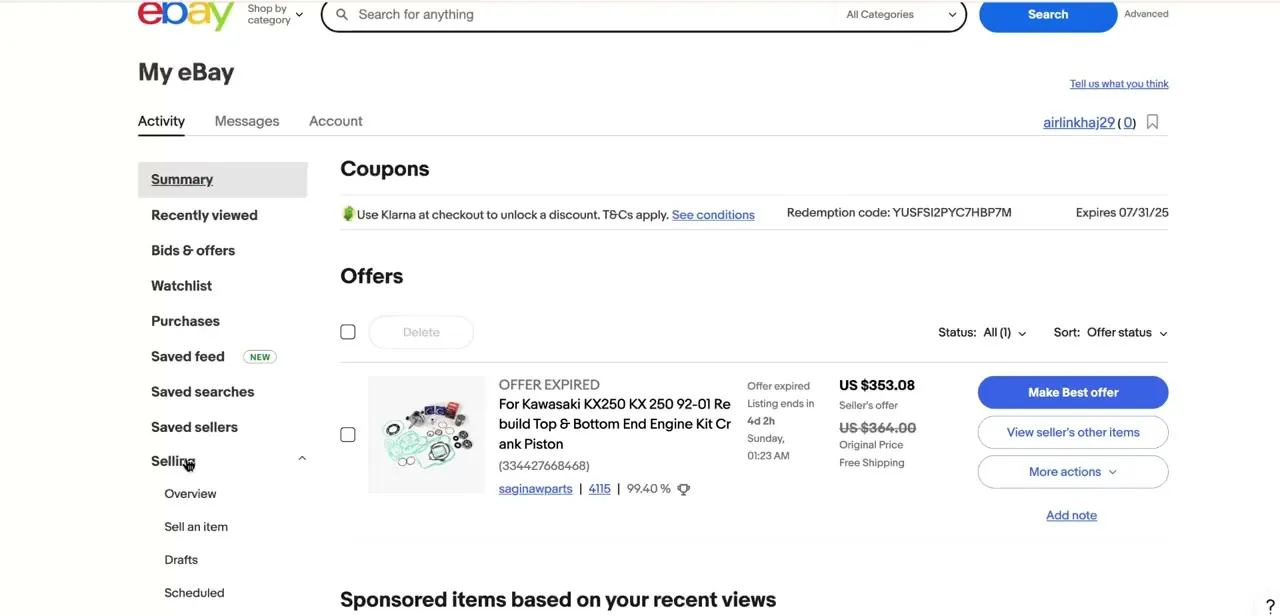
Sign in and go to My eBay's Activity tab, the dashboard that also shows your offers, watchlist, and purchase history. Expand Selling in the left-hand menu.
Seller Hub covers the same ground with a different layout, but the classic My eBay menu works fine and is the more direct route on a personal account. If you land on a sign-in screen instead of the dashboard, your session has simply expired. Log back in and My eBay reopens where you left off.
02Find the order under Orders
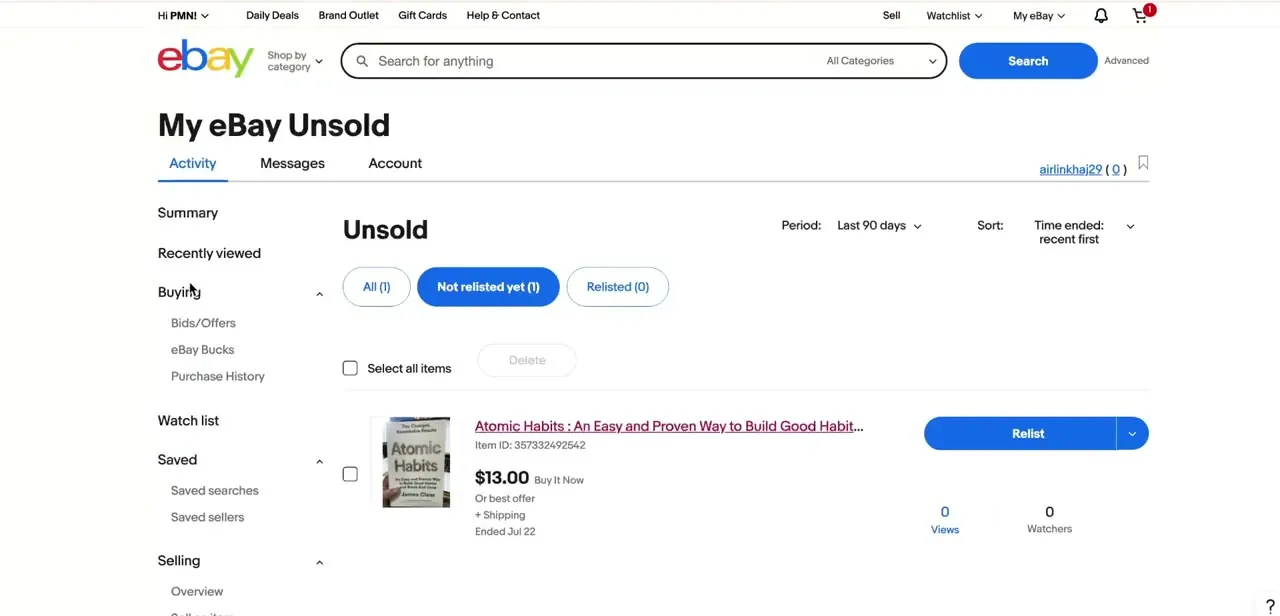
With Selling expanded, the full list appears: Overview, Sell an item, Drafts, Scheduled, Active, Orders, Unsold, Payments, and Shipping labels. Click Orders, then search by buyer name or item title to find the transaction tied to the complaint. The refund tool is scoped to that one order, not a general account setting, so open the specific order before anything else.
03Choose Send refund from the order's dropdown
Open the actions dropdown on that order and select Send refund. The item stays sold and the buyer keeps it; only the money moves, which is the point of this path over a full return.
If Send refund isn't in the list, the order already has an open cancellation, return, Money Back Guarantee case, item-not-received report, or an outside payment dispute against it. In that situation you respond inside that specific request instead. A buyer's return, for instance, has its own Offer a partial refund option under the return's details, and eBay caps that offer at one attempt per return.
04Pick a reason and enter the partial amount
eBay asks for a reason before it will process anything: item not as described, buyer changed their mind, and problem with the order cover most cases. Pick the one that actually matches, since it's what eBay refers back to if the buyer opens a dispute later.
Then enter the amount you agreed on rather than the full price. You can refund up to 100% of the transaction; a cracked case on an otherwise working phone might reasonably warrant 15 to 20% back, for example. Check the figure before you submit. eBay processes it immediately and there's no built-in way to pull an overpaid refund back.
05Message the buyer and confirm it landed
Send a short message explaining what you refunded and why, right after you submit it. Buyers who hear from a seller directly are less likely to escalate to a formal case.
You'll get one email when the refund is initiated and a second once it completes, and the same order page shows its status. The money typically reaches the buyer's original payment method within a few business days. If a buyer says a week has passed with nothing to show, check which payment method is on file before assuming eBay lost it.
When it doesn't work
Send refund doesn't appear on the order
Why: The order already has an open cancellation, return request, Money Back Guarantee case, item-not-received report, or an outside payment dispute attached.
Fix: Respond through that specific request instead. An open return carries its own Offer a partial refund option in the return's details.
eBay won't let you refund an old order
Why: More than 90 days have passed since the transaction. eBay's refund tools have a 90-day cutoff.
Fix: Refund outside that window has to go through eBay customer support rather than the seller-side tool, if it's possible at all.
The refund amount was wrong after you sent it
Why: There's no undo once a refund is submitted.
Fix: You can send a second, smaller refund to correct an undercharge. An overpayment can only be recovered if the buyer agrees to send the difference back; eBay doesn't claw it back for you.
Frequently asked questions
Does a partial refund affect my eBay seller rating?
Handled promptly and explained to the buyer, a partial refund is generally seen favorably and can prevent a negative review or a formal case from being opened at all.
Are eBay fees adjusted after a partial refund?
Yes. eBay automatically credits a prorated portion of your final value fee based on the refunded share of the sale. Fixed per-order fees and Promoted Listings priority fees aren't included in that credit.
Can a buyer request a partial refund themselves?
A buyer can message you asking for one, but only the seller sends it. The exception is an open return: eBay lets the seller respond to it with an Offer a partial refund option, which the buyer then has to accept.
Why don't I see Send refund on this order?
Either an open cancellation, return, Money Back Guarantee case, or item-not-received report is attached to it, or more than 90 days have passed since the sale. Both remove the general refund tool from that order.
Is a partial refund better than accepting a return?
For minor issues, yes, since it skips return shipping and the wait for the item to travel back. It suits low-value or bulky items especially well.
Can I cancel or reduce a refund after sending it?
No. eBay processes a refund immediately with no built-in reversal. Double-check the amount before submitting.
Sources and last check
Click path and screenshots come from a walkthrough of the classic My eBay Selling menu recorded before this pass. The button name, the 90-day window, the 100% cap, the case-based restriction, and the final-value-fee credit behavior were re-checked against eBay's official help pages in September 2026. That check corrected the button name from the article's original 'More actions / Issue a refund' to eBay's actual 'Send refund', and added the open-case restriction and the time and amount limits the original didn't mention.
About the author

Impran M N
I've been hooked on technology for as long as I can remember — especially the new tools and AI apps that seem to land every other week. Easy Tech Tuts is where I write up whatever I've just worked out: I do the task in the real product, record the screen, and turn it into the guide I wish I'd found first.



