 Easy Tech Tuts
How to Increase Selling Limit on Ebay Online Easily 2026
By Impran M NLast checked against official docs
Every new or lower-volume eBay account is capped at a set number of items and total dollar value per month. It's how eBay manages risk while you build a track record.
The limit isn't fixed forever, though, and there's a real request button sitting right where you'd check your current numbers. This guide follows that actual flow: finding your limit, requesting an increase, and understanding why eBay might turn the request down.
01Open My eBay and find the Selling section
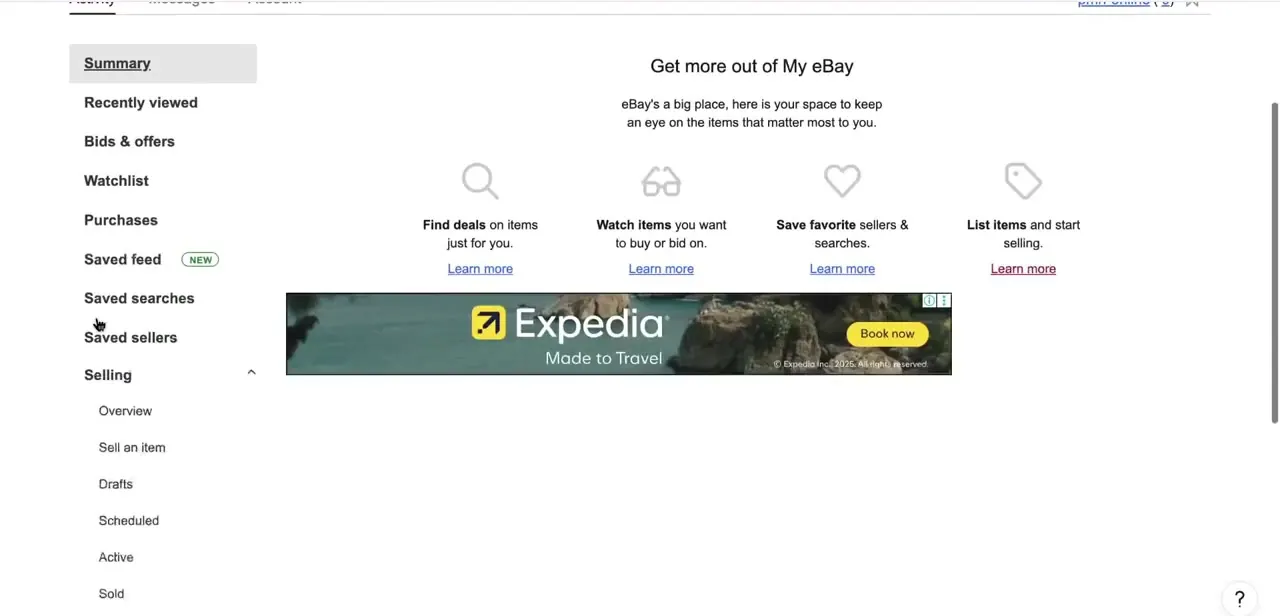
From the My eBay dropdown, scroll past the buying-side items (Recently Viewed, Bids & Offers, Watchlist, Purchases) down to the Selling section, which expands to show Overview, Sell an Item, Drafts, Scheduled, Active, and Sold. Your selling limit isn't a separate hidden setting; it's tied directly to this same seller dashboard.
02Check your current monthly limit
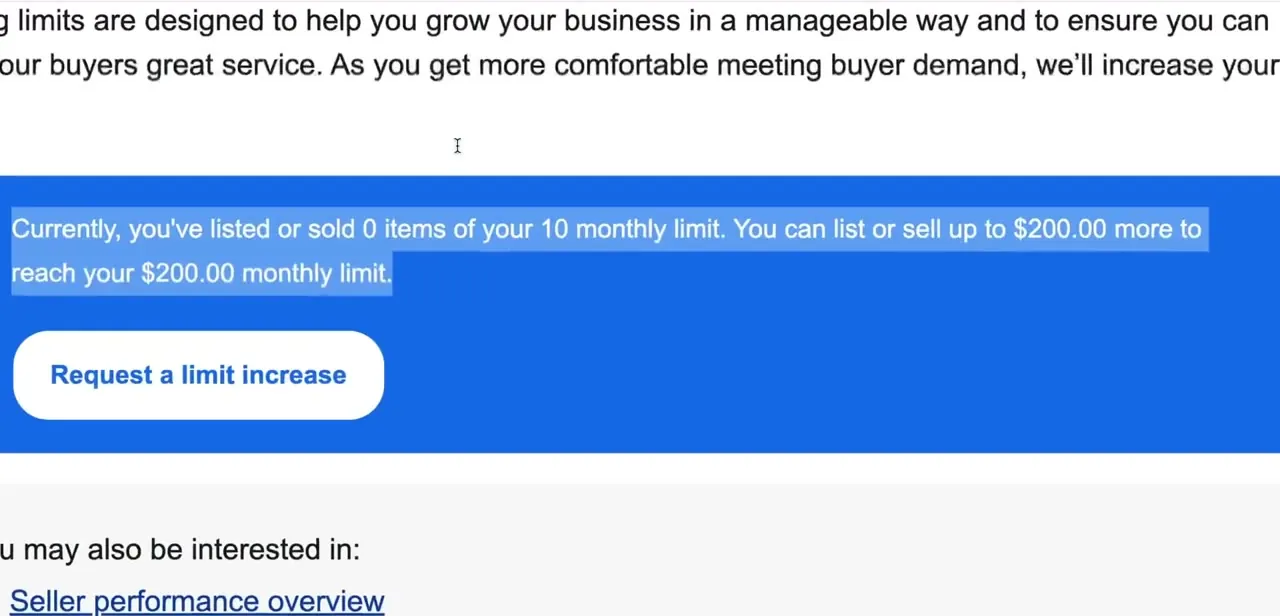
Your selling limits page states your usage plainly. In this account it reads: "Currently, you've listed or sold 0 items of your 10 monthly limit. You can list or sell up to $200.00 more to reach your $200.00 monthly limit." eBay's own help pages describe this cap as a way to help new sellers grow in a manageable way and keep up with buyer demand, with the limit rising as the account demonstrates it can handle more volume reliably.
03Submit a request for a higher limit
Click "Request a limit increase" directly on that same page: a single button, not a support ticket you have to open separately. eBay runs an automatic check against the account, so the outcome usually appears within seconds instead of after a wait for a human reviewer. eBay's help documentation for this exact page notes the request can also prompt eBay to ask for more contact or business details before it finishes deciding.
04Understand why a request might get declined
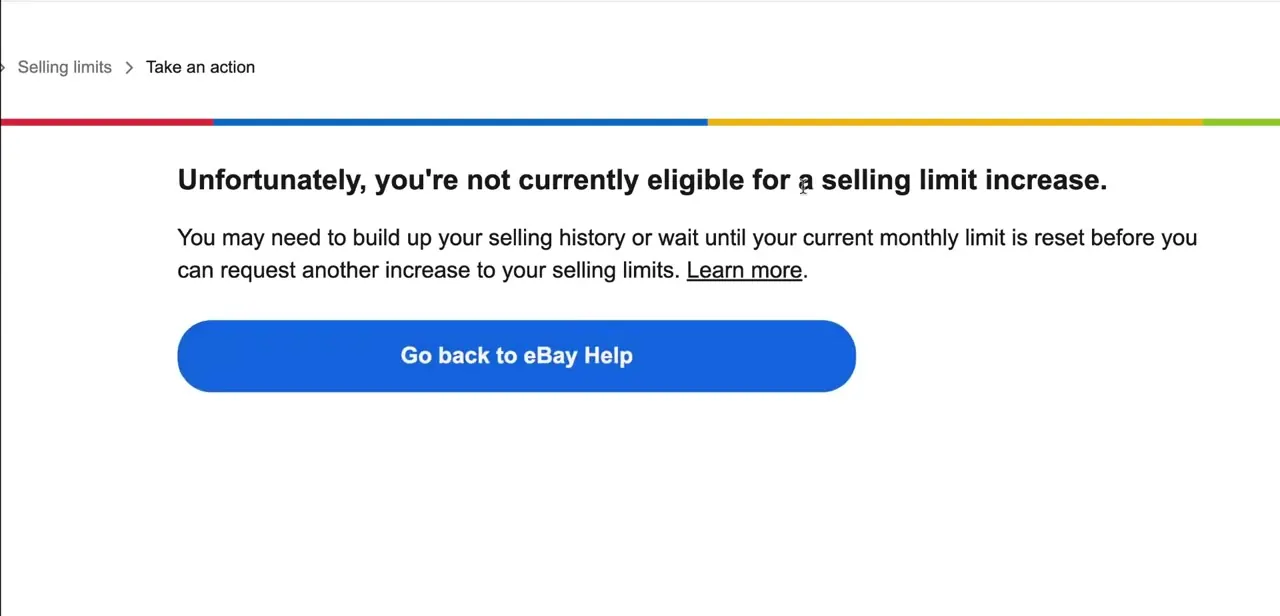
If the account doesn't yet qualify, you'll land on a page that says plainly: "Unfortunately, you're not currently eligible for a selling limit increase," with guidance to build up your selling history or wait until your current monthly limit resets before trying again. This isn't a permanent block; it reflects eBay's automated check deciding the account hasn't yet shown the volume or consistency it wants to see before raising the cap.
05Build the account signals that support approval
Between requests, focus on what eBay's seller-level system tracks: transaction defect rate, late shipment rate, and cases closed without seller resolution, alongside keeping the account active with consistent listings instead of long gaps. One correction worth making here: eBay is no longer the PayPal-processed marketplace it used to be. Selling at all now requires a verified bank account or debit card on file for eBay's own Managed Payments system, not a linked PayPal account, and getting that verification done early removes one more thing that could complicate a limit review.
06Let automatic increases kick in over time
Manually requesting isn't the only path. eBay reviews seller accounts on an ongoing basis and can raise the limit automatically once performance and feedback history clear its internal thresholds. A manual request is most useful when there's a specific reason to need more room right away, such as a bulk purchase to resell; steady, dispute-free selling is what moves the needle for the automatic increases over the following months.
When it doesn't work
The "Request a limit increase" button doesn't appear on the selling limits page
Why: eBay ties the automatic check to a cooldown period, commonly cited as around once every 30 days, so a request made recently can leave the option unavailable for a while.
Fix: Wait for the next review cycle, or contact eBay Support directly if there's a time-sensitive reason to need more room now.
The request gets declined even though sales feel steady
Why: eBay's seller-level system weighs transaction defect rate, late shipment rate, and cases closed without seller resolution. Slipping out of Above Standard on any one of these can block an increase regardless of sales volume.
Fix: Check the Seller Dashboard's performance overview for the specific metric that's off, and let it recover before requesting again.
eBay asks for extra business or contact information before deciding
Why: eBay's help documentation for the selling limits request notes it may need more contact or business details to finish processing a request.
Fix: Supply what's asked for through the prompt; the review resumes once that information is in.
Frequently asked questions
Where do I check my eBay selling limit?
The current limit is shown on the selling limits page, reachable through My eBay's Selling section, along with a direct button to request an increase.
How do I request a selling limit increase?
Click the "Request a limit increase" button shown right on the selling limits summary page. eBay checks it automatically against the account, usually within seconds.
What happens if my request is declined?
A message explains that the account isn't currently eligible, with guidance to build more selling history or wait for the monthly limit to reset before trying again.
What factors influence limit approval?
Transaction defect rate, late shipment rate, cases closed without seller resolution, and consistent account activity are the factors eBay's seller-level system tracks, along with having a verified bank account or debit card on file for Managed Payments payouts.
Does eBay still use PayPal for seller payouts?
No. eBay moved to its own Managed Payments system, so payouts go to a linked bank account or debit card, not PayPal. PayPal is still available to buyers as a checkout option, but it isn't part of how eBay evaluates a seller's account.
Can my limit increase automatically over time?
Yes. eBay's system can grant automatic increases as an account builds a track record of consistent, dispute-free selling, without a manual request.
Sources and last check
Click path and screenshots come from a My eBay walkthrough on a live seller account, including the exact "0 of 10 items" and ineligibility text shown on screen. The approval factors, request behavior, and payout mechanics were checked against eBay's official Help Center in September 2026. That check corrected this guide's earlier claim that a linked PayPal account supports a limit increase: eBay's Managed Payments system pays sellers out to a linked bank account or debit card, and PayPal is no longer eBay's seller payment processor.
About the author

Impran M N
I've been hooked on technology for as long as I can remember — especially the new tools and AI apps that seem to land every other week. Easy Tech Tuts is where I write up whatever I've just worked out: I do the task in the real product, record the screen, and turn it into the guide I wish I'd found first.



